Outline ·
[ Standard ] ·
Linear+
Official TP-Link C1200 V1(EU) Firmware is out, Hidden WDS functionality works!, Page 29
|
eugenecctan
|
 Jun 7 2019, 12:26 PM Jun 7 2019, 12:26 PM
|

|
Sifus, UNIFI has upgraded my WIFI modem to D-link 842 (AC1200 as well). Now I have a spare TP-LINK AC1200. How can I utilize my TP-Link Router? as I dun see the repeater option. Thanks.
|
|
|
|
|
|
eugenecctan
|
Jun 7 2019, 07:23 PM
|
|
|
Should I flash to EU firmware better or US? Thanks
|
|
|
|
|
|
eugenecctan
|
Jun 7 2019, 09:37 PM
|
|
|
Guys, after setup for 2.4G WDS bridging. Then I continue with 5G WDS bridging. Then after Save the 5G WDS became disable? Does it means we can only setup once? To choose either 2.4G or 5G?
|
|
|
|
|
|
eugenecctan
|
Jun 7 2019, 10:01 PM
|
|
|
Thanks for the info, but after setup for 5G bridging, now i cannot access my TP Link setup page. I can still see the default TP Link SSID both 2.4G and 5G.
But my 5G WIFI did able to reach 150Mbps from 100Mbps.. Weird..
Note: I have tried 192.168.0.1 & 192.168.0.2 (the newly changed).
No luck.
This post has been edited by eugenecctan: Jun 7 2019, 10:03 PM
|
|
|
|
|
|
eugenecctan
|
Jun 7 2019, 10:22 PM
|
|
|
Thanks all SIFUs, now I can get stronger 5G signal. After I reset and reconfigured again. Btw, since I only enable Bridging for 5G, is there a way to off the 2.4G signal and purely focusing the 5G signal? Thanks. - Ignore this question. Found the option to disable 2.4g  I am thinking to flash to US firmware to get stronger 5G. Thanks for all the help. This post has been edited by eugenecctan: Jun 7 2019, 10:24 PM |
|
|
|
|
|
eugenecctan
|
Jun 9 2019, 12:26 PM
|
|
|
QUOTE(Aspick @ Jun 9 2019, 02:37 AM) EU firmware have the usual 2.4G channels and only 4 5G channels namely 36, 40, 44 and 48. US firmware have additional 5 5G channels which are 149, 153, 157, 161 and 165. If you plan to use 5G as backhaul in WDS mode and also for SSID wifi broadcast, then i recommend flashing to US firmware. However do take note that 2.4G wifi signal is much weaker than 5G signal. If you have other device that need to connect to 2.4G signal, then i suggest you remain with EU firmware. Thanks. I need only 5G signal. Will consider to flash to US firmware. But so far I am happy with EU firmware. I use only 5G in WDS. This post has been edited by eugenecctan: Jun 9 2019, 12:30 PM |
|
|
|
|
|
eugenecctan
|
Jun 10 2019, 09:58 AM
|
|
|
QUOTE(JohnLai @ Jun 9 2019, 04:23 PM) Which US firmware? This one? https://www.tp-link.com/us/support/download...00/v1/#FirmwareI am using different method to set the wifi country code for EU firmware via config.bin method. It works.  I leave the EU firmware default country code for 2.4ghz wifi while editing the 5.0ghz country code to US. The best of both world. Impressively, there is really an increase in 5.0ghz signal strength dbm.  Not sure if the increase is caused by beamforming functionality. Do I need to change the adapter still? If I disabled the 2.4G, still need 2A adapter? |
|
|
|
|
|
eugenecctan
|
Jun 10 2019, 10:24 AM
|
|
|
QUOTE(heidarren @ Jun 9 2019, 05:26 PM) This is because US FCC allowed higher txpower. Btw, how to edit the config.bin? Btw, stronger signal meaning transmission only or receiver as well? Reason asking because TMNET upgrade my TP-Link Ac1200 to D-Link Ac1200 with MU-MIMO. I placed my main router at 2nd floor and the 5G signal only strong at 2nd floor. In ground floor it will automatically switch to 2.4G, by placing the TP-link router near the staircase as WDS using 5G, now I can get up to 160Mbps (My Unifi speed is 300M). I have done speed testing using my phone at the same location i placed the tp-link modem, I am getting the same speed by connecting to the D-Link (main router). Meaning if stronger signal just for transmission then no point for me to upgrade. Thanks sifus. |
|
|
|
|
|
eugenecctan
|
Jun 10 2019, 02:43 PM
|
|
|
QUOTE(heidarren @ Jun 10 2019, 01:27 PM) Most high-end phones in the market can deliver up to 800mw, so don't worry about the receiver. As for the speed u got, it's normal since this C1200 is 2x2 MIMO device, real world speed for 2x2 devices is about 500~600mbps max, if u can get wi-fi speed about 320mbps at the place, and u put C1200 there as an WDS, the speed will cut into half, half to talk to the main router and half to talk to ur phone. I plug a LAN cable to my PC and set this C1200 as 5G WDS, the speed I got is about 500mbps, if I connect my phone to this unit I got about 250mbps. The best way to use this C1200's strong 5G is to set it as an AP, it has 802.11k supported so ur devices which has 802.11k supported will experience seamless roaming between any router and this AP. Btw, forget about MU-MIMO, it's almost useless, just marketing Thanks for your reply. I didn't feel speed cut into half. As I am getting the same speed connect to the original router or this WDS TP-Link. For D-Link AC1200, the 5G signal is very weak. But I did not feel any disconnection issue that I had previously with TP-LINK AC1200. Maybe because of the MU-MIMO? |
|
|
|
|
|
eugenecctan
|
Jun 10 2019, 02:47 PM
|
|
|
QUOTE(Aspick @ Jun 9 2019, 02:08 AM) I can confirm @heidarren statement is true about flashing C1200 router (EU firmware) to US firmware. Need to first flash to the firmware as listed in Edit 7 of your first page. After flashing to the beta version you'll be able to then flash to US firmware. Yes i do find the 5G signal much stronger after flashing to US firmware. Surprisingly the 5G signal is even stronger than 2.4G signal behind one wall at 10 feet away from the router. US firmware do have the capability for WDS. I'm using mine with 5G as backhaul and also 5G as SSID wifi. Just follow @JohnLai advice in page 29. For the power supply, i tried both the stock power supply and one with 12V/2A output. I find that the wifi signal output is the same strength. Stability not sure yet but I'm testing the router flashed with US firmware using stock power supply. Will see how long it remains before it reboots? So firstly I will need to flash to the EU firmware (already did), after that flash to US firmware and the repeat the same process for WDS. Am I right? |
|
|
|
|
|
eugenecctan
|
Jun 11 2019, 09:55 PM
|
|
|
Dear Sifus, any suggestion on which wifi channel should I use for 5G? Previously I set my original router to 48 due to the EU firmware. Should I stick with channel 48 or switch to Auto? Thanks.
|
|
|
|
|
|
eugenecctan
|
Jun 11 2019, 10:03 PM
|
|
|
Wah, thanks all sifus, very impressive speed using US firmware, previous I am getting up to 160Mbps near to the wireless bridged router. And getting around 100 Mbps around my kitchen area. Now I am getting 200Mbps close to the router and >160Mbps almost every location I have tested including kitchen area. THANKS!!!!
|
|
|
|
|
|
eugenecctan
|
Jun 12 2019, 04:07 PM
|
|
|
QUOTE(JohnLai @ Jun 12 2019, 02:31 PM) Aspick , heidarren and eugenecctan = Any random reboot issue encountered after flashing USv1 firmware? Remember to report back. Second question........did you guy try to flash USv2 or USv3 firmware to the EUv1 hardware? From previous posts made by you three, it appears flashing USv1 firmware to EUv1 hardware work perfectly. But, how about USv2 and USv3? I am using the US firmware listed in page 1 edit 10. I believe is US v1, I never try out v2 or v3. So far very stable, I am using original 1A adapter in WDS mode with 2.4G disable. |
|
|
|
|
|
eugenecctan
|
Apr 1 2020, 06:06 PM
|
|
|
Guys, I flash to US firmware but forgot the default password. Is there a default password? Try admin not working. I want to check my settings again as the US firmware once a while get disconnected. Very frequently.
This post has been edited by eugenecctan: Apr 1 2020, 06:09 PM
|
|
|
|
|
|
eugenecctan
|
Jun 18 2020, 09:26 PM
|
|
|
Guys, I have setup wireless bridge with my old tm Tplink ac1200 (flash to US firmware for faster 5hz) with the new tm d link ac1200. I am thinking to upgrade d link WiFi router because it seems not stable. The main issue now is I forgot my Tplink password and username. If I were to set my new router to the same name as my current d link router. Will the Tplink wireless bridge able to connect to new router automatically? Thanks sifu
Any comment? Thanks.
This post has been edited by eugenecctan: Jul 1 2020, 08:58 AM
|
|
|
|
|
|
eugenecctan
|
Jul 1 2020, 08:59 AM
|
|
|
QUOTE(eugenecctan @ Jun 18 2020, 09:26 PM) Guys, I have setup wireless bridge with my old tm Tplink ac1200 (flash to US firmware for faster 5hz) with the new tm d link ac1200. I am thinking to upgrade d link WiFi router because it seems not stable. The main issue now is I forgot my Tplink password and username. If I were to set my new router to the same name as my current d link router. Will the Tplink wireless bridge able to connect to new router automatically? Thanks sifu Any comment? Thanks. Anyone can confirm this? Thanks. |
|
|
|
|
|
eugenecctan
|
Jul 1 2020, 04:50 PM
|
|
|
QUOTE(ryws @ Jul 1 2020, 02:57 PM) Most likely will not work. The SSID and MAC Address are used for bridge. So, using another router will have different MAC. Why not hard reset the TP link AC1200? THanks for the information. Need to setup again which I dont remember how Anyhow, since I'd placed the aluminium foils (from baby packaging) on top of my router. Now even diff floor also I can get stable 5ghz signal. Unbelievable |
|
|
|
|
|
eugenecctan
|
Jul 3 2020, 12:12 PM
|
|
|
QUOTE(4lt4ir @ Jul 3 2020, 12:05 AM) Can show how and where you place the foil? 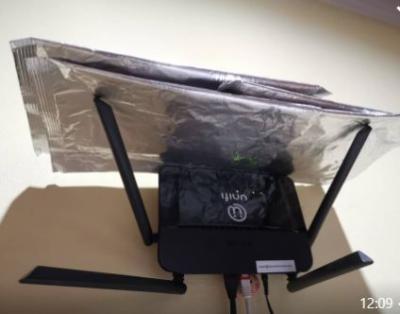
main router at upper floor. Router hanging in the wall in the middle of the house 
ground floor putting on the side |
|
|
|
|
|
eugenecctan
|
Jul 8 2020, 01:38 PM
|
|
|
QUOTE(ryws @ Jul 4 2020, 03:26 PM) The antenna coverage is 360 degree. By doing this, you boost all the signal to the front 180 degree. This is effective especially your router is placed at the corner of your house/condo. 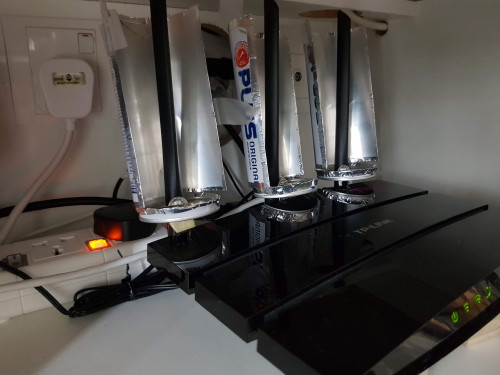 It will works if you place your router at the corner, the recommended location always the center of the house. That is thy i place it in the center of the house by hanging it on the wall. And try to block the signal to go upwards. |
|
|
|
|



 Quote
Quote

 0.0551sec
 0.56
0.56
 7 queries
 GZIP Disabled