Outline ·
[ Standard ] ·
Linear+
Official TP-Link C1200 V1(EU) Firmware is out, Hidden WDS functionality works!, Page 29
|
4lt4ir
|
 Feb 11 2019, 11:37 AM Feb 11 2019, 11:37 AM
|

|
QUOTE(iskandarluqman @ Feb 9 2019, 12:07 AM) Just got Unifi installed, it came with the firmware 1.0.0 Build 20180403 rel.22124 (EU) . So if I were to update the firmware, which firmware will be the best for me? I thought I would use the Unifi firmware but since I got the router in EU firmware. Should I just continue to use the EU firmware? Thanks I'm using the latest EU firmware (20180502 rel 45702) from the TPLink website. Works fine so far. This post has been edited by 4lt4ir: Feb 11 2019, 11:37 AM |
|
|
|
|
|
4lt4ir
|
May 12 2019, 12:28 PM
|
|
|
QUOTE(taqu @ May 11 2019, 10:48 PM) After few weeks in "dead" state (no Internet, no Wifi, no response), I turned it on again to claim new router from TM. Suddenly it's healthy again! As I've already put another router in its place, it's now destined as first floor AP (family area & daughter's room) to replace a D-Link DIR-850L. Pray the best for its second life. That's weird! |
|
|
|
|
|
4lt4ir
|
Jul 8 2019, 11:00 AM
|
|
|
QUOTE(JuneResources @ Jul 8 2019, 10:52 AM) Currently my pc does not install Firefox.  If use Google chrome can edit it? This method edit is it temporary one? However if the router been restart or shut down, then the SSID name behind @unifi appear again, am I right? Can use any browser. By right, if you have saved the new SSID name properly in the Wifi settings page, then it should remain even after router reboot. |
|
|
|
|
|
4lt4ir
|
Aug 15 2019, 02:07 AM
|
|
|
QUOTE(Aspick @ Aug 14 2019, 10:32 PM) Glad you took my advice. 🤗 It's crappy if use as a router. But others like me have found a good use for it either as an AP or as a WDS. In my case after flashing to US firmware, the WDS function with 5GHz as backhaul and wifi has made my whole house connected with fast internet. 😁 5GHz as backhaul meaning the SSID it broadcasts is the 2.4GHz one, right? Or the other way around? |
|
|
|
|
|
4lt4ir
|
Aug 23 2019, 02:11 AM
|
|
|
QUOTE(arkana @ Aug 21 2019, 09:22 PM) Model: TP-Link Archer C1200 Hardware Version: V1 TIME: 500mbps package Hi ... can I remotely control thru TP-link "Thether App" from my mobile phone when I'm out of wifi range or I am different location. If possible to do it, how can I set it to remotely control thru my phone on the Thether app. Hope to receive feedback on the matter above. Thanks in advance. I don't think you can control routers remotely via the Tether app. Must be connected to the same wifi network as the router then only can access via the app. QUOTE(voncrane @ Aug 21 2019, 10:19 PM) I tried and nope.. You must be connected to a compatible tplink router for the Tether app to work. I can use the Tether app with my C1200. |
|
|
|
|
|
4lt4ir
|
Aug 23 2019, 05:27 PM
|
|
|
QUOTE(voncrane @ Aug 23 2019, 07:30 AM) We are saying the same thing. Forummer asked about being able to use the Tether app OUTSIDE the TP-Link router's network. That's a no. Affirmed. Maybe remote access via TeamViewer might work to access 192.168.0.1? No app interface tho. |
|
|
|
|
|
4lt4ir
|
Aug 25 2019, 02:22 PM
|
|
|
QUOTE(slagfart @ Aug 25 2019, 08:13 AM) Hi guys, I used `C1200v1_eu_time-up-boot-1.0.0-Build-20180502-rel.45702` firmware to flash my C1200 V1.0, but the login page isn't accepting any combination of username or password. I've tried admin/admin, admin/password/ admin/*old password* etc, and nothing works. Factory reset multiple times, and it still isn't letting me in. Any ideas? Have you tried checking the C1200's manual/quick start guide to see what is the default username & password? |
|
|
|
|
|
4lt4ir
|
Oct 6 2019, 11:40 PM
|
|
|
QUOTE(Alpha_Tay @ Oct 6 2019, 06:28 PM) my D-Link DIR-850L came with unifi installation still working well after 22months 24x7 uptime, probably i got the good silicon lottery. I used to have & use the DIR850L. Worked fine, no random reboots as far as I could tell....only downside is the subpar wifi signal strength and coverage. |
|
|
|
|
|
4lt4ir
|
Oct 10 2019, 10:59 AM
|
|
|
QUOTE(Alpha_Tay @ Oct 7 2019, 07:30 PM) D-Link DIR-850L only have internal WiFi Antenna, the WiFi Coverage was pretty limited. Exactly. |
|
|
|
|
|
4lt4ir
|
Apr 18 2020, 03:52 AM
|
|
|
QUOTE(Garena @ Apr 18 2020, 02:16 AM) TP-Link doesn't disappoint customers in releasing crap + trash wireless router. I'm amazed by the TP-Link fanboys or they just don't know there are better routers out there for the same or lower price. On the side note if you want a rock solid router or wireless router, go for MikroTik. 6 months uptime also no problem, you can bet your money on it. Can recommend better router in the same or similar price range? Tenda? How about D-Link, would you say they're better than TPLink? I see some D-Link haters around the net, too. I'll look up Mikrotik. Are they compatible with Unifi & HyppTV? |
|
|
|
|
|
4lt4ir
|
Apr 18 2020, 09:23 PM
|
|
|
QUOTE(soonwai @ Apr 18 2020, 03:55 AM) Yes, compatible with UniFi & HyppTV, Maxis, TIME. You can even have all 3 simultaneously running off one Mikrotik if you wish. QUOTE(Garena @ Apr 18 2020, 11:54 AM) You can consider MikroTik hAP ac2 for home use, it's suitable for 500 Mbps unifi subscription plan. Based on the technical specifications hAP ac2 is a 2x2 spatial stream wireless router. For a 2x2 wireless router the maximum theoretical bandwidth you can get is 866.7 Mbps if your device is also a 2x2 spatial stream wireless device and in real world performance you'll get around 650 Mbps in an open air and close to the router condition considering if the CPU is powerful enough. But the hAP ac2 CPU is not powerful enough to achieve that kind of wireless speed so you'll only possible to get around 400 Mbps even though with 866.7 Mbps link speed. If your unifi subscription plan is 800 Mbps then probably you should consider MikroTik RB4011iGS+RM. This router is powerful enough to future-proof your home network or office network for the coming 5 or maybe 10 years if in the future our internet plan is upgraded to 2 Gbps or 4 Gbps, if only lah. But you have to add your own access point though because it's not a wireless router. For that you can consider MikroTik cAP ac or access points from vendors like Ubiquiti Networks for home use or Aruba Networks for enterprise use if your clients are a lot, like 100 to 200 concurrent clients connect to one access point. Thanks for the info & recommendation. From the little googling that I've done on the hAP AC2, the price is reasonable although not strictly cheap. Also, I noticed the router's UI looks a bit...dated? It's bereft of all the nice UI elements from the mainstream router brands. I have no doubt it's very powerful though. Is the barebones UI found on all Mikrotik routers? |
|
|
|
|
|
4lt4ir
|
Apr 19 2020, 03:29 AM
|
|
|
QUOTE(soonwai @ Apr 19 2020, 12:35 AM) Yes, it is. The same OS is in all Mikrotik routers from the RM50 ones to the RM10000 ones. Yeah, I know, it doesn't look pretty. Not many design elements, just information. I'm using the hAP AC2 with UniFi 800Mbps. It's very powerful for a RM300 router. One thing though, Mikrotik's wifi tend to suck. The C1200 beats the hAP AC in wifi performance. Wifi sucks how? Signal not strong/far-reaching enough? |
|
|
|
|
|
4lt4ir
|
May 3 2020, 01:29 PM
|
|
|
QUOTE(Jjuggler @ May 3 2020, 07:29 AM) AVOID consumer-grade router at all cost. I get myself with an Ubiquiti's EdgeRouter ER-6P and I am going to be an ex-asus user after I receive my ubiquiti unit. Whoa, that looks like a bit overkill for casual home use, IMHO. Still, thanks for the recommendation. |
|
|
|
|
|
4lt4ir
|
Jul 3 2020, 12:05 AM
|
|
|
QUOTE(eugenecctan @ Jul 1 2020, 04:50 PM) THanks for the information. Need to setup again which I dont remember how  Anyhow, since I'd placed the aluminium foils (from baby packaging) on top of my router. Now even diff floor also I can get stable 5ghz signal. Unbelievable Can show how and where you place the foil? This post has been edited by 4lt4ir: Jul 3 2020, 12:05 AM |
|
|
|
|
|
4lt4ir
|
Jul 4 2020, 03:08 PM
|
|
|
QUOTE(eugenecctan @ Jul 3 2020, 12:12 PM) [attachmentid=10527244] main router at upper floor. Router hanging in the wall in the middle of the house [attachmentid=10527245] ground floor putting on the side Thanks for the pics! The foil is just normal aluminum foil used for cooking/baking or is it a special one? QUOTE(ryws @ Jul 3 2020, 05:03 PM) I use 100plus can, cut into half semi-circle. The signal is stronger than aluminum foil. (thicker I guess). This is very interesting. Can show us photos please? Is the can put directly on top of the antenna? This post has been edited by 4lt4ir: Jul 4 2020, 09:10 PM |
|
|
|
|
|
4lt4ir
|
Jul 4 2020, 09:12 PM
|
|
|
QUOTE(ryws @ Jul 4 2020, 03:26 PM) The antenna coverage is 360 degree. By doing this, you boost all the signal to the front 180 degree. This is effective especially your router is placed at the corner of your house/condo. 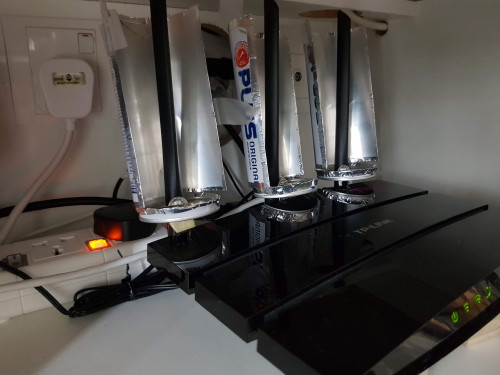 Very nice! And thank you for showing the pics. So doing this should boost both the 2.4GHz as well as 5GHz signal, right? |
|
|
|
|
|
4lt4ir
|
Jul 6 2020, 03:17 PM
|
|
|
QUOTE(ryws @ Jul 6 2020, 11:31 AM) Yes, will significantly increase the WIFI speed at signal weak area.( i.e. 2-3 bars) Thanks. Now wondering if this trick will work with wifi repeaters/range extenders... |
|
|
|
|
|
4lt4ir
|
Jul 26 2020, 06:54 PM
|
|
|
QUOTE(peanut @ Jul 25 2020, 11:42 PM) Just wanna say kudos to those who contributed here. Helped me setup the otherwise useless router from TM to act as a repeater. Which firmware are you on again? |
|
|
|
|
|
4lt4ir
|
Aug 14 2020, 12:09 AM
|
|
|
QUOTE(19 Degree South @ Aug 13 2020, 04:46 PM) I am on unifi 100 as well! I have managed to get my whole 4800sqf house covered with 5ghz of bandwidth at speed of more than 100 Mbps with just two nobes. Amazing! .... Using TPLink Deco M4? |
|
|
|
|
|
4lt4ir
|
Aug 16 2020, 12:17 AM
|
|
|
QUOTE(19 Degree South @ Aug 14 2020, 08:46 AM) Yes bro. The 5ghz is smashing but i don't set up dual bands! Why not? Also, how many nodes in total are you using? |
|
|
|
|



 Quote
Quote
 0.0272sec
 0.26
0.26
 7 queries
 GZIP Disabled