Welcome Guest ( Log In | Register )

68 Pages « < 56 57 58 59 60 > » Bottom

Outline · [ Standard ] · Linear+

 Official TP-Link C1200 V1(EU) Firmware is out, Hidden WDS functionality works!, Page 29

views
     
ryws
post Jun 27 2020, 01:55 AM

New Member
*
Junior Member
47 posts

Joined: Jun 2005


Just to update on the WDS topic.
All the EU, MY, and US firmware will have the WDS feature hidden.
However, the WDS feature only work on EU, US firmware.
I am not able to get it working on MY firmware with the same steps.

I finally settled with : Main router (MY timebb), secondary router WDS enabled (US firmware).

This post has been edited by ryws: Jun 27 2020, 02:10 AM
ryws
post Jun 27 2020, 02:09 AM

New Member
*
Junior Member
47 posts

Joined: Jun 2005


QUOTE(TheUndead @ Jun 20 2020, 07:52 AM)
hi, new c1200 user here. i’m trying to improve my 5ghz wifi signal. can anybody suggest whats the best Firmware version to try?

thank you
*
I have weak 5G signal. I flashed to EU firmware + enabled beamforming.
The 5Ghz wifi signal did improve the speed from 20mbps to 50mbps.
But, stability was still an issue. Connection sometimes dropped due to weak signal.

At the end, I opt for second c1200 (used, plenty selling about RM60) and use WDS.

This post has been edited by ryws: Jun 27 2020, 02:10 AM
eugenecctan
post Jul 1 2020, 08:59 AM

Wee Wang Wang
******
Senior Member
1,058 posts

Joined: Nov 2009


QUOTE(eugenecctan @ Jun 18 2020, 09:26 PM)
Guys, I have setup wireless bridge with my old tm Tplink ac1200 (flash to US firmware for faster 5hz) with the new tm d link ac1200. I am thinking to upgrade d link WiFi router because it seems not stable. The main issue now is I forgot my Tplink password and username. If I were to set my new router to the same name as my current d link router. Will the Tplink wireless bridge able to connect to new router automatically? Thanks sifu

Any comment? Thanks.
*
Anyone can confirm this? Thanks.
ryws
post Jul 1 2020, 02:57 PM

New Member
*
Junior Member
47 posts

Joined: Jun 2005


QUOTE(eugenecctan @ Jul 1 2020, 08:59 AM)
Anyone can confirm this? Thanks.
*
Most likely will not work. The SSID and MAC Address are used for bridge. So, using another router will have different MAC.
Why not hard reset the TP link AC1200?
eugenecctan
post Jul 1 2020, 04:50 PM

Wee Wang Wang
******
Senior Member
1,058 posts

Joined: Nov 2009


QUOTE(ryws @ Jul 1 2020, 02:57 PM)
Most likely will not work. The SSID and MAC Address are used for bridge. So, using another router will have different MAC.
Why not hard reset the TP link AC1200?
*
THanks for the information. Need to setup again which I dont remember how smile.gif
Anyhow, since I'd placed the aluminium foils (from baby packaging) on top of my router. Now even diff floor also I can get stable 5ghz signal. Unbelievable smile.gif
4lt4ir
post Jul 3 2020, 12:05 AM

{--} 7
******
Senior Member
1,397 posts

Joined: Sep 2006
QUOTE(eugenecctan @ Jul 1 2020, 04:50 PM)
THanks for the information. Need to setup again which I dont remember how smile.gif
Anyhow, since I'd placed the aluminium foils (from baby packaging) on top of my router. Now even diff floor also I can get stable 5ghz signal. Unbelievable smile.gif
*
Can show how and where you place the foil?

This post has been edited by 4lt4ir: Jul 3 2020, 12:05 AM
eugenecctan
post Jul 3 2020, 12:12 PM

Wee Wang Wang
******
Senior Member
1,058 posts

Joined: Nov 2009


QUOTE(4lt4ir @ Jul 3 2020, 12:05 AM)
Can show how and where you place the foil?
*
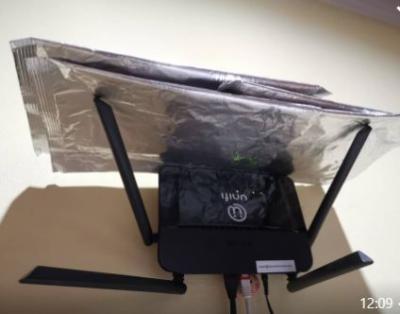
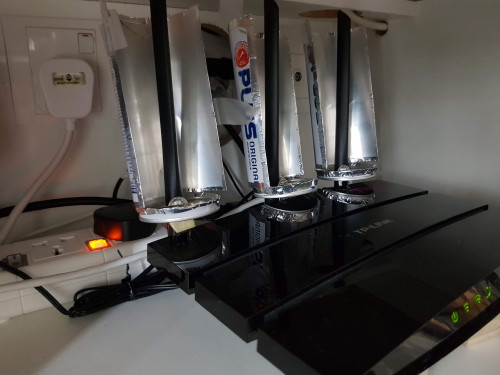
Attached Image
main router at upper floor. Router hanging in the wall in the middle of the house

Attached Image
ground floor putting on the side
ryws
post Jul 3 2020, 05:03 PM

New Member
*
Junior Member
47 posts

Joined: Jun 2005


QUOTE(eugenecctan @ Jul 3 2020, 12:12 PM)
Attached Image
main router at upper floor. Router hanging in the wall in the middle of the house

Attached Image
ground floor putting on the side
*
I use 100plus can, cut into half semi-circle.
The signal is stronger than aluminum foil. (thicker I guess).

JuneResources
post Jul 4 2020, 01:21 PM

ONE Stop Resources
*******
Senior Member
4,168 posts

Joined: Mar 2012
From: Kuala Lumpur


Anybody still using Archer C5 model?
Any better firmware to reduce frequently auto reboot?

Thanks a lot.
4lt4ir
post Jul 4 2020, 03:08 PM

{--} 7
******
Senior Member
1,397 posts

Joined: Sep 2006
QUOTE(eugenecctan @ Jul 3 2020, 12:12 PM)
Attached Image
main router at upper floor. Router hanging in the wall in the middle of the house

Attached Image
ground floor putting on the side
*
Thanks for the pics! The foil is just normal aluminum foil used for cooking/baking or is it a special one?

QUOTE(ryws @ Jul 3 2020, 05:03 PM)
I use 100plus can, cut into half semi-circle.
The signal is stronger than aluminum foil. (thicker I guess).
*
This is very interesting. Can show us photos please? Is the can put directly on top of the antenna?

This post has been edited by 4lt4ir: Jul 4 2020, 09:10 PM
ryws
post Jul 4 2020, 03:26 PM

New Member
*
Junior Member
47 posts

Joined: Jun 2005


QUOTE(4lt4ir @ Jul 4 2020, 03:08 PM)
Thanks for the pics? The foil is just normal aluminum foil used for cooking/baking or is it a special one?
This is very interesting. Can show us photos please? Is the can put directly on top of the antenna?
*
The antenna coverage is 360 degree. By doing this, you boost all the signal to the front 180 degree.
This is effective especially your router is placed at the corner of your house/condo.
user posted image

This post has been edited by ryws: Jul 4 2020, 03:35 PM
4lt4ir
post Jul 4 2020, 09:12 PM

{--} 7
******
Senior Member
1,397 posts

Joined: Sep 2006
QUOTE(ryws @ Jul 4 2020, 03:26 PM)
The antenna coverage is 360 degree. By doing this, you boost all the signal to the front 180 degree.
This is effective especially your router is placed at the corner of your house/condo.
user posted image
*
Very nice! And thank you for showing the pics. So doing this should boost both the 2.4GHz as well as 5GHz signal, right?
ryws
post Jul 6 2020, 11:31 AM

New Member
*
Junior Member
47 posts

Joined: Jun 2005


QUOTE(4lt4ir @ Jul 4 2020, 09:12 PM)
Very nice! And thank you for showing the pics. So doing this should boost both the 2.4GHz as well as 5GHz signal, right?
*
Yes, will significantly increase the WIFI speed at signal weak area.( i.e. 2-3 bars)
4lt4ir
post Jul 6 2020, 03:17 PM

{--} 7
******
Senior Member
1,397 posts

Joined: Sep 2006
QUOTE(ryws @ Jul 6 2020, 11:31 AM)
Yes, will significantly increase the WIFI speed at signal weak area.( i.e. 2-3 bars)
*
Thanks. Now wondering if this trick will work with wifi repeaters/range extenders...
SUSnonamer
post Jul 6 2020, 07:58 PM

Getting Started
**
Junior Member
224 posts

Joined: Apr 2019
QUOTE(ryws @ Jul 4 2020, 03:26 PM)
The antenna coverage is 360 degree. By doing this, you boost all the signal to the front 180 degree.
This is effective especially your router is placed at the corner of your house/condo.
user posted image
*
try turn around router and adjust antenna direction?
SUSnonamer
post Jul 6 2020, 08:01 PM

Getting Started
**
Junior Member
224 posts

Joined: Apr 2019
duplicate

This post has been edited by nonamer: Jul 6 2020, 08:05 PM
SUSnonamer
post Jul 6 2020, 08:04 PM

Getting Started
**
Junior Member
224 posts

Joined: Apr 2019
duplicate

This post has been edited by nonamer: Jul 6 2020, 08:06 PM
josqi
post Jul 7 2020, 01:00 PM

New Member
*
Junior Member
21 posts

Joined: Dec 2009
QUOTE(slagfart @ Aug 25 2019, 08:13 AM)
Hi guys, I used `C1200v1_eu_time-up-boot-1.0.0-Build-20180502-rel.45702` firmware to flash my C1200 V1.0, but the login page isn't accepting any combination of username or password. I've tried admin/admin, admin/password/ admin/*old password* etc, and nothing works. Factory reset multiple times, and it still isn't letting me in. Any ideas?
*
Does anyone found the default password for this firmware?

router : Archer C1200 V1
Firmware Version: C1200v1_eu_time-up-boot-1.0.0 Build 20180502 rel.45702

before update. the router still can log in using default password admin/admin.
but after update to its latest firmware Archer C1200(EU) V1 TIME Wireless Router (Latest 02-05-2018).
become is unable to log in with admin/admin. even after hard reset also cant using this password to log in. the firmware changed the default password.


tried :

admin/admin
admin/password
user/password
admin/adm@xxxx (last 4 digit of MAC)
tmadmin/tmadmin
tmadmin/password
TIMExxxx/TIMExxxx (last 4 digit of MAC)

clement7621
post Jul 7 2020, 05:28 PM

Getting Started
**
Junior Member
218 posts

Joined: Sep 2013


hi , i am using tplink c1200 provided by tm but i encountered frequent disconnect which the internet symbol turns orange frequently, i would like to ask is it something wrong with the firmware ? i have a thought to buy a new router but i need to make sure is it wrong with the firmware. i called for tm technician to come but still the problem persist. should i flash EU firmware ? thanks

BenYeeHua
post Jul 7 2020, 10:25 PM

Regular
******
Senior Member
1,873 posts

Joined: Nov 2010


QUOTE(clement7621 @ Jul 7 2020, 05:28 PM)
hi , i am using tplink c1200 provided by tm but i encountered frequent disconnect which the internet symbol turns orange frequently, i would like to ask is it something wrong with the firmware ? i have a thought to buy a new router but i need to make sure is it wrong with the firmware. i called for tm technician to come but still the problem persist. should i flash EU firmware ? thanks
*
Ask tech check on their side and see who disconnect the connection, and it can be the fibre signal too over and causing disconnection.

Or the modem side got issues need to exchanged, check the c1200 log, should showing some clues on which one is the cause.

Also changing the router is recommended, this router like to reboot randomly, unless you want it to reboot in the middle of enjoying the internet, then nah...

Today is 7.7, better go grab one at discount price. wink.gif

68 Pages « < 56 57 58 59 60 > » Top
 

Change to:
| Lo-Fi Version
0.0296sec    0.34    6 queries    GZIP Disabled
Time is now: 7th December 2025 - 02:09 PM