

QUOTE(1024kbps @ May 9 2020, 06:01 PM)
dont buy dubiously cheap SSD, because might have poor performance (shitty flash controller and nand chip), no firmware support, no driver support

will u avoid Silicon Power?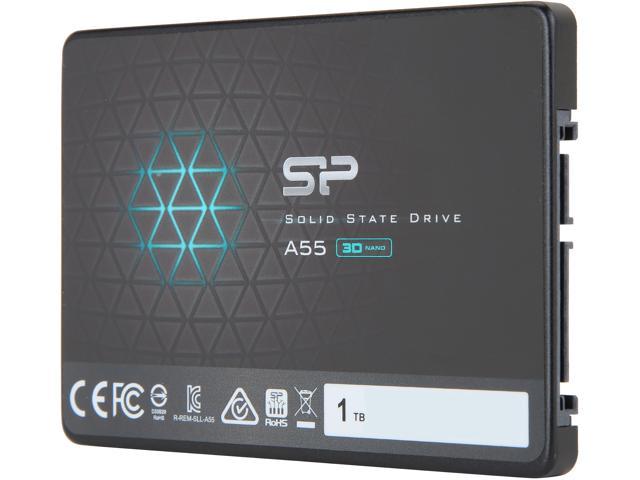
The SSD Thread V6, Solid State Drive, Continued.
|
|
 May 10 2020, 09:13 AM May 10 2020, 09:13 AM
|
 
All Stars
10,475 posts Joined: Jan 2003 From: Sarawak 
|
QUOTE(1024kbps @ May 9 2020, 06:01 PM) dont buy dubiously cheap SSD, because might have poor performance (shitty flash controller and nand chip), no firmware support, no driver support will u avoid Silicon Power? |
|
|
|
|
|
May 10 2020, 09:15 AM
|
|
All Stars
10,475 posts Joined: Jan 2003 From: Sarawak
|
QUOTE(-kytz- @ May 10 2020, 02:09 AM) The biggest culprit is my WD Black 1TB followed by my newly bought Toshiba N300 4TB. Both exhibit this constant "humming" noise even after being dampened by my Fractal R6. It's the HDD making the noises because after I unplugged them my pc became dead silent. I think the constant noise are the "operational noise" of the HDD spinning. are you sure it's not the front panel door that is buzzing?This post has been edited by Skylinestar: May 10 2020, 09:15 AM |
|
|
May 10 2020, 09:18 AM
|

Senior Member
5,261 posts Joined: Oct 2004 From: J@Y B33 
|
QUOTE(-kytz- @ May 10 2020, 02:09 AM) The 2.5" 5400rpm HDDs? Black is performance oriented HDD, N300 is NAS HDD. Both spin at 7200rpm.The biggest culprit is my WD Black 1TB followed by my newly bought Toshiba N300 4TB. Both exhibit this constant "humming" noise even after being dampened by my Fractal R6. It's the HDD making the noises because after I unplugged them my pc became dead silent. I think the constant noise are the "operational noise" of the HDD spinning. I could replace my WD Black 1TB with a cheap 1TB SSD but what am I going to do with the 4TB HDD? I considered turning the 4TB drive into an external HDD and place it further away from my desk and just connect to my PC via USB 3.0 cable.. If your router have USB port you can put the N300 in external cover and connect to it, making it your LAN storage.  |
|
|
May 10 2020, 09:57 AM
Show posts by this member only | IPv6 | Post
#2144
|

Junior Member
637 posts Joined: Nov 2018 From: Taman Sri Muda
|
QUOTE(-kytz- @ May 10 2020, 01:47 AM) I'm looking at the Crucial BX500 1TB SSD for media storage purposes (can't stand the noise of HDD) which is close to RM500. Anything cheaper or of better value? I dont know about you, but I miss those noise....I still remember my P4 jet engine days  When first upgraded to Core2, no noise, I thought PC died.... then got SSD, no HDD spin up sound, also thought PC died..... now, RGB lighting is a must, otherwise will think PC died  |
|
|
May 10 2020, 12:04 PM
|

Senior Member
6,014 posts Joined: Feb 2007 
|
QUOTE(-kytz- @ May 10 2020, 02:09 AM) The 2.5" 5400rpm HDDs? How close you sit to your PC?The biggest culprit is my WD Black 1TB followed by my newly bought Toshiba N300 4TB. Both exhibit this constant "humming" noise even after being dampened by my Fractal R6. It's the HDD making the noises because after I unplugged them my pc became dead silent. I think the constant noise are the "operational noise" of the HDD spinning. I could replace my WD Black 1TB with a cheap 1TB SSD but what am I going to do with the 4TB HDD? I considered turning the 4TB drive into an external HDD and place it further away from my desk and just connect to my PC via USB 3.0 cable.. My pc is at least 1.5 m away so not much of a noise except from my VEGA blower fan when it's working hard. use it as network storage is not too bad, except most of the router still not powerful enough to fully utilize desktop hdd performance, the transfer rate will be much slower than pc. |
|
|
May 10 2020, 12:25 PM
|
|
Senior Member
6,014 posts Joined: Feb 2007
|
QUOTE(Skylinestar @ May 10 2020, 09:13 AM) will u avoid Silicon Power? https://www.madshrimps.be/articles/article/...ND-SSD-Review/9If it's cheap and no major performance problem, i don't see why i should avoid it. |
|
|
|
|
|
May 10 2020, 01:00 PM
|
|
All Stars
10,475 posts Joined: Jan 2003 From: Sarawak
|
QUOTE(EBBattlefield @ May 10 2020, 09:57 AM) I dont know about you, but I miss those noise.... no LED light on USB thumbdrive = didn't know there's virus silently transferring data I still remember my P4 jet engine days When first upgraded to Core2, no noise, I thought PC died.... then got SSD, no HDD spin up sound, also thought PC died..... now, RGB lighting is a must, otherwise will think PC died |
|
|
May 10 2020, 01:09 PM
|

All Stars
12,573 posts Joined: Nov 2008
|
QUOTE(Skylinestar @ May 10 2020, 09:15 AM) are you sure it's not the front panel door that is buzzing? It's not the front door panel for sure. It's not rattling and not much vibrations actually. QUOTE(xxboxx @ May 10 2020, 09:18 AM) Black is performance oriented HDD, N300 is NAS HDD. Both spin at 7200rpm. Thanks! A little worried about the heat management as the place I put my router is lacking ventilation. If your router have USB port you can put the N300 in external cover and connect to it, making it your LAN storage. QUOTE(1024kbps @ May 10 2020, 12:04 PM) How close you sit to your PC? I sit right next to the PC actually. The case actually manage to dampen a lot of the high frequency noise, now what's left is the lower frequency. My pc is at least 1.5 m away so not much of a noise except from my VEGA blower fan when it's working hard. use it as network storage is not too bad, except most of the router still not powerful enough to fully utilize desktop hdd performance, the transfer rate will be much slower than pc. I'm using the ASUS RT 68U router. Getting 3 out of 4 bars from 5Ghz. Speed test result: 180-200 Mbps DL, 350 Mbps UL, 6ms ping. My Internet ISP is Time rated at 800Mbps  p/s: I just remembered that I installed several games on the HDD lol. Is it possible to play it over WiFi or over USB 3.0 cable (if I decide to turn my HDD into an external drive and connect to pc via cable)? 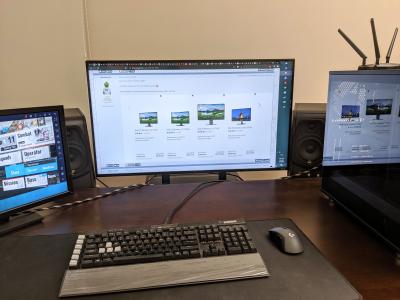
|
|
|
May 10 2020, 01:56 PM
|

Senior Member
1,803 posts Joined: Oct 2007
|
How is PNY CS3030 ?
I am planning to get the 2TB version |
|
|
May 10 2020, 04:29 PM
|
|
Senior Member
6,014 posts Joined: Feb 2007
|
QUOTE(-kytz- @ May 10 2020, 01:09 PM) It's not the front door panel for sure. It's not rattling and not much vibrations actually. I'm using the same router for years, the USB transfer rate from the router is crappy lol, due to missing some function like write caching, USB3 UASP (USB Attached SCSI) Thanks! A little worried about the heat management as the place I put my router is lacking ventilation. I sit right next to the PC actually. The case actually manage to dampen a lot of the high frequency noise, now what's left is the lower frequency. I'm using the ASUS RT 68U router. Getting 3 out of 4 bars from 5Ghz. Speed test result: 180-200 Mbps DL, 350 Mbps UL, 6ms ping. My Internet ISP is Time rated at 800Mbps p/s: I just remembered that I installed several games on the HDD lol. Is it possible to play it over WiFi or over USB 3.0 cable (if I decide to turn my HDD into an external drive and connect to pc via cable)?
My slow WD blue hdd can achieve average transfer rate of 100MB/s for file writing, you probably wont see this kind of performance on router. You can play the games over network, you just have to mount the HDD via Windows 10 function, Map network drive. It work with Steam as i've tried before, but the loading time will be much slower. |
|
|
May 12 2020, 11:30 AM
|

All Stars
14,909 posts Joined: Jul 2005 
|
Anyone wanna trade their Western Digital SN750 1TB without heatsink with my Western Digital SN750 1TB with heatsink?
|
|
|
May 12 2020, 11:40 AM
|

Senior Member
1,648 posts Joined: Jan 2005
|
if i have a nvme ssd but my notebook do not support nvme, what choice do i have to still utilize the ssd
|
|
|
May 12 2020, 11:47 AM
Show posts by this member only | IPv6 | Post
#2153
|
|
All Stars
14,909 posts Joined: Jul 2005
|
QUOTE(gedebe @ May 12 2020, 11:40 AM) if i have a nvme ssd but my notebook do not support nvme, what choice do i have to still utilize the ssd Use it as portable SSD |
|
|
|
|
|
May 13 2020, 02:03 AM
Show posts by this member only | IPv6 | Post
#2154
|

Senior Member
6,214 posts Joined: Sep 2010 From: Busan, Kr | Kuching, Swk 
|
QUOTE(sHawTY @ May 12 2020, 11:30 AM) Anyone wanna trade their Western Digital SN750 1TB without heatsink with my Western Digital SN750 1TB with heatsink? Aik.. why? Tot its even better with heatsink.. or is it because your mobo already have m.2 heatsink? |
|
|
May 13 2020, 10:29 PM
Show posts by this member only | IPv6 | Post
#2155
|
|
Junior Member
505 posts Joined: Feb 2016
|
QUOTE(pandera999 @ May 13 2020, 02:03 AM) Aik.. why? Tot its even better with heatsink.. or is it because your mobo already have m.2 heatsink? I think the laptop or the usb enclosure cannot swallow it...  |
|
|
May 14 2020, 07:33 AM
Show posts by this member only | IPv6 | Post
#2156
|
|
All Stars
14,674 posts Joined: Sep 2010
|
QUOTE(kevin23 @ May 10 2020, 01:56 PM) How is PNY CS3030 ? Looks alright, according to the SSD database:I am planning to get the 2TB version https://docs.google.com/spreadsheets/d/1B27...id=0&range=B163 Toshiba NAND + Phison controller, and comes with DRAM caching as well  This post has been edited by chocobo7779: May 14 2020, 07:33 AM |
|
|
May 20 2020, 07:59 PM
Show posts by this member only | IPv6 | Post
#2157
|

Junior Member
168 posts Joined: Aug 2008
|
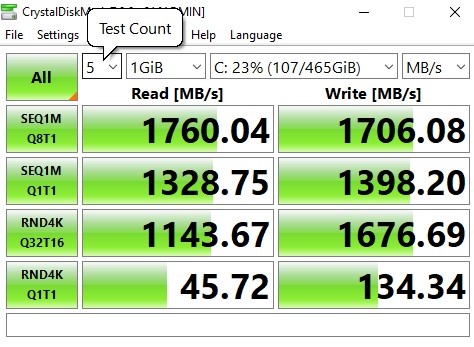 How do people get maximum speed out of this? Mine is Samsung Evo 970 Plus 500gb... i5 9400F TUF B360 Plus Gaming |
|
|
May 20 2020, 08:10 PM
Show posts by this member only | IPv6 | Post
#2158
|
|
All Stars
14,674 posts Joined: Sep 2010
|
QUOTE(FirstOne @ May 20 2020, 07:59 PM) How do people get maximum speed out of this? Mine is Samsung Evo 970 Plus 500gb... i5 9400F TUF B360 Plus Gaming |
|
|
May 20 2020, 08:11 PM
Show posts by this member only | IPv6 | Post
#2159
|

Junior Member
993 posts Joined: May 2010 From: Cheras For PPL to Live 1
|
QUOTE(FirstOne @ May 20 2020, 07:59 PM) How do people get maximum speed out of this? Mine is Samsung Evo 970 Plus 500gb... i5 9400F TUF B360 Plus Gaming from the mobo pages With x2 PCI Express® 3.0 bandwidth, M.2 supports up to 16Gbps data-transfer speeds. both ur mobo m.2 slots running at PCIE 3.0 x 2 mode also logically speaking u wont notice too much diff. |
|
|
May 22 2020, 01:44 PM
|

Junior Member
248 posts Joined: Aug 2011
|
dear all, I am looking to buy 1TB SSD 2.5inch and main purpose is for gaming, as recently gaming installation size looks kinda big and taking up space. I don't really think i need the ssd to be super reliable, so if it's corrupted i will just need to reinstall the game so not like keeping personal documents.
is ADATA ok or anyone else better recommendation? From shopee, i can see about RM450 range for 960GB size... thank you |
|
Topic ClosedOptions
|
| Change to: |  0.0299sec 0.0299sec
 0.48 0.48
 6 queries 6 queries
 GZIP Disabled GZIP Disabled
Time is now: 9th December 2025 - 06:33 AM |
 Quote
Quote