Welcome Guest ( Log In | Register )

Bump Topic Topic Closed RSS Feed
125 Pages « < 104 105 106 107 108 > » Bottom

Outline · [ Standard ] · Linear+

 The SSD Thread V6, Solid State Drive, Continued.

views
     
ntw
post Apr 22 2020, 07:42 PM

One Each At A Time
******
Senior Member
1,432 posts

Joined: Aug 2010
From: Ipoh mali~~~


QUOTE(skylinelover @ Apr 16 2020, 05:18 PM)
Lazada got 50% off 1TB last i checked 3 days ago

Dont know still on today. Go check it out. Haha.
*
which shop?? drool.gif

can't seem to find any... cheapest I found is PC Byte at RM539.00 free shipping
SUSEBBattlefield
post Apr 22 2020, 07:45 PM

Ramadass Vijandren
****
Junior Member
637 posts

Joined: Nov 2018
From: Taman Sri Muda
QUOTE(puifah @ Apr 22 2020, 01:59 PM)
OS can boot at external storage?
*
as long as you can boot from USB drive.
nothing stopping you from booting windows from your 64GB Kingston Pendrive....
but USB Speed....even USB 3.0....

PCIE>SATA>IDE>>>>>>>>>>>>>>>>>>>>>>>>>USB>Pigeon carrier tongue.gif
1024kbps
post Apr 23 2020, 08:57 PM

李素裳
*******
Senior Member
6,014 posts

Joined: Feb 2007


QUOTE(EBBattlefield @ Apr 22 2020, 07:45 PM)
as long as you can boot from USB drive.
nothing stopping you from booting windows from your 64GB Kingston Pendrive....
but USB Speed....even USB 3.0....

PCIE>SATA>IDE>>>>>>>>>>>>>>>>>>>>>>>>>USB>Pigeon carrier tongue.gif
*
USB 3 is almost as fast as SATA 6Gbps now, USB 4 is on the way.
where SATA express is nowhere to be seen because no one really bothered to support the wired connector and port.
SUSEBBattlefield
post Apr 24 2020, 07:58 AM

Ramadass Vijandren
****
Junior Member
637 posts

Joined: Nov 2018
From: Taman Sri Muda
QUOTE(1024kbps @ Apr 23 2020, 08:57 PM)
USB 3 is almost as fast as SATA 6Gbps now, USB 4 is on the way.
where SATA express is nowhere to be seen because no one really bothered to support the wired connector and port.
*
USB3 as fast as SATA only when using proper drives.
pair a shit hard drive with shit controller still shit.
SATA is guaranteed performance
1024kbps
post Apr 24 2020, 01:00 PM

李素裳
*******
Senior Member
6,014 posts

Joined: Feb 2007


QUOTE(EBBattlefield @ Apr 24 2020, 07:58 AM)
USB3 as fast as SATA only when using proper drives.
pair a shit hard drive with shit controller still shit.
SATA is guaranteed performance
*
what? do you wanna see my shit Sata hdd transfer rate?
SkyHermit
post Apr 24 2020, 07:27 PM

Regular
******
Senior Member
1,799 posts

Joined: Nov 2009


Currently I am having 1 SSD (WD Green 240GB) and 2 HDD on my desktop using Z77-D3H motherboard. All 3 are connected using SATA cables.

I am planning to buy a new 1TB SSD to install as my main OS and also play games on here.

But then I just realised that it looks like M.2 SSD doesn't work on my MOBO. So my choice is to remove one of my old HDD and buy a new SATA HDD. (only max 3 SATA slots)

I am looking at WD Blue 3D NAND (WDS100T2B0A). What do you guys think about this?

This post has been edited by SkyHermit: Apr 24 2020, 07:27 PM
SUSEBBattlefield
post Apr 24 2020, 09:08 PM

Ramadass Vijandren
****
Junior Member
637 posts

Joined: Nov 2018
From: Taman Sri Muda
QUOTE(SkyHermit @ Apr 24 2020, 07:27 PM)
Currently I am having 1 SSD (WD Green 240GB) and 2 HDD on my desktop using Z77-D3H motherboard.  All 3 are connected using SATA cables.

I am planning to buy a new 1TB SSD to install as my main OS and also play games on here.

But then I just realised that it looks like M.2 SSD doesn't work on my MOBO. So my choice is to remove one of my old HDD and buy a new SATA HDD. (only max 3 SATA slots)

I am looking at WD Blue 3D NAND (WDS100T2B0A). What do you guys think about this?
*
same price as Crucial MX500.
IMO, can consider either one since both are SSD with RAM.
Either will be Usain bolt compared to your Green.

I have a Green and the MX500.
The Green being DRAMless quickly gets bottlenecked by Unifi 100Mbps when downloading games when its cache runs out.
whereas using the MX500, my downloads can maintain 10Megabytes/s for duration of 65GB thumbup.gif

You'll need to double check on the new Blue on the RAM though. hmm.gif
Anandtech review say got RAM, WD lazada website say dont have hmm.gif

QUOTE(1024kbps @ Apr 24 2020, 01:00 PM)
what? do you wanna see my shit Sata hdd transfer rate?
*
no thanks, i dont want to see your udang directory rclxs0.gif
puifah
post Apr 25 2020, 10:59 AM

Casual
***
Junior Member
451 posts

Joined: Aug 2008
QUOTE(SkyHermit @ Apr 24 2020, 07:27 PM)
Currently I am having 1 SSD (WD Green 240GB) and 2 HDD on my desktop using Z77-D3H motherboard.  All 3 are connected using SATA cables.

I am planning to buy a new 1TB SSD to install as my main OS and also play games on here.

But then I just realised that it looks like M.2 SSD doesn't work on my MOBO. So my choice is to remove one of my old HDD and buy a new SATA HDD. (only max 3 SATA slots)

I am looking at WD Blue 3D NAND (WDS100T2B0A). What do you guys think about this?
*
your motherboard got another slot call msata, not m.2 slot, and maximum capacity available at Malaysia market is 480gb, but it will disable sata port 5 at motherboard if I using msata SSD…by the way your motherboard should have 6 SATA ports
SUSEBBattlefield
post Apr 25 2020, 02:50 PM

Ramadass Vijandren
****
Junior Member
637 posts

Joined: Nov 2018
From: Taman Sri Muda
QUOTE(puifah @ Apr 25 2020, 10:59 AM)
your motherboard got another slot call msata, not m.2 slot, and maximum capacity available at Malaysia market is 480gb, but it will disable sata port 5 at motherboard if I using msata SSD…by the way your motherboard should have 6 SATA ports
*
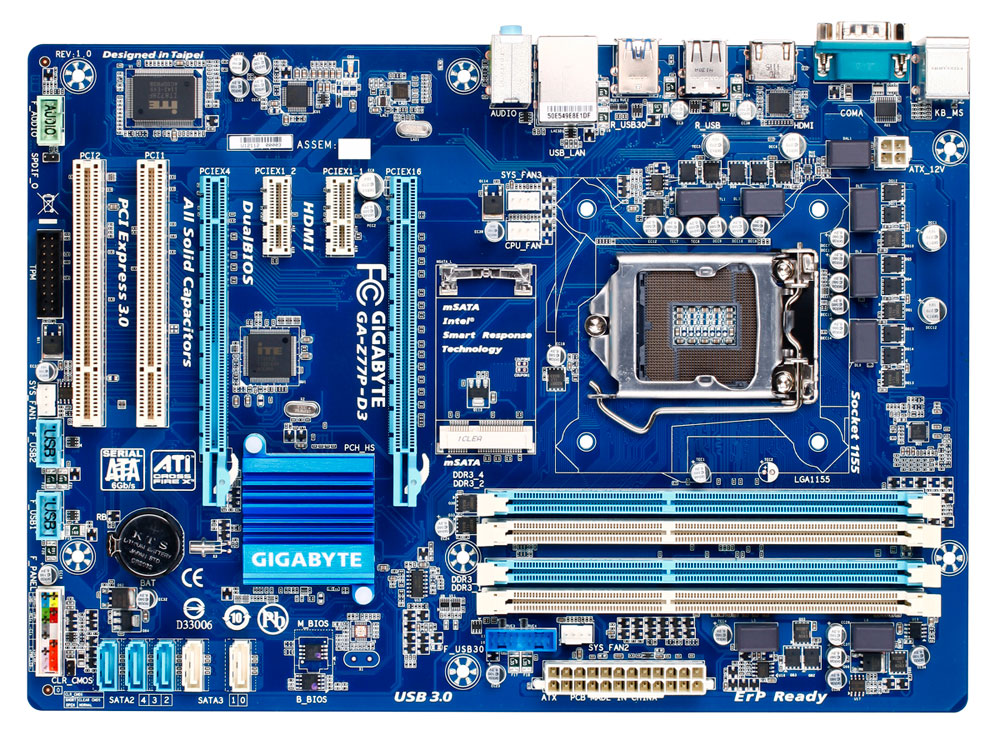
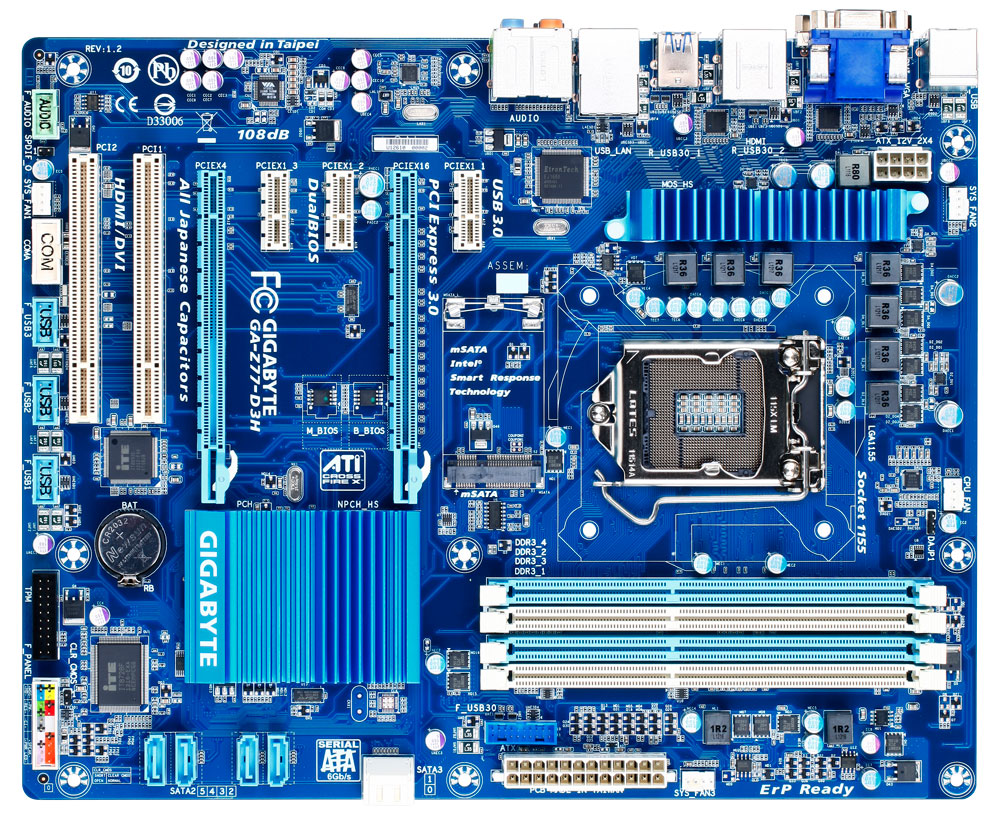
I count 5 SATA slots, 1 mSATA slot.
Should be standard 2+4 config, so it shouldnt disable anything with mSATA plugged in.

Maybe TS buta, maybe TS SATA 3 slots kaput already.
IIRC, SATA III is by chipset and SATA II is by 2nd controller.

but IMO, mSATA is more obsolete than M.2 or SATA already.
might as well go for SATA since speed is same and you dont be able to use mSATA on any future systems anyway.


user posted image
Sky.Live
post Apr 25 2020, 05:30 PM

Proctected Species
*******
Senior Member
4,390 posts

Joined: Oct 2004
From: Cheras, Malaysia


Any good SSD deals out there?
SkyHermit
post Apr 25 2020, 07:26 PM

Regular
******
Senior Member
1,799 posts

Joined: Nov 2009


QUOTE(EBBattlefield @ Apr 25 2020, 02:50 PM)
I count 5 SATA slots, 1 mSATA slot.
Should be standard 2+4 config, so it shouldnt disable anything with mSATA plugged in.

Maybe TS buta, maybe TS SATA 3 slots kaput already.
IIRC, SATA III is by chipset and SATA II is by 2nd controller.

but IMO, mSATA is more obsolete than M.2 or SATA already.
might as well go for SATA since speed is same and you dont be able to use mSATA on any future systems anyway.
user posted image
*
Thanks for this pic. It is 99% same except my SATA2 shows (5,4,3,2) and SATA3 (1,0) is on top of each other and not side by side like in picture

Yes I was buta and quite newbie on this.

So the SATA2 (2,3,4,5) is Sata 2.0
And SATA3 (1,0) is Sata 3.0 which is faster?

Anyway I just bought Crucial MX500 1TB SSD, which I will be installing OS on it soon. So this should go to the SATA3 (white colour) one while all remaining for storage is connected to SATA2 (blue). Correct me if I am wrong

This post has been edited by SkyHermit: Apr 25 2020, 07:37 PM
SUSEBBattlefield
post Apr 25 2020, 08:25 PM

Ramadass Vijandren
****
Junior Member
637 posts

Joined: Nov 2018
From: Taman Sri Muda
QUOTE(SkyHermit @ Apr 25 2020, 07:26 PM)
Thanks for this pic. It is 99% same except my SATA2 shows (5,4,3,2) and SATA3 (1,0) is on top of each other and not side by side like in picture

Yes I was buta and quite newbie on this.

So the SATA2 (2,3,4,5) is Sata 2.0
And SATA3 (1,0) is Sata 3.0 which is faster?

Anyway I just bought Crucial MX500 1TB SSD, which I will be installing OS on it soon. So this should go to the SATA3 (white colour) one while all remaining for storage is connected to SATA2 (blue). Correct me if I am wrong
*
For maximum performance, technically all SSDs and HDDs should be connected to SATA III (6gbps)
since these ancient boards only got 2 SATA III, then just plug the most important drives onto SATA III
puifah
post Apr 25 2020, 11:04 PM

Casual
***
Junior Member
451 posts

Joined: Aug 2008
QUOTE(EBBattlefield @ Apr 25 2020, 02:50 PM)
I count 5 SATA slots, 1 mSATA slot.
Should be standard 2+4 config, so it shouldnt disable anything with mSATA plugged in.

Maybe TS buta, maybe TS SATA 3 slots kaput already.
IIRC, SATA III is by chipset and SATA II is by 2nd controller.

but IMO, mSATA is more obsolete than M.2 or SATA already.
might as well go for SATA since speed is same and you dont be able to use mSATA on any future systems anyway.
user posted image
*
what the owner have is Z77-D3H which is have 6 SATA ports

user posted image

spec is below :

Chipset:

1. 2 x SATA 6Gb/s connectors (SATA3 0/SATA3 1) supporting up to 2 SATA 6Gb/s devices
2. 4 x SATA 3Gb/s connectors (SATA2 2~SATA2 5) supporting up to 4 SATA 3Gb/s devices
3. 1 x mSATA connector
* The SATA2 5 connector will become unavailable when the mSATA connector is installed with a solid state drive.
4. Support for RAID 0, RAID 1, RAID 5, and RAID 10
* When a RAID set is built across the SATA 6Gb/s and SATA 3Gb/s channels, the system performance of the RAID set may vary depending on the devices being connected.

SkyHermit
post Apr 26 2020, 01:08 AM

Regular
******
Senior Member
1,799 posts

Joined: Nov 2009


QUOTE(puifah @ Apr 25 2020, 11:04 PM)
what the owner have is Z77-D3H which is have 6 SATA ports

user posted image

spec is below :

Chipset:

  1. 2 x SATA 6Gb/s connectors (SATA3 0/SATA3 1) supporting up to 2 SATA 6Gb/s devices
  2. 4 x SATA 3Gb/s connectors (SATA2 2~SATA2 5) supporting up to 4 SATA 3Gb/s devices
  3. 1 x mSATA connector
      * The SATA2 5 connector will become unavailable when the mSATA connector is installed with a solid state drive.
  4. Support for RAID 0, RAID 1, RAID 5, and RAID 10
      * When a RAID set is built across the SATA 6Gb/s and SATA 3Gb/s channels, the system performance of the RAID set may vary depending on the devices being connected.
*
Thanks. Now it is all good.

My newly bought Corsair 500MX 1TB SSD is connected to SATA3 0 as my main OS, and the 250GB WD SSD is connected to SATA3 1.

The remaining 2 HDD connected to SATA2.


Anyway, just used HD Tune Pro to check the health of this new SSD (Corsair MX500).

C7 (interface CRC Error Count) shows attention.
Status : There were communication errors. This may be caused by a damaged cable.

Since I am using old SATA cable. Should I be worried about this? Or just normal cable problem.

screenshot
skylinelover
post Apr 26 2020, 01:42 PM

Future Crypto Player😄👊Driver Abamsado😎😎
********
All Stars
11,251 posts

Joined: Jul 2005
QUOTE(Sky.Live @ Apr 25 2020, 05:30 PM)
Any good SSD deals out there?
*
Not putting much hope

Wait like on raya eve 2 check

laugh.gif laugh.gif
SUSEBBattlefield
post Apr 26 2020, 04:12 PM

Ramadass Vijandren
****
Junior Member
637 posts

Joined: Nov 2018
From: Taman Sri Muda
QUOTE(skylinelover @ Apr 26 2020, 01:42 PM)
Not putting much hope

Wait like on raya eve 2 check

laugh.gif laugh.gif
*
Wait until after MCO lifted whistling.gif
ssxxcool
post Apr 26 2020, 04:44 PM

Getting Started
**
Junior Member
174 posts

Joined: Apr 2018
i want to buy ssd for ps5 before it comes out and price increase

any current ssd can support ps5?
SUSEBBattlefield
post Apr 26 2020, 04:58 PM

Ramadass Vijandren
****
Junior Member
637 posts

Joined: Nov 2018
From: Taman Sri Muda
QUOTE(ssxxcool @ Apr 26 2020, 04:44 PM)
i want to buy ssd for ps5 before it comes out and price increase

any current ssd can support ps5?
*
PS5 itself will launch with 1TB SSD.
you buy for what? doh.gif

Either way, PS4 can support any 2.5" SATA HDD or SSD.
PS5 should be using NVMe M.2 instead of a build in storage option.
The question now is just the length of the M.2 drive, which we will have to wait until release to find out,
sHawTY
post Apr 26 2020, 11:46 PM

Frequent Reporter
********
All Stars
14,909 posts

Joined: Jul 2005

QUOTE(SkyHermit @ Apr 26 2020, 01:08 AM)
Thanks. Now it is all good.

My newly bought Corsair 500MX 1TB SSD is connected to SATA3 0 as my main OS, and the 250GB WD SSD is connected to SATA3 1.
You're doing it wrongly
The 250GB SSD should be used for Windows & programs
The 1TB SSD should be used as games installation and what not

This way when you want to format Windows, you just format the 250GB SSD, not the 1TB SSD
QUOTE(SkyHermit @ Apr 26 2020, 01:08 AM)
Anyway, just used HD Tune Pro to check the health of this new SSD (Corsair MX500).

C7 (interface CRC Error Count) shows attention.
Status : There were communication errors. This may be caused by a damaged cable.

Since I am using old SATA cable. Should I be worried about this? Or just normal cable problem.
Aiyah, this one also need to ask meh? Just replace the cable lor sweat.gif
SkyHermit
post Apr 27 2020, 09:40 AM

Regular
******
Senior Member
1,799 posts

Joined: Nov 2009


QUOTE(sHawTY @ Apr 26 2020, 11:46 PM)
You're doing it wrongly
The 250GB SSD should be used for Windows & programs
The 1TB SSD should be used as games installation and what not

This way when you want to format Windows, you just format the 250GB SSD, not the 1TB SSD
Aiyah, this one also need to ask meh? Just replace the cable lor sweat.gif
*
Based on this comparison,

https://ssd.userbenchmark.com/Compare/WD-Bl...191455vsm406099

It seems like MX500 1TB SSD performs faster than my WD Blue, so I am using my MX500 1TB as my main OS with games in it. If I want to format my OS, then i just moved the game to the 250GB SSD.


Ya, I will just buy a new cable for that issue. biggrin.gif

This post has been edited by SkyHermit: Apr 27 2020, 09:42 AM

125 Pages « < 104 105 106 107 108 > » Top
Topic ClosedOptions
 

Change to:
| Lo-Fi Version
0.0344sec    0.25    6 queries    GZIP Disabled
Time is now: 7th December 2025 - 11:26 AM