Welcome Guest ( Log In | Register )

249 Pages « < 237 238 239 240 241 > » Bottom

Outline · [ Standard ] · Linear+

 TP-LINK Malaysia Official Thread, Technical Enquiries and Support

views
     
BladeRider88
post Aug 27 2024, 02:11 PM

On my way
****
Junior Member
554 posts

Joined: Nov 2006


QUOTE(blacktubi @ Aug 27 2024, 12:58 PM)
Actually TP-Link implemented DoT and even DoH on their Wi-Fi 7 routers and they didn't announce it. It's more stable and perform better as well.

user posted image
This is on Archer BE230

But still, even though TP-Link's implementation is excellent, DoH or DoT will make your internet slower, you will definitely feel it.

DNS resolving time is way slower than the plain old DNS.
*
I see, guess WIFI6 users got tough luck getting it

TBH, i don't feel much slowness on my side and i would prefer to have DoT/DoH for safety purpose and etc
jacktiew
post Aug 31 2024, 04:15 PM

Getting Started
**
Junior Member
289 posts

Joined: Sep 2012
What voltage and ampere does the Deco BE65 power adapter used?
zellleonhart
post Sep 4 2024, 06:41 PM

Stars stars stars
*******
Senior Member
5,075 posts

Joined: Oct 2008


Hi all, I am inclined to buy Deco BE65 as my first mesh but I have some concerns coming from Archer series. Not considering Asus because of the price and BE65 with Wifi 7 sounds really good at this price. Also Asus does not support hairpin NAT / NAT looping as far as I know..

However I am used to the web interface of the Archer series and no TP-Link login needed. For Deco can I still access the router settings if internet is down or TP-Link server is down?

QUOTE(blacktubi @ Aug 27 2024, 12:58 PM)
Actually TP-Link implemented DoT and even DoH on their Wi-Fi 7 routers and they didn't announce it. It's more stable and perform better as well.

This is on Archer BE230

But still, even though TP-Link's implementation is excellent, DoH or DoT will make your internet slower, you will definitely feel it.

DNS resolving time is way slower than the plain old DNS.
*
Do the latest Deco series like BE65 have DoH/DoT implemented too?
GameSky
post Sep 5 2024, 07:54 AM

Nyancat too much
*******
Senior Member
6,381 posts

Joined: Jun 2005
From: meow meow
QUOTE(blacktubi @ Aug 27 2024, 12:58 PM)
Actually TP-Link implemented DoT and even DoH on their Wi-Fi 7 routers and they didn't announce it. It's more stable and perform better as well.

user posted image
This is on Archer BE230

But still, even though TP-Link's implementation is excellent, DoH or DoT will make your internet slower, you will definitely feel it.

DNS resolving time is way slower than the plain old DNS.
*
only wifi 7 routers? other model seems doesn't have it right?
BladeRider88
post Sep 5 2024, 08:51 AM

On my way
****
Junior Member
554 posts

Joined: Nov 2006


QUOTE(GameSky @ Sep 5 2024, 07:54 AM)
only wifi 7 routers? other model seems doesn't have it right?
*
Other models are limited

You can refer to here

https://community.tp-link.com/en/home/forum/topic/617138
GameSky
post Sep 5 2024, 12:12 PM

Nyancat too much
*******
Senior Member
6,381 posts

Joined: Jun 2005
From: meow meow
QUOTE(BladeRider88 @ Sep 5 2024, 08:51 AM)
Other models are limited

You can refer to here

https://community.tp-link.com/en/home/forum/topic/617138
*
thanks, was looking for this
eclectice
post Sep 5 2024, 12:46 PM

Look at all my stars!!
*******
Senior Member
2,734 posts

Joined: Mar 2008
QUOTE(zellleonhart @ Sep 4 2024, 06:41 PM)
Hi all, I am inclined to buy Deco BE65 as my first mesh but I have some concerns coming from Archer series. Not considering Asus because of the price and BE65 with Wifi 7 sounds really good at this price. Also Asus does not support hairpin NAT / NAT looping as far as I know..

However I am used to the web interface of the Archer series and no TP-Link login needed. For Deco can I still access the router settings if internet is down or TP-Link server is down?
Do the latest Deco series like BE65 have DoH/DoT implemented too?
*
ASUS Support: What models of router support NAT Loopback?

This post has been edited by eclectice: Sep 5 2024, 12:48 PM
MyProLife
post Sep 5 2024, 02:08 PM

I bully wumao & MPKL
*******
Senior Member
2,068 posts

Joined: Sep 2021
From: nowhere

QUOTE(zellleonhart @ Sep 4 2024, 06:41 PM)
Hi all, I am inclined to buy Deco BE65 as my first mesh but I have some concerns coming from Archer series. Not considering Asus because of the price and BE65 with Wifi 7 sounds really good at this price. Also Asus does not support hairpin NAT / NAT looping as far as I know..

However I am used to the web interface of the Archer series and no TP-Link login needed. For Deco can I still access the router settings if internet is down or TP-Link server is down?
Do the latest Deco series like BE65 have DoH/DoT implemented too?
*
none of deco series having doh/dot features being planned for future update, and since deco series are developed by separate team from archer series, you will need to have some drastic change in manage deco.

deco enforced mobile app login (tp link account required) and also if internet is down/tp server is down it is more difficult to manage them other than try rebooting the main deco.

deco have some things being forced on and cannot changed such as channel width (20/40 for 2.4ghz), channel number and ssid for main network being same for 2.4/5ghz. there are workaround for latter, which is make use of guest network or iot network specially with 2.4ghz on only so with different ssid.

web interface is heavily limited to mostly status monitoring and manual firmware upgrade.

Deco for your first mesh is okay. it is more about simplicity because easier to set up and in newer products, the mesh units in box are pre-paired so you can just turn these sub nodes right after setting up main deco and these sub nodes will automatically join. however deco is not really designed for power users which need absolute control over most settings
zellleonhart
post Sep 5 2024, 02:55 PM

Stars stars stars
*******
Senior Member
5,075 posts

Joined: Oct 2008


QUOTE(eclectice @ Sep 5 2024, 12:46 PM)
Thanks, I found this page too after posting and it says all ZenWifi series are supported so hopefully that's true.

QUOTE(MyProLife @ Sep 5 2024, 02:08 PM)
none of deco series having doh/dot features being planned for future update, and since deco series are developed by separate team from archer series, you will need to have some drastic change in manage deco.

deco enforced mobile app login (tp link account required) and also if internet is down/tp server is down it is more difficult to manage them other than try rebooting the main deco.

deco have some things being forced on and cannot changed such as channel width (20/40 for 2.4ghz), channel number and ssid for main network being same for 2.4/5ghz. there are workaround for latter, which is make use of guest network or iot network specially with 2.4ghz on only so with different ssid.

web interface is heavily limited to mostly status monitoring and manual firmware upgrade.

Deco for your first mesh is okay. it is more about simplicity because easier to set up and in newer products, the mesh units in box are pre-paired so you can just turn these sub nodes right after setting up main deco and these sub nodes will automatically join. however deco is not really designed for power users which need absolute control over most settings
*
that's exactly my worries - I am a power user but for now as long as I can port forward without issue, Wake on LAN works and NAT loopback is supported, I don't need DoH/DoT at router level since my devices have it setup anyway.

But my bigger concern is the mobile app, TP-Link account and if internet/TP server down

Do you know if the Asus XT8 is able to reach 1gbps internet speed on the node if separated by 1 wall but very close e.g. just 4 ft away but 1 wall in between? I can't really find exact test data on this. XT12/ET12 is too expensive. The use case is:
CODE
Main Router ----> || 1 wall || <---- Mesh router --- gigabit switch --- My PC, NAS and mini server


But Deco BE65 has Wifi 7 and the seamless roaming seems to be really good so I am torn.. Should I pay more for XT8 for the robust ASUS firmware, better privacy etc at the (possible) expense of performance.

MyProLife
post Sep 5 2024, 03:09 PM

I bully wumao & MPKL
*******
Senior Member
2,068 posts

Joined: Sep 2021
From: nowhere

QUOTE(zellleonhart @ Sep 5 2024, 02:55 PM)
Thanks, I found this page too after posting and it says all ZenWifi series are supported so hopefully that's true.
that's exactly my worries - I am a power user but for now as long as I can port forward without issue, Wake on LAN works and NAT loopback is supported, I don't need DoH/DoT at router level since my devices have it setup anyway.

But my bigger concern is the mobile app, TP-Link account and if internet/TP server down

Do you know if the Asus XT8 is able to reach 1gbps internet speed on the node if separated by 1 wall but very close e.g. just 4 ft away but 1 wall in between? I can't really find exact test data on this. XT12/ET12 is too expensive. The use case is:
CODE
Main Router ----> || 1 wall || <---- Mesh router --- gigabit switch --- My PC, NAS and mini server


But Deco BE65 has Wifi 7 and the seamless roaming seems to be really good so I am torn.. Should I pay more for XT8 for the robust ASUS firmware, better privacy etc at the (possible) expense of performance.
*
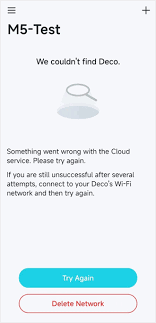
if internet/tp server down you will most probably see this

user posted image

so tough luck manage deco just in case internet down or tp link server down. because deco app heavily relies on tp link cloud service for managing deco


port forwarding is supported in deco


XT8 is not worth for me. it having much weaker hardware compared to on paper spec. you might as well get 2 x AX86u pro or above but its dual band solution is not quite ideal for certain situation
zellleonhart
post Sep 5 2024, 05:13 PM

Stars stars stars
*******
Senior Member
5,075 posts

Joined: Oct 2008


QUOTE(MyProLife @ Sep 5 2024, 03:09 PM)
if internet/tp server down you will most probably see this

user posted image

so tough luck manage deco just in case internet down or tp link server down. because deco app heavily relies on tp link cloud service for managing deco
port forwarding is supported in deco
XT8 is not worth for me. it having much weaker hardware compared to on paper spec. you might as well get 2 x AX86u pro or above but its dual band solution is not quite ideal for certain situation
*
what the actual clusterfuck.. locked out of your local router when it's just internet down.

That's what I thought too, XT8 is 3+ years old. But AX86u pro and AX92u both will use the Wifi 6 for AiMesh backhaul, end up my devices can only connect to it via Wifi 5 or have a performance drop if not dedicated backhaul.

Looks like I just have to bear with the TP-link cons... Really can't find a good alternative yet unless I pay more than 2x more for XT12.
blacktubi
post Sep 5 2024, 06:11 PM

-
Group Icon
Elite
8,400 posts

Joined: Jul 2008

QUOTE(zellleonhart @ Sep 5 2024, 05:13 PM)
what the actual clusterfuck.. locked out of your local router when it's just internet down.

That's what I thought too, XT8 is 3+ years old. But AX86u pro and AX92u both will use the Wifi 6 for AiMesh backhaul, end up my devices can only connect to it via Wifi 5 or have a performance drop if not dedicated backhaul.

Looks like I just have to bear with the TP-link cons... Really can't find a good alternative yet unless I pay more than 2x more for XT12.
*
XT8 actually received a silent upgrade from ASUS. The version on sale now is the V2 version with upgraded CPU and new Wi-FI chipset.

They dont even use the same firmware as the original XT8.

And yes, XT8 can do 1Gbps over wireless backhaul from main unit to mesh node.
zellleonhart
post Sep 5 2024, 06:23 PM

Stars stars stars
*******
Senior Member
5,075 posts

Joined: Oct 2008


QUOTE(blacktubi @ Sep 5 2024, 06:11 PM)
XT8 actually received a silent upgrade from ASUS. The version on sale now is the V2 version with upgraded CPU and new Wi-FI chipset.

They dont even use the same firmware as the original XT8.

And yes, XT8 can do 1Gbps over wireless backhaul from main unit to mesh node.
*
Thanks for the info! I read all your reviews and initially decided to get BE65 due to your test that it can sustain 1Gbps at the node even if separated by a wall.

Can the XT8 also achieve 1Gbps if separated by a wall and not in line of sight?
blacktubi
post Sep 5 2024, 11:12 PM

-
Group Icon
Elite
8,400 posts

Joined: Jul 2008

QUOTE(zellleonhart @ Sep 5 2024, 06:23 PM)
Thanks for the info! I read all your reviews and initially decided to get BE65 due to your test that it can sustain 1Gbps at the node even if separated by a wall.

Can the XT8 also achieve 1Gbps if separated by a wall and not in line of sight?
*
Both models can do this but I think the Deco BE65 have a slight edge

But I’m pretty sure the XT8 would deliver at least 800Mbps

It’s up to you to choose what you prefer
Anime4000
post Sep 7 2024, 08:16 PM

Look at all my stars!!
*******
Senior Member
2,399 posts

Joined: Jul 2009
From: /dev/null


Hi TP-LINK MY

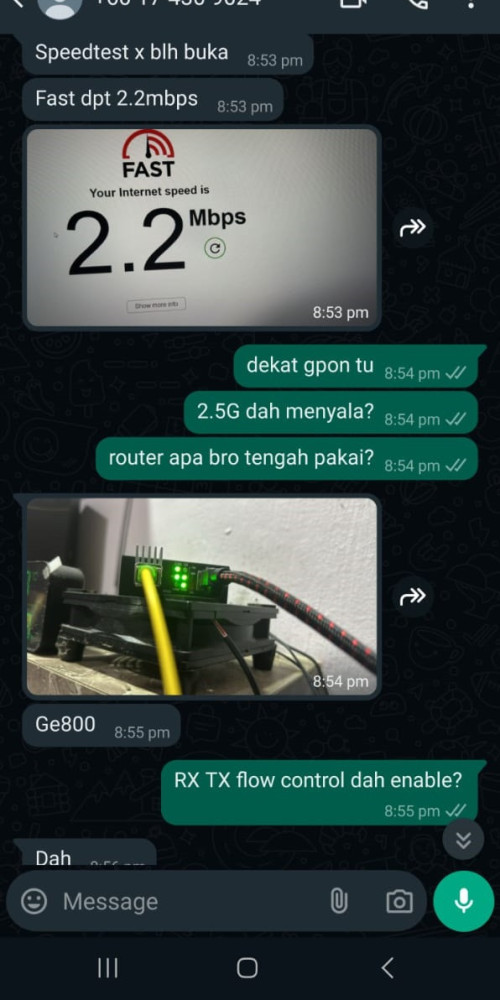
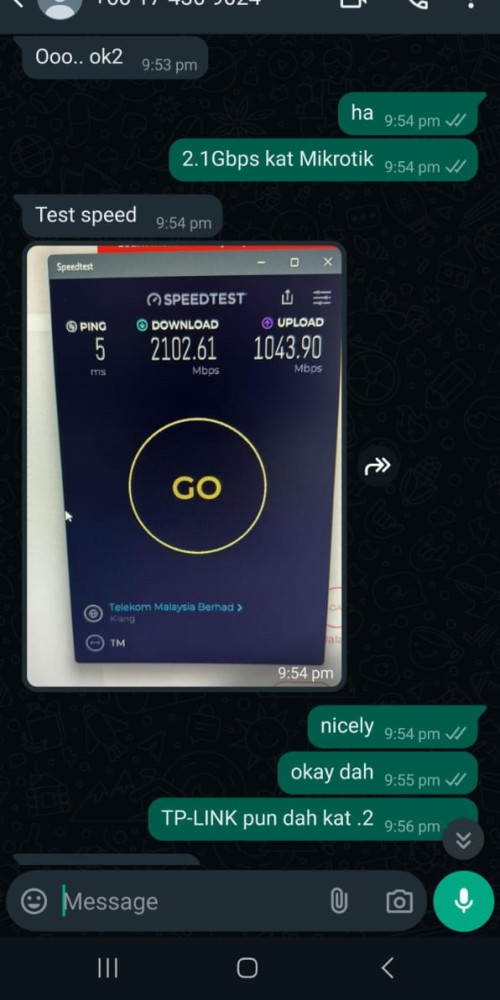
I have sold the 2.5G GPON to TP-LINK Archer GE800 customer, apparently two customer using GE800 having issue with 2500Mbps WAN Ethernet where unable to achieve max speed.

Customer #1
user posted image

Solution, customer decide to buy Mikrotik RB5009 and GE800 as Access Point
user posted image

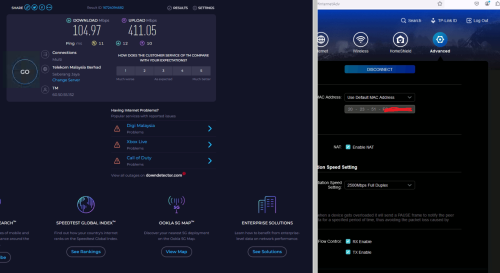
Customer #2
When set 1000Mbps WAN Ethernet, able to saturate GbE Speed, as expected...
user posted image

When set 2500Mbps WAN Ethernet, unable to achieve at least GbE at upload speed!
user posted image

What I see, GE800 cannot handle 2.5G traffic when pair with PPPoE

GE800 only can work as Access Point where no PPPoE is involve, TP-Link Engineer need to fix this...

For now, I would ask customer to use BE800 even device is EoL

If TP-LINK think my 2.5G GPON is bad, I wonder how ASUSmy Router can handle 2500Mbps PPPoE as per review showed here:
https://www.carousell.com.my/u/anime4000/reviews/

This post has been edited by Anime4000: Sep 7 2024, 08:23 PM
Omochao
post Sep 7 2024, 08:44 PM

Enthusiast
*****
Junior Member
835 posts

Joined: Nov 2007
From: Land of Forgotten
QUOTE(Anime4000 @ Sep 7 2024, 08:16 PM)
Hi TP-LINK MY

I have sold the 2.5G GPON to TP-LINK Archer GE800 customer, apparently two customer using GE800 having issue with 2500Mbps WAN Ethernet where unable to achieve max speed.

Solution, customer decide to buy Mikrotik RB5009 and GE800 as Access Point


When set 2500Mbps WAN Ethernet, unable to achieve at least GbE at upload speed!


GE800 only can work as Access Point where no PPPoE is involve, TP-Link Engineer need to fix this...

For now, I would ask customer to use BE800 even device is EoL

*
i think is better you go directly to their forums for immediate response. The forum is active and they have a moderator who is active daily whenever a support ticket is opened. Or you can proceed to email them a support ticket..

I had once had their engineer team viewer to my laptop to diagnose on deco issues. So it should be the same for the tplink archer series...usually they will have to get access to your hardware by sending over a custom firmware which can be debugged.
Anime4000
post Sep 7 2024, 08:52 PM

Look at all my stars!!
*******
Senior Member
2,399 posts

Joined: Jul 2009
From: /dev/null


QUOTE(Omochao @ Sep 7 2024, 08:44 PM)
i think is better you go directly to their forums for immediate response. The forum is active and they have a moderator who is active daily whenever a support ticket is opened. Or you can proceed to email them a support ticket..

I had once had their engineer team viewer to my laptop to diagnose on deco issues. So it should be the same for the tplink archer series...usually they will have to get access to your hardware by sending over a custom firmware which can be debugged.
*
That happened before with one of my clients about his BE85

Also, I have ask my client to contact, I post here for him to refer
Omochao
post Sep 7 2024, 09:19 PM

Enthusiast
*****
Junior Member
835 posts

Joined: Nov 2007
From: Land of Forgotten
QUOTE(Anime4000 @ Sep 7 2024, 08:52 PM)
That happened before with one of my clients about his BE85

Also, I have ask my client to contact, I post here for him to refer
*
though it won't be immediate but they are very proactive in tackling software issues especially their latest lineups...

They are now focusing heavily for their Wifi7 series ...but is not a suprise..since a normal entry level wifi7 router mesh can essily cost up to a thousand.
smallarcana
post Sep 7 2024, 09:45 PM

Getting Started
**
Junior Member
61 posts

Joined: Jul 2017
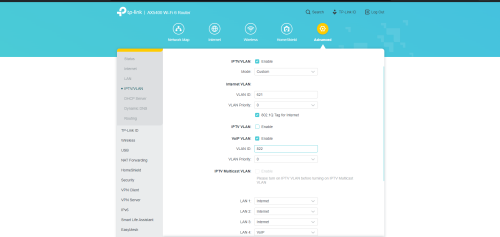
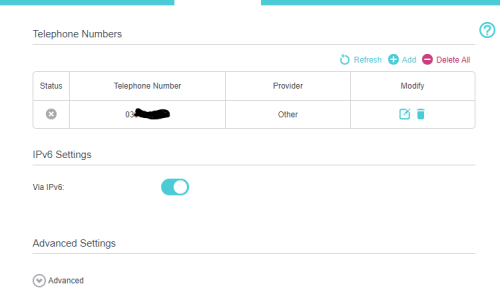
Hi, it's me again. I I changed my Maxis router to AX73, but I cannot get my VoIP to work.

Below is the setting for my AX73.
user posted image

Not sure if I should set this on the Maxis router


user posted image

Hoping someone can help guide me in this matter, thanks!

blacktubi
post Sep 7 2024, 10:24 PM

-
Group Icon
Elite
8,400 posts

Joined: Jul 2008

QUOTE(smallarcana @ Sep 7 2024, 09:45 PM)
Hi, it's me again. I I changed my Maxis router to AX73, but I cannot get my VoIP to work.

Below is the setting for my AX73.
user posted image

Not sure if I should set this on the Maxis router
user posted image

Hoping someone can help guide me in this matter, thanks!
*
TP-Link does not support Maxis VoIP passthrough

249 Pages « < 237 238 239 240 241 > » Top
 

Change to:
| Lo-Fi Version
0.0204sec    0.69    6 queries    GZIP Disabled
Time is now: 1st December 2025 - 10:50 PM