

Hi. Is there any way to enable guest wifi in AP mode on deco M4? Both of the unit are connected with Ethernet backhaul.
TP-LINK Malaysia Official Thread, Technical Enquiries and Support
TP-LINK Malaysia Official Thread, Technical Enquiries and Support
|
|
 Jul 1 2019, 02:41 AM Jul 1 2019, 02:41 AM
Return to original view | IPv6 | Post
#1
|
 
Junior Member
289 posts Joined: Sep 2012 
|
Hi. Is there any way to enable guest wifi in AP mode on deco M4? Both of the unit are connected with Ethernet backhaul.
|
|
|
|
|
|
Jul 11 2020, 04:42 PM
Return to original view | IPv6 | Post
#2
|
|
Junior Member
289 posts Joined: Sep 2012
|
QUOTE(wywy2020 @ Jul 11 2020, 04:28 PM) Hi Sifu here, If possible, pull an ethernet cable to your place and set another access point at your place so that you can avoid speed drop.I am moving into a new double storey terrace house where my relative next to my door already with Unifi. I plan to share the wifi with him and share the bill monthly. Appreciate your advise if this is possible and what are the device i need to boost the wifi signal just in case? i have heard of repeater, extender, mesh? Which is more suitable for me for my purpose?  Else, get mesh wifi if you don't want messy cable all around the places, but speed drop might happens |
|
|
Jul 13 2020, 01:18 PM
Return to original view | IPv6 | Post
#3
|
|
Junior Member
289 posts Joined: Sep 2012
|
QUOTE(wywy2020 @ Jul 13 2020, 11:18 AM) u mean the speed drop if it is via wifi? Yes. Cause wifi and be affected by many variables such as interference, walls to penetrate and repeating the wifi signal might cause speed reduction etc. |
|
|
Sep 12 2020, 02:23 PM
Return to original view | IPv6 | Post
#4
|
|
Junior Member
289 posts Joined: Sep 2012
|
Hi, TP-LINK MY
I have a deco M4 and unifi 100/50 package that is working fine. I have my slave deco connected with ethernet bachaul. Until recent firmware update of 1.4.2, the slave deco would drops the speed from 100Mbps to 20Mbps without reason after some time. And after reboot, it will back to normal again. Is there any beta firmware available to fix the problem or how can we downgrade to previous firmware? TQ. This post has been edited by jacktiew: Sep 13 2020, 12:29 AM |
|
|
Sep 15 2020, 06:03 PM
Return to original view | Post
#5
|
|
Junior Member
289 posts Joined: Sep 2012
|
QUOTE(Kuddo Sachi @ Sep 12 2020, 10:37 PM) Ya me too, so annoying. May I know you're using it in AP mode also? |
|
|
Sep 15 2020, 11:18 PM
Return to original view | IPv6 | Post
#6
|
|
Junior Member
289 posts Joined: Sep 2012
|
QUOTE(techm @ Sep 15 2020, 07:25 PM) Yes, but I'm using wired backhaul with 2 nodes. You're using Deco M4 in router mode or AP mode?I think its a firmware issue though, as it fails in the next morning. |
|
|
|
|
|
Sep 18 2020, 02:44 PM
Return to original view | Post
#7
|
|
Junior Member
289 posts Joined: Sep 2012
|
QUOTE(Kuddo Sachi @ Sep 12 2020, 10:37 PM) Ya me too, so annoying. QUOTE(techm @ Sep 17 2020, 06:34 PM) Using it in AP mode as i already have an existing router There a beta firmware on Deco M4 now, you might want to check it out.https://community.tp-link.com/en/home/forum/topic/227662 |
|
|
Sep 18 2020, 05:04 PM
Return to original view | IPv6 | Post
#8
|
|
Junior Member
289 posts Joined: Sep 2012
|
Edit: Wrong reply
This post has been edited by jacktiew: Sep 18 2020, 05:22 PM |
|
|
Sep 21 2020, 03:38 PM
Return to original view | Post
#9
|
|
Junior Member
289 posts Joined: Sep 2012
|
QUOTE(Kuddo Sachi @ Sep 12 2020, 10:37 PM) Ya me too, so annoying. QUOTE(techm @ Sep 15 2020, 07:25 PM) Yes, but I'm using wired backhaul with 2 nodes. My temporary solution is to change from access point mode to router mode. After the deco reboots, I delete network from the app. Then set up everything from scratch. I think its a firmware issue though, as it fails in the next morning. It's been two days or so. I haven't face any speed reduction so far... Will report back in maybe a few days more. Not sure this method helpful to you guys or not. Hope it helps. |
|
|
Sep 28 2020, 01:06 PM
Return to original view | IPv6 | Post
#10
|
|
Junior Member
289 posts Joined: Sep 2012
|
QUOTE(Kuddo Sachi @ Sep 28 2020, 07:37 AM) Im really annoying with this issue, please do update for me anything you've done to avoid this issue. Really dissapointed Issue came back after a few days. Not sure is firmware problem or interference from neighbour. Before update the firmware, same setup and situation also no problem. This post has been edited by jacktiew: Sep 28 2020, 01:06 PM |
|
|
Sep 28 2020, 01:12 PM
Return to original view | IPv6 | Post
#11
|
|
Junior Member
289 posts Joined: Sep 2012
|
QUOTE(blacktubi @ Sep 28 2020, 01:08 PM) Try downgrade the firmware using the web interface I tried. Deco only allows downgrade from 1.4.3 to 1.4.x. Not 1.4.3 to 1.x.x.My previous firmware was 1.1.0. This post has been edited by jacktiew: Sep 28 2020, 01:21 PM |
|
|
Sep 28 2020, 07:52 PM
Return to original view | IPv6 | Post
#12
|
|
Junior Member
289 posts Joined: Sep 2012
|
QUOTE(Kuddo Sachi @ Sep 28 2020, 05:09 PM) Did TpLink reply on your issue ? this issues really make me annoying so much with this product. This is what they told me.Snce I already have another router, I only use it as AP. Fyi, I did reset and set it up as AP, but the problem still exists. Maybe you can try and let me know. 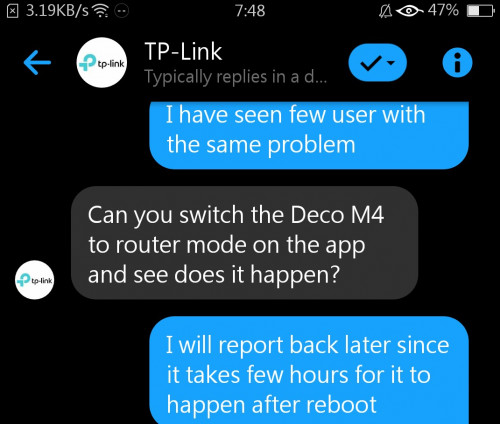 This post has been edited by jacktiew: Sep 28 2020, 07:54 PM |
|
|
Sep 29 2020, 01:24 PM
Return to original view | Post
#13
|
|
Junior Member
289 posts Joined: Sep 2012
|
QUOTE(Kuddo Sachi @ Sep 28 2020, 08:09 PM) Hm, i'd hope they release new firmware to solve this issues asap. I also set as AP mode and sadly it still happen. I just realized they did update the beta firmware with different build number. Maybe you can update again from this link. https://community.tp-link.com/en/home/forum...c/227662?page=1 |
|
|
|
|
|
Sep 29 2020, 01:44 PM
Return to original view | Post
#14
|
|
Junior Member
289 posts Joined: Sep 2012
|
QUOTE(Kuddo Sachi @ Sep 29 2020, 01:38 PM) i want to try but since it still beta i worried that firmware could worse than now. Btw, thank you for information. If i try it, i'll tell you about the result. You're on 1.4.2 right? You can always downgrade to 1.4.x after you update. Cause the beta firmware version is 1.4.3. |
|
|
Oct 2 2020, 12:51 PM
Return to original view | IPv6 | Post
#15
|
|
Junior Member
289 posts Joined: Sep 2012
|
QUOTE(lokilim @ Oct 2 2020, 12:44 PM)  TL-POE150S PoE Injector 5.0-5_normal_1506408012515j.jpg) TL-POE10R PoE Splitter Got a silly question. Can I use this to make Deco M5 to become POE? Thinking to put 1 unit outside living area that don't have power point, around 25meter away from the nearest node. https://www.dlink.com/en/products/dpe-301gi...it-poe-injector https://dlinkmea.com/index.php/product/deta...WtSZUI4TXZ6QT09 |
|
|
Oct 20 2020, 11:42 PM
Return to original view | IPv6 | Post
#16
|
|
Junior Member
289 posts Joined: Sep 2012
|
QUOTE(rickyro @ Oct 20 2020, 10:41 PM) yeah got ax device with me now... Blacktubi did the comparison before.but then the tri-band feature of m9 plus, isn't it a big "booster" point? https://www.blacktubi.com/review/tp-link-deco-x20/ |
|
|
Feb 9 2021, 01:13 PM
Return to original view | IPv6 | Post
#17
|
|
Junior Member
289 posts Joined: Sep 2012
|
QUOTE(ray8426 @ Feb 9 2021, 01:07 PM) AX73 and Deco, which more recommend ? Depending you have big house or not. If you do, I would recommend you get Deco series.  Deco series comes with mesh and fast roaming, which will allow you to have seemless wifi experience when moving around the house. |
|
|
Apr 30 2021, 11:21 PM
Return to original view | IPv6 | Post
#18
|
|
Junior Member
289 posts Joined: Sep 2012
|
QUOTE(JadenFongV @ Apr 30 2021, 10:51 PM) I'm thinking to have Deco M4 to improve wifi coverage in my house (1200-1300 sqf), as currently using stock router from unifi, kinda weak signal at 2nd floor, is it good enough to use only 1 unit Deco M4 as wifi router for the house. Any advice, thanks 5Ghz is not able to cover 2 floor. You might get slow speed.1 unit each floor is better for speed and stability. E4 only have 100Mbps port while M4 has 1000Mbps. If you signed up 100Mbps and above, then take M4. This post has been edited by jacktiew: Apr 30 2021, 11:23 PM |
|
|
May 9 2021, 05:56 PM
Return to original view | IPv6 | Post
#19
|
|
Junior Member
289 posts Joined: Sep 2012
|
QUOTE(K-o-E @ May 9 2021, 05:19 PM) anyone with any suggestion? HyppTV wants Just sharing. The article is not mine.  the 2nd LAN port from the 2-port router the 2nd LAN port from the 2-port routerhttps://ahot.home.blog/2019/01/05/make-any-...router-as-well/ Credits to owner |
|
|
Jun 9 2021, 08:03 PM
Return to original view | IPv6 | Post
#20
|
|
Junior Member
289 posts Joined: Sep 2012
|
QUOTE(spreeeee @ Jun 9 2021, 05:15 PM) just setup successfully the tplink m4, and then only found out cannot separate the ssid for 2.4 and 5ghz.. read a few forum saying just wait for the next firmware.. Turn on the guest network and disable the 'Isolated from main network'. Then disabl3 2.4Ghz on main network'.while waiting, any alternative solution? current setup is already replaced tm provided wifi router (fiberhome). |
| Change to: |  0.2083sec 0.2083sec
 0.65 0.65
 7 queries 7 queries
 GZIP Disabled GZIP Disabled
Time is now: 20th December 2025 - 07:02 PM |
 Quote
Quote