Welcome Guest ( Log In | Register )

249 Pages « < 236 237 238 239 240 > » Bottom

Outline · [ Standard ] · Linear+

 TP-LINK Malaysia Official Thread, Technical Enquiries and Support

views
     
Omochao
post Aug 10 2024, 10:31 AM

Enthusiast
*****
Junior Member
835 posts

Joined: Nov 2007
From: Land of Forgotten
TP link released newest firmware updates for X20 (V3) and X50 (V1/1.3)

Finally added ECO mode and IoT network for V3 X20
https://www.tp-link.com/en/support/download...20/v3/#Firmware

» Click to show Spoiler - click again to hide... «


Note:
1. Your device's configuration will not be lost after upgrading, which means you don't need to configure your device again after upgrading.
2. This firmware version does not allow downgrading to a previous version.


For X50 v1/1.3, they finally introduced the individual LED control for each node, as how Asus did with their mesh.

https://www.tp-link.com/en/support/download...50/v1/#Firmware
» Click to show Spoiler - click again to hide... «


For XE75 users, can refer to this link for the latest as well, ECO mode introduced but not individual node LED control yet, should be coming soon.
https://community.tp-link.com/en/home/forum/topic/669544

» Click to show Spoiler - click again to hide... «


This post has been edited by Omochao: Aug 10 2024, 10:39 AM
seand19
post Aug 10 2024, 11:17 AM

Getting Started
**
Junior Member
86 posts

Joined: Nov 2015
QUOTE(blacktubi @ Aug 10 2024, 10:22 AM)
Ideally, using a LAN cable directly to the router will offer the best performance so if you want the best performane for your gaming rig, get them to install it at your study room

As for product recommendation, Deco X20 is way faster than the Deco M4

And, a general rule of thumbs in networking is don't trust the specs completely. You won't get anywhere near 300Mbps on 2.4GHz.

Use 5GHz whenever possible.
*
How about the x10 instead of x20? Because on paper the specs seems the same except for the home shield app feature and 100 sqft lesser coverage. Just trying to save money where I can 😅

Oh and how many mesh nodes would I need to cover the areas I need, 2 or 3?

This post has been edited by seand19: Aug 10 2024, 11:19 AM
blacktubi
post Aug 10 2024, 11:21 AM

-
Group Icon
Elite
8,402 posts

Joined: Jul 2008

QUOTE(seand19 @ Aug 10 2024, 11:17 AM)
How about the x10 instead of x20? Because on paper the specs seems the same except for the home shield app feature and 100 sqft lesser coverage. Just trying to save money where I can 😅

Oh and how many mesh nodes would I need to cover the areas I need, 2 or 3?
*
The X20 is actually quite a bit faster in reality

I believe 2 units should be sufficient
maxlim94
post Aug 12 2024, 06:39 PM

Getting Started
**
Junior Member
53 posts

Joined: Dec 2009
From: Penang


Is there any webpage for us to register our newly bought TP Link router products? I couldn't find any of them.
smallarcana
post Aug 17 2024, 05:34 PM

Getting Started
**
Junior Member
61 posts

Joined: Jul 2017
Hi, looking for advice on my router configuration. Using EX23v (provided by Maxis), and AX5400 is connected to it using a LAN cable.

My issue is, the connection for AX5400 is horrible. After using it for half an hour or so, it will lose connectivity to the internet. The only way to reset the connection is to change the LAN port it was plugged into. I'm not sure what causes this issue and it has veen happening for months. Appreciate any advice I can get as I cannot use the AX5400 to its full capabilities.
blacktubi
post Aug 17 2024, 07:55 PM

-
Group Icon
Elite
8,402 posts

Joined: Jul 2008

QUOTE(smallarcana @ Aug 17 2024, 05:34 PM)
Hi, looking for advice on my router configuration. Using EX23v (provided by Maxis), and AX5400 is connected to it using a LAN cable.

My issue is, the connection for AX5400 is horrible. After using it for half an hour or so, it will lose connectivity to the internet. The only way to reset the connection is to change the LAN port it was plugged into. I'm not sure what causes this issue and it has veen happening for months. Appreciate any advice I can get as I cannot use the AX5400 to its full capabilities.
*
Connect it directly to the modem instead of connecting it to the router
PRSXFENG
post Aug 17 2024, 08:40 PM

Look at all my stars!!
*******
Senior Member
2,608 posts

Joined: Nov 2020


QUOTE(smallarcana @ Aug 17 2024, 05:34 PM)
Hi, looking for advice on my router configuration. Using EX23v (provided by Maxis), and AX5400 is connected to it using a LAN cable.

My issue is, the connection for AX5400 is horrible. After using it for half an hour or so, it will lose connectivity to the internet. The only way to reset the connection is to change the LAN port it was plugged into. I'm not sure what causes this issue and it has veen happening for months. Appreciate any advice I can get as I cannot use the AX5400 to its full capabilities.
*
drop the maxis provided router and connected your own router (of which btw, AX5400 is NOT the model, that's just the speed rating) directly to the TM/Maxis provided Huawei/FiberHome/ZTE/Nokia/Alcatel-Lucent modem
connect it from the original LAN port of the modem, which should be LAN2 or LAN1, do not change it, to the WAN port of your tplink

login to Maxis router and go to setup and make note of the PPPoE Username and password, use inspect element to retrieve password, or, it is usually just your username with a 1 added to the back

Eg: your username is A12345@home.maxis.com.my, then your password is most likely A123451

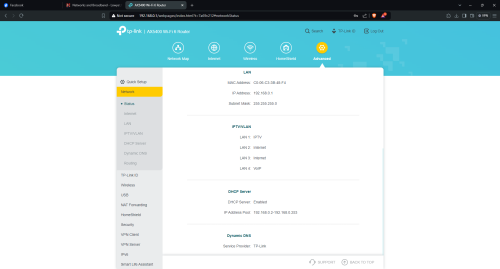
now, go to your TP-Link's
Advanced -> Network -> Internet

select PPPoE
enter username and password here
optionally, you may change dns as well

then, go to IPTV/VLAN under the same Network section
tick to enable it, then select the Malaysia-Maxis1 profile
if that doesn't work, try Maxis2

(tplink webgui simulator doesn't update the ui to show me the changes so im not sure which one)

I myself prefer to use custom
if your original router was on LAN2, use Internet VLAN 621, VOIP VLAN 822
if you were on LAN1, use Internet VLAN 11, VOIP VLAN 14

then, under LAN section
if you do not intend to use the VOIP of the Maxis, just set all LAN ports to Internet and put your Maxis router into the box
if you wish to reuse the VOIP on the maxis router, set one of the ports, eg, LAN4, to VOIP, then connect a cable from it to the WAN port of your maxis router
login to maxis router and disable internet interface, and disable its wifi too

smallarcana
post Aug 17 2024, 10:34 PM

Getting Started
**
Junior Member
61 posts

Joined: Jul 2017
QUOTE(PRSXFENG @ Aug 17 2024, 08:40 PM)
drop the maxis provided router and connected your own router (of which btw, AX5400 is NOT the model, that's just the speed rating) directly to the TM/Maxis provided Huawei/FiberHome/ZTE/Nokia/Alcatel-Lucent modem
connect it from the original LAN port of the modem, which should be LAN2 or LAN1, do not change it, to the WAN port of your tplink

login to Maxis router and go to setup and make note of the PPPoE Username and password, use inspect element to retrieve password, or, it is usually just your username with a 1 added to the back

Eg: your username is A12345@home.maxis.com.my, then your password is most likely A123451

now, go to your TP-Link's
Advanced -> Network -> Internet

select PPPoE
enter username and password here
optionally, you may change dns as well

then, go to IPTV/VLAN under the same Network section
tick to enable it, then select the Malaysia-Maxis1 profile
if that doesn't work, try Maxis2

(tplink webgui simulator doesn't update the ui to show me the changes so im not sure which one)

I myself prefer to use custom
if your original router was on LAN2, use Internet VLAN 621, VOIP VLAN 822
if you were on LAN1, use Internet VLAN 11, VOIP VLAN 14

then, under LAN section
if you do not intend to use the VOIP of the Maxis, just set all LAN ports to Internet and put your Maxis router into the box
if you wish to reuse the VOIP on the maxis router, set one of the ports, eg, LAN4, to VOIP, then connect a cable from it to the WAN port of your maxis router
login to maxis router and disable internet interface, and disable its wifi too
*
Thanks dude, you really helped me out. Noted on the wrong name of AX5400. Should be Archer AX73.

I do need to use the VOIP, but it is unable to connect. Not sure which part isn't configured correctly.

user posted image

Is it possible to use the Maxis router as another access point as my PC is far away from AX73?


This post has been edited by smallarcana: Aug 17 2024, 11:29 PM
iz1011
post Aug 24 2024, 02:21 PM

On my way
****
Junior Member
515 posts

Joined: Dec 2008
Guys just wandering if anyone heard any news regarding BE65-5G? Or anything similar 5G modem with Wi-Fi 7 coming into Malaysia soon?
anavrin
post Aug 26 2024, 10:42 AM

Getting Started
**
Junior Member
156 posts

Joined: Jun 2006


Dear TPLink, for a 2 storey hse that is less than 2000 sqft, using Time internet 600mbps, what is your recommendation for cost effective mesh solution..?

the furthest point in the house to the modem router gets about 80-100mbps during speed test..
QuantumEdge
post Aug 26 2024, 01:14 PM

Regular
******
Senior Member
1,595 posts

Joined: Jan 2016


Hi, does the new Wifi 7 deco supports DoT and DoH?
harmeet15
post Aug 26 2024, 08:10 PM

Winners don't make excuses
*******
Senior Member
2,729 posts

Joined: Oct 2005
From: Gotham City


QUOTE(anavrin @ Aug 26 2024, 10:42 AM)
Dear TPLink, for a 2 storey hse that is less than 2000 sqft, using Time internet 600mbps, what is your recommendation for cost effective mesh solution..?

the furthest point in the house to the modem router gets  about 80-100mbps during speed test..
*
im using xe 75 and I am able to get close to full speeds everywhere in my house.
if you want to future proof, can go for be65/85 as well.
both of these are wireless solutions as they come with extra band for backhaul.
if you like to spend less, can connects nodes using wired backhaul and opt for x60.

BladeRider88
post Aug 27 2024, 08:10 AM

On my way
****
Junior Member
554 posts

Joined: Nov 2006


QUOTE(QuantumEdge @ Aug 26 2024, 01:14 PM)
Hi, does the new Wifi 7 deco supports DoT and DoH?
*
This is the list of supported routers

https://community.tp-link.com/en/home/forum/topic/617138

TLDR: The list never mentioned anything about WiFi7 and limited choices of WIFI6 routers too
QuantumEdge
post Aug 27 2024, 10:38 AM

Regular
******
Senior Member
1,595 posts

Joined: Jan 2016


QUOTE(BladeRider88 @ Aug 27 2024, 08:10 AM)
This is the list of supported routers

https://community.tp-link.com/en/home/forum/topic/617138

TLDR: The list never mentioned anything about WiFi7 and limited choices of WIFI6 routers too
*
Gosh why are they so behind ASUS on these particular kind of stuff...
BladeRider88
post Aug 27 2024, 11:49 AM

On my way
****
Junior Member
554 posts

Joined: Nov 2006


QUOTE(QuantumEdge @ Aug 27 2024, 10:38 AM)
Gosh why are they so behind ASUS on these particular kind of stuff...
*
whistling.gif whistling.gif whistling.gif
TBH i also no idea and i am having the same thought with you, and i do express the same statement to one of my friend and end up he blocked me

p.s he is working for the company that we are talking right now

Besides that you can host your own DNS server if you are lazy to set manually one by one in the computer

This post has been edited by BladeRider88: Aug 27 2024, 11:50 AM
BladeRider88
post Aug 27 2024, 11:56 AM

On my way
****
Junior Member
554 posts

Joined: Nov 2006


QUOTE(QuantumEdge @ Aug 27 2024, 10:38 AM)
Gosh why are they so behind ASUS on these particular kind of stuff...
*
I host my own DNS server with DoT & DoH based on this guide

https://youtu.be/B2V_8M9cjYw?si=GyN9nGR00331E5XT

Enjoy the journey
QuantumEdge
post Aug 27 2024, 11:57 AM

Regular
******
Senior Member
1,595 posts

Joined: Jan 2016


QUOTE(BladeRider88 @ Aug 27 2024, 11:49 AM)
whistling.gif  whistling.gif  whistling.gif
TBH i also no idea and i am having the same thought with you, and i do express the same statement to one of my friend and end up he blocked me

p.s he is working for the company that we are talking right now

Besides that you can host your own DNS server if you are lazy to set manually one by one in the computer
*
Ya, the hardware is totally capable of running DoT and DoH
If we host our own DNS server, it will occupy one of the WAN ports...which are limited on Mesh routers...
Just dont know why they dont want to put in the efford implementing it confused.gif
BladeRider88
post Aug 27 2024, 12:02 PM

On my way
****
Junior Member
554 posts

Joined: Nov 2006


QUOTE(QuantumEdge @ Aug 27 2024, 11:57 AM)
Ya, the hardware is totally capable of running DoT and DoH
If we host our own DNS server, it will occupy one of the WAN ports...which are limited on Mesh routers...
Just dont know why they dont want to put in the efford implementing it confused.gif
*
No no bro..
you can hook up the DNS server in the main router LAN port, then assign a static IP address to your DNS server, and use the DNS server static ip address as DNS configuration in your main router. Then all your DNS queries will be routed to your DNS server, regardless you are using mesh or not.

For your question on why they don't want to implement it, I do suspect it is due to lack of RAM/Memory & speedy CPU in the router as DoT/DoH will consume resources and might cause the router "hang" if resources are not enough. sweat.gif
BladeRider88
post Aug 27 2024, 12:06 PM

On my way
****
Junior Member
554 posts

Joined: Nov 2006


QUOTE(QuantumEdge @ Aug 27 2024, 11:57 AM)
Ya, the hardware is totally capable of running DoT and DoH
If we host our own DNS server, it will occupy one of the WAN ports...which are limited on Mesh routers...
Just dont know why they dont want to put in the efford implementing it confused.gif
*
If you look at the hardware between AX73 & AX-86U you will see the differences why AX73 still yet to implement the DoT/DoH feature
blacktubi
post Aug 27 2024, 12:58 PM

-
Group Icon
Elite
8,402 posts

Joined: Jul 2008

QUOTE(BladeRider88 @ Aug 27 2024, 11:49 AM)
whistling.gif  whistling.gif  whistling.gif
TBH i also no idea and i am having the same thought with you, and i do express the same statement to one of my friend and end up he blocked me

p.s he is working for the company that we are talking right now

Besides that you can host your own DNS server if you are lazy to set manually one by one in the computer
*
Actually TP-Link implemented DoT and even DoH on their Wi-Fi 7 routers and they didn't announce it. It's more stable and perform better as well.

user posted image
This is on Archer BE230

But still, even though TP-Link's implementation is excellent, DoH or DoT will make your internet slower, you will definitely feel it.

DNS resolving time is way slower than the plain old DNS.

249 Pages « < 236 237 238 239 240 > » Top
 

Change to:
| Lo-Fi Version
0.0230sec    0.46    6 queries    GZIP Disabled
Time is now: 3rd December 2025 - 06:43 PM