Welcome Guest ( Log In | Register )

249 Pages « < 228 229 230 231 232 > » Bottom

Outline · [ Standard ] · Linear+

 TP-LINK Malaysia Official Thread, Technical Enquiries and Support

views
     
Anime4000
post Mar 7 2024, 02:03 PM

Look at all my stars!!
*******
Senior Member
2,400 posts

Joined: Jul 2009
From: /dev/null


QUOTE(ahbenchai @ Mar 7 2024, 01:24 PM)
Want to ask

How come there is no fiber optic port for TP-Link router ax72, and need an additional optical network terminal (fiber -> wan)

But the default Huawei router from Times have input for fiber optic?

Are these 2 router different thing?
*
This called Optical Network Router (ONR) can be called as All in One as opposed to two device ONT + Router

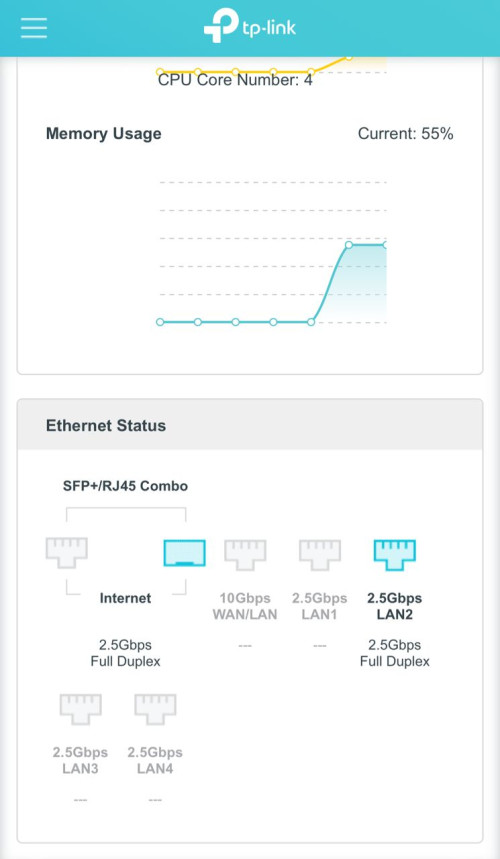
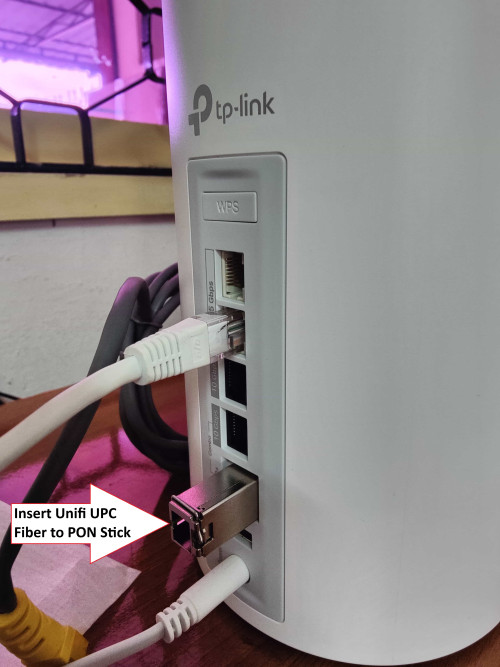
if you wan to achieve ONR style, get an TP-LINK Archer BE800 and BE900 with beta Firmware and pair with PON Stick that plug into BE800 SFP+ slot

I have few customers have done this setup
ahbenchai
post Mar 7 2024, 04:23 PM

what do you mean you people?
******
Senior Member
1,210 posts

Joined: Jun 2005
From: penang


QUOTE(Anime4000 @ Mar 7 2024, 02:03 PM)
This called Optical Network Router (ONR) can be called as All in One as opposed to two device ONT + Router

if you wan to achieve ONR style, get an TP-LINK Archer BE800 and BE900 with beta Firmware and pair with PON Stick that plug into BE800 SFP+ slot

I have few customers have done this setup
*
can i use the all in one router to act as ONT for my tp-link AX72
PRSXFENG
post Mar 7 2024, 09:21 PM

Look at all my stars!!
*******
Senior Member
2,611 posts

Joined: Nov 2020


QUOTE(ahbenchai @ Mar 7 2024, 04:23 PM)
can i use the all in one router to act as ONT for my tp-link AX72
*
assuming you are using TIME
just contact them and say you want to use your own router
they will configure it and then you can use your own router like with the standalone ont
nles
post Mar 8 2024, 08:56 AM

♥ It's not about the girl ♥ It's the G-Shock
*******
Senior Member
2,125 posts

Joined: Jan 2003


QUOTE(Anime4000 @ Mar 7 2024, 02:03 PM)
This called Optical Network Router (ONR) can be called as All in One as opposed to two device ONT + Router

if you wan to achieve ONR style, get an TP-LINK Archer BE800 and BE900 with beta Firmware and pair with PON Stick that plug into BE800 SFP+ slot

I have few customers have done this setup
*
Interesting, how's the stability?

You mentioned customer, you provide networks or isp services?

This post has been edited by nles: Mar 8 2024, 08:58 AM
Anime4000
post Mar 8 2024, 03:08 PM

Look at all my stars!!
*******
Senior Member
2,400 posts

Joined: Jul 2009
From: /dev/null


QUOTE(nles @ Mar 8 2024, 08:56 AM)
Interesting, how's the stability?

You mentioned customer, you provide networks or isp services?
*
I just seller of PON Stick that works with Unifi, I guide them how to setup

as beta firmware, need put manual command in TP-Link Shell

CODE

BusyBox v1.19.4 (2023-12-05 15:52:32 CST) built-in shell (ash)
Enter 'help' for a list of built-in commands.

    MM           NM                    MMMMMMM          M       M
  $MMMMM        MMMMM                MMMMMMMMMMM      MMM     MMM
 MMMMMMMM     MM MMMMM.              MMMMM:MMMMMM:   MMMM   MMMMM
MMMM= MMMMMM  MMM   MMMM       MMMMM   MMMM  MMMMMM   MMMM  MMMMM'
MMMM=  MMMMM MMMM    MM       MMMMM    MMMM    MMMM   MMMMNMMMMM
MMMM=   MMMM  MMMMM          MMMMM     MMMM    MMMM   MMMMMMMM
MMMM=   MMMM   MMMMMM       MMMMM      MMMM    MMMM   MMMMMMMMM
MMMM=   MMMM     MMMMM,    NMMMMMMMM   MMMM    MMMM   MMMMMMMMMMM
MMMM=   MMMM      MMMMMM   MMMMMMMM    MMMM    MMMM   MMMM  MMMMMM
MMMM=   MMMM   MM    MMMM    MMMM      MMMM    MMMM   MMMM    MMMM
MMMM$ ,MMMMM  MMMMM  MMMM    MMM       MMMM   MMMMM   MMMM    MMMM
 MMMMMMM:      MMMMMMM     M         MMMMMMMMMMMM  MMMMMMM MMMMMMM
   MMMMMM       MMMMN     M           MMMMMMMMM      MMMM    MMMM
    MMMM          M                    MMMMMMM        M       M
      M
---------------------------------------------------------------
  For those about to rock... (Attitude Adjustment, unknown)
---------------------------------------------------------------

admin@BE800:~$ combo_debug stop
admin@BE800:~$ combo_debug set plus
admin@BE800:~$ combo_debug ipg_set combo10g 1_192bit


Archer BE800
user posted image

Example:
user posted image
waihung82
post Mar 8 2024, 07:32 PM

Getting Started
**
Junior Member
65 posts

Joined: Jul 2006
Hi guys, what is the TP link Deco model can support 2gps broadband package?
nles
post Mar 8 2024, 09:01 PM

♥ It's not about the girl ♥ It's the G-Shock
*******
Senior Member
2,125 posts

Joined: Jan 2003


QUOTE(Anime4000 @ Mar 8 2024, 03:08 PM)
I just seller of PON Stick that works with Unifi, I guide them how to setup

as beta firmware, need put manual command in TP-Link Shell

CODE

BusyBox v1.19.4 (2023-12-05 15:52:32 CST) built-in shell (ash)
Enter 'help' for a list of built-in commands.

    MM           NM                    MMMMMMM          M       M
  $MMMMM        MMMMM                MMMMMMMMMMM      MMM     MMM
 MMMMMMMM     MM MMMMM.              MMMMM:MMMMMM:   MMMM   MMMMM
MMMM= MMMMMM  MMM   MMMM       MMMMM   MMMM  MMMMMM   MMMM  MMMMM'
MMMM=  MMMMM MMMM    MM       MMMMM    MMMM    MMMM   MMMMNMMMMM
MMMM=   MMMM  MMMMM          MMMMM     MMMM    MMMM   MMMMMMMM
MMMM=   MMMM   MMMMMM       MMMMM      MMMM    MMMM   MMMMMMMMM
MMMM=   MMMM     MMMMM,    NMMMMMMMM   MMMM    MMMM   MMMMMMMMMMM
MMMM=   MMMM      MMMMMM   MMMMMMMM    MMMM    MMMM   MMMM  MMMMMM
MMMM=   MMMM   MM    MMMM    MMMM      MMMM    MMMM   MMMM    MMMM
MMMM$ ,MMMMM  MMMMM  MMMM    MMM       MMMM   MMMMM   MMMM    MMMM
 MMMMMMM:      MMMMMMM     M         MMMMMMMMMMMM  MMMMMMM MMMMMMM
   MMMMMM       MMMMN     M           MMMMMMMMM      MMMM    MMMM
    MMMM          M                    MMMMMMM        M       M
      M
---------------------------------------------------------------
  For those about to rock... (Attitude Adjustment, unknown)
---------------------------------------------------------------

admin@BE800:~$ combo_debug stop
admin@BE800:~$ combo_debug set plus
admin@BE800:~$ combo_debug ipg_set combo10g 1_192bit


Archer BE800
user posted image

Example:
user posted image
*
Nice, BE85 also supported ya. Any asus router works?
PRSXFENG
post Mar 8 2024, 11:26 PM

Look at all my stars!!
*******
Senior Member
2,611 posts

Joined: Nov 2020


QUOTE(nles @ Mar 8 2024, 09:01 PM)
Nice, BE85 also supported ya. Any asus router works?
*
I don't think any Asus routers have SFP ports
Anime4000
post Mar 9 2024, 01:50 AM

Look at all my stars!!
*******
Senior Member
2,400 posts

Joined: Jul 2009
From: /dev/null


QUOTE(nles @ Mar 8 2024, 09:01 PM)
Nice, BE85 also supported ya. Any asus router works?
*
still in WIP, it appear TP-Link focusing more on Archer BE900 and BE800 instead of Deco
Vediaz
post Mar 10 2024, 12:18 AM

Getting Started
**
Junior Member
57 posts

Joined: Jan 2003


Hi... can tplink ax73 be configured to replace astro fiber skyworth22 router? What other setting, apart from pppoe username and password?

#astro fiber #astrowifi kencang

This post has been edited by Vediaz: Mar 10 2024, 12:19 AM
Omochao
post Mar 10 2024, 07:26 AM

Enthusiast
*****
Junior Member
835 posts

Joined: Nov 2007
From: Land of Forgotten
QUOTE(Vediaz @ Mar 10 2024, 12:18 AM)
Hi... can tplink ax73 be configured to replace astro fiber skyworth22 router? What other setting, apart from pppoe username and password?

#astro fiber #astrowifi kencang
*
Yes, you need to get the correct VLAN ID for astro and PPPOE.
nles
post Mar 10 2024, 10:11 AM

♥ It's not about the girl ♥ It's the G-Shock
*******
Senior Member
2,125 posts

Joined: Jan 2003


QUOTE(Anime4000 @ Mar 9 2024, 01:50 AM)
still in WIP, it appear TP-Link focusing more on Archer BE900 and BE800 instead of Deco
*
BE800 pair which model to form mesh? need two more AP/Nodes. Stability wise BE800 combo or Deco. But deco firmware/software is more simple compare to BE800 right, that's why cannot configure too much things.
Omochao
post Mar 10 2024, 11:42 AM

Enthusiast
*****
Junior Member
835 posts

Joined: Nov 2007
From: Land of Forgotten
QUOTE(nles @ Mar 10 2024, 10:11 AM)
BE800 pair which model to form mesh? need two more AP/Nodes. Stability wise BE800 combo or Deco. But deco firmware/software is more simple compare to BE800 right, that's why cannot configure too much things.
*
It MIGHT or MIGHT NOT come to the Deco series, most of the more advanced and highly configurable options are based off from their Router series.

Hence if you want to get a taste of all the latest techs and options to set around, go for their Router series. Deco series is only meant for extending mesh network in a premise with simplicity over the app setup.
Anime4000
post Mar 10 2024, 12:34 PM

Look at all my stars!!
*******
Senior Member
2,400 posts

Joined: Jul 2009
From: /dev/null


QUOTE(Omochao @ Mar 10 2024, 11:42 AM)
Hence if you want to get a taste of all the latest techs and options to set around, go for their Router series. Deco series is only meant for extending mesh network in a premise with simplicity over the app setup.
*
I agreed, anything latest, device compatibility, TP-Link invest more to Router Archer series
nles
post Mar 10 2024, 12:48 PM

♥ It's not about the girl ♥ It's the G-Shock
*******
Senior Member
2,125 posts

Joined: Jan 2003


My current home also using archer series for a few years already, satisfy with it.

I read BE800 doesn’t support wired backhaul for now, any solution if I want to put my main at home office, then extend to other 2 location, tv console and first floor?
blacktubi
post Mar 10 2024, 06:02 PM

-
Group Icon
Elite
8,420 posts

Joined: Jul 2008

QUOTE(nles @ Mar 10 2024, 12:48 PM)
My current home also using archer series for a few years already, satisfy with it.

I read BE800 doesn’t support wired backhaul for now, any solution if I want to put my main at home office, then extend to other 2 location, tv console and first floor?
*
IMHO the Deco series is better as almost all the features for Archer series are available on Deco.

The roaming of Deco mesh is just so much better than EasyMesh. It has better roaming algorithm, TP-Link says it's AI powered but IMO it's just some really well tuned algorithm.

802.11r fast roaming is available exclusively on Deco series as well.
Omochao
post Mar 11 2024, 08:31 AM

Enthusiast
*****
Junior Member
835 posts

Joined: Nov 2007
From: Land of Forgotten
QUOTE(nles @ Mar 10 2024, 12:48 PM)
My current home also using archer series for a few years already, satisfy with it.

I read BE800 doesn’t support wired backhaul for now, any solution if I want to put my main at home office, then extend to other 2 location, tv console and first floor?
*
The only way I can think off, just set the router to AP mode under the operation mode, then hardwire it with ethernet, set the SSID and security protocol to the same as the main, should be working but don't expect full roaming capabilities.

QUOTE(blacktubi @ Mar 10 2024, 06:02 PM)
IMHO the Deco series is better as almost all the features for Archer series are available on Deco.

The roaming of Deco mesh is just so much better than EasyMesh. It has better roaming algorithm, TP-Link says it's AI powered but IMO it's just some really well tuned algorithm.

802.11r fast roaming is available exclusively on Deco series as well.
*
DNS over HTTP has been requested for the Deco series.
Many have been requesting Tp-Link to allow web management control, but up to date still no news on this feature.

Fyi, I am currently running 2 X50's and 1 X20. Whenever I turn on the fast roaming feature, one of my phone cannot register to X20 node whenever I'm near it. Other devices such as iPhone or Samsung no issues.

And surprisingly, once turned off roaming, all phones and my phone is able to roam seamlessly and register to any of the nodes in my house.

Despite updating the firmware and rolling back to previous, and even hard reset. Still same issue when roaming is turned on.

But yes, the roaming of Deco Mesh is great when it works. just lacking true updates as compared to Asus, and Asus product cost a bomb.

nles
post Mar 11 2024, 06:33 PM

♥ It's not about the girl ♥ It's the G-Shock
*******
Senior Member
2,125 posts

Joined: Jan 2003


QUOTE(Omochao @ Mar 11 2024, 08:31 AM)
The only way I can think off, just set the router to AP mode under the operation mode, then hardwire it with ethernet, set the SSID and security protocol to the same as the main, should be working but don't expect full roaming capabilities.
DNS over HTTP has been requested for the Deco series.
Many have been requesting Tp-Link to allow web management control, but up to date still no news on this feature.

Fyi, I am currently running 2 X50's and 1 X20. Whenever I turn on the fast roaming feature, one of my phone cannot register to X20 node whenever I'm near it. Other devices such as iPhone or Samsung no issues.

And surprisingly, once turned off roaming, all phones and my phone is able to roam seamlessly and register to any of the nodes in my house.

Despite updating the firmware and rolling back to previous, and even hard reset. Still same issue when roaming is turned on.

But yes, the roaming of Deco Mesh is great when it works. just lacking true updates as compared to Asus, and Asus product cost a bomb.
*
Is Asus still more user friendly?

I'm at the age where I don't mind spending a bit extra for lesser hassle. If 20 years back maybe I still have the energy and time to tamper. Look at my profile not senior member, soon senior citizen hahhahahahhaaa.
TongCN
post Mar 12 2024, 08:54 AM

Look ma, I have lots stars :D
*******
Senior Member
6,709 posts

Joined: Aug 2008
From: Malaysia


QUOTE(nles @ Mar 11 2024, 06:33 PM)
Is Asus still more user friendly?

I'm at the age where I don't mind spending a bit extra for lesser hassle. If 20 years back maybe I still have the energy and time to tamper. Look at my profile not senior member, soon senior citizen hahhahahahhaaa.
*
Lol .. soon i'm also senior citizen XD

Last time did dig around wanna go Deco or Asus but end up go for Deco cause it just simple to setup.
Asus is toward more advance and gaming which i don't really bother much.

Old dy .. sweat.gif
Omochao
post Mar 13 2024, 07:59 AM

Enthusiast
*****
Junior Member
835 posts

Joined: Nov 2007
From: Land of Forgotten
QUOTE(nles @ Mar 11 2024, 06:33 PM)
Is Asus still more user friendly?

I'm at the age where I don't mind spending a bit extra for lesser hassle. If 20 years back maybe I still have the energy and time to tamper. Look at my profile not senior member, soon senior citizen hahhahahahhaaa.
*
Not quite in my opinion, but that's where the fun part is, more customization but once you get use to it, should be fine.

and their devices longer firmware support, so you don't have to worry after 1 or 2 years your device will be shelved.

249 Pages « < 228 229 230 231 232 > » Top
 

Change to:
| Lo-Fi Version
0.0250sec    0.70    6 queries    GZIP Disabled
Time is now: 17th December 2025 - 02:20 PM