Welcome Guest ( Log In | Register )

249 Pages « < 227 228 229 230 231 > » Bottom

Outline · [ Standard ] · Linear+

 TP-LINK Malaysia Official Thread, Technical Enquiries and Support

views
     
PRSXFENG
post Feb 12 2024, 06:02 PM

Look at all my stars!!
*******
Senior Member
2,613 posts

Joined: Nov 2020


QUOTE(Alert_RaZO @ Feb 12 2024, 01:28 PM)
I just bought Deco x50
Upon setting up, after putting the wifi name, it turns red. Tested no internet.

What went wrong?
*
What did you select for mode
Please use PPPoE mode and remove old router and connect deco directly to modem

See this video
https://youtu.be/TOFEVnjbBDc
Alert_RaZO
post Feb 12 2024, 07:52 PM

On my way
****
Junior Member
601 posts

Joined: May 2013


QUOTE(Omochao @ Feb 12 2024, 02:53 PM)
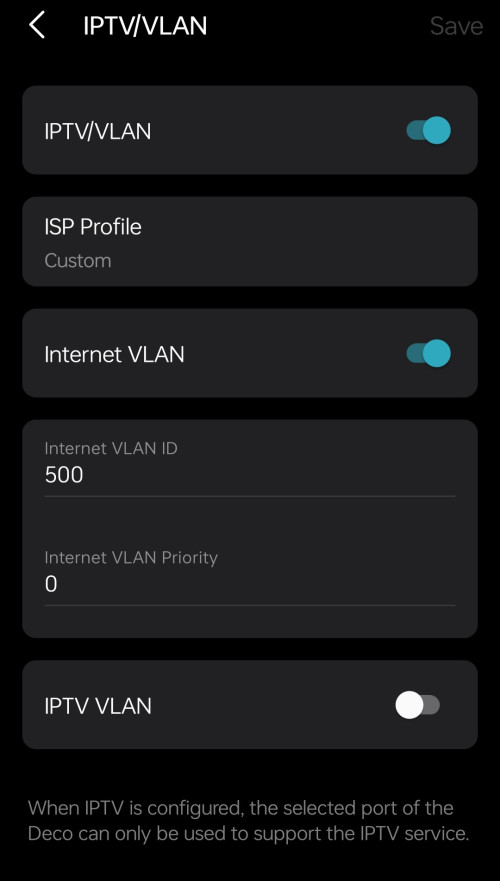
What isp are you using? need to set vlan tagging
*
Unifi, I just follow the YouTube
How to set vlan tagging?
Now I put back my router, no internet
Omochao
post Feb 13 2024, 10:42 AM

Enthusiast
*****
Junior Member
835 posts

Joined: Nov 2007
From: Land of Forgotten
QUOTE(Alert_RaZO @ Feb 12 2024, 07:52 PM)
Unifi, I just follow the YouTube
How to set vlan tagging?
Now I put back my router, no internet
*
Update your DECO app and firmware to latest if possible.

Make sure you are using PPPOE connection in IPv4 settings
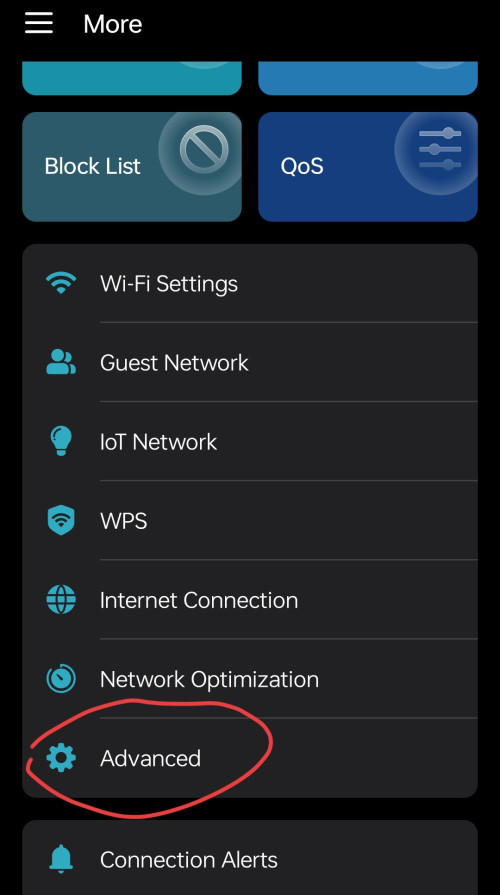
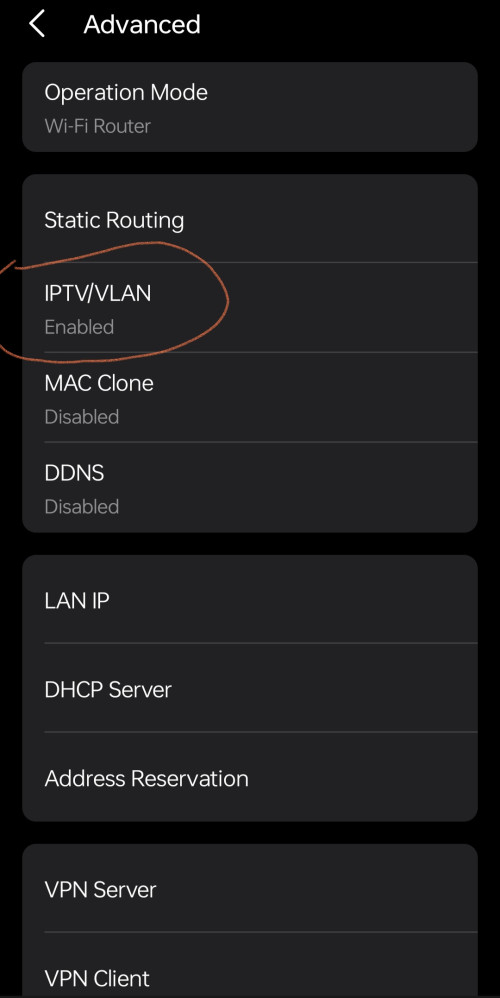
Go to Advance and find under IPTV/VLAN

Depending on which you prefer you can select Malaysia-Unifi or Custom (if you want to switch off any of the ports at any time to use either for IPTV (tvbox) or just for internet LAN connection.
» Click to show Spoiler - click again to hide... «


This post has been edited by Omochao: Feb 13 2024, 10:51 AM
CommodoreAmiga
post Feb 25 2024, 02:52 PM

Look at all my stars!!
*******
Senior Member
3,864 posts

Joined: Jun 2022


Hi, i have just upgraded my internet to TIME 500Mbps, currently using their Huawei router, which many says is no good.

Previously i was using an old Tplink AC1200. I managed to do some test before they change to the new Huawei router. Old router actually managed to get around 250Mbps/250Mbps for D/U. After switched to the Huawei, the download drops by about 10Mbps (still acceptable) but the upload really bad down to 170Mbps tops. And the old router was only AC1200! I am thinking of getting a new TPLINK router as there are discounts online these few days. Between AX52 and AX72, which is good enough to get close to 500Mbps? Is the AX52 any better than my current Huawei router? FYI, my PC using a USB TPLINK AC1900 T9UH which i think is considered a high end USB Wifi adapter back then.
Omochao
post Feb 29 2024, 07:36 AM

Enthusiast
*****
Junior Member
835 posts

Joined: Nov 2007
From: Land of Forgotten
Deco X50/X55 beta firmware released, V 1.5.0

» Click to show Spoiler - click again to hide... «


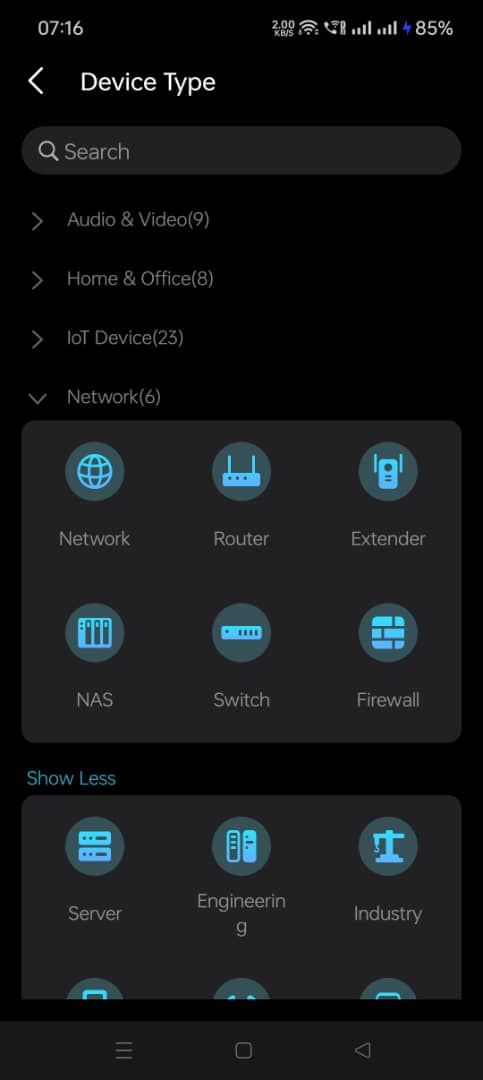
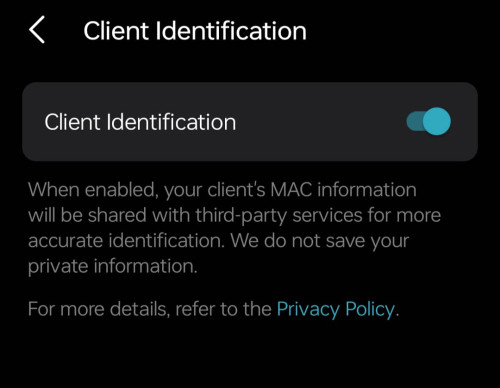
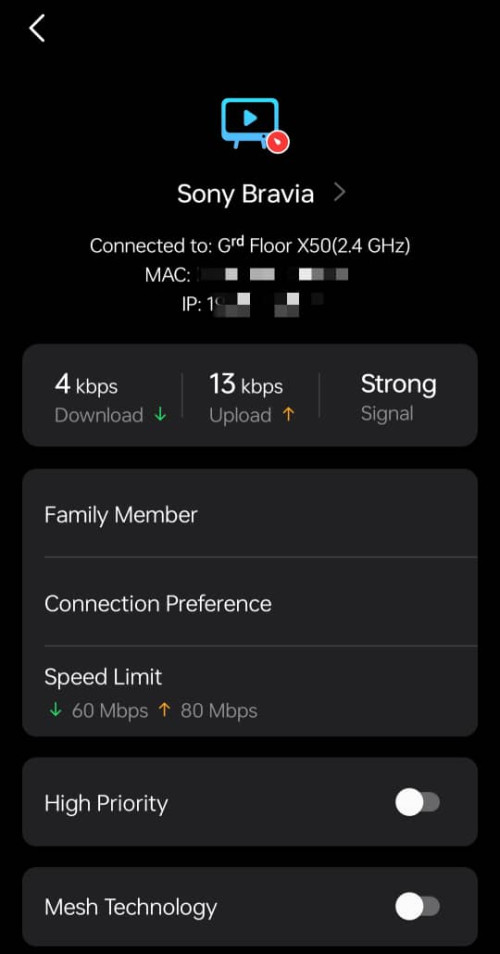
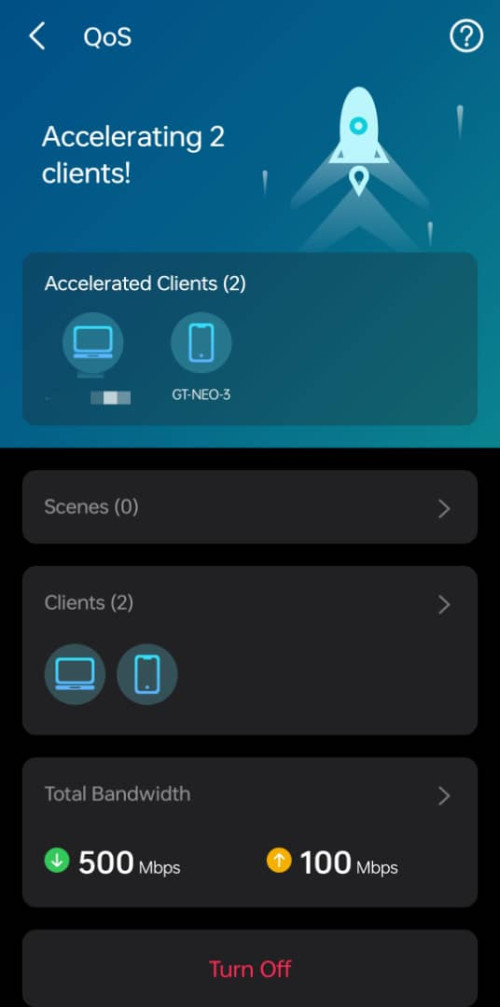
Just updated, QOS and Client Identification got better with more icons to represent each individual IP devices.

» Click to show Spoiler - click again to hide... «


QUOTE
Firmware Modifications
1. Support WireGuard VPN Server/Client.
2. Support built-in easy configuration of NordVPN/Surfshark VPN.
Note: In compliance with local regulations, the Third-party VPN feature may be restricted in specific regions.
3. Add client speed limit under clients' detailed setting page.
4. Support Fixing the WAN port under Deco APP>More>Advanced>WAN Port.
5. Add Scene Priority under QOS.


Update through web browser by downloading the zip file. Everything went smoothly.

This post has been edited by Omochao: Feb 29 2024, 07:36 AM
Omochao
post Feb 29 2024, 07:39 AM

Enthusiast
*****
Junior Member
835 posts

Joined: Nov 2007
From: Land of Forgotten
QUOTE(CommodoreAmiga @ Feb 25 2024, 02:52 PM)
Hi, i have just upgraded my internet to TIME 500Mbps, currently using their Huawei router, which many says is no good.

Previously i was using an old Tplink AC1200. I managed to do some test before they change to the new Huawei router. Old router actually managed to get around 250Mbps/250Mbps for D/U. After switched to the Huawei, the download drops by about 10Mbps (still acceptable) but the upload really bad down to 170Mbps tops. And the old router was only AC1200!  I am thinking of getting a new TPLINK router as there are discounts online these few days. Between AX52 and AX72, which is good enough to get close to 500Mbps? Is the AX52 any better than my current Huawei router? FYI, my PC using a USB TPLINK AC1900 T9UH which i think is considered a high end USB Wifi adapter back then.
*
Both AX52 AX72 can support up to 500Mbps, no problem.

Also before making a purchase, do compare out the hardware versions firmware first before buying, else you might be confused why that certain device does not have the features that you see and read online.
TongCN
post Feb 29 2024, 08:47 AM

Look ma, I have lots stars :D
*******
Senior Member
6,716 posts

Joined: Aug 2008
From: Malaysia


QUOTE(Omochao @ Feb 29 2024, 07:36 AM)
Deco X50/X55 beta firmware released, V 1.5.0

» Click to show Spoiler - click again to hide... «


Just updated, QOS and Client Identification got better with more icons to represent each individual IP devices.

» Click to show Spoiler - click again to hide... «

Update through web browser by downloading the zip file. Everything went smoothly.
*
Waiting for Malaysia XE75v1 1.3.2

Saw US XE75v1 has the update already
But the update log seems not much sweat.gif
Omochao
post Feb 29 2024, 09:10 AM

Enthusiast
*****
Junior Member
835 posts

Joined: Nov 2007
From: Land of Forgotten
QUOTE(TongCN @ Feb 29 2024, 08:47 AM)
Waiting for Malaysia XE75v1 1.3.2

Saw US XE75v1 has the update already
But the update log seems not much  sweat.gif
*
yes kind of disappointing at them for not being able to release for more devices simultaneously
bahjan_2000
post Mar 2 2024, 11:40 AM

Casual
***
Junior Member
454 posts

Joined: Oct 2017


QUOTE(Omochao @ Feb 10 2024, 01:23 PM)
Re-simulate the scenario ,then login to router page to check on

Ram usage%
Cpu usage%

if both parameters is near to maximum limit, you need to consider upgrading it.

or just set QOS or bandwidth limit onto his device .

Is the router firmware up to date ?
*
I just replaced it with an AX72, no more issues after that(other than problems connecting to a TC60 camera). Than you for your reply!
Omochao
post Mar 2 2024, 04:50 PM

Enthusiast
*****
Junior Member
835 posts

Joined: Nov 2007
From: Land of Forgotten
QUOTE(bahjan_2000 @ Mar 2 2024, 11:40 AM)
I just replaced it with an AX72, no more issues after that(other than problems connecting to a TC60 camera). Than you for your reply!
*
As i notice on tplink website ,the newest firmware has IoT network function , you can try using that new network for your media devices that only supports 2.4Ghz.

but that would mean you need to reset the entire network IP devices.
bahjan_2000
post Mar 2 2024, 05:02 PM

Casual
***
Junior Member
454 posts

Joined: Oct 2017


QUOTE(Omochao @ Mar 2 2024, 04:50 PM)
As i notice on tplink website ,the newest firmware has IoT network function , you can try using that new network for your media devices that only supports 2.4Ghz.

but that would mean you need to reset the entire network IP devices.
*
Yes, just noticed it, thanks to you! Will see and experiment
james2306
post Mar 4 2024, 02:58 PM

A not so Senior, Señor
******
Senior Member
1,119 posts

Joined: Jan 2007
From: USJ


Hello i have an AX73 v1.0

I wanna swap this with the default router i got from celcom home fibre.

But im having trouble setting it up. Keeps saying no connection. I already picked the Celcom profile, but the VLAN values are locked in/greyed out?

Any guide/help?
ahbenchai
post Mar 4 2024, 10:42 PM

what do you mean you people?
******
Senior Member
1,210 posts

Joined: Jun 2005
From: penang


how easy is it to setup times with my AX72 to replace my existing huawei router?
blacktubi
post Mar 4 2024, 10:50 PM

-
Group Icon
Elite
8,421 posts

Joined: Jul 2008

QUOTE(ahbenchai @ Mar 4 2024, 10:42 PM)
how easy is it to setup times with my AX72 to replace my existing huawei router?
*
https://www.youtube.com/watch?v=0e3D1aWmtZI

Check TP-Link's own video. Quite straight forward.
ahbenchai
post Mar 4 2024, 10:57 PM

what do you mean you people?
******
Senior Member
1,210 posts

Joined: Jun 2005
From: penang


QUOTE(blacktubi @ Mar 4 2024, 10:50 PM)
https://www.youtube.com/watch?v=0e3D1aWmtZI

Check TP-Link's own video. Quite straight forward.
*
thanks, it looks very easy !
blacktubi
post Mar 4 2024, 11:01 PM

-
Group Icon
Elite
8,421 posts

Joined: Jul 2008

QUOTE(ahbenchai @ Mar 4 2024, 10:57 PM)
thanks, it looks very easy !
*
The hardest part is probably calling TM and waiting them to send you the PPPoE ID and password


TongCN
post Mar 5 2024, 09:08 AM

Look ma, I have lots stars :D
*******
Senior Member
6,716 posts

Joined: Aug 2008
From: Malaysia


QUOTE(james2306 @ Mar 4 2024, 02:58 PM)
Hello i have an AX73 v1.0

I wanna swap this with the default router i got from celcom home fibre.

But im having trouble setting it up. Keeps saying no connection. I already picked the Celcom profile, but the VLAN values are locked in/greyed out?

Any guide/help?
*
Celcom Profile like hit and miss ..

Last time after the service man done setting using celcom router (i think is FibreHome)
After they left, I change to Deco M4 and find that setting up from scratch doesn't have connection at all
Then i tried to mimic everything in their router and finally works which i remove the FibreHome and keeps in drawer.
Half year later back to last month, i wanna replaced to Deco X20 which i used the method of Add Deco and Replace main Deco.

The Add Deco works with M4 as main and X20 as node
So i later change the main to X20 which the problem comes - no connection on all deco

I later try to mimic again like last time and still cannot connect this time.
* i'm using PPPoe method by the way

End up try google and saw this documents using Dynamic IP method : https://www.celcom.com.my/sites/default/fil..._Setup_0326.pdf

So now my parent home setup is Modem > FibreHome (disable Wi-Fi) > X20 (Wi-Fi access point) sweat.gif
blacktubi
post Mar 5 2024, 09:46 AM

-
Group Icon
Elite
8,421 posts

Joined: Jul 2008

QUOTE(TongCN @ Mar 5 2024, 09:08 AM)
Celcom Profile like hit and miss ..

Last time after the service man done setting using celcom router (i think is FibreHome)
After they left, I change to Deco M4 and find that setting up from scratch doesn't have connection at all
Then i tried to mimic everything in their router and finally works which i remove the FibreHome and keeps in drawer.
Half year later back to last month, i wanna replaced to Deco X20 which i used the method of Add Deco and Replace main Deco.

The Add Deco works with M4 as main and X20 as node
So i later change the main to X20 which the problem comes - no connection on all deco

I later try to mimic again like last time and still cannot connect this time.
* i'm using PPPoe method by the way

End up try google and saw this documents using Dynamic IP method : https://www.celcom.com.my/sites/default/fil..._Setup_0326.pdf

So now my parent home setup is Modem > FibreHome (disable Wi-Fi) >  X20 (Wi-Fi access point)  sweat.gif

*
Celcom changed some of their config after the Celcom DiGi merger. They can remote and reconfigure their router but not on your own router.


TongCN
post Mar 5 2024, 11:48 AM

Look ma, I have lots stars :D
*******
Senior Member
6,716 posts

Joined: Aug 2008
From: Malaysia


QUOTE(blacktubi @ Mar 5 2024, 09:46 AM)
Celcom changed some of their config after the Celcom DiGi merger. They can remote and reconfigure their router but not on your own router.
*
Hmm that time (August or September 2023) when i change to M4, it is CelcomDigi broadband already.
If they changed the config between the period till now, how come my M4 won't affect?

Another thing is when i add deco X20, it also doesnt have issue.

Until i change main deco from M4 to X20 then only i cannot connect <-- so the point here is the config cannot detect or incorrect?

Lucky i still keep the Celcom router sweat.gif
ahbenchai
post Mar 7 2024, 01:24 PM

what do you mean you people?
******
Senior Member
1,210 posts

Joined: Jun 2005
From: penang


Want to ask

How come there is no fiber optic port for TP-Link router ax72, and need an additional optical network terminal (fiber -> wan)

But the default Huawei router from Times have input for fiber optic?

Are these 2 router different thing?

249 Pages « < 227 228 229 230 231 > » Top
 

Change to:
| Lo-Fi Version
0.0389sec    0.71    6 queries    GZIP Disabled
Time is now: 19th December 2025 - 02:10 AM