Welcome Guest ( Log In | Register )

249 Pages « < 230 231 232 233 234 > » Bottom

Outline · [ Standard ] · Linear+

 TP-LINK Malaysia Official Thread, Technical Enquiries and Support

views
     
TongCN
post Apr 9 2024, 01:49 PM

Look ma, I have lots stars :D
*******
Senior Member
6,712 posts

Joined: Aug 2008
From: Malaysia


QUOTE(handyboy @ Apr 9 2024, 11:06 AM)
hi sifu...
i have a question...
my unifi and modem are in a bedroom upstairs...recently internet speed very slow and unifi technician went to check saying that my taman is getting more users thats why internet speed affected compare with last time...
the technician suggested to use deco mesh system, is it help?since my problem is the slow internet speed... 
and what are the differences between single pack, 2-pack and 3-pack model? for deco mesh type

thank you...
*
Technician says more users meaning ? Many ppl using Wi-Fi (2.4/5Ghz) hence more congestion affect speed?

Or is it more users sharing the ports ? sweat.gif

Do share your current router /modem model and speed package
handyboy
post Apr 9 2024, 02:27 PM

Getting Started
**
Junior Member
119 posts

Joined: Feb 2021

QUOTE(TongCN @ Apr 9 2024, 01:49 PM)
Technician says more users meaning ? Many ppl using Wi-Fi (2.4/5Ghz) hence more congestion affect speed?

Or is it more users sharing the ports ?  sweat.gif

Do share your current router /modem model and speed package
*
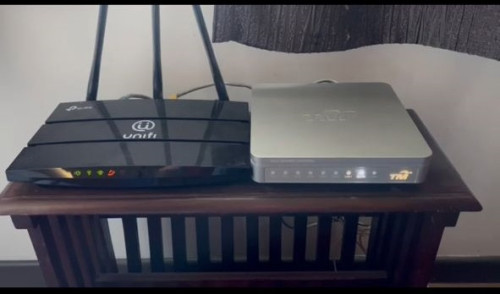
user posted image

my current router and modem as above photo...and using their 300mbps package..

yes the technician said my taman more residents compare few years back so the more congested and affect the speed mad.gif because i told them previously was ok but why recently only has this issue

TongCN
post Apr 9 2024, 02:34 PM

Look ma, I have lots stars :D
*******
Senior Member
6,712 posts

Joined: Aug 2008
From: Malaysia


QUOTE(handyboy @ Apr 9 2024, 02:27 PM)
user posted image

my current router and modem as above photo...and using their 300mbps package..

yes the technician said my taman more residents compare few years back so the more congested and affect the speed  mad.gif because i told them previously was ok but why recently only has this issue
*
Ouch, looking at that router, it's time to change the router biggrin.gif

Try pull out your phone and see how many Wi-Fi SSID around your home sweat.gif
handyboy
post Apr 9 2024, 02:50 PM

Getting Started
**
Junior Member
119 posts

Joined: Feb 2021

QUOTE(TongCN @ Apr 9 2024, 02:34 PM)
Ouch, looking at that router, it's time to change the router biggrin.gif

Try pull out your phone and see how many Wi-Fi SSID around your home sweat.gif
*
sweat.gif
which model of router you think that can resolve my issue? biggrin.gif
TongCN
post Apr 9 2024, 03:09 PM

Look ma, I have lots stars :D
*******
Senior Member
6,712 posts

Joined: Aug 2008
From: Malaysia


QUOTE(handyboy @ Apr 9 2024, 02:50 PM)
sweat.gif
which model of router you think that can resolve my issue?  biggrin.gif
*
1) Budget
2) House type - 2-storey or more ?
3) Does your house have those ethernet connecting point on each room?
4) What's your current speed test after reboot your modem and router :
i) test beside your router
ii) test on another room let say the room just below your router placement
archangel1989
post Apr 10 2024, 06:48 AM

Getting Started
**
Junior Member
163 posts

Joined: Mar 2010
From: Lembah Keramat,Wangsa Maju


QUOTE(PRSXFENG @ Apr 8 2024, 05:21 PM)
they do have some that supports those bands
https://www.tp-link.com/my/home-networking/...mr500/#overview

but some of the cheaper models dont
*
thank you boss for suggestion...already bought yesterday that model
cloudclone
post Apr 10 2024, 03:03 PM

Casual
***
Junior Member
431 posts

Joined: Jan 2005
From: Sibu, Sarawak


Hi.
wanna ask, M7300 4g Portable wifi got bricked after upgraded to latest version, what can i do?
battery light blinking even with battery on.

Omochao
post Apr 11 2024, 09:16 AM

Enthusiast
*****
Junior Member
835 posts

Joined: Nov 2007
From: Land of Forgotten
QUOTE(cloudclone @ Apr 10 2024, 03:03 PM)
Hi.
wanna ask, M7300 4g Portable wifi got bricked after upgraded to latest version, what can i do?
battery light blinking even with battery on.
*
https://www.tp-link.com/no/support/faq/3730/
KronenZerg
post Apr 11 2024, 10:19 AM

Casual
***
Junior Member
393 posts

Joined: Nov 2006
Hello,
I am using Unifi 300MB and original router: Fibrehome.

My 2nd floor room has poor or zero coveage so i want to solve this issue.
One shope suggest MESH Deco while other suggest Archer model. So i am a bit confused
if Archer model, which is better .. AX72, AX73 or AXE75 thgh last one is most expensive all 3 models.

If i buy online, can i set up myself if i have the Unifi details?

Thanks.

PRSXFENG
post Apr 11 2024, 02:01 PM

Look at all my stars!!
*******
Senior Member
2,613 posts

Joined: Nov 2020


QUOTE(KronenZerg @ Apr 11 2024, 10:19 AM)
Hello,
I am using Unifi 300MB and original router: Fibrehome.

My 2nd floor room has poor or zero coveage so i want to solve this issue.
One shope suggest MESH Deco while other suggest Archer model. So i am a bit confused
if Archer model, which is better .. AX72, AX73 or AXE75 thgh last one is most expensive all 3 models.

If i buy online, can i set up myself if i have the Unifi details?

Thanks.
*
For Archer, it is a replacement router that will hopefully have better range/strength

AX73 is a good choice

Deco mesh is for larger homes, if your home is large then you place a unit on each floor
Ideally, the 2nd unit should be connected back to main unit via cable or on the more expensive models they have a dedicated wireless radio
Otherwise connecting wirelessly works but speeds get reduced a lot

For the setup, simply ask TM for the PPPoE Username and Password and input them into the router while selecting the Malaysia TM Unifi profile
Omochao
post Apr 11 2024, 02:05 PM

Enthusiast
*****
Junior Member
835 posts

Joined: Nov 2007
From: Land of Forgotten
QUOTE(handyboy @ Apr 9 2024, 02:50 PM)
sweat.gif
which model of router you think that can resolve my issue?  biggrin.gif
*
AX1800 and above rated can solve your problem.

Budget must ready 300-400.

If you are fine with just mesh and roaming alone, and good coverage, I have a spare unused mesh. Can PM me if you are keen or interested.
Omochao
post Apr 11 2024, 02:10 PM

Enthusiast
*****
Junior Member
835 posts

Joined: Nov 2007
From: Land of Forgotten
QUOTE(KronenZerg @ Apr 11 2024, 10:19 AM)
Hello,
I am using Unifi 300MB and original router: Fibrehome.

My 2nd floor room has poor or zero coveage so i want to solve this issue.
One shope suggest MESH Deco while other suggest Archer model. So i am a bit confused
if Archer model, which is better .. AX72, AX73 or AXE75 thgh last one is most expensive all 3 models.

If i buy online, can i set up myself if i have the Unifi details?

Thanks.
*
Ask yourself this few points before moving over to mesh

1) are you interested in just getting stronger signal coverage only or you want full maximum speed + wifi signal in your house?

2) you want a basic setup or slightly advance configurations that may be required along the way?

3) are you willing to spent time tinkering around the settings or just want easy setup and get go on the run type?

If your answer is YES/NO

1) if you just want stronger signal coverage, just a get a used 2nd hand fiberhome from online market, you can pair it with existing FB AX1800/3000 easily with WPS (easy mesh method)
If you want speed+ signal coverage, DIY ethernet cat5e around your home.

2) Tp-Link or Asus offer more settings to play around with and features, unifi provided don't expect much and just basic router for you to get Wifi, that's all. Avoid D'Link if possible.

3) If easy setup through app control anywhere anytime, suggest you Deco mesh, if you got time on hands to play around or curious to tinker around, go for ASUS.

Both brands, price differently.
cloudclone
post Apr 11 2024, 03:31 PM

Casual
***
Junior Member
431 posts

Joined: Jan 2005
From: Sibu, Sarawak


QUOTE(Omochao @ Apr 11 2024, 09:16 AM)
Hi. I tried to press reset button, no response, the red battery light keep blinking. Plug in pc, shows android device with no driver install
Omochao
post Apr 11 2024, 03:53 PM

Enthusiast
*****
Junior Member
835 posts

Joined: Nov 2007
From: Land of Forgotten
QUOTE(cloudclone @ Apr 11 2024, 03:31 PM)
Hi. I tried to press reset button, no response, the red battery light keep blinking. Plug in pc, shows android device with no driver install
*
go to TP link malaysia website and contact their support to see what other methods to flash it back to previous firmwares
KronenZerg
post Apr 11 2024, 08:02 PM

Casual
***
Junior Member
393 posts

Joined: Nov 2006
Hello .. thanks for reply see my response below

QUOTE(Omochao @ Apr 11 2024, 02:10 PM)
Ask yourself this few points before moving over to mesh

1) are you interested in just getting stronger signal coverage only or you want full maximum speed + wifi signal in your house?
- Better wifi signal and full max speed. This would support 2 cctvs and computer usage, not gaming purpose.

2) you want a basic setup or slightly advance configurations that may be required along the way?
- As long i know how to setup and get it running .. that would be fine.

3) are you willing to spent time tinkering around the settings or just want easy setup and get go on the run type?
- Single setup is fine but not tinkering ard the settings.

If your answer is YES/NO

1) if you just want stronger signal coverage, just a get a used 2nd hand fiberhome from online market, you can pair it with existing FB AX1800/3000 easily with WPS (easy mesh method)
If you want speed+ signal coverage, DIY ethernet cat5e around your home.
- Guess older Unifi dlink cant be setup as mesh. What abt older tplink wifi router that uses sim-card?

2) Tp-Link or Asus offer more settings to play around with and features, unifi provided don't expect much and just basic router for you to get Wifi, that's all. Avoid D'Link if possible.
- Thanks !

3) If easy setup through app control anywhere anytime, suggest you Deco mesh, if you got time on hands to play around or curious to tinker around, go for ASUS.
- Prefer tplink .. seems easier to handle and have 3yrs warranty.

Both brands, price differently.
That is why i am thinking A73 or AXE75..

*
iotbot000
post Apr 11 2024, 08:29 PM

New Member
*
Junior Member
36 posts

Joined: Apr 2019
Anyone here using the TP-Link TL-SX1008 switch ?

TL-SX1008 New 8-Port 10G Desktop/Rackmount Switch

Most online reviews noted that the fan is very noisy.

Can share your experience with the switch ?

Thanks.
handyboy
post Apr 12 2024, 08:58 AM

Getting Started
**
Junior Member
119 posts

Joined: Feb 2021

QUOTE(Omochao @ Apr 11 2024, 02:05 PM)
AX1800 and above rated can solve your problem.

Budget must ready 300-400.

If you are fine with just mesh and roaming alone, and good coverage, I have a spare unused mesh. Can PM me if you are keen or interested.
*
thanks dude thumbup.gif
KronenZerg
post Apr 16 2024, 10:45 PM

Casual
***
Junior Member
393 posts

Joined: Nov 2006
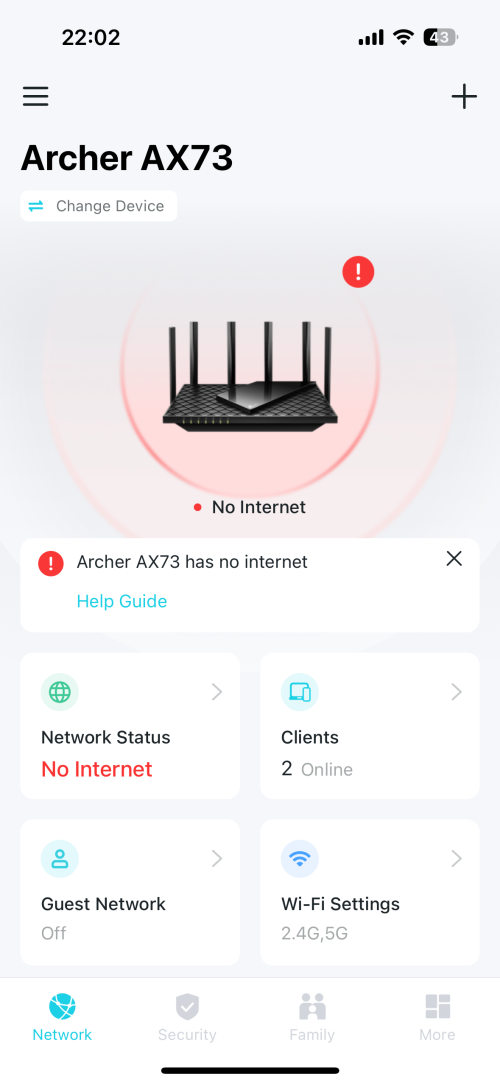
Hello .. i bought tplink archer Ax73 online. I tried setting up tether and laptop via cable. Both is showing no internet but when i plugged back the unifi one, it is working fine.
I set up using auto-detect as what the instructions showed.

Which steps am i missing? Appreciate everyone feedback ..
Thanks.

user posted image
gtiwtks
post Apr 17 2024, 03:13 PM

Getting Started
**
Junior Member
77 posts

Joined: Jun 2006
Guys, need so advise....

I am currently using TPLINK AX55... Prior to the Time Fibre Free Upgrade from 500mbps to 600mbps.... I can constantly get 500++ when doing speed test on lan connection

However after the so call upgrade... When i do speed test can only get 400++...

Reported to Time... Technician come over and do some test.... On modem can get 600... but on the tplink ax55 just getting 400... Use back the time provided old huawei wa8021 also get 600 too... Technician said problem with my own supplied router and ask me to resolve myself....

Any idea how to resolve speed issue?

This post has been edited by gtiwtks: Apr 17 2024, 03:14 PM
TongCN
post Apr 17 2024, 03:35 PM

Look ma, I have lots stars :D
*******
Senior Member
6,712 posts

Joined: Aug 2008
From: Malaysia


QUOTE(gtiwtks @ Apr 17 2024, 03:13 PM)
Guys, need so advise....

I am currently using TPLINK AX55... Prior to the Time Fibre Free Upgrade from 500mbps to 600mbps.... I can constantly get 500++ when doing speed test on lan connection

However after the so call upgrade... When i do speed test can only get 400++...

Reported to Time... Technician come over and do some test.... On modem can get 600... but on the tplink ax55 just getting 400... Use back the time provided old huawei wa8021 also get 600 too... Technician said problem with my own supplied router and ask me to resolve myself....

Any idea how to resolve speed issue?
*
Try check your TPLink App - Tether to see any limitation set under QoS ?

Maybe accidentally limit max 400 download bandwidth

249 Pages « < 230 231 232 233 234 > » Top
 

Change to:
| Lo-Fi Version
0.0240sec    0.90    6 queries    GZIP Disabled
Time is now: 17th December 2025 - 09:35 PM