

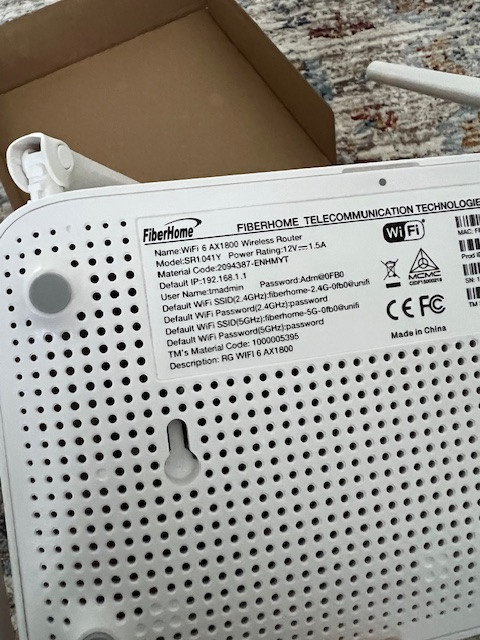
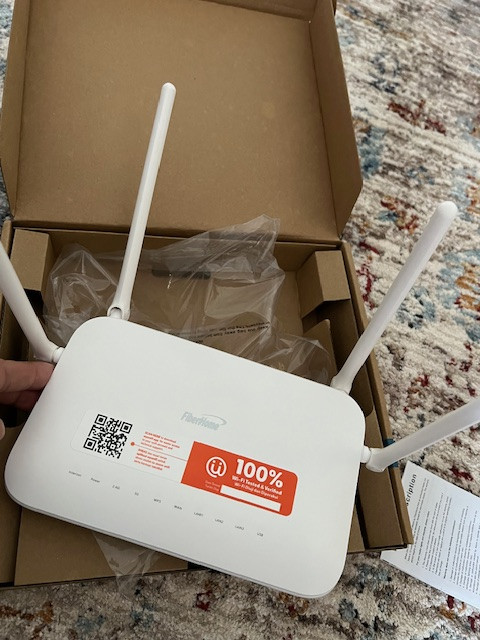
upgrading unifi package and come with this Fiberhome SR1041Y
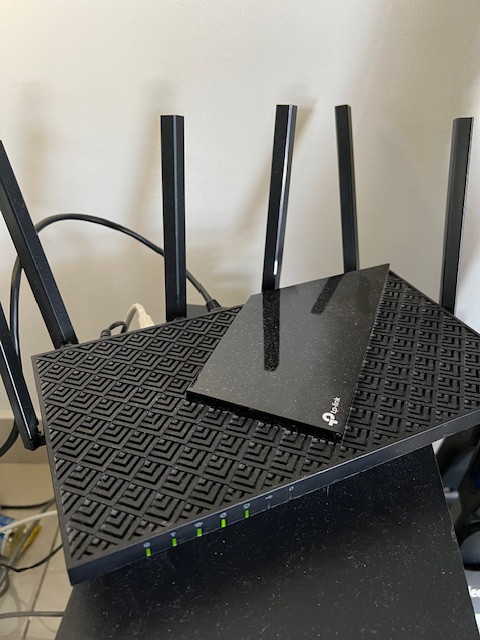
primary still using this AX73.
how could i add this Fiberhome act as wifi extender? this possible?
it is true mesh/extender only work with same brand?
TP-LINK Malaysia Official Thread, Technical Enquiries and Support
|
|
 Mar 13 2024, 04:35 PM Mar 13 2024, 04:35 PM
|
 
Junior Member
404 posts Joined: Jul 2006  
|
hi everyone, need help here on wifi - extender. current using tplink AX73 .
upgrading unifi package and come with this Fiberhome SR1041Y primary still using this AX73. how could i add this Fiberhome act as wifi extender? this possible? it is true mesh/extender only work with same brand? |
|
|
|
|
|
Mar 14 2024, 11:32 AM
|

Junior Member
42 posts Joined: Jul 2010
|
Hi,
I bought a set of 3x M5 Deco in Dec 2021, now 1 of the unit can't seem to power on. I tried with different power adapter and wall socket, and confirmed it is the unit itself that has issue. I emailed TP-LINK support to ask if there is any way to repair it but they said they do not provide repair service. So just wana know if anyone here had similar issue like this and what can be done. Thanks. |
|
|
Mar 15 2024, 08:04 AM
Show posts by this member only | IPv6 | Post
#4603
|

Senior Member
2,611 posts Joined: Nov 2020
|
QUOTE(cawan @ Mar 13 2024, 04:35 PM) hi everyone, need help here on wifi - extender. current using tplink AX73 . Yes, usually mesh systems are brand specificupgrading unifi package and come with this Fiberhome SR1041Y primary still using this AX73. how could i add this Fiberhome act as wifi extender? this possible? it is true mesh/extender only work with same brand?  There is an open standard, wifi alliance easymesh but no clue if the fiberhome supports it while the tplink absolutely does not support it you could connect a cable and use as Wired Access Point, if there is an option like that on the fiberhome wireless repeater is not recommended as it heavily decreases speeds cawan liked this post
|
|
|
Mar 15 2024, 11:32 AM
Show posts by this member only | IPv6 | Post
#4604
|

Junior Member
835 posts Joined: Nov 2007 From: Land of Forgotten
|
QUOTE(cawan @ Mar 13 2024, 04:35 PM) hi everyone, need help here on wifi - extender. current using tplink AX73 . Yes you can, on that fiberhome, just perform a quick reset with the pinhole or reset button to reset the router to factory mode.upgrading unifi package and come with this Fiberhome SR1041Y primary still using this AX73. how could i add this Fiberhome act as wifi extender? this possible? it is true mesh/extender only work with same brand? Once booted back again, set your AX73 WPS on through tether app or use the button behind to set it broadcast wps signal out, on your fiberhome router, hold down the wps button until LED flashes rapidly, if successfully paired, should turn green. It should turn into bridge mode automatically. By then you can choose to either link it with ethernet or just wireless backhaul. QUOTE(belialjo @ Mar 14 2024, 11:32 AM) Hi, All Tp-Link products come with 3 year manufacturer warranty, you bought in Dec 2021, should be until Dec 2024, can still try to go claim for warranty.I bought a set of 3x M5 Deco in Dec 2021, now 1 of the unit can't seem to power on. I tried with different power adapter and wall socket, and confirmed it is the unit itself that has issue. I emailed TP-LINK support to ask if there is any way to repair it but they said they do not provide repair service. So just wana know if anyone here had similar issue like this and what can be done. Thanks. |
|
|
Mar 18 2024, 11:19 PM
Show posts by this member only | IPv6 | Post
#4605
|
|
Junior Member
5 posts Joined: Jan 2021
|
Hello, I've got a question regarding my home networking.
I stay in a double-storey house and wifi connection in certain areas can be quite bad. Currently I am using 1 router and 1 modem at the same point. However, my electrician has routed cat6 cables within the walls from the modem/router point to other areas of the house so that my TV and PC can have wired connection. Even though my PC has good wired connection, the room in which the PC is in has quite a bad wifi connection. I am wondering if there is a device which I can plug into at the PC point to act as another Wifi point? |
|
|
Mar 19 2024, 08:54 AM
Show posts by this member only | IPv6 | Post
#4606
|
|
Senior Member
2,611 posts Joined: Nov 2020
|
QUOTE(moumoumou @ Mar 18 2024, 11:19 PM) Hello, I've got a question regarding my home networking. Yes, it is called an Access PointI stay in a double-storey house and wifi connection in certain areas can be quite bad. Currently I am using 1 router and 1 modem at the same point. However, my electrician has routed cat6 cables within the walls from the modem/router point to other areas of the house so that my TV and PC can have wired connection. Even though my PC has good wired connection, the room in which the PC is in has quite a bad wifi connection. I am wondering if there is a device which I can plug into at the PC point to act as another Wifi point? but nowdays most people have moved onto mesh systems but if you just need a bit of wifi coverage an AP will do or you could just use any old router you have laying around if they have that option ( do not use in router mode) |
|
|
|
|
|
Mar 19 2024, 11:18 AM
Show posts by this member only | IPv6 | Post
#4607
|
|
Junior Member
5 posts Joined: Jan 2021
|
QUOTE(PRSXFENG @ Mar 19 2024, 08:54 AM) Yes, it is called an Access Point Thanks for the information. How do mesh system compare against using an old router for wifi coverage? And do I need to do some configuration on the old router for the wifi access?but nowdays most people have moved onto mesh systems but if you just need a bit of wifi coverage an AP will do or you could just use any old router you have laying around if they have that option ( do not use in router mode) |
|
|
Mar 20 2024, 04:06 PM
|
|
Senior Member
2,292 posts Joined: Jan 2003
|
Hi, want to ask if Deco X50-5G is VLAN "aware"? There is no option for VLAN settings on this router.
|
|
|
Mar 25 2024, 11:59 PM
Show posts by this member only | IPv6 | Post
#4609
|
|
Junior Member
835 posts Joined: Nov 2007 From: Land of Forgotten
|
QUOTE(Minolta @ Mar 20 2024, 04:06 PM) Hi, want to ask if Deco X50-5G is VLAN "aware"? There is no option for VLAN settings on this router. Deco very limited in VLAN.but X20 has 802.1Q tagging..not sure if that's what you are looking for. |
|
|
Mar 26 2024, 12:02 AM
Show posts by this member only | IPv6 | Post
#4610
|
|
Junior Member
835 posts Joined: Nov 2007 From: Land of Forgotten
|
QUOTE(moumoumou @ Mar 19 2024, 11:18 AM) Thanks for the information. How do mesh system compare against using an old router for wifi coverage? And do I need to do some configuration on the old router for the wifi access? Mesh system works seamlessly for fast roaming transition.You can still however set up old routers for wireless AP but with very limited functions. The purpose of using mesh is to increase coverage. Suggest you to check this long winded explanation so that you won't make the wrong move in getting the right setup . https://www.wiisfi.com/ PRSXFENG liked this post
|
|
|
Mar 29 2024, 09:11 AM
|

Senior Member
1,239 posts Joined: Jan 2003 From: SMK Kepong Baru, KL 
|
Hi everyone. Check with u guys who has TPLink router.
I bought an TPlink AX72 router and connected to Unifi. I've configured using its Wizard setup and also did selected the Malaysia-Unifi VLan option. It was connected and able to surf internet but now the problem is the Router kept disconnecting after some time intermittently. Done factory reset oso still happening. So I bought a cheaper TPLink router AX53 totally new one. Did all the same wizard setup and connected to internet and after awhile same issue happening again! It keeps disconnecting.. Not sure why.. Stress Anyone have this same issue before? Please help.. |
|
|
Mar 29 2024, 10:58 AM
|
|
Senior Member
1,109 posts Joined: Mar 2007
|
Hi all, I am using TP Link AX73 now. was wondering will it be compatible if I hook it up with
- D Link M15 Mesh ? If yes, will it have 1 single SSID or 2 separate SSID? |
|
|
Mar 29 2024, 07:15 PM
Show posts by this member only | IPv6 | Post
#4613
|
|
Junior Member
835 posts Joined: Nov 2007 From: Land of Forgotten
|
QUOTE(takeshi99 @ Mar 29 2024, 09:11 AM) Hi everyone. Check with u guys who has TPLink router. Have you tried with your ISP router? could it be your modem/ont is at fault?or fibre issues?I bought an TPlink AX72 router and connected to Unifi. I've configured using its Wizard setup and also did selected the Malaysia-Unifi VLan option. It was connected and able to surf internet but now the problem is the Router kept disconnecting after some time intermittently. Done factory reset oso still happening. So I bought a cheaper TPLink router AX53 totally new one. Did all the same wizard setup and connected to internet and after awhile same issue happening again! It keeps disconnecting.. Not sure why.. Stress Anyone have this same issue before? Please help.. QUOTE(coconutzz @ Mar 29 2024, 10:58 AM) Hi all, I am using TP Link AX73 now. was wondering will it be compatible if I hook it up with Seems like can. whether it turns to 1 or 2 SSID , you have to try and let us know.- D Link M15 Mesh ? If yes, will it have 1 single SSID or 2 separate SSID? Basically this Dlink mesh M15 has repeater mode and easy mesh function. https://support.dlink.com/resource/products...IG_v1.00_US.pdf coconutzz liked this post
|
|
|
|
|
|
Mar 30 2024, 04:39 PM
|
 
Elite
8,417 posts Joined: Jul 2008 
|
QUOTE(coconutzz @ Mar 29 2024, 10:58 AM) Hi all, I am using TP Link AX73 now. was wondering will it be compatible if I hook it up with Wouldn’t recommend mixing brands on EasyMesh- D Link M15 Mesh ? If yes, will it have 1 single SSID or 2 separate SSID? Sticking to the same brand would offer the best performance and user experience Things like roaming and backhaul management is not great when mixing brands, the experience is more similar to a repeater than proper mesh |
|
|
Mar 30 2024, 04:41 PM
|
|
Elite
8,417 posts Joined: Jul 2008
|
QUOTE(takeshi99 @ Mar 29 2024, 09:11 AM) Hi everyone. Check with u guys who has TPLink router. What modem are you using, check the Ethernet connectionI bought an TPlink AX72 router and connected to Unifi. I've configured using its Wizard setup and also did selected the Malaysia-Unifi VLan option. It was connected and able to surf internet but now the problem is the Router kept disconnecting after some time intermittently. Done factory reset oso still happening. So I bought a cheaper TPLink router AX53 totally new one. Did all the same wizard setup and connected to internet and after awhile same issue happening again! It keeps disconnecting.. Not sure why.. Stress Anyone have this same issue before? Please help.. |
|
|
Apr 5 2024, 03:58 PM
Show posts by this member only | IPv6 | Post
#4616
|

Junior Member
163 posts Joined: Mar 2010 From: Lembah Keramat,Wangsa Maju
|
Hi...may i ask something..which TP Link 4G LTE router that can support Yes 4G sim card?
|
|
|
Apr 6 2024, 09:45 PM
Show posts by this member only | IPv6 | Post
#4617
|
|
Senior Member
2,611 posts Joined: Nov 2020
|
QUOTE(archangel1989 @ Apr 5 2024, 03:58 PM) Hi...may i ask something..which TP Link 4G LTE router that can support Yes 4G sim card? You need the high up bands like 38 and 48most cheap generic routers do not support those |
|
|
Apr 8 2024, 12:43 AM
|
|
Junior Member
163 posts Joined: Mar 2010 From: Lembah Keramat,Wangsa Maju
|
QUOTE(PRSXFENG @ Apr 6 2024, 09:45 PM) You need the high up bands like 38 and 48 alright...thank you...i will try to find other brand routermost cheap generic routers do not support those |
|
|
Apr 8 2024, 05:21 PM
Show posts by this member only | IPv6 | Post
#4619
|
|
Senior Member
2,611 posts Joined: Nov 2020
|
QUOTE(archangel1989 @ Apr 8 2024, 12:43 AM) alright...thank you...i will try to find other brand router they do have some that supports those bandshttps://www.tp-link.com/my/home-networking/...mr500/#overview but some of the cheaper models dont |
|
|
Apr 9 2024, 11:06 AM
Show posts by this member only | IPv6 | Post
#4620
|

Junior Member
119 posts Joined: Feb 2021
|
hi sifu...
i have a question... my unifi and modem are in a bedroom upstairs...recently internet speed very slow and unifi technician went to check saying that my taman is getting more users thats why internet speed affected compare with last time... the technician suggested to use deco mesh system, is it help?since my problem is the slow internet speed... and what are the differences between single pack, 2-pack and 3-pack model? for deco mesh type thank you... |
| Change to: |  0.0218sec 0.0218sec
 0.34 0.34
 6 queries 6 queries
 GZIP Disabled GZIP Disabled
Time is now: 15th December 2025 - 12:46 PM |
 Quote
Quote