

QUOTE(SwarmTroll @ Oct 30 2023, 07:53 PM)
Question guys, does it matter if I pick channel 149 or 161 if I am using 80mhz? If I use either it will still center at 155 (149-153-157-161) correct?

YesTP-LINK Malaysia Official Thread, Technical Enquiries and Support
|
|
 Oct 30 2023, 08:43 PM Oct 30 2023, 08:43 PM
|
 
Elite
8,421 posts Joined: Jul 2008  
|
QUOTE(SwarmTroll @ Oct 30 2023, 07:53 PM) Question guys, does it matter if I pick channel 149 or 161 if I am using 80mhz? If I use either it will still center at 155 (149-153-157-161) correct? Yes SwarmTroll liked this post
|
|
|
|
|
|
Oct 30 2023, 09:01 PM
Show posts by this member only | IPv6 | Post
#4482
|
 
Senior Member
1,402 posts Joined: Apr 2012
|
QUOTE(blacktubi @ Oct 30 2023, 08:43 PM) Yes Thanks sifu Blacktubi, I'll stay with my channel 161 then.Btw, I couldn't find the Malaysian version but to confirm are we somewhat following the US version like this? 5GHz Channels So lower (36-40-44-48) and upper (149-153-157-161) channels are allowed to broadcast 1,000mW Tx power, whereas all DFS channels are only allowed a quarter at 250mW Tx power? This is the main reason I'm not using DFS. This post has been edited by SwarmTroll: Oct 30 2023, 09:03 PM |
|
|
Oct 30 2023, 09:05 PM
Show posts by this member only | IPv6 | Post
#4483
|

Senior Member
4,034 posts Joined: Dec 2019
|
QUOTE(SwarmTroll @ Oct 30 2023, 09:01 PM) Thanks sifu Blacktubi, I'll stay with my channel 161 then. Different country, different regulation.Btw, I couldn't find the Malaysian version but to confirm are we somewhat following the US version like this? 5GHz Channels So lower (36-40-44-48) and upper (149-153-157-161) channels are allowed to broadcast 1,000mW Tx power, whereas all DFS channels are only allowed a quarter at 250mW Tx power? This is the main reason I'm not using DFS. TP-Link wifi devices always have a wifi setting to set country. Please set your wifi device to match the country you are in so that your device can operate in the permissible channels. Don't simply set country=US (example) when you are in MY; you might cause illegal interference when your wifi device operates outside local regulation. SwarmTroll liked this post
|
|
|
Oct 30 2023, 09:15 PM
|
|
Elite
8,421 posts Joined: Jul 2008
|
QUOTE(SwarmTroll @ Oct 30 2023, 09:01 PM) Thanks sifu Blacktubi, I'll stay with my channel 161 then. DFS channels will always have lower transmit power than normal UNII-1 and UNII-3 channels for the entire world to minimize interference with military and aviation radar. It's an aviation standard.Btw, I couldn't find the Malaysian version but to confirm are we somewhat following the US version like this? 5GHz Channels So lower (36-40-44-48) and upper (149-153-157-161) channels are allowed to broadcast 1,000mW Tx power, whereas all DFS channels are only allowed a quarter at 250mW Tx power? This is the main reason I'm not using DFS. The only scenario where I will recommend DFS channels is when you are setting up a router in a shopping mall. Else, UNII-1 and UNII-3 will always provide better performance. SwarmTroll liked this post
|
|
|
Oct 31 2023, 04:06 AM
Show posts by this member only | IPv6 | Post
#4485
|

Junior Member
558 posts Joined: Aug 2017  
|
Just bought Ax55 and try to setup using tether app.
Sign in pppoe and everything but the Internet led still orange color. Already ask ISP cs to reset port but issue still persists. Is there anything else I can do? |
|
|
Oct 31 2023, 08:24 AM
Show posts by this member only | IPv6 | Post
#4486
|
|
Senior Member
4,034 posts Joined: Dec 2019
|
QUOTE(Khan92 @ Oct 31 2023, 04:06 AM) Just bought Ax55 and try to setup using tether app. VLAN?Sign in pppoe and everything but the Internet led still orange color. Already ask ISP cs to reset port but issue still persists. Is there anything else I can do? correct LAN port on BTU side? |
|
|
|
|
|
Oct 31 2023, 08:56 AM
Show posts by this member only | IPv6 | Post
#4487
|

Senior Member
2,075 posts Joined: Sep 2021 From: nowhere
|
QUOTE(Khan92 @ Oct 31 2023, 04:06 AM) Just bought Ax55 and try to setup using tether app. i suggest NOT to use mobile app setup when possible because bugsSign in pppoe and everything but the Internet led still orange color. Already ask ISP cs to reset port but issue still persists. Is there anything else I can do? use 192 web management to setup on phone browser or pc dont forget about vlan/iptv profile if all else fails, try reset and do setup one more time (use 192 of course) |
|
|
Nov 1 2023, 12:54 AM
|
|
Junior Member
558 posts Joined: Aug 2017
|
QUOTE(Oltromen Ripot @ Oct 31 2023, 08:24 AM) VLAN? Update :correct LAN port on BTU side? I'm not setup the VLAN setting. After the setup internet working accordingly. If I set dns on my router, is there any bottleneck on speed? |
|
|
Nov 1 2023, 01:02 AM
|
|
Junior Member
260 posts Joined: Sep 2009 From: kuala lumpur
|
Hi guys,any suggestion which tp link model have support wifi 6 and good coverage for 2storeys house? Currently im using deco m4 mesh,2nd unit where i put at 2nd floor can only achieved max speed 140-160mbps only,im using unifi 500mbps
|
|
|
Nov 1 2023, 01:58 AM
Show posts by this member only | IPv6 | Post
#4490
|
|
Senior Member
2,075 posts Joined: Sep 2021 From: nowhere
|
QUOTE(aizat22 @ Nov 1 2023, 01:02 AM) Hi guys,any suggestion which tp link model have support wifi 6 and good coverage for 2storeys house? Currently im using deco m4 mesh,2nd unit where i put at 2nd floor can only achieved max speed 140-160mbps only,im using unifi 500mbps Any archer ax series and deco X series support WiFi 6My suggestion is just get deco XE75 (2x) to replace m4 as what I did for the speed |
|
|
Nov 1 2023, 02:02 AM
Show posts by this member only | IPv6 | Post
#4491
|
|
Senior Member
2,075 posts Joined: Sep 2021 From: nowhere
|
QUOTE(Khan92 @ Nov 1 2023, 12:54 AM) Update : Nah, just set to popular one like Google or cloud flare and the speed will be the same or slightly fasterI'm not setup the VLAN setting. After the setup internet working accordingly. If I set dns on my router, is there any bottleneck on speed? |
|
|
Nov 1 2023, 08:56 AM
Show posts by this member only | IPv6 | Post
#4492
|
|
Junior Member
72 posts Joined: Dec 2014
|
QUOTE(MyProLife @ Nov 1 2023, 01:58 AM) Any archer ax series and deco X series support WiFi 6 How big is your place? Thinking to get single or pair for my place about 2000sq/ft apartment.My suggestion is just get deco XE75 (2x) to replace m4 as what I did for the speed Should I wait for 11/11 or not much different? Thanks |
|
|
Nov 1 2023, 11:04 AM
Show posts by this member only | IPv6 | Post
#4493
|
|
Senior Member
2,075 posts Joined: Sep 2021 From: nowhere
|
QUOTE(free2d @ Nov 1 2023, 08:56 AM) How big is your place? Thinking to get single or pair for my place about 2000sq/ft apartment. I suggest wait 11.11 for vouchers and deals to useShould I wait for 11/11 or not much different? Thanks I suggest buy from Lazada later. Ookas has both Lazada and shopee stores via their own as well as tp link flagship store. Shopee is fine but I had sour experiences with the platform especially during big sales My house is just typical double storey Terrace only For apartment, just make sure both units put far enough but not to far |
|
|
|
|
|
Nov 2 2023, 04:05 PM
|
|
Junior Member
52 posts Joined: May 2020
|
Anyone had AXE75 / wifi 6E router tested?
I plan to redo my home network all for 2.5gbe or 5gbe router, switch, mesh. Would be any good getting base wifi 6E network or router need to be higher end side? |
|
|
Nov 2 2023, 09:12 PM
Show posts by this member only | IPv6 | Post
#4495
|

Junior Member
306 posts Joined: May 2009
|
Hi guys.
I am using TP Link EX510 Maxis Fibre stock router. The problem I am facing right now is, after resetting the router, I cannot set the new router password. It keep asking me to enter the correct password. I’ve been entering “admin”, my old password but still cannot login. AFAIK, after resetting, the router should set the new password right? But my router keep asking me to enter the password. 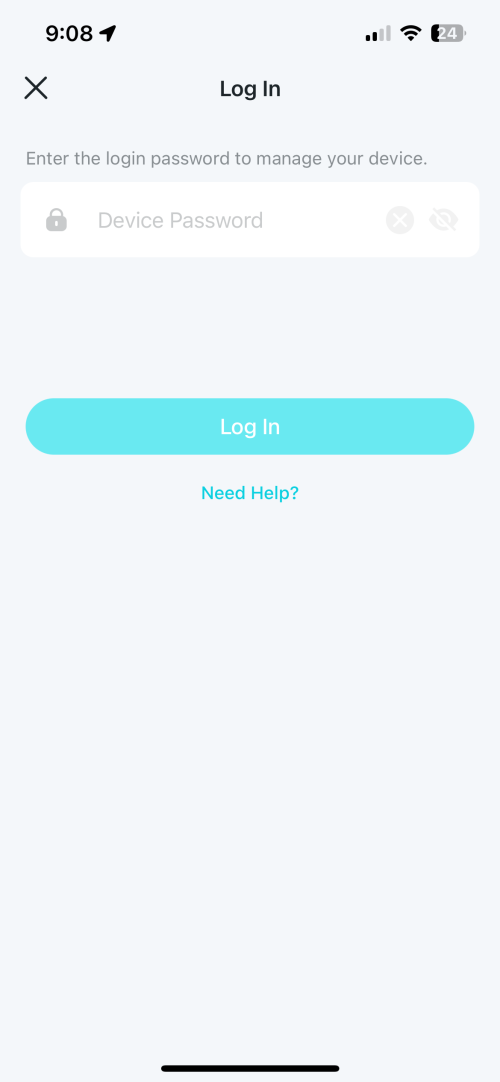 |
|
|
Nov 2 2023, 09:15 PM
|
|
Elite
8,421 posts Joined: Jul 2008
|
QUOTE(lpsoldier007 @ Nov 2 2023, 09:12 PM) Hi guys. Have you look at the label behind the router?I am using TP Link EX510 Maxis Fibre stock router. The problem I am facing right now is, after resetting the router, I cannot set the new router password. It keep asking me to enter the correct password. I’ve been entering “admin”, my old password but still cannot login. AFAIK, after resetting, the router should set the new password right? But my router keep asking me to enter the password. |
|
|
Nov 2 2023, 09:16 PM
Show posts by this member only | IPv6 | Post
#4497
|
|
Senior Member
2,614 posts Joined: Nov 2020
|
QUOTE(lpsoldier007 @ Nov 2 2023, 09:12 PM) Hi guys. Aginet App password is not known (or at least I dont know it so I never used the app)I am using TP Link EX510 Maxis Fibre stock router. The problem I am facing right now is, after resetting the router, I cannot set the new router password. It keep asking me to enter the correct password. I’ve been entering “admin”, my old password but still cannot login. AFAIK, after resetting, the router should set the new password right? But my router keep asking me to enter the password. You have to manage it from webui, via 192.168.1.254 then the credentials printed will work |
|
|
Nov 2 2023, 09:20 PM
Show posts by this member only | IPv6 | Post
#4498
|
|
Junior Member
306 posts Joined: May 2009
|
QUOTE(blacktubi @ Nov 2 2023, 09:15 PM) Have you look at the label behind the router? Nothing stated about the login password at the label. Only wifi password. |
|
|
Nov 2 2023, 09:22 PM
Show posts by this member only | IPv6 | Post
#4499
|
|
Junior Member
306 posts Joined: May 2009
|
QUOTE(PRSXFENG @ Nov 2 2023, 09:16 PM) Aginet App password is not known (or at least I dont know it so I never used the app) Still cannot login from webui.You have to manage it from webui, via 192.168.1.254 then the credentials printed will work   |
|
|
Nov 2 2023, 09:41 PM
Show posts by this member only | IPv6 | Post
#4500
|
|
Senior Member
4,034 posts Joined: Dec 2019
|
QUOTE(lpsoldier007 @ Nov 2 2023, 09:12 PM) Hi guys. let me get this right?I am using TP Link EX510 Maxis Fibre stock router. The problem I am facing right now is, after resetting the router, I cannot set the new router password. It keep asking me to enter the correct password. I’ve been entering “admin”, my old password but still cannot login. AFAIK, after resetting, the router should set the new password right? But my router keep asking me to enter the password. the router asked you to set a new password upon first-time login after reset, correct? maybe you mistakenly pressed Shift and end up using different capitalisation or symbol? |
| Change to: |  0.0310sec 0.0310sec
 0.43 0.43
 6 queries 6 queries
 GZIP Disabled GZIP Disabled
Time is now: 20th December 2025 - 12:48 PM |
 Quote
Quote