Outline ·
[ Standard ] ·
Linear+
TP-LINK Malaysia Official Thread, Technical Enquiries and Support
|
SwarmTroll
|
 Oct 13 2023, 04:32 AM Oct 13 2023, 04:32 AM
|

|
QUOTE(abcdef123456 @ Sep 25 2023, 04:33 PM) I realized that while doing the setup i set the dns to google dns at internet part,which an IT friend told me for that part better to use the ISP dns. Now i set it to ISP dns, and set the google dns at the dhcp server part. Still monitoring now,but my 5ghz speedtest looking normal now. Guys, is this an actual thing? I actually set Cloudfare DNS at the internet settings there lol. This post has been edited by SwarmTroll: Oct 13 2023, 04:34 AM |
|
|
|
|
|
SwarmTroll
|
Oct 14 2023, 01:21 PM
|
|
|
Ooooh looks like TP-Link AX73 v1 is getting EasyMesh function real soon, they released the firmware for EU version already.
|
|
|
|
|
|
SwarmTroll
|
Oct 17 2023, 09:06 PM
|
|
|
Hello Sifu's,
When you change to a new router, is there anything that should be tweaked in the advanced settings to improve the router? e.g. OFDMA, airtime fairness, DHCP server address lease time set to max, etc.
I can't really find a proper guide online.
|
|
|
|
|
|
SwarmTroll
|
Oct 27 2023, 11:58 AM
|
|
|
Hey guys, have you ever encountered this issue with TP-Link router before? I'm using TP-Link AX73 v1. This occurred few days ago, then all is fine for few days, then appeared in log again in the morning. » Click to show Spoiler - click again to hide... « 2023-10-27 04:32:36 Led Controller INFO [1162] Start to run WAN1_ON
2023-10-27 04:32:36 Led Controller INFO [1162] Start to run WAN0_OFF
2023-10-27 04:32:36 Led Controller INFO [1162] Start to run LAN_OFF
2023-10-27 04:32:23 Led Controller INFO [1162] Start to run WAN1_OFF
2023-10-27 04:32:23 Led Controller INFO [1162] Start to run WAN0_ON
2023-10-27 04:32:23 Led Controller INFO [1162] Start to run LAN_OFF
2023-10-27 04:32:21 Led Controller INFO [1162] Start to run WAN1_OFF
2023-10-27 04:32:21 Led Controller INFO [1162] Start to run WAN0_OFF
2023-10-27 04:32:21 Led Controller INFO [1162] Start to run LAN_OFF I googled and it seems to commonly happen on TP-Link routers? |
|
|
|
|
|
SwarmTroll
|
Oct 27 2023, 01:36 PM
|
|
|
QUOTE(eddie_lim @ Oct 27 2023, 12:43 PM) Off the flow control on both LAN and WAN on your LAN connected PC, disable auto-negotiation, put 1gbps manually on router, also put 1gbps manually istead of 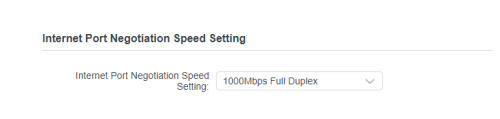 I don't have any LAN connected devices, everything is through wireless. So I guess the only thing I can do is changing 'Internet Port Negotiation Speed Setting' from Auto to 1000Mbps Full Duplex. I don't see anything regarding flow control in the TP-Link configuration. |
|
|
|
|
|
SwarmTroll
|
Oct 28 2023, 06:22 PM
|
|
|
Da heck another thing appeared in my AX73's log, something to do with USB, padahal I've never plugged anything in to the router's USB port before. » Click to show Spoiler - click again to hide... « 2023-10-28 12:33:59 USB Share NOTICE [18028] MiniDLNA start
2023-10-28 12:33:59 USB Share NOTICE [18028] ProFTPd start
2023-10-28 12:33:59 USB Share NOTICE [18028] MiniDLNA stop
2023-10-28 12:33:59 USB Share NOTICE [18028] ProFTPd stop
2023-10-28 12:33:59 USB Share NOTICE [18028] Samba stop
2023-10-28 12:33:59 USB Share NOTICE [18043] MiniDLNA start
2023-10-28 12:33:59 USB Share NOTICE [18043] ProFTPd start
2023-10-28 12:33:59 USB Share NOTICE [18043] MiniDLNA stop
2023-10-28 12:33:58 USB Share NOTICE [18043] ProFTPd stop
2023-10-28 12:33:58 USB Share NOTICE [18043] Samba stop I've also disabled the media sharing function. This thing has occured multiple times lol. |
|
|
|
|
|
SwarmTroll
|
Oct 30 2023, 07:53 PM
|
|
|
Question guys, does it matter if I pick channel 149 or 161 if I am using 80mhz? If I use either it will still center at 155 (149-153-157-161) correct?
|
|
|
|
|
|
SwarmTroll
|
Oct 30 2023, 09:01 PM
|
|
|
QUOTE(blacktubi @ Oct 30 2023, 08:43 PM) Thanks sifu Blacktubi, I'll stay with my channel 161 then. Btw, I couldn't find the Malaysian version but to confirm are we somewhat following the US version like this? 5GHz ChannelsSo lower (36-40-44-48) and upper (149-153-157-161) channels are allowed to broadcast 1,000mW Tx power, whereas all DFS channels are only allowed a quarter at 250mW Tx power? This is the main reason I'm not using DFS. This post has been edited by SwarmTroll: Oct 30 2023, 09:03 PM |
|
|
|
|
|
SwarmTroll
|
Nov 23 2023, 06:25 PM
|
|
|
Does anyone know what I can possibly do to resolve an issue where my phone loses connection with my router and even if it reconnects, it will say 'device connected but no access to network'. It happens time to time, and will then reconnect sucessfully again later on.
I have done things like set security to 'WPA2-PSK', and also use device MAC rather than setting it as random. Firmwares are also at latest.
Router: TP-Link AX73
Phone: Poco F3
Could DHCP Lan settings be a cause for it? The only thing I changed is set lease time to 2880 minutes, others are left at default.
Edit: Turned off WiFi Scan Throttling in Android developer options didn't really help either. Sad, most probably related to the phone/software somehow, can't find an answer.
This post has been edited by SwarmTroll: Nov 26 2023, 07:57 PM
|
|
|
|
|
|
SwarmTroll
|
Jun 30 2024, 02:13 AM
|
|
|
Hi guys, is there any side effects if I disable IPv6? Is it okay if I just use IPv4 for now? Will be setting in router configuration.
|
|
|
|
|
|
SwarmTroll
|
Jul 1 2024, 04:59 PM
|
|
|
blacktubi Boss, if you don't mind me asking since you are well versed with TP-Link products. Do you turn on IPv6 on your routers? I'm currently testing disabling IPv6 on my AX73 and so far it actually seems somewhat better by just being on IPv4 alone.
|
|
|
|
|



 Quote
Quote
 0.1086sec
 0.68
0.68
 7 queries
 GZIP Disabled