Outline ·
[ Standard ] ·
Linear+
TP-LINK Malaysia Official Thread, Technical Enquiries and Support
|
FusionXY
|
 Dec 21 2021, 08:28 PM Dec 21 2021, 08:28 PM
|

|
QUOTE(PJng @ Dec 21 2021, 08:13 PM) Wow so fast respond I let 2.4ghz and 5ghz as one ssid, so not family confuse why got 2 wifi I search those app, try 2 nothing show, not sure which app can use Using Android or IPhone? Try set both separate. Maybe much better. |
|
|
|
|
|
PJng
|
Dec 21 2021, 08:33 PM
|
|
|
QUOTE(FusionXY @ Dec 21 2021, 08:28 PM) Using Android or IPhone? Try set both separate. Maybe much better. Ok found one is showing data Android  2.4ghz orange color my wifi  5ghz red color behind purple my wifi |
|
|
|
|
|
FusionXY
|
Dec 21 2021, 08:39 PM
|
|
|
QUOTE(PJng @ Dec 21 2021, 08:33 PM) Ok found one is showing data Android 2.4ghz orange color my wifi 5ghz red color behind purple my wifi Yup. Try changing channels which one is not congested. For 2.4GHz best to use 1,6 or 11 5GHz need to check as no valid number for which channel is not congested. |
|
|
|
|
|
PJng
|
Dec 21 2021, 08:48 PM
|
|
|
QUOTE(FusionXY @ Dec 21 2021, 08:39 PM) Yup. Try changing channels which one is not congested. For 2.4GHz best to use 1,6 or 11 5GHz need to check as no valid number for which channel is not congested. 5ghz on list 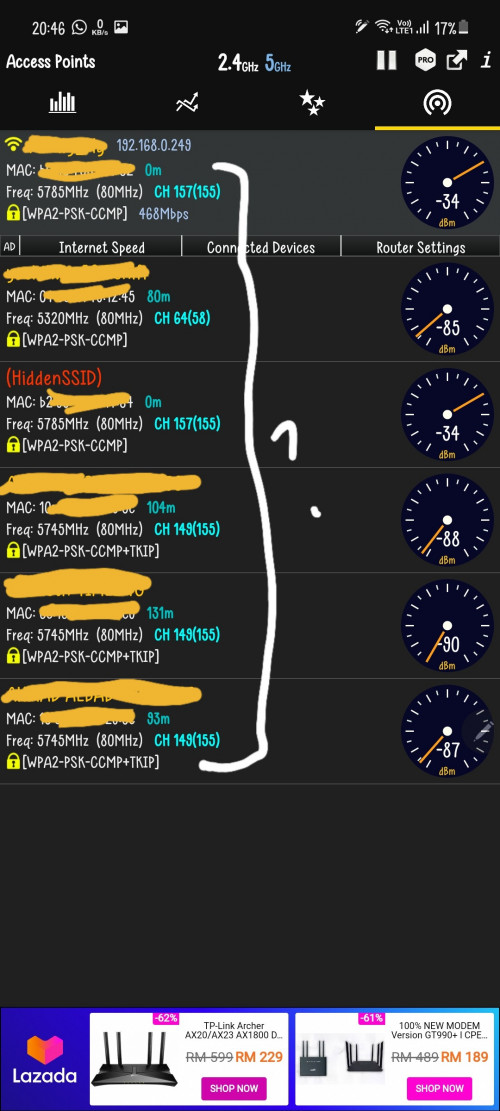 So i can just test different channel? |
|
|
|
|
|
FusionXY
|
Dec 21 2021, 08:58 PM
|
|
|
QUOTE(PJng @ Dec 21 2021, 08:48 PM) 5ghz on list So i can just test different channel? Yes. Highest normally the best. |
|
|
|
|
|
Davidtcf
|
Dec 24 2021, 07:29 PM
|
|
|
QUOTE(Davidtcf @ Dec 20 2021, 07:31 PM) 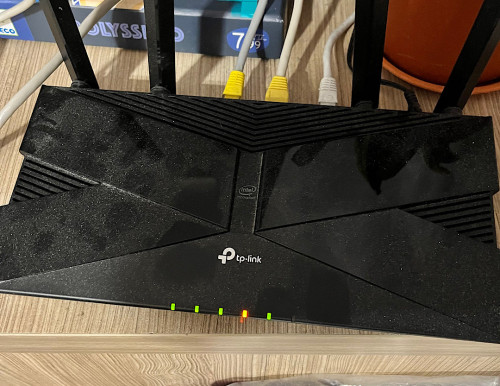 Light for wifi orange but we manage to connect to it. What can do to fix it? Anyone experience before? Already restart both modem and router also same. Solve adi after adjusting dns using web browser. |
|
|
|
|
|
Skylinestar
|
Dec 25 2021, 01:31 PM
|
|
|
QUOTE(PJng @ Dec 21 2021, 08:33 PM) Ok found one is showing data Android 2.4ghz orange color my wifi 5ghz red color behind purple my wifi use this. no ad. https://play.google.com/store/apps/details?...em.wifianalyzer |
|
|
|
|
|
hellfried
|
Dec 26 2021, 08:51 AM
|
|
|
Just ordered an AX73 router. I have been doing some research online about how to set it up with Digi Fibre. I know I have to connect the modem to the router with the provided cable but when I start to configure it, do I have to connect the router to the PC via ethernet cable or will it appear wirelessly in my browser?
|
|
|
|
|
|
wira1979
|
Dec 26 2021, 02:45 PM
|
|
|
I hope this is the right thread to ask this.
I'm currently on Unifi 30 mbps and use the Deco M5 for mesh wifi.
I'll be upgrading to Maxis 100 mbps in my new unit. Will upgrading to a Deco M9 improve my wireless experience or the M5 should be enough?
Thanks.
|
|
|
|
|
|
blacktubi
|
Dec 26 2021, 02:51 PM
|
-

|
QUOTE(wira1979 @ Dec 26 2021, 02:45 PM) I hope this is the right thread to ask this. I'm currently on Unifi 30 mbps and use the Deco M5 for mesh wifi. I'll be upgrading to Maxis 100 mbps in my new unit. Will upgrading to a Deco M9 improve my wireless experience or the M5 should be enough? Thanks. Deco M5 should be more than enough for 100Mbps |
|
|
|
|
|
wira1979
|
Dec 26 2021, 03:08 PM
|
|
|
QUOTE(blacktubi @ Dec 26 2021, 02:51 PM) Deco M5 should be more than enough for 100Mbps Cheers  |
|
|
|
|
|
megahertz
|
Dec 27 2021, 09:30 AM
|
|
|
QUOTE(hellfried @ Dec 26 2021, 08:51 AM) Just ordered an AX73 router. I have been doing some research online about how to set it up with Digi Fibre. I know I have to connect the modem to the router with the provided cable but when I start to configure it, do I have to connect the router to the PC via ethernet cable or will it appear wirelessly in my browser? it will appear wirelessly. most of the router right now , the wireless is on by default. the default wifi name and password should be on the back of the router |
|
|
|
|
|
phh9310
|
Dec 27 2021, 07:59 PM
|
|
|
New Firmware update for AX73 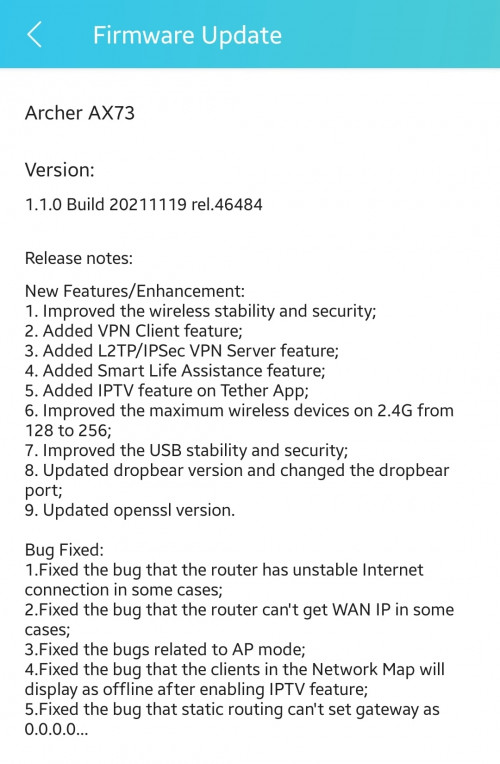 |
|
|
|
|
|
blacktubi
|
Dec 27 2021, 08:05 PM
|
-
|
QUOTE(phh9310 @ Dec 27 2021, 07:59 PM) New Firmware update for AX73 Good to see TP-Link added VPN client feature. That's rather useful. Better late than never |
|
|
|
|
|
JohnLai
|
Dec 27 2021, 08:28 PM
|
|
|
Meanwhile, I still waiting for the official AX50 DFS channel fix for a year now.
|
|
|
|
|
|
blacktubi
|
Dec 27 2021, 08:54 PM
|
-
|
QUOTE(JohnLai @ Dec 27 2021, 08:28 PM) Meanwhile, I still waiting for the official AX50 DFS channel fix for a year now. It can't be fixed when it is working as required by FCC radar law. Just don't use DFS channels on any router. |
|
|
|
|
|
JohnLai
|
Dec 27 2021, 09:15 PM
|
|
|
QUOTE(blacktubi @ Dec 27 2021, 08:54 PM) It can't be fixed when it is working as required by FCC radar law. Just don't use DFS channels on any router. No, AX50 DFS really not working. Within few hours, it will jump to non-DFS channel and stay there forever. I got myself Asus AX86U and AX88U too, both units stay to the selected DFS channel (52 and 100 respectively) respectively without changing for months. Hell, even my TP-Link Archer A6 flashed with openwrt can use DFS channel properly for months (screw that TP-Link original firmware IPv6 firewall issue). |
|
|
|
|
|
PJng
|
Dec 28 2021, 12:48 AM
|
|
|
QUOTE(Skylinestar @ Dec 25 2021, 01:31 PM) Ok, forgot this post This app even show wifi 6 logo, even my phone only support ac |
|
|
|
|
|
spideymung
|
Dec 29 2021, 07:35 PM
|
Getting Started

|
Sifu sifu, i wanted to wire my Samsung TV and Apple TV to my new AX73 router, but as only 2 LAN ports can work for internet, other 2 ports for unifi vlan are used for IPTV and VOIP. Current 2 LAN ports are being used for my cctv and alarm. 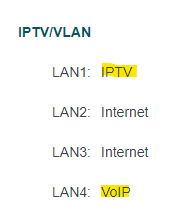 Any workaround how I can remove these 2 so I can utilize fully all 4 LAN ports. I had an old asus AC1200 router and tried to use it in AP Mode. Hooked up my cctv and alarm in the Asus router's LAN ports, but could not get the 2 items connected. This post has been edited by spideymung: Dec 29 2021, 07:38 PM |
|
|
|
|
|
phh9310
|
Dec 29 2021, 08:03 PM
|
|
|
QUOTE(spideymung @ Dec 29 2021, 07:35 PM) Sifu sifu, i wanted to wire my Samsung TV and Apple TV to my new AX73 router, but as only 2 LAN ports can work for internet, other 2 ports for unifi vlan are used for IPTV and VOIP. Current 2 LAN ports are being used for my cctv and alarm. Any workaround how I can remove these 2 so I can utilize fully all 4 LAN ports. I had an old asus AC1200 router and tried to use it in AP Mode. Hooked up my cctv and alarm in the Asus router's LAN ports, but could not get the 2 items connected. Try custom your IPTV/VLAN  My VLAN use Maxis please follow Unifi VLAN  This post has been edited by phh9310: Dec 29 2021, 08:04 PM
 |
|
|
|
|



 Quote
Quote




 0.0310sec
 1.18
1.18
 6 queries
 GZIP Disabled