Welcome Guest ( Log In | Register )

Outline · [ Standard ] · Linear+

 TP-LINK Malaysia Official Thread, Technical Enquiries and Support

views
     
cybpsych
post Sep 30 2020, 02:53 PM

---------------------
*********
All Stars
65,362 posts

Joined: Jan 2003
just gotten TP-Link Archer AX20.

been trying to setup Unifi, but encounter unknown issue with WIFI

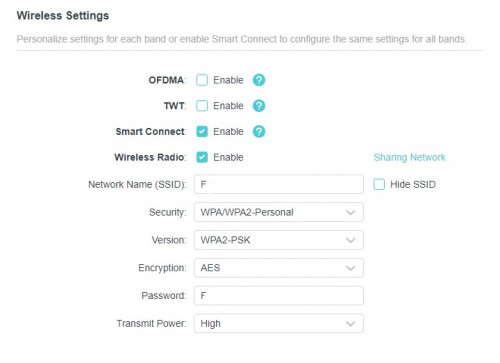
Enabled OFDMA and Smart Connect (combi 2.4G/5G in 1 SSID)
WPA2-PSK and AES (default)

laptop connection ok, but Xiaomi Redmi Note 8 handphone wifi not ok. able to enter wifi password, but somehow the phone doesnt recognize any internet connection.

From WIFI settings (phone), the status just saying "Saved". But unable to resolve for internet connection.

I reconnect back to old AC1200 (existing Unifi), phone connected to Wifi (5G and 2.4G separately).


any specific setup for AX20 that need to be aware of? or some settings that might not be compatible with phone's wifi detection?

thanks


*update: managed to solve the issue. somehow the phone doesnt work if version=WPA2-PSK and encryption=AES exclusively. after changing to version=WPA-PSK/WPA2-PSK and encryption=TKIP/AES, then only the phone wifi can work

This post has been edited by cybpsych: Sep 30 2020, 09:24 PM
cybpsych
post Oct 1 2020, 08:44 AM

---------------------
*********
All Stars
65,362 posts

Joined: Jan 2003
QUOTE(TongCN @ Oct 1 2020, 08:36 AM)
Cause the wifi security firmware of your phone not compatible  sweat.gif

Sometime certain phone has limited hardware/firmware for future proof.
You get for what you paid actually (1 sen 1 product)

Right now entering WPA3 era soon.
*
yep laugh.gif
cybpsych
post Oct 2 2020, 07:50 AM

---------------------
*********
All Stars
65,362 posts

Joined: Jan 2003
speaking of TP-Link Archer AX20, some devices may not compatible with the wifi if you setup 5Ghz Mode=802.11a/n/ac/ax (mixed)

eventhough it's backward compatible, some devices (non-AX support) doesnt recognize the 5Ghz wifi channel.

setting to 5Ghz Mode=802.11a/n/ac (mixed) --- without ax, the device would then recognize 5Ghz wifi from AX20.

This post has been edited by cybpsych: Oct 2 2020, 07:51 AM
cybpsych
post Oct 2 2020, 03:44 PM

---------------------
*********
All Stars
65,362 posts

Joined: Jan 2003
QUOTE(moiskyrie @ Oct 2 2020, 01:45 PM)
Got any model to reccomend for unifi 100mbps?
The router tm giv really dont know is which brand...
Just 1 wall already signal drop half..
*
recently bought TP-Link Archer AX20.

or can try AX50 which is a bit more. got 1 seller in Shopee gives a good deal.
cybpsych
post Feb 20 2021, 10:21 AM

---------------------
*********
All Stars
65,362 posts

Joined: Jan 2003
QUOTE(szecheng @ Feb 12 2021, 06:56 PM)
Anyone knows how to set turn off router function at
huawei HG8145 2in1 ONU + Router?

trying to use TPlink AX20 WAN port to HG8145 LAN port 1
pppoe using TIME username & password at TPlink
update: problem resolved
*
how did u solve it?

for me, I changed tp-link router mode to AP/BRIDGE mode, then only can use with HG8145 combo onu+router

still finding how to do it on HG unit.
cybpsych
post Feb 22 2021, 06:48 PM

---------------------
*********
All Stars
65,362 posts

Joined: Jan 2003
QUOTE(szecheng @ Feb 22 2021, 06:43 PM)
you got access to that setting?
only Time can do that right
*
changed the tplink setting, not the Huawei unit sweat.gif
cybpsych
post Jul 28 2021, 07:27 PM

---------------------
*********
All Stars
65,362 posts

Joined: Jan 2003
need some suggestion

currently using AX20 with Time Fiber 100mbps. AX20 set as Bridge Mode <--> Time's Huawei HG8145V5 router+BTU.

Firmware Version: 1.3.1 Build 20210521 rel.72481(5553)
Hardware Version: Archer AX20 v1.20

intermittently, some of my devices cannot connect to 5G. could it be too many devices connecting to the router?


i've split some devices to 2.4GHz (Channel: 1, to avoid majority of nearby wifi connections in my condo biggrin.gif)

1) smartphone #1
2) xiaomi cctv
3) laptop #1 (old, cannot support 5GHz) -- when doing MS Teams, connectivity would drop
4) previously smart tv connected to 2.5GHz, but i suspect congestion at 2.4Ghz, so i switched it to 5GHz)


5GHz devices (Channel: Auto, Current: 149)

1) smartphone #2
2) laptop #2 (newer, can support 5GHz) -- some times auto-disconnect, need to manually connect back
3) laptop #3 (newer, office laptop, can support 5GHz) -- only use during WFH hours biggrin.gif
4) smart TV (previously 2.4GHz)


if i upgrade to AX73 or AX90 (may be overkill), would it help to improve connectivity?


thanks!
cybpsych
post Jul 28 2021, 07:54 PM

---------------------
*********
All Stars
65,362 posts

Joined: Jan 2003
QUOTE(blacktubi @ Jul 28 2021, 07:47 PM)
Just for clarification, do you use bridge mode on the AX20 or the router on TIME’s router?
*
ax20 as bridge

no change to HG, but I disabled its wifi since I'm using ax20 wifi anyway
cybpsych
post Jul 28 2021, 08:32 PM

---------------------
*********
All Stars
65,362 posts

Joined: Jan 2003
QUOTE(blacktubi @ Jul 28 2021, 08:31 PM)
I will explore changing the Huawei modem router from TIME into bridge mode else you’ll always be bottlenecked by that.
*
i see!

if Huawei in bridge mode, does AX20 need to be in bridge mode too?
cybpsych
post Jul 28 2021, 08:44 PM

---------------------
*********
All Stars
65,362 posts

Joined: Jan 2003
QUOTE(blacktubi @ Jul 28 2021, 08:43 PM)
In that case you will use PPPOE mode on your Archer AX20.

PPPOE username and password is required.
*
yep, no issue with pppoe credentials

thanks for the suggestion
cybpsych
post Aug 20 2021, 02:44 PM

---------------------
*********
All Stars
65,362 posts

Joined: Jan 2003
AX72 better?


π—‘π—²π˜„ π—”π—«πŸ±πŸ°πŸ¬πŸ¬ π—ͺ𝗢𝗙𝗢 𝟲 π—₯π—Όπ˜‚π˜π—²π—Ώ

Introducing the new Archer AX72 with lightning fast WiFi speed and a strong coverage that will surprise you!

Buy Now: https://bit.ly/AX72MYLZ

Why the Archer AX72 is so fast?
βœ… 6 antennas with high-power signal amplifier
βœ… Qualcomm 1Ghz Dual-Core CPU
βœ… Connect 100+ WiFi Devices
βœ… Works with Unifi, Maxis, DiGi, TIME and more!

Buy now while stocks last! Our routers come with 3 years router warranty and sales support

user posted image

This post has been edited by cybpsych: Aug 20 2021, 02:44 PM
cybpsych
post Jan 13 2022, 05:31 PM

---------------------
*********
All Stars
65,362 posts

Joined: Jan 2003
QUOTE(cfyong2020 @ Jan 13 2022, 11:23 AM)
dear sifu,
im using tp link ax1800/ax20
my problem is when my smart tv using youtube all my other device will be no internet. i tried a andriod tv stick same problem happen. whenever the tv on youtube all the speed seems to reserve to there it makes my other device either very slow or no internet at all. Any setting i need to do?

user posted image
*
maybe can disable QoS or Parental Control?

or temporary remove Guest Network (wifi)
cybpsych
post Feb 12 2022, 09:41 PM

---------------------
*********
All Stars
65,362 posts

Joined: Jan 2003
QUOTE(blacktubi @ Feb 12 2022, 09:32 PM)
Same proc but different 5Ghz radio.

Very big difference in performance in my test. I will suggest spending the RM100 extra instead.  tongue.gif
*
i was also confused with ax55 vs ax72 rclxub.gif (even after read your reviews thumbup.gif )

seems like almost comparable, but am sure ax72 has some advantage over ax55 (in terms of wifi performance)
cybpsych
post Dec 19 2022, 03:58 PM

---------------------
*********
All Stars
65,362 posts

Joined: Jan 2003
thinking to upgrade from AX20 to AX73.

any good deal lately?

now, price hovering rm459 on a good average price in shopee.


cybpsych
post Dec 19 2022, 04:45 PM

---------------------
*********
All Stars
65,362 posts

Joined: Jan 2003
QUOTE(slackinux @ Dec 19 2022, 04:27 PM)
I have been using Mercusys MR80X since Saturday last week.
My first ever WiFi 6 router. So far not bad.
Bought it on 12/12 for RM 177.
Consider value for money for my Double Storey Terrace.
*
not bad for the price!

QUOTE(FusionXY @ Dec 19 2022, 04:32 PM)
You miss the boat.
Asus TUF-AX5400 got promo price @ RM37X during 12.12 sales.
RM600-120 Lazada platform.
*
wahh, kinda overkill, but with that price, really ok thumbsup.gif

cybpsych
post Dec 19 2022, 05:25 PM

---------------------
*********
All Stars
65,362 posts

Joined: Jan 2003
QUOTE(Seng89 @ Dec 19 2022, 05:21 PM)
Overkill for future proof
*
with promo price, dont mind the price biggrin.gif

with RRP, kinda steep for general WFH, daily household use.
cybpsych
post Feb 14 2023, 09:10 PM

---------------------
*********
All Stars
65,362 posts

Joined: Jan 2003
QUOTE(Momo33 @ Feb 14 2023, 04:49 PM)
Advice needed to  setup op mode  on tplink  router .

yesterday i set up a  tp link  AX72  on my fiber unifi .  My old Asus router  still working but like 5 year old.  so doing a swap out.

i configure  operation mode  using  '' https://www.youtube.com/watch?v=Mb50X3PcPUU

at the test part  its say ''  connect  but  NO  internet .
power off/on  and router ready ..  i see  can connect  but  no internet  icon. on my mobile .
selected MY iptv setting .
PPoE  i have all the necessary login details.  copy of Asus.

next
I configure as AP  mode .
the AC wireless works fine  with internet.

what did i miss for OP mode setup and any other  item i need to check .  Thanks
i have not off/on  the  unifi  BTU yet.
*
the ax72 used before? somehow it retain old settings.

try do router reset, then follow the wizard to setup unifi pppoe.


Change to:
| Lo-Fi Version
0.1324sec    0.89    7 queries    GZIP Disabled
Time is now: 19th December 2025 - 10:06 AM