

QUOTE(EdwardCCL @ Dec 14 2021, 10:13 AM)
Hi, can you share how u manage to upgrade? there's 3 firmware upgrade. I tried with the onemesh featured but cant. or I should follow the all firmware?

I did not upgrade. Only use admin login.TP-LINK Malaysia Official Thread, Technical Enquiries and Support
|
|
 Dec 14 2021, 11:25 AM Dec 14 2021, 11:25 AM
|
 
Senior Member
3,918 posts Joined: Nov 2004 
|
QUOTE(EdwardCCL @ Dec 14 2021, 10:13 AM) Hi, can you share how u manage to upgrade? there's 3 firmware upgrade. I tried with the onemesh featured but cant. or I should follow the all firmware? I did not upgrade. Only use admin login. |
|
|
|
|
|
Dec 14 2021, 02:58 PM
Show posts by this member only | IPv6 | Post
#3962
|

Junior Member
76 posts Joined: Jul 2011 
|
Need some help guys... Thinking to replace my aging c1200 unifi router with the AX73... I'm on 300mbs in small double storey terrace.. however I don't have a computer and was wondering if we can do basic setup for unifi using the tether app..... Any instructions/video?.. Most YouTube ones using computer to setup
Thanks |
|
|
Dec 14 2021, 04:42 PM
|
|
Probation
5 posts Joined: Dec 2021
|
QUOTE(yvliew @ Dec 14 2021, 11:25 AM) I did not upgrade. Only use admin login. Hi, do you manage to configure onemesh for Celcom HomeFibre TPlink AX10 & RE505? coz I have tried to click the onemesh at the RE505 but cant? message pop said my router is not onemesh. |
|
|
Dec 16 2021, 12:09 PM
Show posts by this member only | IPv6 | Post
#3964
|
|
Junior Member
172 posts Joined: Jul 2021
|
just curious. Does the deco m4 only support wifi channel 42 in malaysia. My area 4 house already using 42 so it is very slow.
This post has been edited by bugipunch: Dec 16 2021, 12:10 PM |
|
|
Dec 16 2021, 12:39 PM
|

Senior Member
4,034 posts Joined: Dec 2019
|
QUOTE(bugipunch @ Dec 16 2021, 12:09 PM) just curious. Does the deco m4 only support wifi channel 42 in malaysia. My area 4 house already using 42 so it is very slow. Can we even select which channel Deco wants to spring up in?... |
|
|
Dec 16 2021, 01:28 PM
|

Senior Member
2,075 posts Joined: Sep 2021 From: nowhere
|
QUOTE(Oltromen Ripot @ Dec 16 2021, 12:39 PM) Can we even select which channel Deco wants to spring up in?... no deco models can change channel manuallyplease avoid deco series if this concern you the most, i recommend Aimesh instead |
|
|
|
|
|
Dec 16 2021, 01:35 PM
Show posts by this member only | IPv6 | Post
#3967
|

Senior Member
3,836 posts Joined: Aug 2016
|
QUOTE(MyProLife @ Dec 16 2021, 01:28 PM) no deco models can change channel manually ASUS>Allplease avoid deco series if this concern you the most, i recommend Aimesh instead |
|
|
Dec 20 2021, 03:23 AM
|

Senior Member
663 posts Joined: Oct 2010 From: Penang Island 
|
QUOTE(judesh @ Dec 14 2021, 02:58 PM) Need some help guys... Thinking to replace my aging c1200 unifi router with the AX73... I'm on 300mbs in small double storey terrace.. however I don't have a computer and was wondering if we can do basic setup for unifi using the tether app..... Any instructions/video?.. Most YouTube ones using computer to setup can use tablet and select Desktop View Thanks  |
|
|
Dec 20 2021, 05:04 PM
|
|
Newbie
34 posts Joined: Aug 2017
|
QUOTE(blacktubi @ Oct 28 2021, 08:00 PM) TP-Link released a beta firmware that fixed this issue quite some time ago, have you tried it? I checked the support pages of TP-Link and found that there is a new published firmware upgrade for the M4.Not sure whether they added it to public release but I’ve updated this firmware for a family previously and it works fine. https://community.tp-link.com/en/home/forum/topic/272384 The firmware bin is named as below: M4R 2.0_1.5.2 Build 20210916 Rel. 56193 I would just like to ask if anyone here have upgraded to this firmware. Are there any issues? My 3 M4 units have been in mothballs for months now. I should upgrade it from the problematic 1.5.0 Build 20210511 Rel. 34580 firmware. Thanks in advance. |
|
|
Dec 20 2021, 05:08 PM
|

Senior Member
1,146 posts Joined: Dec 2015
|
Can I check with gurus here, I am given Deco HC4 (AC1200) by my ISP. I am thinking of buying X20 to connect to it. Because the router sits next to the modem in a riser box, I like to put HC4 in the box instead of X20 due to poor air circulation inside the box (might spoil faster).
If connected this way, will the X20 still able to support the AX devices? |
|
|
Dec 20 2021, 05:28 PM
|

All Stars
12,053 posts Joined: Oct 2017
|
hi, just setup ax20, how to connect ipv6? setting page more option that my previous router
ok, after google search i get back this post, is worked https://forum.lowyat.net/index.php?showtopi...post&p=85934778 and port 4 fixed voip? 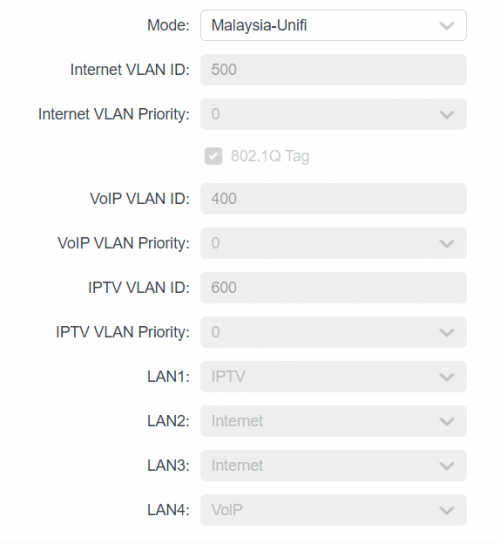 This post has been edited by PJng: Dec 20 2021, 08:35 PM |
|
|
Dec 20 2021, 07:31 PM
Show posts by this member only | IPv6 | Post
#3972
|

Senior Member
3,520 posts Joined: Jan 2003
|
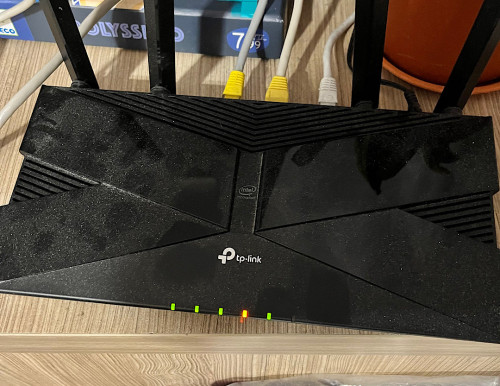 Light for wifi orange but we manage to connect to it. What can do to fix it? Anyone experience before? Already restart both modem and router also same. |
|
|
Dec 20 2021, 09:25 PM
Show posts by this member only | IPv6 | Post
#3973
|
|
Junior Member
214 posts Joined: May 2017
|
QUOTE(PJng @ Dec 20 2021, 05:28 PM) hi, just setup ax20, how to connect ipv6? setting page more option that my previous router you should be able to do custom settings.ok, after google search i get back this post, is worked https://forum.lowyat.net/index.php?showtopi...post&p=85934778 and port 4 fixed voip? just set Internet VLAN ID = 500 can disregard VoiP and IPTV if not used, otherwise just replicate as necessary and assign which port you want it to be on |
|
|
|
|
|
Dec 21 2021, 07:41 AM
Show posts by this member only | IPv6 | Post
#3974
|
|
Junior Member
76 posts Joined: Jul 2011
|
QUOTE(phh9310 @ Dec 20 2021, 03:23 AM) can use tablet and select Desktop View Thanks for the reply... In the end I got Deco M5 2 pack during 12.12 sale at good price....setup was a breeze with the app phh9310 liked this post
|
|
|
Dec 21 2021, 09:03 AM
Show posts by this member only | IPv6 | Post
#3975
|
|
Senior Member
4,034 posts Joined: Dec 2019
|
The 3-years antivirus that comes with Deco M9 Plus.
How to activate? (Deco is set up as Access Point to Asus router) |
|
|
Dec 21 2021, 04:15 PM
|
|
Senior Member
2,075 posts Joined: Sep 2021 From: nowhere
|
QUOTE(Oltromen Ripot @ Dec 21 2021, 09:03 AM) The 3-years antivirus that comes with Deco M9 Plus. Homecare function only works in Router modeHow to activate? (Deco is set up as Access Point to Asus router) |
|
|
Dec 21 2021, 04:29 PM
Show posts by this member only | IPv6 | Post
#3977
|
|
Senior Member
4,034 posts Joined: Dec 2019
|
QUOTE(MyProLife @ Dec 21 2021, 04:15 PM) Homecare function only works in Router mode oh, okay. thank you for explanation. |
|
|
Dec 21 2021, 08:09 PM
Show posts by this member only | IPv6 | Post
#3978
|
|
All Stars
12,053 posts Joined: Oct 2017
|
I dunno ask on where, do i need check any wifi setting about this?
Some area of my home on old router cannot use, only 1 bar Now new router can get 3 bar, but speed not stable, sometime 50, 70mbps, sometime only 5mbps and it keep switching back to data |
|
|
Dec 21 2021, 08:11 PM
Show posts by this member only | IPv6 | Post
#3979
|
|
Senior Member
3,836 posts Joined: Aug 2016
|
QUOTE(PJng @ Dec 21 2021, 08:09 PM) I dunno ask on where, do i need check any wifi setting about this? 2.4GHz or 5GHz?Some area of my home on old router cannot use, only 1 bar Now new router can get 3 bar, but speed not stable, sometime 50, 70mbps, sometime only 5mbps and it keep switching back to data Try install WiFi analyser then check channel not congested. |
|
|
Dec 21 2021, 08:13 PM
Show posts by this member only | IPv6 | Post
#3980
|
|
All Stars
12,053 posts Joined: Oct 2017
|
QUOTE(FusionXY @ Dec 21 2021, 08:11 PM) 2.4GHz or 5GHz? Wow so fast respondTry install WiFi analyser then check channel not congested. I let 2.4ghz and 5ghz as one ssid, so not family confuse why got 2 wifi I search those app, try 2 nothing show, not sure which app can use |
| Change to: |  0.0262sec 0.0262sec
 1.42 1.42
 6 queries 6 queries
 GZIP Disabled GZIP Disabled
Time is now: 19th December 2025 - 11:42 AM |
 Quote
Quote