Outline ·
[ Standard ] ·
Linear+
TP-LINK Malaysia Official Thread, Technical Enquiries and Support
|
megahertz
|
 Nov 17 2021, 02:51 PM Nov 17 2021, 02:51 PM
|

|
i just bought TP Link Ax20 for my unifi 100mbps.
put username and password for the pppoe. its jus show orange LED and status connecting.
plug back my old router, seem working fine.
then i suspect my username n password is not same.
i request unifi to reset my password to new 1.
reconfigure and still same. ax20 failed to connect to WAN but old router can work. both are using same cable, i just unplug cable on old router and then plug in into ax20 WAN port.
i lost idea right now.
the 1 i havent try yet, to restart the fibre modem as well.
|
|
|
|
|
|
megahertz
|
Nov 17 2021, 04:14 PM
|
|
|
QUOTE(FusionXY @ Nov 17 2021, 03:09 PM) i didnt set as i dont need that IPTV vlan. i only got problem with WAN. it failed to connect to the pppoe that i hv set. so dont think got related with VLAN. now use it as AP mode. will try again tonite once nobody use the wifi. |
|
|
|
|
|
megahertz
|
Nov 20 2021, 05:26 PM
|
|
|
QUOTE(aniq8676 @ Nov 17 2021, 05:03 PM) VLAN is mandatory even if you not use IPTV service. 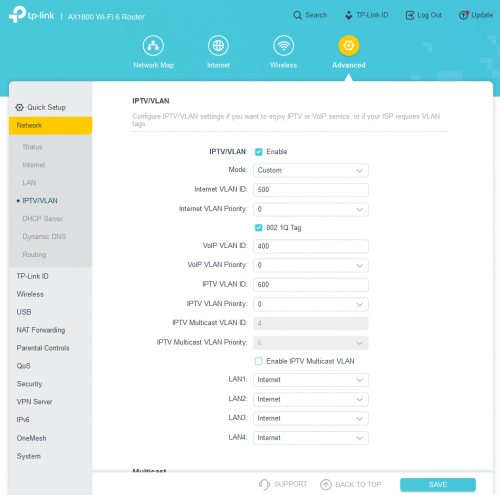 thanks. now working fine. |
|
|
|
|
|
megahertz
|
Dec 27 2021, 09:30 AM
|
|
|
QUOTE(hellfried @ Dec 26 2021, 08:51 AM) Just ordered an AX73 router. I have been doing some research online about how to set it up with Digi Fibre. I know I have to connect the modem to the router with the provided cable but when I start to configure it, do I have to connect the router to the PC via ethernet cable or will it appear wirelessly in my browser? it will appear wirelessly. most of the router right now , the wireless is on by default. the default wifi name and password should be on the back of the router |
|
|
|
|



 Quote
Quote

 0.1449sec
 1.09
1.09
 7 queries
 GZIP Disabled