Welcome Guest ( Log In | Register )

249 Pages « < 195 196 197 198 199 > » Bottom

Outline · [ Standard ] · Linear+

 TP-LINK Malaysia Official Thread, Technical Enquiries and Support

views
     
linkinpark
post Nov 5 2021, 02:25 AM

Casual
***
Junior Member
454 posts

Joined: Jan 2003
From: KL


QUOTE(blacktubi @ Nov 4 2021, 11:32 PM)
So are you still using VDSL or fibre?

If you use Fibre, do you have an all-in-one modem?
*
My apartment was upgrade from VDSL (copper line) to Fiber (new fiber cable). So i apply and get upgrade. So Unifi give me the new ZTE + Netis wifi router (using my previous all-in-one modem get from TM which is a very bad). They say they dunno configure my VR600v. After letting them finish Netis configuration and line is up, i replace Netis with my VR600V using Wireless Router Mode. So i wonder should i change a better wireless router or VR600v is good enough to use.
blacktubi
post Nov 6 2021, 11:49 AM

-
Group Icon
Elite
8,421 posts

Joined: Jul 2008

QUOTE(linkinpark @ Nov 5 2021, 02:25 AM)
My apartment was upgrade from VDSL (copper line) to Fiber (new fiber cable). So i apply and get upgrade. So Unifi give me the new ZTE + Netis wifi router (using my previous all-in-one modem get from TM which is a very bad). They say they dunno configure my VR600v. After letting them finish Netis configuration and line is up, i replace Netis with my VR600V using Wireless Router Mode. So i wonder should i change a better wireless router or VR600v is good enough to use.
*
VR600V is more than good enough for 100Mbps.

I suggest maintaining it for now.
Alpha_Tay
post Nov 8 2021, 01:17 PM

Beware The Spammer Star!
******
Senior Member
1,725 posts

Joined: Jan 2003
Archer AX20(US)_V1_210902

Published Date: 2021-11-04 Language: Multi-language File Size: 33.48 MB

ax20v1-up-ver1-3-2-P1[20210902-rel35277]_sign_2021-09-02_09.49.56.bin


Hardware Version:
Archer AX20 v1.20

Latest Firmware Version:
1.3.2 Build 20210901 rel.69096


Archer AX20(US)_V2_210901

Published Date: 2021-11-04 Language: Multi-language File Size: 33.54 MB

ax20v2-US&CA-up-ver2-1-2-P1[20210901-rel75450]_sign_2021-09-01_21.12.25.bin


New Features/Enhancement:
1. Improved the wireless performance;
2. Improved the stability of USB sharing feature;
3. Optimized VPN Client and VPN Server feature;
4. Enhanced the security of HTTPS web page;
5. Updated dropbear version and changed the dropbear port;
6. Updated openssl version;
7. Improved the stability of OneMesh feature.

Bug Fixed:
1.Fixed the bugs related to IPTV feature;
2.Fixed the bug that static routing can't set gateway as 0.0.0.0;
3.Fixed the bugs related to AP mode;
4.Fixed the bug that the router can't get WAN IP in some cases;
5.Fixed the bug that WAN pc can get access to the Windows shared folder after disabling DMZ in some cases;
6.Fixed the bugs on the Web UI;
7.Fixed the bugs related to Smart Connect;
8.Fixed the bug related to GDRP encryption.

jchong
post Nov 9 2021, 02:38 PM

****************
*******
Senior Member
5,989 posts

Joined: Nov 2005
QUOTE(Alpha_Tay @ Nov 8 2021, 01:17 PM)
Archer AX20(US)_V1_210902

Published Date: 2021-11-04 Language: Multi-language File Size: 33.48 MB

ax20v1-up-ver1-3-2-P1[20210902-rel35277]_sign_2021-09-02_09.49.56.bin
Hardware Version:
Archer AX20 v1.20

Latest Firmware Version:
1.3.2 Build 20210901 rel.69096
Archer AX20(US)_V2_210901

Published Date: 2021-11-04 Language: Multi-language File Size: 33.54 MB

ax20v2-US&CA-up-ver2-1-2-P1[20210901-rel75450]_sign_2021-09-01_21.12.25.bin
New Features/Enhancement:
1. Improved the wireless performance;
2. Improved the stability of USB sharing feature;
3. Optimized VPN Client and VPN Server feature;
4. Enhanced the security of HTTPS web page;
5. Updated dropbear version and changed the dropbear port;
6. Updated openssl version;
7. Improved the stability of OneMesh feature.

Bug Fixed:
1.Fixed the bugs related to IPTV feature;
2.Fixed the bug that static routing can't set gateway as 0.0.0.0;
3.Fixed the bugs related to AP mode;
4.Fixed the bug that the router can't get WAN IP in some cases;
5.Fixed the bug that WAN pc can get access to the Windows shared folder after disabling DMZ in some cases;
6.Fixed the bugs on the Web UI;
7.Fixed the bugs related to Smart Connect;
8.Fixed the bug related to GDRP encryption.
*
Good to know got new firmware for the AX20. Just updated.
jitbeng
post Nov 10 2021, 12:21 PM

Casual
***
Junior Member
302 posts

Joined: Jan 2003
From: Petaling Jaya


Hi,

I was abled to connect using lan cable from my Xbox Series S to the tplink archer AC1200 supplied by TM. Recently I bought the tplink AX5400 Archer A73 but unable to connect successfully using lan cable to my Xbox Series S. Btw was abled to connect using WIFI.

Can anyone help out. Thank you very much for your kind understanding and cooperation.
aniq8676
post Nov 10 2021, 01:28 PM

Regular
******
Senior Member
1,524 posts

Joined: Dec 2020
From: Perak


QUOTE(jitbeng @ Nov 10 2021, 12:21 PM)
Hi,

I was abled to connect using lan cable from my Xbox Series S  to the tplink archer AC1200 supplied by TM. Recently I bought the tplink AX5400 Archer A73 but unable to connect successfully using lan cable to my Xbox Series S.  Btw was abled to connect using WIFI.

Can anyone help out. Thank you very much for your kind understanding and cooperation.
*
AX73 to Xbox using LAN 1 ??
Please switch to LAN2-4, LAN1 is reserved for Unifi IPTV
Dylnyat
post Nov 12 2021, 07:15 PM

Getting Started
**
Junior Member
216 posts

Joined: Dec 2019


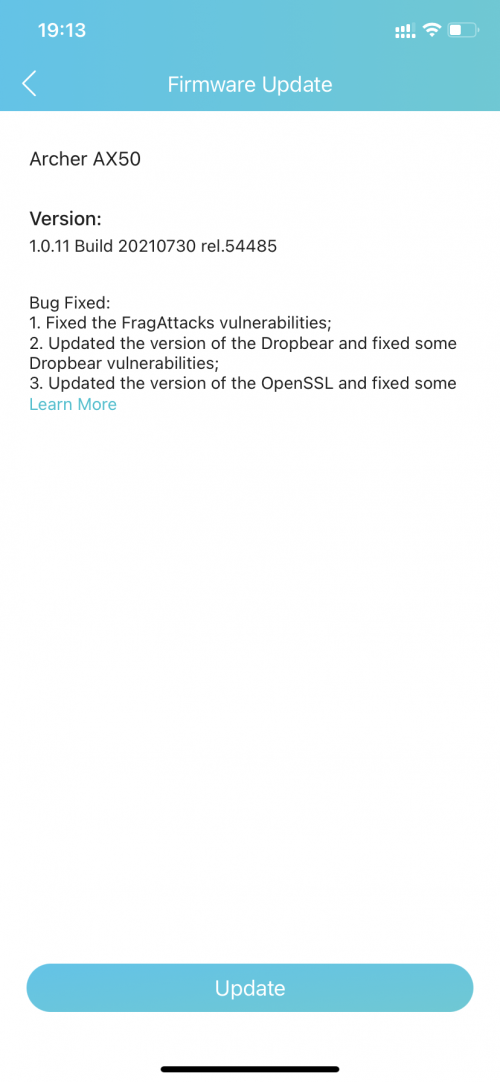
Any one update to this ?? Ax50

user posted image
JohnLai
post Nov 12 2021, 09:10 PM

Skeptical Cat
*******
Senior Member
3,669 posts

Joined: Apr 2006
QUOTE(Dylnyat @ Nov 12 2021, 07:15 PM)
Any one update to this ?? Ax50

user posted image
*
Me.

Nothing major.

Other than the update screwed up the router log time/date.
NTP works, but for unknown reason, the router log time doesn't reflect the correct time.

Disappointing AX50 support.
Got scammed on OneMess and WPA3 "upcoming features", then AX50 has faulty radar detection (high false positive and doesn't revert back) for DFS channels.

The hardware is good, but TP-Link firmware support leave a lot to be desired.

By the way, TP-Link already put AX50 as "legacy" status and currently focusing on AX55. dry.gif
Meaning there will be no further firmware update.
ckh83
post Nov 13 2021, 03:38 PM

Getting Started
**
Junior Member
176 posts

Joined: Jan 2003
Hi, may i know I'm using tplink c2300.
If i get deco m4 or m5.
I can use c2300 as router and turn off wifi.
Then use deco m4 or m5 connect to router as ap mode for mesh wifi. Right? Both m4 or m5 is support ap mode right?
Oltromen Ripot
post Nov 15 2021, 12:27 PM

👍 999999 person Likes this member
*******
Senior Member
4,034 posts

Joined: Dec 2019
Hi,

This is question regarding VLAN switch TL-SG108E.

I'm attempting to set-up a fibre failover to 4G+.

Switch port #1 - TM Unifi BTU - VLAN-tagged (vlan500, etc)
Switch port #2 - untagged vlan500 to Huawei B618 WAN
Switch port #3-#8 - untagged LAN from Huawei B618 LAN


My question is, can TL-SG108E support such set up on port #3-#8 i.e. just normal LAN traffic going to other devices.

Thank you.


(If I can't use it for non-VLAN traffic, then I'll use TL-SG105E sufficient to just for splitting and untagging VLAN only.)
megahertz
post Nov 17 2021, 02:51 PM

i always smiling, problem?
******
Senior Member
1,846 posts

Joined: Apr 2008
i just bought TP Link Ax20 for my unifi 100mbps.
put username and password for the pppoe. its jus show orange LED and status connecting.
plug back my old router, seem working fine.
then i suspect my username n password is not same.
i request unifi to reset my password to new 1.

reconfigure and still same. ax20 failed to connect to WAN but old router can work. both are using same cable, i just unplug cable on old router and then plug in into ax20 WAN port.

i lost idea right now.
the 1 i havent try yet, to restart the fibre modem as well.
FusionXY
post Nov 17 2021, 03:09 PM

LAZZIE ON VACATION
*******
Senior Member
3,836 posts

Joined: Aug 2016

QUOTE(megahertz @ Nov 17 2021, 02:51 PM)
i just bought TP Link Ax20 for my unifi 100mbps.
put username and password for the pppoe. its jus show orange LED and status connecting.
plug back my old router, seem working fine.
then i suspect my username n password is not same.
i request unifi to reset my password to new 1.

reconfigure and still same. ax20 failed to connect to WAN but old router can work.  both are using same  cable, i just unplug cable on old router and then plug in into ax20 WAN port.

i lost idea right now.
the 1 i havent try yet, to restart the fibre modem as well.
*
Got set VLAN?
megahertz
post Nov 17 2021, 04:14 PM

i always smiling, problem?
******
Senior Member
1,846 posts

Joined: Apr 2008
QUOTE(FusionXY @ Nov 17 2021, 03:09 PM)
Got set VLAN?
*
i didnt set as i dont need that IPTV vlan.
i only got problem with WAN. it failed to connect to the pppoe that i hv set. so dont think got related with VLAN.

now use it as AP mode. will try again tonite once nobody use the wifi.
aniq8676
post Nov 17 2021, 05:03 PM

Regular
******
Senior Member
1,524 posts

Joined: Dec 2020
From: Perak


QUOTE(megahertz @ Nov 17 2021, 04:14 PM)
i didnt set as i dont need that IPTV vlan.
i only got problem with WAN. it failed to connect to the pppoe that i hv set. so dont think got related with VLAN.

now use it as AP mode. will try again tonite once nobody use the wifi.
*
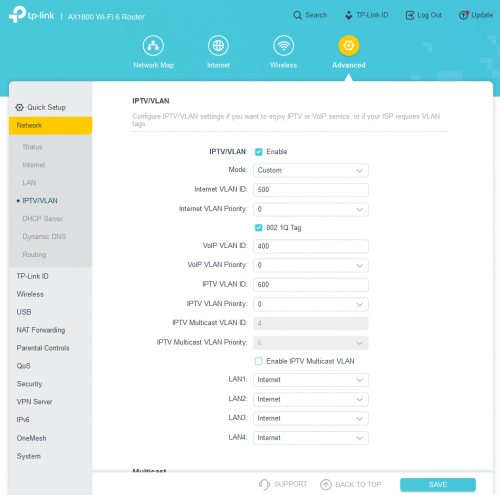
VLAN is mandatory even if you not use IPTV service.

user posted image

This post has been edited by aniq8676: Nov 17 2021, 05:07 PM
jchong
post Nov 19 2021, 04:50 PM

****************
*******
Senior Member
5,989 posts

Joined: Nov 2005
Say, anybody here used the AX23 router? How is it?
megahertz
post Nov 20 2021, 05:26 PM

i always smiling, problem?
******
Senior Member
1,846 posts

Joined: Apr 2008
QUOTE(aniq8676 @ Nov 17 2021, 05:03 PM)
VLAN is mandatory even if you not use IPTV service.

user posted image
*
thanks. now working fine.
Alpha_Tay
post Nov 21 2021, 09:51 PM

Beware The Spammer Star!
******
Senior Member
1,725 posts

Joined: Jan 2003
this internet IPV6 become FE80 issue still happen with latest firmware, especially after reboot, even multiple times after each reboot.

QUOTE(Alpha_Tay @ Sep 9 2020, 10:16 PM)
TP-Link Archer AX20 V1.20 and IPv6

Latest Firmware

IPv6 by Default is turned off.

after turn on IPv6, sometime when cold boot or reboot, the Internet IPv6 was wrong, it's LAN IPv6 FE80: , while the actual LAN IPv6 was correct, normal Internet IPv6, 2001:E68: , couldnt access IPv6 website, have to reconnect or reboot again.

if wanted to reconnect for another ip range, disconnect, and reconnect at IPv4, IPv6 wouldn't reconnect, and /Share the same PPPoE session with IPv4/ at IPv6 would untick itself.

if wanted to reconnect for another ip range, disconnect, and reconnect at IPv6, IPv4 and both IPv6 LAN and Internet would get the correct IP, but sometime the IPv6 wouldn't issue to connected client, even after connected client try to reconnect multiple time.

Solution, disconnect at IPv4, retick /Share the same PPPoE session with IPv4/ and reconnect at IPv6, IPv4 and both IPv6 LAN and Internet would get the correct IP and connected client would get correct and working IPv6, but already connected client before router reconnect for another ip range, have to disconnect and reconnect again to get the new IPv6 Internet IP Range.
*
QUOTE(Alpha_Tay @ Sep 9 2020, 10:29 PM)
*
This post has been edited by Alpha_Tay: Nov 21 2021, 09:54 PM
brandon8921
post Nov 24 2021, 11:20 AM

Getting Started
**
Junior Member
242 posts

Joined: Jul 2010


QUOTE(crimv @ Oct 6 2021, 11:47 AM)
i manage to claim for my AX50 and bought new AX73 found good price .. mana tahu still same issue .. every 2-3 days
*
This is why i refrain myself from buying tplink router until they really fix this random disconnect and reconnect issue.
Good spec on paper, best price value but very very very unstable. Not sure is firmware or hardware but just very unstable because i can't replicate the issue.
It just happen to suka suka disconnect and reconnect or randomly restart.
All my past tplink router from archer ac1200, archer c7 ac1750, ax73 all having same issue. And all of them i manage to claim a new unit and sold it off.
You should really consider other brand like Axxx. Best stable router i have use so far. Never disconnect or random restart on me. But price is also high.
brandon8921
post Nov 24 2021, 11:27 AM

Getting Started
**
Junior Member
242 posts

Joined: Jul 2010


QUOTE(brandon8921 @ Nov 24 2021, 11:20 AM)
This is why i refrain myself from buying tplink router until they really fix this random disconnect and reconnect issue.
Good spec on paper, best price value but very very very unstable. Not sure is firmware or hardware but just very unstable because i can't replicate the issue.
It just happen to suka suka disconnect and reconnect or randomly restart.
All my past tplink router from archer ac1200, archer c7 ac1750, ax73 all having same issue. And all of them i manage to claim a new unit and sold it off.
You should really consider other brand if you are looking for a stable router like Axxx. Best stable router i have use so far. Never disconnect or random restart on me. But price is also high.
*
SUSEBBattlefield
post Nov 24 2021, 11:39 AM

Ramadass Vijandren
****
Junior Member
637 posts

Joined: Nov 2018
From: Taman Sri Muda
QUOTE(brandon8921 @ Nov 24 2021, 11:20 AM)
This is why i refrain myself from buying tplink router until they really fix this random disconnect and reconnect issue.
Good spec on paper, best price value but very very very unstable. Not sure is firmware or hardware but just very unstable because i can't replicate the issue.
It just happen to suka suka disconnect and reconnect or randomly restart.
All my past tplink router from archer ac1200, archer c7 ac1750, ax73 all having same issue. And all of them i manage to claim a new unit and sold it off.
You should really consider other brand like Axxx. Best stable router i have use so far. Never disconnect or random restart on me. But price is also high.
*
dont but tplink, buy what brand?
mine same issue...

TMnut stock tplink unifi router dont have this issue though.


249 Pages « < 195 196 197 198 199 > » Top
 

Change to:
| Lo-Fi Version
0.0306sec    0.31    6 queries    GZIP Disabled
Time is now: 18th December 2025 - 06:05 AM