Welcome Guest ( Log In | Register )

249 Pages « < 193 194 195 196 197 > » Bottom

Outline · [ Standard ] · Linear+

 TP-LINK Malaysia Official Thread, Technical Enquiries and Support

views
     
mjchua
post Oct 14 2021, 11:21 PM

Getting Started
**
Junior Member
285 posts

Joined: Sep 2005
QUOTE(MyProLife @ Oct 14 2021, 04:55 PM)
Yes it's possible with latest Deco firmware (at least 1.5.x)

Just that the main Deco will only reserve for hypptv iptv if enable the iptv settings, plus the secondary Deco can configured for iptv port as well.

Source for reference : Deco IPTV/VLAN

For wireless backhaul on 300mbps and above, recommended to consider tri band solutions like M9 plus, X68 and X90
*
what is the different between dual band and tri band ? how about x60 ?

This post has been edited by mjchua: Oct 14 2021, 11:25 PM
MyProLife
post Oct 15 2021, 09:48 AM

I bully wumao & MPKL
*******
Senior Member
2,075 posts

Joined: Sep 2021
From: nowhere

QUOTE(mjchua @ Oct 14 2021, 11:21 PM)
what is the different between dual band and tri band ? how about x60 ?
*
Tri band models comes with dedicated wireless backhaul that will not occupy bandwidth with the main 5ghz band.

Without dedicated wireless backhaul (on dual band models like m4 and m5), the speed WILL reduce by about half from the secondary or satellite deco node due to the way Wifi works. For instance, on 300mbps, the main deco will reach full speed, but the satellite will be about 100-150mbps wireless speed in real life.

X60 is also dual band model, but the AX3000 class is still barely acceptable for 300mbps wireless backhaul setup because the raw speed is higher to offset the speed reduction.

Check out the review by BlackTubi X60 review
arief_jezza
post Oct 15 2021, 09:37 PM

New Member
*
Newbie
11 posts

Joined: Mar 2015
Anyone using AX73 and maxis fibre?
Can guide how to enable ipv6/setting properly? Tried doing it but cannot get ipv6 running somehow. Test on ipv6 test site shows its ready but not on ipv6
syahpian
post Oct 17 2021, 10:31 AM

Enthusiast
*****
Junior Member
815 posts

Joined: Jul 2008
From: Kota Kinabalu <-> Kuala Lumpur


user posted image

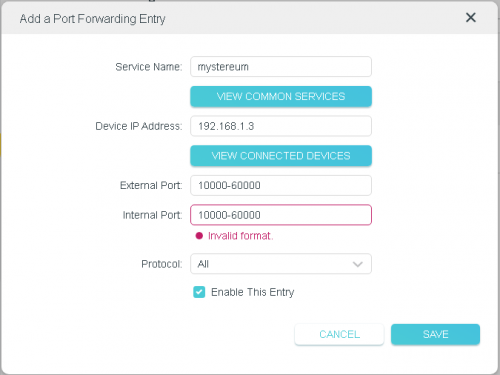
having issue opening range port on ax20,

is there anyway to do this?
frozen7
post Oct 19 2021, 12:27 PM

Getting Started
**
Junior Member
176 posts

Joined: Jul 2006
Hi. I am using Deco M4 connecting to Unifi provided router, I have no problem with the speed while using my mobile phone when i am at 3rd floor, but the speed is dramatically slower on my laptop (30++Mbps vs <10 Mpbs)
This happen only while i am at 3rd floor at my house.
Is it because of my laptop wireless adaptor? (8 years old laptop)
Thanks.
blacktubi
post Oct 19 2021, 01:46 PM

-
Group Icon
Elite
8,421 posts

Joined: Jul 2008

QUOTE(frozen7 @ Oct 19 2021, 12:27 PM)
Hi. I am using Deco M4 connecting to Unifi provided router, I have no problem with the speed while using my mobile phone when i am at 3rd floor, but the speed is dramatically slower on my laptop (30++Mbps vs <10 Mpbs)
This happen only while i am at 3rd floor at my house.
Is it because of my laptop wireless adaptor? (8 years old laptop)
Thanks.
*
You have the answer. Your laptop only support older wireless technology that’s really slow

While technically you can buy a USB WiFi dongle, I wouldn’t recommend that as your laptop probably lacks the processing power for faster speed as well
frozen7
post Oct 19 2021, 05:42 PM

Getting Started
**
Junior Member
176 posts

Joined: Jul 2006
QUOTE(blacktubi @ Oct 19 2021, 01:46 PM)
You have the answer. Your laptop only support older wireless technology that’s really slow

While technically you can buy a USB WiFi dongle, I wouldn’t recommend that as your laptop probably lacks the processing power for faster speed as well
*
Thanks. notworthy.gif
Too bad then. sweat.gif I still love my current laptop. unsure.gif
andrekua2
post Oct 20 2021, 01:03 AM

10k Club
********
All Stars
13,484 posts

Joined: Jan 2012


QUOTE(syahpian @ Oct 17 2021, 10:31 AM)
user posted image

having issue opening range port on ax20,

is there anyway to do this?
*
Why set so many ports? Just one port is enough.
syahpian
post Oct 20 2021, 01:09 AM

Enthusiast
*****
Junior Member
815 posts

Joined: Jul 2008
From: Kota Kinabalu <-> Kuala Lumpur


QUOTE(andrekua2 @ Oct 20 2021, 01:03 AM)
Why set so many ports? Just one port is enough.
*
user posted image

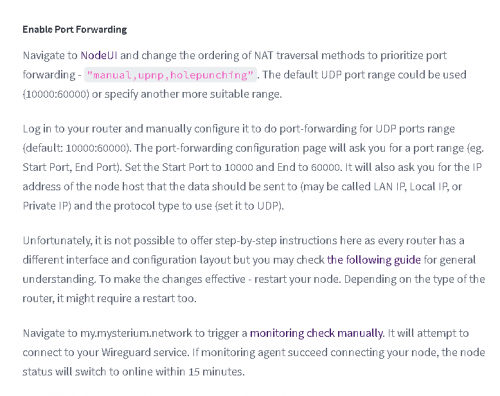
it needed for mysterium node to properly work
andrekua2
post Oct 20 2021, 01:31 AM

10k Club
********
All Stars
13,484 posts

Joined: Jan 2012


QUOTE(syahpian @ Oct 20 2021, 01:09 AM)
user posted image

it needed for mysterium node to properly work
*
It doesn't matter.. you just need to punch a hole in your router.

Hence when any external ports in the 10000~60000 triggered, it will open an internal port in your router. Just put a static number and then try check if your port forwarding works.
syahpian
post Oct 20 2021, 01:47 AM

Enthusiast
*****
Junior Member
815 posts

Joined: Jul 2008
From: Kota Kinabalu <-> Kuala Lumpur


QUOTE(andrekua2 @ Oct 20 2021, 01:31 AM)
It doesn't matter.. you just need to punch a hole in your router.

Hence when any external ports in the 10000~60000 triggered, it will open an internal port in your router. Just put a static number and then try check if your port forwarding works.
*
is there any guide that i can use for punch hole method? hmm.gif
andrekua2
post Oct 20 2021, 01:55 AM

10k Club
********
All Stars
13,484 posts

Joined: Jan 2012


QUOTE(syahpian @ Oct 20 2021, 01:47 AM)
is there any guide that i can use for punch hole method? hmm.gif
*
Normally ppl set different port number for external and internal to avoid being compromised.

Like when using torrent, you can set torrent app ports between 10000~10010. In port forwarding, set external port to 10000~10010 but for internal just set a different number like 8888 for example.
jimmy.soo
post Oct 20 2021, 07:58 PM

Happy Go Lucky
******
Senior Member
1,050 posts

Joined: Feb 2006
From: KL


Rubbish Deco M4, the WiFi on 1 of my unit is extremely slow or rendered useless. It was working fine a week ago then out of a sudden became like this.

Updated to the latest firmware (https://community.tp-link.com/en/home/forum...c/272384?page=1) and regardless of how I set it up it just won't work. Cable on the other hand works just fine.

This post has been edited by jimmy.soo: Oct 20 2021, 08:01 PM
knuxed
post Oct 23 2021, 02:50 PM

Regular
******
Senior Member
1,885 posts

Joined: Jan 2003
From: Bangsar,Kuala Lumpur


I am trying to set up an IPv6 network on my R605 but I dont know how to start?I have activated it on WAN and it is getting an ip address but my local clients are not getting an IPv6 address. I also keyed in my own

Does anyone know what I should change as per my settings below?Thanks

user posted image


If I try using DHCPv6, I am asked to key in an ip range but I dont know what range I need to put in

user posted image


Thanks

This post has been edited by knuxed: Oct 23 2021, 02:50 PM
MyProLife
post Oct 23 2021, 08:24 PM

I bully wumao & MPKL
*******
Senior Member
2,075 posts

Joined: Sep 2021
From: nowhere

QUOTE(jimmy.soo @ Oct 20 2021, 07:58 PM)
Rubbish Deco M4, the WiFi on 1 of my unit is extremely slow or rendered useless. It was working fine a week ago then out of a sudden became like this.

Updated to the latest firmware (https://community.tp-link.com/en/home/forum...c/272384?page=1) and regardless of how I set it up it just won't work. Cable on the other hand works just fine.
*
Try swapping the main and satellite deco by referring to this guide

https://www.tp-link.com/my/support/faq/2400/

This has solve my problem of slow / unstable speed of deco after firmware update, as long as you use default Unifi VLAN profile
MyProLife
post Oct 23 2021, 08:29 PM

I bully wumao & MPKL
*******
Senior Member
2,075 posts

Joined: Sep 2021
From: nowhere

QUOTE(knuxed @ Oct 23 2021, 02:50 PM)
I am trying to set up an IPv6 network on my R605 but I dont know how to start?I have activated it on WAN and it is getting an ip address but my local clients are not getting an IPv6 address. I also keyed in my own

Does anyone know what I should change as per my settings below?Thanks

user posted image
If I try using DHCPv6, I am asked to key in an ip range but I dont know what range I need to put in

user posted image
Thanks
*
Switch to Auto prefix delegation
Then use SLAAC+stateless for best compatibility

This is because Android devices (incl. Chromebook) not supported dhcpv6
knuxed
post Oct 25 2021, 11:44 AM

Regular
******
Senior Member
1,885 posts

Joined: Jan 2003
From: Bangsar,Kuala Lumpur


QUOTE(MyProLife @ Oct 23 2021, 08:29 PM)
Switch to Auto prefix delegation
Then use SLAAC+stateless for best compatibility

This is because Android devices (incl. Chromebook) not supported dhcpv6
*
If I use auto prefix delegation, it is asking me to select an interface but I cant select any interface on it.
jimmy.soo
post Oct 25 2021, 02:59 PM

Happy Go Lucky
******
Senior Member
1,050 posts

Joined: Feb 2006
From: KL


QUOTE(MyProLife @ Oct 23 2021, 08:24 PM)
Try swapping the main and satellite deco by referring to this guide

https://www.tp-link.com/my/support/faq/2400/

This has solve my problem of slow / unstable speed of deco after firmware update, as long as you use default Unifi VLAN profile
*
That's what I did, I tested it using only 1 unit each time so both are set as the main unit. Unfortuntaely WiFi connectivity and speed are still very unstable except for the speed of LAN.
bernardryan
post Oct 26 2021, 11:38 AM

bench warmer
****
Senior Member
662 posts

Joined: Mar 2006
Im currently using the WiFi Router by Time, I think its called Archer C1200. This router is in the hall, quite central for a 1.3k sqft condo.

My room at the corner can only get around 60 to 80 mbps... my TIME is on the 300mbps. I can get that when I stand next to or close to my router.

Should I get a repeater ie the re305 or re505x .... or get another router like the AX72/73?

BTW, TIME suppose to come to my house to give me a new Huawei device since the promotion of upgrade from 100mbps to 300mbps. Maybe I should wait and see if that Huawei device can do the job as a repeater and get close to 300mbps in my room.
+Mie1+
post Oct 26 2021, 10:14 PM

New Member
*
Newbie
34 posts

Joined: Aug 2017
QUOTE(+Mie1+ @ Jul 22 2021, 08:56 PM)
The issue that I have with Deco M4 is the slow wifi speed with IPTV/VLAN in Custom Mode with one port set up for LAN. This issue started after I updated the firmware to the latest one.

The issue is still not resolved.

I have resorted to using my old stock Dlink unifi router for now until a remedial firmware is issued.

I have put the Deco M4 aside. I hope temporarily.
*
I am bumping up this issue.

Has a new stable firmware been issued for Deco M4?

Equipment:
3-pack DECO M4R (US) Ver. 2.0
Firmware upgraded to: 1.5.0 Build 20210511 Rel. 34580
Date purchased: 6th June 2021

249 Pages « < 193 194 195 196 197 > » Top
 

Change to:
| Lo-Fi Version
0.0297sec    1.02    6 queries    GZIP Disabled
Time is now: 18th December 2025 - 07:46 PM