

QUOTE(DeLarafi @ Jul 5 2008, 05:10 PM)
Got My SZ already... nguhahahahahaha..

the only thing i dun like is the antennaClub VAIO
|
|
 Jul 6 2008, 01:50 AM Jul 6 2008, 01:50 AM
|
 
Senior Member
1,616 posts Joined: Jan 2005   
|
QUOTE(DeLarafi @ Jul 5 2008, 05:10 PM) Got My SZ already... nguhahahahahaha.. the only thing i dun like is the antenna |
|
|
|
|
|
Jul 6 2008, 04:56 AM
|

Junior Member
57 posts Joined: May 2005 From: Alam Impian - Shah Alam
|
Being used TZ 26 series almost 7 month, any idea how to change Hard Disk?
|
|
|
Jul 6 2008, 10:19 AM
|

Senior Member
562 posts Joined: Dec 2007 From: Ipoh,Kepong,Sg. Buloh 
|
QUOTE(DeLarafi @ Jul 2 2008, 02:30 PM) to be exact: +6MB chache  +2.50Ghz Processor  +White LED screen  +Thiner Screen +250GB hdd +0.2 KG lighter +extra minute in battery life.  +cooler  (in style term. not as the temp term) (in style term. not as the temp term) hmmmm............ hmmmm............  come to think bout it... I will.  |
|
|
Jul 6 2008, 11:28 AM
|

Senior Member
1,592 posts Joined: Jul 2005 From: Poland
|
QUOTE(hasratusaha @ Jul 6 2008, 04:56 AM) Being used TZ 26 series almost 7 month, any idea how to change Hard Disk? SSD or 2.5" HDDcredits: http://www.notebookreview.com |
|
|
Jul 6 2008, 02:32 PM
|
|
Junior Member
57 posts Joined: May 2005 From: Alam Impian - Shah Alam
|
|
|
|
 Jul 6 2008, 10:23 PM Jul 6 2008, 10:23 PM
|

Junior Member
5 posts Joined: Jul 2008
|
QUOTE(jdreamer @ Jul 3 2008, 08:51 PM) Does your vaio comes with the drivers? I've searched all over the box and couldn't find it. VAIO Drivers are found in a VAIO Recovery Center - just type VAIO Recovery Center on the Windows Vista Search areaBesides drivers, you can create Recovery Discs for your VAIO which I recommend highly in case you need to recover your VAIO to factory settings in the future. Added on July 6, 2008, 10:32 pm QUOTE(GemKing @ Jun 29 2008, 05:43 PM) I gotta clear my decision faster. So i really need help from u guys. Can anyone give me any comment about the FZ35G coz im kinda interested to own one. One more thing, is the TP model some kind of a desktop or what? If it is, then does it come with an LCD screen? Coz i don't see any LCD in its picture. VAIO TP is kinda of a desktop but with mainly notebook specs such as notebook type motherboard, chipsets etc. If not mistaken, it's part of Sony Digital Home products. HDD is very big though...read that it's 500GB on the current TP2 modelThe site is here: http://www.sony.com.my/product/vgx-tp2g/sk...site=hp_en_MY_i As far as I know there is no supplied LCD. You would need buy a separate LCD Monitor or if you have a LCD TV with HDMI connection, you could connect the TP series with it. Heard it comes supplied with a HDMI cable but I don't think it's very long one..... This post has been edited by vaio_crazy: Jul 6 2008, 10:32 PM |
|
|
|
|
|
Jul 7 2008, 02:07 AM
|
|
Junior Member
90 posts Joined: Aug 2006
|
I'm using Vaio CR35 since last week. I found the batery icon and volume icon disappear frm y system tray. I tr to get them by using the follwoing method:
right click on system tray to go to property -> notification area -> in the system icon, i can only tick or untick the "clock", volume, network and power is dimmed.... can you please teach me how to pt the volume and batery icon in the system tray permanent? thanks... |
|
|
Jul 7 2008, 05:05 AM
|
|
Senior Member
1,592 posts Joined: Jul 2005 From: Poland
|
QUOTE(jc79 @ Jul 7 2008, 02:07 AM) I'm using Vaio CR35 since last week. I found the batery icon and volume icon disappear frm y system tray. I tr to get them by using the follwoing method: do you mean to keep it permanent and disable hiding?right click on system tray to go to property -> notification area -> in the system icon, i can only tick or untick the "clock", volume, network and power is dimmed.... can you please teach me how to pt the volume and batery icon in the system tray permanent? thanks... Right click taskbar -> Property -> Notification Area -> Customize -> Choose any application you want it permanent by changing its behavior to "Show" rather than "Hide when inactive" -> Click "Ok" -> Click "Apply" This post has been edited by Miyabi: Jul 7 2008, 05:07 AM |
|
|
Jul 7 2008, 10:47 AM
|

Senior Member
1,423 posts Joined: Jan 2003 From: Yasud - Tash Murkon
|
QUOTE(Chartry @ Jul 6 2008, 01:50 AM) the only thing i dun like is the antenna SZ75 and SZ79 version dont have the antenna... no worries.Ah.. love my SuZy soooo much. Hey.. do they sell the sleeve in malaysia? |
|
|
Jul 7 2008, 11:49 AM
|
|
Senior Member
1,592 posts Joined: Jul 2005 From: Poland
|
QUOTE(DeLarafi @ Jul 7 2008, 10:47 AM) SZ75 and SZ79 version dont have the antenna... no worries. yes, they do sell it. go check out at any Sony shops.Ah.. love my SuZy soooo much. Hey.. do they sell the sleeve in malaysia? |
|
|
Jul 7 2008, 05:46 PM
|

Junior Member
39 posts Joined: Jul 2007
|
replaced my C25G with a 'ON PROMOTION' SZ75GN last thursday...
love it to the max! so light compared to the C25G... |
|
|
Jul 7 2008, 10:48 PM
|
|
Junior Member
90 posts Joined: Aug 2006
|
QUOTE(Miyabi @ Jul 7 2008, 05:05 AM) do you mean to keep it permanent and disable hiding? thank you so much... i found the icons after i restarted the system...Right click taskbar -> Property -> Notification Area -> Customize -> Choose any application you want it permanent by changing its behavior to "Show" rather than "Hide when inactive" -> Click "Ok" -> Click "Apply" Now i'm facing another problem... I accidentally deleted the recording device.... how to reinstall it?  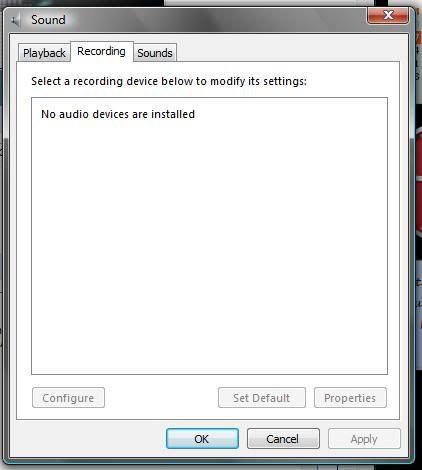 Added on July 7, 2008, 10:50 pm QUOTE(jc79 @ Jul 7 2008, 10:48 PM) thank you so much... i found the icons after i restarted the system... Just got it!!!hehe... Now i'm facing another problem... I accidentally deleted the recording device.... how to reinstall it? This post has been edited by jc79: Jul 7 2008, 10:50 PM |
|
|
Jul 8 2008, 03:49 AM
|
|
Senior Member
1,592 posts Joined: Jul 2005 From: Poland
|
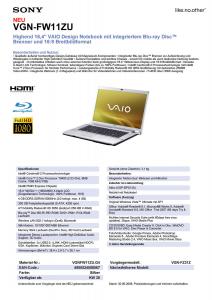
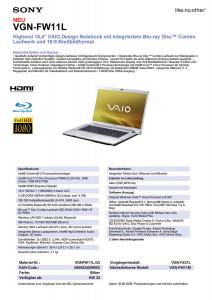
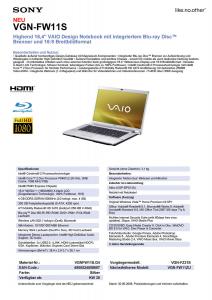
More news on VAIO SR and VAIO FW.
*note that FW is replacement to AR while SR is another 13.3" subnotebooks besides SZ series. **note that the leak info is in germany language. ***all upcoming VAIO is based on Montevina platform. ****credits for the info: http://www.notebookreview.com Attached thumbnail(s) 



|
|
|
|
|
|
Jul 11 2008, 09:03 AM
|

Senior Member
1,521 posts Joined: Jan 2003 From: Kuala Lumpur
|
sweeeeeeeeeeeeet..
looking forward to the sr series.. |
|
|
Jul 11 2008, 10:14 AM
|

Senior Member
2,220 posts Joined: May 2007
|
cool. am waiting for FW series.
|
|
|
Jul 11 2008, 12:31 PM
|
|
Junior Member
133 posts Joined: Mar 2007
|
WOW> THE ARTICLE ON LOWYAT FRONT PAGE. SONY VAIO NR. ONLY RM 2788. But kinda heavy lar. 2.9kg. But usually new model launch only after PC FAIR.. Why this time b4 pc fair launch?
This post has been edited by bmd: Jul 11 2008, 12:32 PM |
|
|
Jul 12 2008, 04:05 AM
|
|
Senior Member
1,592 posts Joined: Jul 2005 From: Poland
|
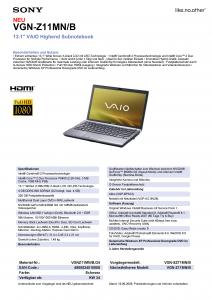
More news on VAIO Z
*note that VAIO Z is 13.1" subnotebook (switchable graphic : nvidia 9300GS (speed mode) and Intel IGP (stamina mode) successor to SZ series. **note that the leak info is in germany language. ***all upcoming VAIO is based on Montevina platform. ****credits for the info: http://www.notebookreview.com enjoy  Added on July 12, 2008, 4:08 am QUOTE(bmd @ Jul 11 2008, 12:31 PM) WOW> THE ARTICLE ON LOWYAT FRONT PAGE. SONY VAIO NR. ONLY RM 2788. But kinda heavy lar. 2.9kg. But usually new model launch only after PC FAIR.. Why this time b4 pc fair launch? VAIO NR is old series.  read the review here done by Jerry from http://www.notebookreview.com http://www.notebookreview.com/default.asp?newsID=4075  This post has been edited by Miyabi: Jul 12 2008, 04:12 AM Attached thumbnail(s) 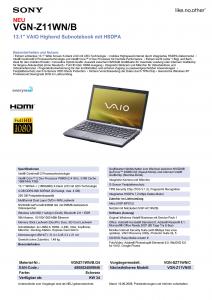

|
|
|
Jul 12 2008, 06:12 AM
|

Senior Member
2,960 posts Joined: Jan 2003
|
QUOTE(DeLarafi @ Jul 2 2008, 02:30 PM) to be exact: yahoo...my company has approved my SZ79 purchase. can't wait to get hold of it & get rid of my old, heavy, slow vaio+6MB chache +2.50Ghz Processor +White LED screen +Thiner Screen +250GB hdd +0.2 KG lighter +extra minute in battery life. +cooler (in style term. not as the temp term) hmmmm............ come to think bout it... I will. |
|
|
Jul 12 2008, 02:20 PM
|
|
Senior Member
1,592 posts Joined: Jul 2005 From: Poland
|
ajay67: good for ya and keep vaio-ing lol.
|
|
|
Jul 12 2008, 06:38 PM
|

Junior Member
42 posts Joined: Jun 2008 From: somewhere between hell and heaven
|
hi, ezinger. or anyone.
can u all help me with this? i am consider to buy VGN-CR23W/G. do anyone know what is the market price now? http://forum.lowyat.net/topic/740779 can reply to the forum above.thanks!! |
|
Topic ClosedOptions
|
| Change to: |  0.0193sec 0.0193sec
 0.21 0.21
 6 queries 6 queries
 GZIP Disabled GZIP Disabled
Time is now: 7th December 2025 - 05:02 AM |
 Quote
Quote