Welcome Guest ( Log In | Register )

Bump Topic Topic Closed RSS Feed

Outline · [ Standard ] · Linear+

 Club VAIO

views
     
jc79
post Jul 2 2008, 11:25 AM

Getting Started
**
Junior Member
90 posts

Joined: Aug 2006


QUOTE(Gred @ May 3 2008, 07:14 PM)
Hi All
I just bought a Sony VAIO CR35 last few days....I encountered a problem with the sound quality.
The sound volume is very low....even though i have set maximum for volume in vista/system/etc etc. even on the laptop itself i keep pressing + sound.
Thing gets worse when I play DVD....the volume is so soft until I can hardly hear...its like 20% volume out of 100...it is just not an acceptable level.
Anyone else having this problem ?  Please help

P/S: I am sure I have set maximum volume on my vista and laptop.....
*
Hi, I'm a new Vaio user...

Just got my CR35 on last Sunday...It's cool!! rclxms.gif

yeah.. i'm facing the same problem as yours. but i found that it depends on the DVD. I tried 2 DVD (MV), one is Jay Chow, another one is LeeHom. The result is, Jay's DVD played in a low volume but LeeHom's DVD played normal! of course I was using the same speaker level.

So i think it's DVD's matter, not CR35...hehe... biggrin.gif

correct me if i'm wrong....

btw, how to adjust the color for our laptop? I can only find the brightness adjust function... hmm.gif
jc79
post Jul 7 2008, 02:07 AM

Getting Started
**
Junior Member
90 posts

Joined: Aug 2006


I'm using Vaio CR35 since last week. I found the batery icon and volume icon disappear frm y system tray. I tr to get them by using the follwoing method:

right click on system tray to go to property -> notification area -> in the system icon, i can only tick or untick the "clock", volume, network and power is dimmed....

can you please teach me how to pt the volume and batery icon in the system tray permanent?

thanks...

jc79
post Jul 7 2008, 10:48 PM

Getting Started
**
Junior Member
90 posts

Joined: Aug 2006


QUOTE(Miyabi @ Jul 7 2008, 05:05 AM)
do you mean to keep it permanent and disable hiding?
Right click taskbar -> Property -> Notification Area -> Customize -> Choose any application you want it permanent by changing its behavior to "Show" rather than "Hide when inactive" -> Click "Ok" -> Click "Apply"
*
thank you so much... i found the icons after i restarted the system...

Now i'm facing another problem...

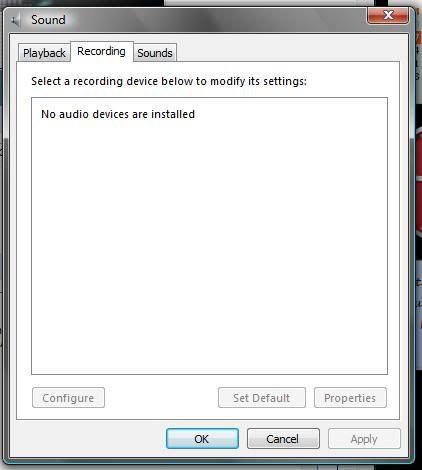
I accidentally deleted the recording device.... how to reinstall it? rclxub.gif

user posted image


Added on July 7, 2008, 10:50 pm
QUOTE(jc79 @ Jul 7 2008, 10:48 PM)
thank you so much... i found the icons after i restarted the system...

Now i'm facing another problem...

I accidentally deleted the recording device.... how to reinstall it? rclxub.gif

user posted image
*
Just got it!!!hehe... rclxms.gif

This post has been edited by jc79: Jul 7 2008, 10:50 PM
jc79
post Jul 15 2008, 11:09 PM

Getting Started
**
Junior Member
90 posts

Joined: Aug 2006


i'm using cr35g and i found that the optical drive tray is very low until when i open the tray, it is actually touch the desk surface... r u haveing the same problem? or it's the design?

thanks...
jc79
post Jul 17 2008, 05:50 PM

Getting Started
**
Junior Member
90 posts

Joined: Aug 2006


QUOTE(-celest- @ Jul 16 2008, 09:35 AM)
I'm planning to buy VAIO CR - VGN-CR32G/B this coming PC fair on 1st August.
Anyone currently using this model? Need some advice =)
*
You can consider cr 35G which costs you at RM3988 and it comes with core 2 duo. RM3988 is the promoyional price, I don;t know whether it is available or not now...

jc79
post Sep 14 2008, 11:11 PM

Getting Started
**
Junior Member
90 posts

Joined: Aug 2006


Hi guys,

I'm using the model CR35G since july and I found this....

Please click to see the picture

the chrome already peel off... can we claim the warranty? please advise...thanks
jc79
post Sep 15 2008, 11:55 AM

Getting Started
**
Junior Member
90 posts

Joined: Aug 2006


QUOTE(nevenchailj @ Sep 15 2008, 12:42 AM)
Gosh, how did it happened?

Well, if you plug the power cable to the laptop, do you feel electricity shock at the chrome part?  hmm.gif
*
sigh.... I don't know how it happened.... I understand the chrome will be peeled off one day... but won;t be so fast? I just use for 2 months leh... yeah... i can feel the electric shock sometimes...

fyi, i called the service centre just now.. the girl asked me to send over my laptop for inspection... sad.gif

jc79
post Sep 18 2008, 03:44 PM

Getting Started
**
Junior Member
90 posts

Joined: Aug 2006


QUOTE(davidmak @ Sep 15 2008, 01:03 PM)
Maybe it hit on something and scrap the chrome part?
*
i don't think so loh... anyway, I sent my laptop to the service centre and they promise to replace it for me FOC, but have to wait for the part. They are running out of stock now....

and.. their service is quite good!:)
jc79
post Sep 26 2008, 06:29 PM

Getting Started
**
Junior Member
90 posts

Joined: Aug 2006


QUOTE(alex_cyw1985 @ Sep 18 2008, 09:58 PM)
which service center?
*
North Point.... only got one in KL:)

Topic ClosedOptions
 

Change to:
| Lo-Fi Version
0.0435sec    0.33    7 queries    GZIP Disabled
Time is now: 7th December 2025 - 06:41 PM