

QUOTE(sHawTY @ Jul 16 2016, 11:05 PM)
The app will only work once you're using AsusWRT firmware
The app won't work with stock firmware

Just downloaded the app, detected right away and cool app. The app won't work with stock firmware

Cheap Asus Wifi Router Alternative, Huawei WS880 & Others
|
|
 Jul 16 2016, 11:09 PM Jul 16 2016, 11:09 PM
Show posts by this member only | IPv6 | Post
#681
|
 
Staff
72,815 posts Joined: Sep 2005 From: KUL  
|
QUOTE(sHawTY @ Jul 16 2016, 11:05 PM) The app will only work once you're using AsusWRT firmware Just downloaded the app, detected right away and cool app. The app won't work with stock firmware |
|
|
|
|
|
Jul 16 2016, 11:10 PM
|
 
Senior Member
4,454 posts Joined: Apr 2006
|
QUOTE(sHawTY @ Jul 16 2016, 11:05 PM) The app will only work once you're using AsusWRT firmware I flashed the r7000 oneThe app won't work with stock firmware Or should be a different one? Just noticed there's multiple version listed on xwrt site Seems like menu always get stuck for this version Crap, i just realized I flashed the wrong version Anyway I can get back to firmware upload setting? Samw method as before? This post has been edited by alucard89: Jul 16 2016, 11:15 PM Attached thumbnail(s) 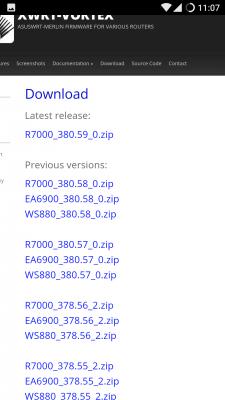
|
|
|
Jul 16 2016, 11:14 PM
Show posts by this member only | IPv6 | Post
#683
|

All Stars
14,909 posts Joined: Jul 2005 
|
QUOTE(alucard89 @ Jul 16 2016, 11:10 PM) I flashed the r7000 one That's the wrong firmware. You should've used the WS880_380.58_0.zip Or should be a different one? Just noticed there's multiple version listed on xwrt site Seems like menu always get stuck for this version  The R7000 is for Netgear Nighthawk R7000 router irwan6179 you got a friend here  This post has been edited by sHawTY: Jul 16 2016, 11:15 PM |
|
|
Jul 16 2016, 11:17 PM
Show posts by this member only | IPv6 | Post
#684
|

Senior Member
4,333 posts Joined: Jan 2003 
|
It is a wonder they didn't brick the Huawei WS880 by flashing a Netgear Nighthawk R7000 firmware into it.
 This post has been edited by raynman: Jul 16 2016, 11:18 PM |
|
|
Jul 16 2016, 11:19 PM
Show posts by this member only | IPv6 | Post
#685
|
|
All Stars
14,909 posts Joined: Jul 2005
|
QUOTE(alucard89 @ Jul 16 2016, 11:10 PM) Anyway I can get back to firmware upload setting? Samw method as before? Ask irwan6179He had the same issue What I gathered from his previous posts, flashing to a different firmware doesn't work |
|
|
Jul 16 2016, 11:21 PM
|
|
Senior Member
4,454 posts Joined: Apr 2006
|
QUOTE(raynman @ Jul 16 2016, 11:17 PM) It is a wonder they didn't brick the Huawei WS880 by flashing a Netgear Nighthawk R7000 firmware into it. Saw the latest firmware version only posted 1 file, so I just assumed it works Damn, should read more thoroughly next time  |
|
|
|
|
|
Jul 16 2016, 11:22 PM
|

Junior Member
64 posts Joined: Jan 2014
|
QUOTE(alucard89 @ Jul 16 2016, 11:10 PM) I flashed the r7000 one i also flashed to the r7000 Or should be a different one? Just noticed there's multiple version listed on xwrt site Seems like menu always get stuck for this version Crap, i just realized I flashed the wrong version Anyway I can get back to firmware upload setting? Samw method as before?  but the router still work somehow, am still waiting ppl for solution but the router still work somehow, am still waiting ppl for solution  |
|
|
Jul 16 2016, 11:22 PM
|
|
Senior Member
4,454 posts Joined: Apr 2006
|
QUOTE(sHawTY @ Jul 16 2016, 11:19 PM) Ask irwan6179 So just need to go to CFE miniweb server by using the same method?He had the same issue What I gathered from his previous posts, flashing to a different firmware doesn't work |
|
|
Jul 16 2016, 11:30 PM
|
|
Junior Member
64 posts Joined: Jan 2014
|
QUOTE(alucard89 @ Jul 16 2016, 11:22 PM) So just need to go to CFE miniweb server by using the same method? tell me the steps later if u succeed to chnge the firmware  i had the same problem as u |
|
|
Jul 16 2016, 11:33 PM
|
|
Senior Member
4,454 posts Joined: Apr 2006
|
QUOTE(raymondmc @ Jul 16 2016, 11:30 PM) tell me the steps later if u succeed to chnge the firmware Can you still go cfe firmware page by pressing reset button 15-20 secs? i had the same problem as u Gonna ask around at the 4pda page about my problem |
|
|
Jul 16 2016, 11:38 PM
|
|
Junior Member
64 posts Joined: Jan 2014
|
QUOTE(alucard89 @ Jul 16 2016, 11:33 PM) Can you still go cfe firmware page by pressing reset button 15-20 secs? i dint try to fix it, so long as the router work im ok with it, jz the led signal malfunction abit.Gonna ask around at the 4pda page about my problem |
|
|
Jul 16 2016, 11:46 PM
Show posts by this member only | IPv6 | Post
#692
|
|
All Stars
14,909 posts Joined: Jul 2005
|
QUOTE(alucard89 @ Jul 16 2016, 11:22 PM) So just need to go to CFE miniweb server by using the same method? irwan6179 previous post said that he failed to go back to the CFE miniweb server page after he flashed the wrong firmwareYou can try though irwan6179 & raymondmc Have you tried using the ASUS Firmware Restoration Utility? Not sure if it'll work but it's worth a try since XWRT-VORTEX is based on AsusWRT-Merlin which is a modified ASUS firmware Download Link: https://mega.nz/#!cEpVBL5Z How To Use It: 1. Download & install the ASUS Firmware Restoration Utility 2. Download the correct WS880 firmware & extract it to your desktop: https://mega.nz/#!99NkFRwb!1qih7sDd...A7C_Wnl2jVzTlL8 3. Power off your WS880 4. Set Static IP to your IPv4 as per the screenshot below:  5. Press the reset button on the back of your WS880 with a toothpick or a needle & hold it for 5 seconds 6. Reconnect the AC adaptor to the router while still holding the reset button then release the reset button after 10 seconds 7. Run the ASUS Firmware Restoration Utility 8. Locate the WS880 380.58 Firmware  9. Click Upload & wait for the upload to finish  10. Once the upload is completed, the router will reboot by itself & you can close the app  Warning: I don't know if this will work, I'm only following a guide I found in ASUS website. DO IT AT YOUR OWN RISK This post has been edited by sHawTY: Jul 16 2016, 11:51 PM |
|
|
Jul 16 2016, 11:56 PM
|
|
Senior Member
4,454 posts Joined: Apr 2006
|
QUOTE(raymondmc @ Jul 16 2016, 11:38 PM) i dint try to fix it, so long as the router work im ok with it, jz the led signal malfunction abit. Ok, so I managed to get back to ws880 firmwareI just went back to cfe mini server mode, and uploaded the (correct) firmware this time around. Seemd like everything working nicely LED display still there Gonna try reset it again, still not detected by asus app though This post has been edited by alucard89: Jul 16 2016, 11:58 PM |
|
|
|
|
|
Jul 17 2016, 12:00 AM
|
|
Junior Member
64 posts Joined: Jan 2014
|
QUOTE(alucard89 @ Jul 16 2016, 11:56 PM) Ok, so I managed to get back to ws880 firmware how u went back to cfe mode? repeat the hold reset button+ plug adapter only?I just went back to cfe mini server mode, and uploaded the (correct) firmware this time around. Seemd like everything working nicely LED display still there Gonna try reset it again, still not detected by asus app though |
|
|
Jul 17 2016, 12:07 AM
|
|
Senior Member
4,454 posts Joined: Apr 2006
|
QUOTE(sHawTY @ Jul 16 2016, 11:46 PM) irwan6179 previous post said that he failed to go back to the CFE miniweb server page after he flashed the wrong firmware I was still able to go back CFE miniweb server modeYou can try though irwan6179 & raymondmc TS might need to add some warning on the front page to flash proper firmware otherwise end up like me haha For the asus app, do you need to login as admin on the router settings first or just connect to the wifi |
|
|
Jul 17 2016, 12:07 AM
|
|
Senior Member
4,454 posts Joined: Apr 2006
|
QUOTE(raymondmc @ Jul 17 2016, 12:00 AM) how u went back to cfe mode? repeat the hold reset button+ plug adapter only? Yeah, same method |
|
|
Jul 17 2016, 12:10 AM
|
|
Junior Member
64 posts Joined: Jan 2014
|
QUOTE(alucard89 @ Jul 17 2016, 12:07 AM) Yeah, same method ok nice, for the asus app, jz download it n open, it will ask for ur router id pw. thats all |
|
|
Jul 17 2016, 12:21 AM
|
|
Senior Member
4,454 posts Joined: Apr 2006
|
QUOTE(raymondmc @ Jul 17 2016, 12:10 AM) ok nice, for the asus app, jz download it n open, it will ask for ur router id pw. thats all Did you get your router detected even though it's flashed with n7000 firmware?Or does the router have to be connected to internet first? My router still not connected to modem btw This post has been edited by alucard89: Jul 17 2016, 12:22 AM |
|
|
Jul 17 2016, 04:11 AM
Show posts by this member only | IPv6 | Post
#699
|

Junior Member
5 posts Joined: Jul 2016
|
Guys I need help, I've flashed into asuswrt as recommended here, however I can't seem to get my 5Ghz WiFi to work even though I already enabled it with my SSID and password. What have I missed ?
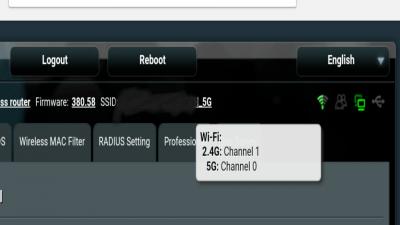

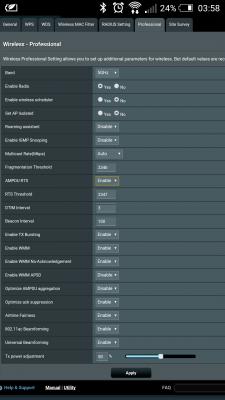
Problem solved, after factory reset 5G is working now. This post has been edited by Newbiezzzz: Jul 17 2016, 08:55 AM |
|
|
Jul 17 2016, 07:53 AM
|

Senior Member
4,231 posts Joined: Jan 2003 From: Selangor 
|
can someone upload the WS880 zip file somewhere else cos i can't get it from the xvtx.ru website
update: its ok now, managed to dl the zip This post has been edited by ycs: Jul 17 2016, 08:25 AM |
| Change to: |  0.0266sec 0.0266sec
 0.27 0.27
 6 queries 6 queries
 GZIP Disabled GZIP Disabled
Time is now: 9th December 2025 - 02:39 AM |
 Quote
Quote