Outline ·
[ Standard ] ·
Linear+
Cheap Asus Wifi Router Alternative, Huawei WS880 & Others
|
alucard89
|
 Jul 13 2016, 04:04 PM Jul 13 2016, 04:04 PM
|

|
QUOTE(irwan6179 @ Jul 13 2016, 12:33 PM) Yes, I'm using download master to download torrent. Anyone has any success accessing CFE page after flash? I can't access it anymore. Plus, I can't flash tomato or downgrade to proper version of WS880. Does asus USB apps like download master needs the hdd to be in ext4 format or is ntfs just fine? |
|
|
|
|
|
alucard89
|
Jul 13 2016, 04:20 PM
|
|
|
QUOTE(irwan6179 @ Jul 13 2016, 04:18 PM) Not sure. Mine is fat32 btw. I see, looks like ntfs won't be a problem since fat32 can be used How's the transfer speed on gigabit lan (from pc to hdd attached to routet)? |
|
|
|
|
|
alucard89
|
Jul 16 2016, 01:08 PM
|
|
|
QUOTE(sHawTY @ Jul 16 2016, 12:28 PM) Beautiful GUI, highly stable, easier to find everything, free DDNS & the capability of using the Asus Router app Can we revert back to stock firmware? Just in case Is there a tutorial for it, or can we backup current firmware version to be restored later This post has been edited by alucard89: Jul 16 2016, 01:09 PM |
|
|
|
|
|
alucard89
|
Jul 16 2016, 10:32 PM
|
|
|
Guys, so I'm trying to unlock the bootloader here
Just need some confirmation for the ip address for CFE
Should it be 192.168.3.1 or 192.168.1.1?
|
|
|
|
|
|
alucard89
|
Jul 16 2016, 10:43 PM
|
|
|
QUOTE(ycs @ Jul 16 2016, 10:38 PM) Ok, thanks Since unlock bootloader voids the warranty Could I just flash back to hk firmware/does it relock the bootloader? |
|
|
|
|
|
alucard89
|
Jul 16 2016, 11:03 PM
|
|
|
QUOTE(raynman @ Jul 13 2016, 06:37 PM) The ASUS Router Android app recognizes the Huawei WS880 (flashed with Xwrt-Vortex firmware) as an ASUS RT-AC68U. This is really great! We are buying a nearly RM1K router for only RM199!   For the router app, did you have to rename the router wifi or something? I tried using that app, but it doesn't detect the router like yours did |
|
|
|
|
|
alucard89
|
Jul 16 2016, 11:10 PM
|
|
|
QUOTE(sHawTY @ Jul 16 2016, 11:05 PM) The app will only work once you're using AsusWRT firmware The app won't work with stock firmware I flashed the r7000 one Or should be a different one? Just noticed there's multiple version listed on xwrt site Seems like menu always get stuck for this version Crap, i just realized I flashed the wrong version Anyway I can get back to firmware upload setting? Samw method as before? This post has been edited by alucard89: Jul 16 2016, 11:15 PM Attached thumbnail(s)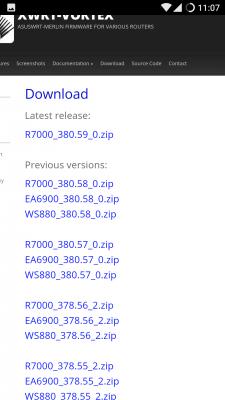
|
|
|
|
|
|
alucard89
|
Jul 16 2016, 11:21 PM
|
|
|
QUOTE(raynman @ Jul 16 2016, 11:17 PM) It is a wonder they didn't brick the Huawei WS880 by flashing a Netgear Nighthawk R7000 firmware into it.  Saw the latest firmware version only posted 1 file, so I just assumed it works Damn, should read more thoroughly next time  |
|
|
|
|
|
alucard89
|
Jul 16 2016, 11:22 PM
|
|
|
QUOTE(sHawTY @ Jul 16 2016, 11:19 PM) Ask irwan6179He had the same issue What I gathered from his previous posts, flashing to a different firmware doesn't work So just need to go to CFE miniweb server by using the same method? |
|
|
|
|
|
alucard89
|
Jul 16 2016, 11:33 PM
|
|
|
QUOTE(raymondmc @ Jul 16 2016, 11:30 PM) tell me the steps later if u succeed to chnge the firmware  i had the same problem as u Can you still go cfe firmware page by pressing reset button 15-20 secs? Gonna ask around at the 4pda page about my problem |
|
|
|
|
|
alucard89
|
Jul 16 2016, 11:56 PM
|
|
|
QUOTE(raymondmc @ Jul 16 2016, 11:38 PM) i dint try to fix it, so long as the router work im ok with it, jz the led signal malfunction abit. Ok, so I managed to get back to ws880 firmware I just went back to cfe mini server mode, and uploaded the (correct) firmware this time around. Seemd like everything working nicely LED display still there Gonna try reset it again, still not detected by asus app though This post has been edited by alucard89: Jul 16 2016, 11:58 PM |
|
|
|
|
|
alucard89
|
Jul 17 2016, 12:07 AM
|
|
|
QUOTE(sHawTY @ Jul 16 2016, 11:46 PM) irwan6179 previous post said that he failed to go back to the CFE miniweb server page after he flashed the wrong firmware
You can try though
irwan6179 & raymondmc
I was still able to go back CFE miniweb server mode TS might need to add some warning on the front page to flash proper firmware otherwise end up like me haha For the asus app, do you need to login as admin on the router settings first or just connect to the wifi |
|
|
|
|
|
alucard89
|
Jul 17 2016, 12:07 AM
|
|
|
QUOTE(raymondmc @ Jul 17 2016, 12:00 AM) how u went back to cfe mode? repeat the hold reset button+ plug adapter only? Yeah, same method |
|
|
|
|
|
alucard89
|
Jul 17 2016, 12:21 AM
|
|
|
QUOTE(raymondmc @ Jul 17 2016, 12:10 AM) ok nice, for the asus app, jz download it n open, it will ask for ur router id pw. thats all Did you get your router detected even though it's flashed with n7000 firmware? Or does the router have to be connected to internet first? My router still not connected to modem btw This post has been edited by alucard89: Jul 17 2016, 12:22 AM |
|
|
|
|
|
alucard89
|
Jul 19 2016, 08:49 PM
|
|
|
QUOTE(sHawTY @ Jul 18 2016, 11:29 AM) Already tried. Tested transferring a 6GB file. Getting 15 ~ 25MB/s only Thanks for testing with ntfs partition. Dedicated NAS is a bit too expensive and I'm a reluctant to format ext4 for my drives since I'm mostly using windows at home. |
|
|
|
|
|
alucard89
|
Oct 28 2016, 08:12 AM
|
|
|
Hi guys, mine is flashed is asuswrt
Now i haven't use it for a while now and i already forgot password to access the router settings
Can I just factory reset it back?
|
|
|
|
|
|
alucard89
|
Oct 28 2016, 09:31 AM
|
|
|
QUOTE(sHawTY @ Oct 28 2016, 09:18 AM) Yes. Pick the reset hole button for 3 seconds and you should be good to go :thumbsup: Thanks for the confirmation, Just a bit worried about the hard reset since it's no longer running original firmware I've tried the most common password I've used before and still can't login. Gotta save the login details in keep now |
|
|
|
|
|
alucard89
|
Oct 28 2016, 09:39 AM
|
|
|
QUOTE(sHawTY @ Oct 28 2016, 09:35 AM) No need to save the password lar, but instead just create something easy for you to remember, something you know you'll never forget Tapi jangan la guna "admin" pulak LOL Haha, not admin of course Previous password must have special characters or something that I forgot |
|
|
|
|
|
alucard89
|
Apr 28 2017, 02:16 PM
|
|
|
Anyone successfully use usb tethering directly to the router?
I just tested it, switched to android phone on the usb device
But is still not connected?
I'm on Firmware 380.65 btw
|
|
|
|
|
|
alucard89
|
Apr 28 2017, 02:28 PM
|
|
|
QUOTE(blacktubi @ Apr 28 2017, 02:17 PM) USB tethering is hit and miss, not all phones utilise the same protocol. It is hard to troubleshoot as well. I see, I tried usb tethering on another router running openwrt and got no problems with that |
|
|
|
|



 Quote
Quote
 0.0978sec
 0.94
0.94
 7 queries
 GZIP Disabled