


i tried to reset button behind but no good

how now???

am i the first one to brick??

This post has been edited by bsa12: Jul 17 2016, 08:03 AM
Cheap Asus Wifi Router Alternative, Huawei WS880 & Others
|
|
 Jul 17 2016, 08:01 AM Jul 17 2016, 08:01 AM
|
 
Senior Member
562 posts Joined: Feb 2009 From: klang valley   
|
i bricked the router: keying in wrong MAC address format. uploaded the bin file and now the router led blinking "Internet" for 10 minutes already
i tried to reset button behind but no good how now??? am i the first one to brick?? This post has been edited by bsa12: Jul 17 2016, 08:03 AM |
|
|
|
|
|
Jul 17 2016, 08:53 AM
|

Senior Member
1,138 posts Joined: May 2010
|
QUOTE(Newbiezzzz @ Jul 17 2016, 04:11 AM) Guys I need help, I've flashed into asuswrt as recommended here, however I can't seem to get my 5Ghz WiFi to work even though I already enabled it with my SSID and password. What have I missed ? select any no. on control channel[attachmentid=7108038][attachmentid=7108037][attachmentid=7108036]  |
|
|
Jul 17 2016, 10:12 AM
|
|
Junior Member
5 posts Joined: Jul 2016
|
QUOTE(Khalid21 @ Jul 17 2016, 08:53 AM) select any no. on control channel That does not help, no matter which channel I choose still unable to switch on 5G not sure whether is the firmware bugged. After I factory reset then only it works. |
|
|
Jul 17 2016, 10:18 AM
|
|
Junior Member
5 posts Joined: Jul 2016
|
QUOTE(alucard89 @ Jul 16 2016, 11:10 PM) I flashed the r7000 one Or should be a different one? Just noticed there's multiple version listed on xwrt site Seems like menu always get stuck for this version Crap, i just realized I flashed the wrong version Anyway I can get back to firmware upload setting? Samw method as before? QUOTE(raymondmc @ Jul 16 2016, 11:22 PM) i also flashed to the r7000 No worries, still can go back CFE to upload the right firmware again. I've done that.  but the router still work somehow, am still waiting ppl for solution but the router still work somehow, am still waiting ppl for solution  Same step, power off router, press and hold reset key, while holding reset key, power on router then use whatever browser access 192.168.1.1 CFE will appear. |
|
|
Jul 17 2016, 10:22 AM
|
|
Senior Member
562 posts Joined: Feb 2009 From: klang valley
|
Could any one share MAC address format you modify in the bin file?
|
|
|
Jul 17 2016, 10:26 AM
|
|
Junior Member
5 posts Joined: Jul 2016
|
QUOTE(bsa12 @ Jul 17 2016, 10:22 AM) Could any one share MAC address format you modify in the bin file? It should be xx:xx: |
|
|
|
|
|
Jul 17 2016, 10:26 AM
|

Senior Member
4,232 posts Joined: Jan 2003 From: Selangor 
|
QUOTE(bsa12 @ Jul 17 2016, 10:22 AM) Could any one share MAC address format you modify in the bin file? eget0macaddr=B4:30:52:38:CB:0E |
|
|
Jul 17 2016, 10:33 AM
|

Senior Member
1,029 posts Joined: Apr 2008 From: Earth
|
Has anyone faced this problem:
1) one/to out of few devices unable to connect to the router(my lenovo Z510 and note 3 neo sometime unable to connect even after install new driver) 2) keep connect and disconnecting ( happen at my z510 and ipad) Btw im on stock firmware. In this case my ancient DIR615 perform better than this WS880 except wireless range. |
|
|
Jul 17 2016, 11:13 AM
|

Junior Member
64 posts Joined: Jan 2014
|
QUOTE(alucard89 @ Jul 17 2016, 12:21 AM) Did you get your router detected even though it's flashed with n7000 firmware? Yea, the app detected the router as r7000 instead of ws880.Or does the router have to be connected to internet first? My router still not connected to modem btw I guess ur router need to be connected to Internet 1st in order for ur phone to connect the Internet and auto detect the router ure using. |
|
|
Jul 17 2016, 11:20 AM
|
 
Staff
72,818 posts Joined: Sep 2005 From: KUL 
|
QUOTE(BigSaver @ Jul 17 2016, 10:33 AM) Has anyone faced this problem: Try changing wireless channels? I used to have this kind of issue too on my previous routers, my iPad acted the same way you described above. It was solved after I changed the channel, gotta trial and error until you find the better channel.1) one/to out of few devices unable to connect to the router(my lenovo Z510 and note 3 neo sometime unable to connect even after install new driver) 2) keep connect and disconnecting ( happen at my z510 and ipad) Btw im on stock firmware. In this case my ancient DIR615 perform better than this WS880 except wireless range. |
|
|
Jul 17 2016, 11:24 AM
|
|
Senior Member
1,138 posts Joined: May 2010
|
QUOTE(Newbiezzzz @ Jul 17 2016, 10:18 AM) No worries, still can go back CFE to upload the right firmware again. I've done that. can flash back to original firmwareSame step, power off router, press and hold reset key, while holding reset key, power on router then use whatever browser access 192.168.1.1 CFE will appear. |
|
|
Jul 17 2016, 11:31 AM
|
|
Senior Member
4,232 posts Joined: Jan 2003 From: Selangor
|
how come i'm getting 2 wan ip's?
also, how to use google dns instead of tm's? solved the DNS issue 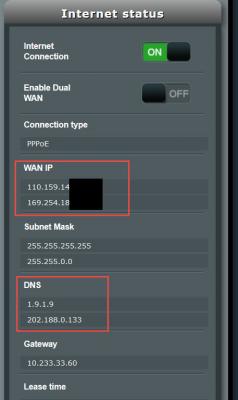
This post has been edited by ycs: Jul 17 2016, 11:40 AM |
|
|
Jul 17 2016, 02:20 PM
|

All Stars
13,475 posts Joined: Jan 2012
|
Looks like this router will cause dns problem with some older device like ipad2 on stock firmware. There's a solution though. Just goto DHCP settings, change to manual dns, enter Google dns and viola, even faster now.
|
|
|
|
|
|
Jul 17 2016, 02:37 PM
|
|
Junior Member
5 posts Joined: Jul 2016
|
QUOTE(Khalid21 @ Jul 17 2016, 11:24 AM) can flash back to original firmware Where to download original firmware? |
|
|
Jul 17 2016, 02:48 PM
|
 
Elite
8,413 posts Joined: Jul 2008 
|
QUOTE(BigSaver @ Jul 17 2016, 10:33 AM) Has anyone faced this problem: Wireless instability is a famous issue on this router as a lot of users reported it Chinese forum.1) one/to out of few devices unable to connect to the router(my lenovo Z510 and note 3 neo sometime unable to connect even after install new driver) 2) keep connect and disconnecting ( happen at my z510 and ipad) Btw im on stock firmware. In this case my ancient DIR615 perform better than this WS880 except wireless range. You can try the latest firmware which may fix the issue. |
|
|
Jul 17 2016, 03:54 PM
|
|
Senior Member
562 posts Joined: Feb 2009 From: klang valley
|
finally, flashed to asuswrt
 . thanks all for prompt help . thanks all for prompt help  but need to setup my synology NAS. connected the NAS to router, but no indicator light at all on the synology.  |
|
|
Jul 17 2016, 03:59 PM
Show posts by this member only | IPv6 | Post
#717
|

Senior Member
4,333 posts Joined: Jan 2003
|
QUOTE(bsa12 @ Jul 17 2016, 03:54 PM) finally, flashed to asuswrt If you on Unifi, you can't use LAN4 port to connect the Synology NAS. . thanks all for prompt help but need to setup my synology NAS. connected the NAS to router, but no indicator light at all on the synology. It is reserved for IPTV. Use LAN1, LAN2 or LAN3 only. |
|
|
Jul 17 2016, 04:51 PM
|

Junior Member
124 posts Joined: Jan 2003
|
anyone using tomato firmware here?
i notice tomato firmware will make the router wifi hang after using for sometime. Totally no respond for PING. will asuswrt firmware the same? This post has been edited by Vernon: Jul 17 2016, 04:55 PM |
|
|
Jul 17 2016, 05:11 PM
|

Junior Member
285 posts Joined: Jan 2006
|
sold
This post has been edited by developer: Jul 17 2016, 06:20 PM |
|
|
Jul 17 2016, 05:17 PM
|
|
Junior Member
197 posts Joined: Apr 2012
|
QUOTE(developer @ Jul 17 2016, 05:11 PM) i got 1 unit to let go. totally brand new and sealed. purchased on 5 july 2016 from sri computer. Anyone interested you can pm me. first come first serve. Bro, I am interested, already pm you, thanks.letting go at @rm 199, you pay for delivery or can COD at wangsa maju at night time, or petaling jaya near digital mall/jaya 33 during office hours. |
| Change to: |  0.0321sec 0.0321sec
 0.82 0.82
 6 queries 6 queries
 GZIP Disabled GZIP Disabled
Time is now: 9th December 2025 - 02:21 PM |
 Quote
Quote