

QUOTE(Vernon @ Jul 17 2016, 04:51 PM)
will asuswrt firmware the same?
No. Mine is running perfectly since 12 JulyNo hang, no intermittent WiFi signal lost, no sudden restart, nothing
Remember to do a factory restore before you switch to AsusWRT
Cheap Asus Wifi Router Alternative, Huawei WS880 & Others
|
|
 Jul 17 2016, 06:51 PM Jul 17 2016, 06:51 PM
Show posts by this member only | IPv6 | Post
#721
|
 
All Stars
14,909 posts Joined: Jul 2005  
|
QUOTE(Vernon @ Jul 17 2016, 04:51 PM) will asuswrt firmware the same? No. Mine is running perfectly since 12 JulyNo hang, no intermittent WiFi signal lost, no sudden restart, nothing Remember to do a factory restore before you switch to AsusWRT |
|
|
|
|
|
Jul 17 2016, 06:59 PM
Show posts by this member only | IPv6 | Post
#722
|

Senior Member
4,333 posts Joined: Jan 2003 
|
I am glad I didn't flash to AdvancedTomato as I initially planned.
Luckily sanity prevailed and I flashed to Xwrt-Vortex. It is really rock solid.  |
|
|
Jul 17 2016, 07:18 PM
|

Junior Member
124 posts Joined: Jan 2003
|
QUOTE(sHawTY @ Jul 17 2016, 06:51 PM) No. Mine is running perfectly since 12 July yup, always erase nvram, and restore factory setting after flashed new firmware, now trying advancedtomato, previously using shibby tomato, but both firmware are same, just cosmetic different.... lol, just give it a try. No hang, no intermittent WiFi signal lost, no sudden restart, nothing Remember to do a factory restore before you switch to AsusWRT   update: after reply this msg, it hanged again, no choice will flash xwrt-vortex  QUOTE(raynman @ Jul 17 2016, 06:59 PM) I am glad I didn't flash to AdvancedTomato as I initially planned. will try xwrt-vortexLuckily sanity prevailed and I flashed to Xwrt-Vortex. It is really rock solid. This post has been edited by Vernon: Jul 17 2016, 07:23 PM |
|
|
Jul 17 2016, 07:58 PM
|
 
Staff
72,820 posts Joined: Sep 2005 From: KUL 
|
My WiFi did lost intermittently, just changed the channel from 11 to 6, hope it will improve.
I'm on Xwrt-Vortex. Anybody has the same encounter as mine? |
|
|
Jul 17 2016, 08:09 PM
Show posts by this member only | IPv6 | Post
#725
|

Senior Member
1,609 posts Joined: Sep 2005 From: KL
|
QUOTE(Vernon @ Jul 17 2016, 07:18 PM) yup, always erase nvram, and restore factory setting after flashed new firmware, now trying advancedtomato, previously using shibby tomato, but both firmware are same, just cosmetic different.... lol, just give it a try. Oh need to erase nvram and restore factory settings?update: after reply this msg, it hanged again, no choice will flash xwrt-vortex will try xwrt-vortex |
|
|
Jul 17 2016, 08:13 PM
|

All Stars
13,476 posts Joined: Jan 2012
|
QUOTE(bsa12 @ Jul 17 2016, 10:22 AM) Could any one share MAC address format you modify in the bin file? At the top of your router, there is an information panel. Pull it out and you will have your mac address. |
|
|
|
|
|
Jul 17 2016, 08:24 PM
|
|
Junior Member
124 posts Joined: Jan 2003
|
QUOTE(CoffeeDude @ Jul 17 2016, 08:09 PM) Oh need to erase nvram and restore factory settings? yes, it is recommend to do these steps when flashing firmware. |
|
|
Jul 17 2016, 08:36 PM
|

Senior Member
1,029 posts Joined: Apr 2008 From: Earth
|
QUOTE(fruitie @ Jul 17 2016, 11:20 AM) Try changing wireless channels? I used to have this kind of issue too on my previous routers, my iPad acted the same way you described above. It was solved after I changed the channel, gotta trial and error until you find the better channel. QUOTE(blacktubi @ Jul 17 2016, 02:48 PM) Wireless instability is a famous issue on this router as a lot of users reported it Chinese forum. Thanks ya for the feedback. Yerp right now im trying to change the channel and see any improvement.You can try the latest firmware which may fix the issue. Btw, after few time of searching stock firmware (new version), i cant find the correct one. Even Huawei website shows nothing on its firmware. Anybody got the idea where to find latest firmware?  This post has been edited by BigSaver: Jul 17 2016, 08:37 PM |
|
|
Jul 17 2016, 08:41 PM
|

Senior Member
1,472 posts Joined: Apr 2005 From: SumwHeRe In MaLaYsIa 
|
has anyone tested the hardware nat acceleration ?
|
|
|
Jul 17 2016, 09:53 PM
Show posts by this member only | IPv6 | Post
#730
|
|
All Stars
14,909 posts Joined: Jul 2005
|
QUOTE(fruitie @ Jul 17 2016, 07:58 PM) My WiFi did lost intermittently, just changed the channel from 11 to 6, hope it will improve. All my devices is connected to the 5GHz SSID, so not sure if I'm affected by the same issue as yoursI'm on Xwrt-Vortex. Anybody has the same encounter as mine? |
|
|
Jul 17 2016, 09:58 PM
|
|
Staff
72,820 posts Joined: Sep 2005 From: KUL
|
QUOTE(sHawTY @ Jul 17 2016, 09:53 PM) All my devices is connected to the 5GHz SSID, so not sure if I'm affected by the same issue as yours Mine only mobile phone is connected to 5GHz. My laptop is a 5 years old laptop, so still 2.4GHz. So far OK since I changed in the afternoon.  |
|
|
Jul 17 2016, 10:57 PM
|

Junior Member
879 posts Joined: Jan 2007
|
Anyone flashed with OpenWRT?
|
|
|
Jul 17 2016, 11:14 PM
|

Junior Member
151 posts Joined: Oct 2008
|
|
|
|
|
|
|
Jul 18 2016, 01:44 AM
Show posts by this member only | IPv6 | Post
#734
|

Senior Member
1,941 posts Joined: Jan 2003
|
QUOTE(superdog @ Jul 17 2016, 11:14 PM) Hopefully no one buy from him then he'll press the panic button... |
|
|
Jul 18 2016, 02:42 AM
|
|
Senior Member
6,265 posts Joined: Jul 2005 From: UEP Subang Jaya
|
Why not happy with him? Buy and sell is a common thing ma.
Not like he's the only one who got chance to buy for RM199. Now he takes the risk on whether able to sell or not. |
|
|
Jul 18 2016, 08:30 AM
|
|
Senior Member
1,138 posts Joined: May 2010
|
QUOTE(LostAndFound @ Jul 18 2016, 02:42 AM) Why not happy with him? Buy and sell is a common thing ma. price still reasonable .. but he can offer to this group first . Blacktubi also chasing this ..Not like he's the only one who got chance to buy for RM199. Now he takes the risk on whether able to sell or not. |
|
|
Jul 18 2016, 08:54 AM
|

Senior Member
1,040 posts Joined: Oct 2004 From: the other side
|
Following of Shawty's suggestion(Thanks btw), I tried using Asus Recovery tool. After powerup+reset, the program detected the router but it said the router wasn't in recovery mode.
So for the twentieth time and with the renewed faith from one of the forumer who can reflash, I tried one more time to access CFE page, and this time, it's working! Now I'm back on WS880 firmware everything works as expected(specifically LED). Now enabling the stealth mode would turn off all LED except 'Internet'. This post has been edited by irwan6179: Jul 18 2016, 08:54 AM |
|
|
Jul 18 2016, 09:17 AM
|
|
All Stars
14,909 posts Joined: Jul 2005
|
QUOTE(irwan6179 @ Jul 18 2016, 08:54 AM) Now I'm back on WS880 firmware everything works as expected(specifically LED). Now enabling the stealth mode would turn off all LED except 'Internet'. Glad to know you're finally on the correct firmware  By the way, where did you find the stealth mode in AsusWRT? I tried looking for it but couldn't find anything |
|
|
Jul 18 2016, 09:28 AM
|

Senior Member
4,232 posts Joined: Jan 2003 From: Selangor 
|
anyone else getting the 2nd WAN ip? my real asus router doesn't have this 2nd WAN ip

stealth mode 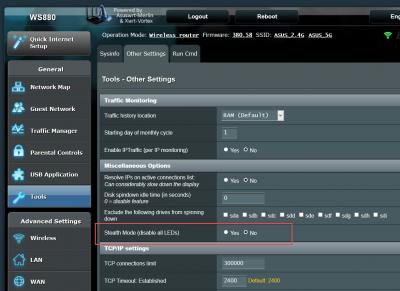
This post has been edited by ycs: Jul 18 2016, 09:32 AM |
|
|
Jul 18 2016, 09:29 AM
|

Junior Member
64 posts Joined: Jan 2014
|
QUOTE(sHawTY @ Jul 18 2016, 09:17 AM) Glad to know you're finally on the correct firmware :thumbsup: I'm not at home right now to tell you the exact location setting but if I'm not mistaken the stealth mode is located at "tools > other setting (2nd tab)"By the way, where did you find the stealth mode in AsusWRT? I tried looking for it but couldn't find anything QUOTE(ycs @ Jul 18 2016, 09:28 AM) anyone else getting the 2nd WAN ip? my real asus router doesn't have this 2nd WAN ip It seems that I also have the 2nd wan ip address tho I don't know what the use of it so long as the Internet work
This post has been edited by raymondmc: Jul 18 2016, 09:35 AM |
| Change to: |  0.0334sec 0.0334sec
 0.63 0.63
 6 queries 6 queries
 GZIP Disabled GZIP Disabled
Time is now: 10th December 2025 - 03:42 AM |
 Quote
Quote
