Outline ·
[ Standard ] ·
Linear+
Unifi Official TM UniFi High Speed Broadband Thread V23, ( -_・) ︻デ═一▸ Maxis & Time
|
fruitie
|
 Nov 27 2015, 06:07 PM Nov 27 2015, 06:07 PM
|
Rise and Shine


|
QUOTE(alucard89 @ Nov 27 2015, 06:02 PM) How exactly is your unifi setup with the xiaomi router Is it... 1) TM modem --> TM router --> Xiaomi wifi router or 2) TM modem --> Xiaomi wifi router May I know your step by step configuration with the nano router?] Cause mine's still in chinese, haven't updated it since last year ONU > TM Router > Xiaomi Router [LAN2 of TM] to [WAN of Xiaomi] Don't change anything for ONU to TM router. I previously was using TP Link MR-3420 then replaced it to Xiaomi. Nothing else changes. Just replaced my TP Link with Xiaomi.  So, in a way I didn't go through the configuration using Xiaomi page. So sorry.  |
|
|
|
|
|
Tsj261
|
Nov 27 2015, 08:19 PM
|
|
|
Anyone facing major Unifi downtime around Setapak @ Taman Sri Rampai area? No light at all.
|
|
|
|
|
|
jusbella
|
Nov 27 2015, 08:59 PM
|
|
|
Most of the server got packet loss now.
|
|
|
|
|
|
fruitie
|
Nov 27 2015, 09:04 PM
|
Rise and Shine
|
Thank God still OK in PJ now.  |
|
|
|
|
|
Tsj261
|
Nov 27 2015, 09:07 PM
|
|
|
QUOTE(jusbella @ Nov 27 2015, 08:59 PM) Most of the server got packet loss now. QUOTE(fruitie @ Nov 27 2015, 09:04 PM) Thank God still OK in PJ now. I was surfing the net half way and the line just drop and after restart modem no light whatsoever. Make report and the CSO told me my entire area seems got interruption service. Dunno want to trust him or not but gotten my report number. Now only can sit and wait |
|
|
|
|
|
azcromex
|
Nov 27 2015, 09:14 PM
|
Getting Started

|
I just got my first bill for UNIFI30 w/jumbo. when i signed up i asked numerous time if my package falls under normal RM229 or promotion RM209.
customer service even confirmed mine is RM209.
when bill arrived i was charged RM298.95.
where the heck did this number came from?
the bill doesnt state any extra things.
they just say Recurring Charges RM272.58, GST RM16.35.
scam ka apa ni
|
|
|
|
|
|
Jasley
|
Nov 27 2015, 09:21 PM
|
New Member
|
Just tweet with TM, they can't adjust my old early adopter unifi 30 monthly RM209 (with Ruby packs) to new charge RM189/month, but they can adjust the extra rm20 I'm paying to 600min free calls same as added voice pack that was offer to new unifi advance new subscribers.worth it or not?
|
|
|
|
|
|
fruitie
|
Nov 27 2015, 09:31 PM
|
Rise and Shine
|
QUOTE(Jasley @ Nov 27 2015, 09:21 PM) Just tweet with TM, they can't adjust my old early adopter unifi 30 monthly RM209 (with Ruby packs) to new charge RM189/month, but they can adjust the extra rm20 I'm paying to 600min free calls same as added voice pack that was offer to new unifi advance new subscribers.worth it or not? Not worth I guess unless you make a lot of calls?  I didn't even install my phone and HyppTV, so not an issue for me. Moreover, I doubt those people behind Twitter know anything about this... If you want discount of RM 20, need to go to TM Point.  |
|
|
|
|
|
Jasley
|
Nov 27 2015, 09:50 PM
|
New Member
|
QUOTE(fruitie @ Nov 27 2015, 09:31 PM) Not worth I guess unless you make a lot of calls? I didn't even install my phone and HyppTV, so not an issue for me. Moreover, I doubt those people behind Twitter know anything about this... If you want discount of RM 20, need to go to TM Point. I think I will rarely using voice calls service also so then I tweet back asking if I can convert the ruby packs to jumbo pack because sometimes I watched the hypptv. Now waiting for their reply. Yes they advise me to go to tm point to accept that offer, so later I will asking the rm20 discount directly there, If they mati2 cant give me Rm20 discount, so I think I will do accept the offer between the voice call or the jumbo pack (if can). Better accept than nothing for rm20 |
|
|
|
|
|
eikozai
|
Nov 27 2015, 10:31 PM
|
|
|
Guys, if you're still using DIR-615 after upgraded to Unifi Advance 30Mbps, you won't be able to utilize the full potential as the router is not capable of handling high bandwidth. I changed a new third party router and to my surprise it was stable at max speed (+- less than 1Mbps).
I've complaint to TM before and they insisted their side have no problem, and yeah, after changed the router it proved them right.
|
|
|
|
|
|
Jasley
|
Nov 27 2015, 11:11 PM
|
New Member
|
QUOTE(eikozai @ Nov 27 2015, 10:31 PM) Guys, if you're still using DIR-615 after upgraded to Unifi Advance 30Mbps, you won't be able to utilize the full potential as the router is not capable of handling high bandwidth. I changed a new third party router and to my surprise it was stable at max speed (+- less than 1Mbps). I've complaint to TM before and they insisted their side have no problem, and yeah, after changed the router it proved them right. Yes I got this experienced too before. my problem my router connection not stable after upgraded. But im not using stock Tm wifi router but also got problem. now I'm using Asus RT-N56U. really satisfied with it This post has been edited by Jasley: Nov 27 2015, 11:13 PM |
|
|
|
|
|
calvinlaw510
|
Nov 27 2015, 11:20 PM
|
|
|
QUOTE(eikozai @ Nov 27 2015, 10:31 PM) Guys, if you're still using DIR-615 after upgraded to Unifi Advance 30Mbps, you won't be able to utilize the full potential as the router is not capable of handling high bandwidth. I changed a new third party router and to my surprise it was stable at max speed (+- less than 1Mbps). I've complaint to TM before and they insisted their side have no problem, and yeah, after changed the router it proved them right. The wifi signal are weak for dir-615, if u wanna get max speed then u have to be near to the router. But if u are using lan cable then u can get max speed all the time...i am still using the dir-615 with lan cable for my pc, no problem to get max speed 50Mbps with lan cable, but i gonna buy better router to replace it bcos only manage to get around 30Mbps on my wifi devices on ground floor as the router are at 1st floor. This post has been edited by calvinlaw510: Nov 27 2015, 11:25 PM |
|
|
|
|
|
kingsora
|
Nov 27 2015, 11:27 PM
|
|
|
QUOTE(eikozai @ Nov 27 2015, 10:31 PM) Guys, if you're still using DIR-615 after upgraded to Unifi Advance 30Mbps, you won't be able to utilize the full potential as the router is not capable of handling high bandwidth. I changed a new third party router and to my surprise it was stable at max speed (+- less than 1Mbps). I've complaint to TM before and they insisted their side have no problem, and yeah, after changed the router it proved them right. What router you currently use? Currently scouting around for new router. Hopefully can get sub 200. This post has been edited by kingsora: Nov 27 2015, 11:30 PM |
|
|
|
|
|
zher4883
|
Nov 28 2015, 08:38 AM
|
|
|
QUOTE(kingsora @ Nov 27 2015, 11:27 PM) What router you currently use? Currently scouting around for new router. Hopefully can get sub 200. Sub 200 router can't max out 50mbps most of the time. But still perfect for 30mbps. I would recommend tl-wr1043nd around 170 |
|
|
|
|
|
kingsora
|
Nov 28 2015, 12:25 PM
|
|
|
QUOTE(zher4883 @ Nov 28 2015, 08:38 AM) Sub 200 router can't max out 50mbps most of the time. But still perfect for 30mbps. I would recommend tl-wr1043nd around 170 Thanks for the recommendation. It's not dual band right? Will it affect the WiFi speed if I don't get dual band router? |
|
|
|
|
|
vknight
|
Nov 28 2015, 01:12 PM
|
|
|
Guys the is the model they gave me last week. Its older model.Connection seems to be ok. Should I ask them to change? Or just leave it be? This post has been edited by vknight: Nov 28 2015, 01:15 PM Attached thumbnail(s)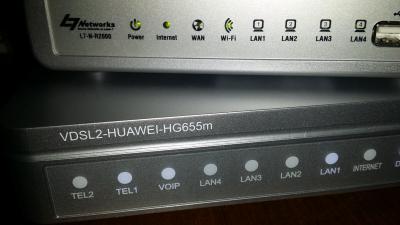
|
|
|
|
|
|
zher4883
|
Nov 28 2015, 01:14 PM
|
|
|
QUOTE(kingsora @ Nov 28 2015, 12:25 PM) Thanks for the recommendation. It's not dual band right? Will it affect the WiFi speed if I don't get dual band router? That's not dual band Most likely. Most networking experts recommend at least dual band router for 50mbps |
|
|
|
|
|
afroboy
|
Nov 28 2015, 04:59 PM
|
Getting Started
|
Can I upgrade to 30 mbps through their website? Or should I go to tm center?
|
|
|
|
|
|
Hezegroth
|
Nov 28 2015, 05:37 PM
|
|
|
sign getting serious time out problem on ffxiv server tornberry 124.150.157.30
using celcom tracert reach the ip but when using unifi stuck at 115.132.110.*
This post has been edited by Hezegroth: Nov 28 2015, 07:04 PM
|
|
|
|
|
|
onlinepaycheck
|
Nov 28 2015, 06:51 PM
|
|
|
QUOTE(afroboy @ Nov 28 2015, 04:59 PM) Can I upgrade to 30 mbps through their website? Or should I go to tm center? Go to dealers (counters in mall/shops or online forumers) I think it's faster... because they earn commission... I went to dealer immediate log in to system and register and put in schedule into system via his computer based on earliest available installation time. And it's done just like that. |
|
|
|
|



 Quote
Quote


 0.0386sec
 0.61
0.61
 6 queries
 GZIP Disabled