Outline ·
[ Standard ] ·
Linear+
Unifi Official TM UniFi High Speed Broadband Thread V23, ( -_・) ︻デ═一▸ Maxis & Time
|
zher4883
|
 Nov 28 2015, 06:58 PM Nov 28 2015, 06:58 PM
|

|
QUOTE(Hezegroth @ Nov 28 2015, 05:37 PM) sign getting serious time out problem on ffxiv server tornberry 124.150.157.* using celcom tracert reach the ip but when using unifi stuck at 115.132.110.* Do not post your sensitive information here for your own safety. Post like how I quote your post |
|
|
|
|
|
Colonel Cabuk
|
Nov 28 2015, 07:04 PM
|
|
|
I'm on the Unifi 30 (RM 179) with 600 minute voicepack (RM 20). My question is: why am I being charged for the calls? I'm on the 600 minutes plan. fylon, was this your problem? Attached thumbnail(s)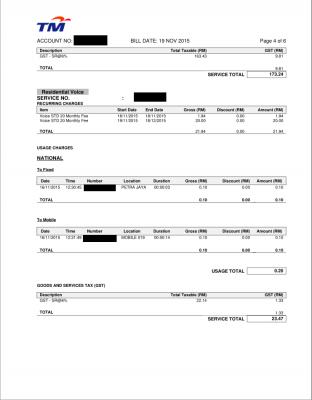

|
|
|
|
|
|
fylon
|
Nov 28 2015, 07:31 PM
|
|
|
QUOTE(Colonel Cabuk @ Nov 28 2015, 07:04 PM) I'm on the Unifi 30 (RM 179) with 600 minute voicepack (RM 20). My question is: why am I being charged for the calls? I'm on the 600 minutes plan. fylon, was this your problem? It's the voicepack covered mobile call? I yet get my bill yet tho. I sub Advance30 + ruby pack (for my parents) so total is 189. My voice pack seems to be terbalik with yours.  
|
|
|
|
|
|
kebeckham7
|
Nov 28 2015, 07:41 PM
|
|
|
I got tp-link ac1750 at cheaper price from all i have google. Lazada plus 15% cimb sat&sun discount true mobile app. 
. What do uguys think. including postage  This post has been edited by kebeckham7: Nov 28 2015, 07:54 PM This post has been edited by kebeckham7: Nov 28 2015, 07:54 PM |
|
|
|
|
|
Colonel Cabuk
|
Nov 28 2015, 07:47 PM
|
|
|
QUOTE(fylon @ Nov 28 2015, 07:31 PM) It's the voicepack covered mobile call? I yet get my bill yet tho. I sub Advance30 + ruby pack (for my parents) so total is 189. My voice pack seems to be terbalik with yours.
Advace 30 + Voice Pack 20 here, total is 199. Are my calls charged because it's not 19/11 yet when I made them? |
|
|
|
|
|
agy4699
|
Nov 28 2015, 08:33 PM
|
New Member

|
hello guys, i just upgrading from vip5 to 30mbps package.. is it normal to get 20mbps-ish speed when connected to handphone or laptop via wifi? i always get around 15-20mbps on ookla speedtest..
|
|
|
|
|
|
Fantasia
|
Nov 28 2015, 08:51 PM
|
|
|
guys, i have experiencing issue when i try to surf some website. it couldnt open those websites when i am using microsoft windows but i can access to the website when i use my linux os in the same computer or my phone which also connected to the same wifi. apparently this is not happening to my pc only, same thing happen to my sister laptop. it didnt bothering much previously until today i am fuming when i am trying to order pizza from domino's online from my sister computer which doesnt have alternative OS other than windows.
previously it was only www.theverge.com and now out of sudden, www.dominos.com.my also affected. in fact, my connection domino's website interrupted half way when i am ordering and couldnt access to it anymore. i checked my router setting and my firewall settings from my windows and couldnt find anything odd. and it only happened when we use windows OS and our OS is genuine.
note: i did overcome this issue in windows using those free proxy connection but since they r free, they r slow and some time i couldnt display the website properly. well, it's free so i have no right to complain.
This post has been edited by Fantasia: Nov 28 2015, 08:54 PM
|
|
|
|
|
|
zher4883
|
Nov 28 2015, 09:13 PM
|
|
|
QUOTE(agy4699 @ Nov 28 2015, 08:33 PM) hello guys, i just upgrading from vip5 to 30mbps package.. is it normal to get 20mbps-ish speed when connected to handphone or laptop via wifi? i always get around 15-20mbps on ookla speedtest.. If you are using router provided by TM, you wouldn't get good speed on wifi. If you are able to hit at least 28 on LAN, you can confirm the problem is poor wifi reception. |
|
|
|
|
|
onlinepaycheck
|
Nov 28 2015, 09:13 PM
|
|
|
QUOTE(agy4699 @ Nov 28 2015, 08:33 PM) hello guys, i just upgrading from vip5 to 30mbps package.. is it normal to get 20mbps-ish speed when connected to handphone or laptop via wifi? i always get around 15-20mbps on ookla speedtest.. I am getting 20-30Mbps on both laptop and phone...... same floor wifi speedtest... |
|
|
|
|
|
ycs
|
Nov 28 2015, 09:17 PM
|
|
|
QUOTE(agy4699 @ Nov 28 2015, 08:33 PM) hello guys, i just upgrading from vip5 to 30mbps package.. is it normal to get 20mbps-ish speed when connected to handphone or laptop via wifi? i always get around 15-20mbps on ookla speedtest.. try change your channel to either 1,6 or 11, 40MHz bandwidth |
|
|
|
|
|
Colonel Cabuk
|
Nov 28 2015, 09:41 PM
|
|
|
QUOTE(Fantasia @ Nov 28 2015, 08:51 PM) guys, i have experiencing issue when i try to surf some website. it couldnt open those websites when i am using microsoft windows but i can access to the website when i use my linux os in the same computer or my phone which also connected to the same wifi. apparently this is not happening to my pc only, same thing happen to my sister laptop. it didnt bothering much previously until today i am fuming when i am trying to order pizza from domino's online from my sister computer which doesnt have alternative OS other than windows. previously it was only www.theverge.com and now out of sudden, www.dominos.com.my also affected. in fact, my connection domino's website interrupted half way when i am ordering and couldnt access to it anymore. i checked my router setting and my firewall settings from my windows and couldnt find anything odd. and it only happened when we use windows OS and our OS is genuine. note: i did overcome this issue in windows using those free proxy connection but since they r free, they r slow and some time i couldnt display the website properly. well, it's free so i have no right to complain. Try Google DNS or OpenDNS. |
|
|
|
|
|
blacktubi
|
Nov 28 2015, 09:41 PM
|
-

|
A simple diagnostic for those facing wireless issue. agy4699- Connect your computer to your router via a wired Ethernet connection to isolate the issue to wireless. Conduct a speedtest and make sure you are able to achieve a decent speed.
- Stand beside your wireless router. The throughput (speed) of wireless deteriorates as distance get further. If you manage to achieve the full speed when you are beside your router but not when you are further away, you probably need a stronger wireless router or a repeater.
- If you stay at a location with a lot of wireless routers (apartment and condo), the congestion and interference on the 2.4Ghz band deteriorate the performance. Try configuring your wireless router to a least congested channel. You can use the Wifi Analyzer app on your Android device to determine the best channel.
- You tried everything above and you are still unable to achieve 30Mbps on Wireless. You probably need a new wireless router. Get a dual band wireless router, they are getting cheaper. If budget allows, get a Wireless AC router.
This post has been edited by blacktubi: Nov 28 2015, 09:43 PM |
|
|
|
|
|
wyh
|
Nov 28 2015, 11:20 PM
|
|
|
Anyway release their unifi 3rd party router ? finding cheapo used stuff to replace stock router
|
|
|
|
|
|
stanum
|
Nov 28 2015, 11:21 PM
|
|
|
For the past 1 month using the 30 mbps advance plan ( im new subscriber anyway), i ca n remember for 30 days, i can only ahieve 30mbps around 20 days. while the other 10 days, is the time when the line is very suck to the max, get <1Mbps . calling 100 line almost everyday. Im really tired of this. maybe i should ask for termination as the services is no up to the par.
|
|
|
|
|
|
agy4699
|
Nov 28 2015, 11:21 PM
|
New Member
|
QUOTE(blacktubi @ Nov 28 2015, 09:41 PM) A simple diagnostic for those facing wireless issue. agy4699
- Connect your computer to your router via a wired Ethernet connection to isolate the issue to wireless. Conduct a speedtest and make sure you are able to achieve a decent speed.
- Stand beside your wireless router. The throughput (speed) of wireless deteriorates as distance get further. If you manage to achieve the full speed when you are beside your router but not when you are further away, you probably need a stronger wireless router or a repeater.
- If you stay at a location with a lot of wireless routers (apartment and condo), the congestion and interference on the 2.4Ghz band deteriorate the performance. Try configuring your wireless router to a least congested channel. You can use the Wifi Analyzer app on your Android device to determine the best channel.
- You tried everything above and you are still unable to achieve 30Mbps on Wireless. You probably need a new wireless router. Get a dual band wireless router, they are getting cheaper. If budget allows, get a Wireless AC router.
thnk you blacktubi for your help.. i tested with two different spot, when im in my room and near router (really near).. so im aware of the obstacle that will affect the speed, so i dont care the speed on my room.. the thing become more weird even i test the speed near router the speed still not satisfy me.. getting around 15-20mbps only.. and one more, my laptop result is really low around 5mbps (tested too close to the router) but my phone getting around 22mbps.. pening bro.. This post has been edited by agy4699: Nov 28 2015, 11:23 PM |
|
|
|
|
|
agy4699
|
Nov 28 2015, 11:28 PM
|
New Member
|
QUOTE(ycs @ Nov 28 2015, 09:17 PM) try change your channel to either 1,6 or 11, 40MHz bandwidth thnks bro for workaround but im still noob about internet thingy.. so i need to change channel on my router or modem or my devices?  |
|
|
|
|
|
jusbella
|
Nov 28 2015, 11:29 PM
|
|
|
Router. QUOTE(agy4699 @ Nov 28 2015, 11:28 PM) thnks bro for workaround but im still noob about internet thingy.. so i need to change channel on my router or modem or my devices? |
|
|
|
|
|
agy4699
|
Nov 28 2015, 11:36 PM
|
New Member
|
QUOTE(jusbella @ Nov 28 2015, 11:29 PM) thanks jusbella, will try to search how to video on utube.. hehehe.. |
|
|
|
|
|
Fantasia
|
Nov 29 2015, 01:04 AM
|
|
|
QUOTE(Colonel Cabuk @ Nov 28 2015, 09:41 PM) Try Google DNS or OpenDNS. i already used google dns. can u access to the 2 websites i mentioned using windows machine? i have no problem going to those websites when i am back at my hostel which using maxis fibre. |
|
|
|
|
|
Colonel Cabuk
|
Nov 29 2015, 01:18 AM
|
|
|
QUOTE(Fantasia @ Nov 29 2015, 01:04 AM) i already used google dns. can u access to the 2 websites i mentioned using windows machine? i have no problem going to those websites when i am back at my hostel which using maxis fibre. Yes I can. Windows 7, Unifi Advance 30. |
|
|
|
|



 Quote
Quote








 0.0347sec
 1.13
1.13
 6 queries
 GZIP Disabled