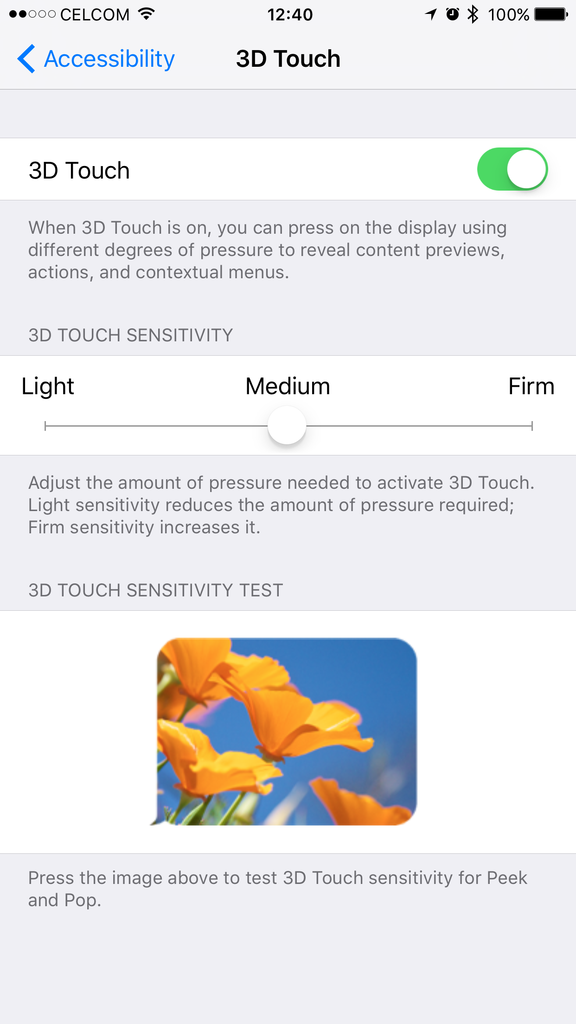
3D Touch can be used with your own measure of how hard you want to press into the screen. The settings are available in the "Accessibility" section (why it's here, Apple? Why not in the Settings tab?).
I find that I'm fine with "Medium", although others cant master it and prefer to use "Light" instead. I find that "Light" makes it more likely for me to activate the "jiggle to uninstall apps" than "3D Touch". "Firm" is like really pressing hard, and I wouldn't advise using this, especially for ladies (or Ah Bengs) with long fingernails.

That picture below, you can test and to try how sensitive you want the 3D Touch to be, which is perfect to use the "Peek and Pop" feature. The pressure recognized is analog in nature, meaning that it does not register pressures as 1s and zeroes or a light switch (on and off), it detects increasing pressure as harder you press. Press in firm the picture pops into "preview" mode at full screen, press in even firmer, the photo pops into "Photos" app for full manipulation.
4K recording has been steady and pretty consistent in the OIS department. It may seem that color is much more pleasing on AMOLED screens on Samsung devices, but upon reviewing them for editing on my Mac, I'd prefer the iPhone's 4K recordings, less sharpening, soft natural quality to them.
LivePhoto is nice, I left it on still for not having to worry about storage space on this 128GB model. I'd consider leaving it off for smaller capacity models. LivePhoto thumbnail scrolling has this nice stop-motion quality to it when viewing through them, makes them stand out against all the normal still shots of the past.
Touch ID almost feels like a button now instead of a scanner, the moment you press it in, it grabs your fingerprint scans so fast, you'd swear it's works like a button already. For making sure it's not a fluke, I tried to see if it does unlock on an unscanned finger, and nope, it's a lockout.
First thing I did was turn off WiFi Assist, data hogger that thing, I had instances of utilizing 80% of my data quota SMSes coming in from Celcom more often than before it was available. Signal retrieval is pretty much improved all around, I used to have a dead zone around my place which consistently drops signal to 1 bar, and now, they're at least 4 bars on 4G. Full bars on 3G if I manually select it.
"Blazingly fast" would be the word I'd describe it. Bear in mind the iPhone 6 Plus isn't a slouch, but keeping up with my typing would be a task for the 6 Plus on iOS 9, the 6S Plus does that and keeps 20+ odd apps running in the background (during first setup I had more than that, approaching 30, to cross log-in between apps that signs in with social media credentials), and it is as fast as when I first opened it out of the box.
I rarely game on this, other than for the occasional Crossy Road and the new "The Martian" game with Apple Watch support on it. Battery life has improved so much that I'm comfortable leaving my Anker battery pack at home and travel light when I'm in town, even when the iPhone is tied to my Apple Watch via Bluetooth and notifications streaming in.
I use Apple Music (now discontinued, as I found Tidal to be better) and Tidal lossless music streaming subscription service HEAVILY when I'm outside, and this takes a hit on the battery life, but even so, it still lasts more than a day. When I'm with my Sennheiser Momentum M2, and in the mood for better quality than streaming music, I use the Onkyo HF player app and Kaisertone app to play FLAC files coded at 16bit/44.1kHz and DSD files through DoP conversion at 24bit 192kHz, and these takes even heavier toll than simple MP3 playback. Pipe the digital feed to the iFi or Hugo portable DACs, put on the Momentum, and the world outside fades away. By the end of the day, I usually get the 10% battery warning, but my end of the day usually ends around 11pm or midnight.
This post has been edited by stringfellow: Oct 5 2015, 01:13 PM 

 Oct 5 2015, 11:28 AM


 Quote
Quote








 ) and if I didn't turn WiFi Assist off, and those WiFi signal drops in quality and WiFi Assist kicks in, I'll be sucked dry out of my data quota in no time.
 Thats why I turned it off on day one I upgraded to IOS 9.





 0.0304sec
 0.77
0.77
 6 queries
 GZIP Disabled