Welcome Guest ( Log In | Register )

488 Pages « < 478 479 480 481 482 > » Bottom

Outline · [ Standard ] · Linear+

 The Official Maxis FTTH Thread | v5, Maxis Home Fibre Internet, from RM89

views
     
cyberic
post Aug 20 2025, 09:02 PM

Regular
******
Senior Member
1,129 posts

Joined: Jan 2003


QUOTE(fruitie @ Aug 20 2025, 04:18 PM)
Well, if you have no issue with UniFi currently you won't have issue with Maxis. My condo is also using UniFi infra and I'm using Maxis Fiber, it has been three years, TM was not required to fix anything that specific for my unit. If it is any outage, it affects all users regardless UniFi, Maxis, Digi or etc, TM will still fix for everyone.

I also work from home exclusively smile.gif
*
I had broken underground fiber twice due to rat frew years ago. Last repair they do splicing, not sure if my cable can get very good reading for 1 Gb. Furthermore, Maxis mobile coverage is not great in my area. Maybe next round.
fruitie
post Aug 20 2025, 09:15 PM

Rise and Shine
Group Icon
Staff
72,804 posts

Joined: Sep 2005
From: KUL

QUOTE(cyberic @ Aug 20 2025, 09:02 PM)
I had broken underground fiber twice due to rat frew years ago. Last repair they do splicing,  not sure if my cable can get very good reading for 1 Gb. Furthermore,  Maxis mobile coverage is not great in my area. Maybe next round.
*
Maxis Fiber is not related to mobile coverage. smile.gif If you are referring to the backup line, then yes.

Anyway, use whatever suits you. I have both UniFi and Maxis Fiber at two different houses. I also have 5G router and mobile broadband as spare. laugh.gif
Raymond T.
post Aug 22 2025, 12:09 PM

Glock 19 Holder
******
Senior Member
1,368 posts

Joined: Aug 2010
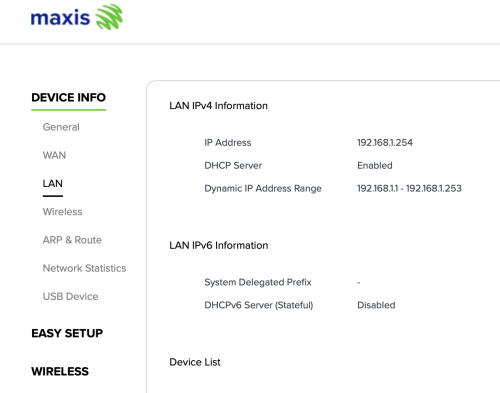
user posted image

How to enable LAN IPv6
Keatsan
post Aug 22 2025, 02:12 PM

If it ain't broke, don't 6ix it
******
Senior Member
1,218 posts

Joined: Jan 2010
From: Today 06.09 am
QUOTE(Raymond T. @ Aug 22 2025, 12:09 PM)
user posted image

How to enable LAN IPv6
*
If I remember correctly, it's under WAN settings for ipv6 WAN.

Not sure if you can only enable ipv6 without WAN ipv6.

This post has been edited by Keatsan: Aug 22 2025, 02:13 PM
Raymond T.
post Aug 22 2025, 04:05 PM

Glock 19 Holder
******
Senior Member
1,368 posts

Joined: Aug 2010
QUOTE(Keatsan @ Aug 22 2025, 02:12 PM)
If I remember correctly, it's under WAN settings for ipv6 WAN.

Not sure if you can only enable ipv6 without WAN ipv6.
*
WAN IPv6 seems enabled but unsure is it my login account got any configuration restrictions.

I'm using the user & password on the back of maxis router to access
Keatsan
post Aug 25 2025, 01:26 PM

If it ain't broke, don't 6ix it
******
Senior Member
1,218 posts

Joined: Jan 2010
From: Today 06.09 am
QUOTE(Raymond T. @ Aug 22 2025, 04:05 PM)
WAN IPv6 seems enabled but unsure is it my login account got any configuration restrictions.

I'm using the user & password on the back of maxis router to access
*
If it's the KAON wifi 6 router, the admin login should be either below.

Option A
username: administrator
password: router serial number

Option B
username: MaxARSysOpr
password: !!bestHOME!!XXXX (last 4 s/n)

Then try Enable the DHCP Server for both IPv4 & IPv6
Then use Stateless ipv6

This post has been edited by Keatsan: Aug 25 2025, 01:28 PM
Raymond T.
post Aug 26 2025, 12:20 PM

Glock 19 Holder
******
Senior Member
1,368 posts

Joined: Aug 2010
QUOTE(Keatsan @ Aug 25 2025, 01:26 PM)
If it's the KAON wifi 6 router, the admin login should be either below.

Option A
username: administrator
password: router serial number

Option B
username: MaxARSysOpr
password: !!bestHOME!!XXXX (last 4 s/n)

Then try Enable the DHCP Server for both IPv4 & IPv6
Then use Stateless ipv6
*
Thank you 😊 managed to access using option a
QuantumEdge
post Aug 27 2025, 05:53 PM

Regular
******
Senior Member
1,595 posts

Joined: Jan 2016


Maxis users, have you encountered any slowdowns recently? Especially during the night?
dev/numb
post Aug 27 2025, 09:32 PM

On my way
****
Junior Member
691 posts

Joined: Nov 2021
QUOTE(QuantumEdge @ Aug 27 2025, 05:53 PM)
Maxis users, have you encountered any slowdowns recently? Especially during the night?
*
So far so good, but maybe I’m not the best person to ask since my main browsing devices are connected to a VPN server (server in KL, I’m in JB) via router full-time. Sometimes latency might go up a bit at night compared to day time, but still comfortably around 20ms. Occasionally might drop a few packets, but doesn’t affect anything I do. Not a gamer so cannot comment on gaming latency. Also disabled IPv6 (to prevent VPN leaks) so cannot comment on that either.

This post has been edited by dev/numb: Aug 27 2025, 09:35 PM
QuantumEdge
post Aug 27 2025, 11:40 PM

Regular
******
Senior Member
1,595 posts

Joined: Jan 2016


QUOTE(dev/numb @ Aug 27 2025, 09:32 PM)
So far so good, but maybe I’m not the best person to ask since my main browsing devices are connected to a VPN server (server in KL, I’m in JB) via router full-time. Sometimes latency might go up a bit at night compared to day time, but still comfortably around 20ms. Occasionally might drop a few packets, but doesn’t affect anything I do. Not a gamer so cannot comment on gaming latency. Also disabled IPv6 (to prevent VPN leaks) so cannot comment on that either.
*
So not Unifi level of bad then?
Geez, U is not usable in the night recently
fruitie
post Aug 28 2025, 10:54 AM

Rise and Shine
Group Icon
Staff
72,804 posts

Joined: Sep 2005
From: KUL

QUOTE(QuantumEdge @ Aug 27 2025, 11:40 PM)
So not Unifi level of bad then?
Geez, U is not usable in the night recently
*
Is it? I think location based kot. I’m now living at my sister’s house in Seremban and her house is equipped with UniFi 500Mbps, it is good. Full speed all the time.
dev/numb
post Aug 28 2025, 12:31 PM

On my way
****
Junior Member
691 posts

Joined: Nov 2021
QUOTE(QuantumEdge @ Aug 27 2025, 11:40 PM)
So not Unifi level of bad then?
Geez, U is not usable in the night recently
*
For my needs, no contest. Maxis ain’t perfect but at the very least it seems like their network engineers went to school. My only regret was not switching sooner. All the blood I vomited from TM’s nightly international peering nonsense, I will never be able to claim back.
QuantumEdge
post Aug 28 2025, 05:29 PM

Regular
******
Senior Member
1,595 posts

Joined: Jan 2016


QUOTE(fruitie @ Aug 28 2025, 10:54 AM)
Is it? I think location based kot. I’m now living at my sister’s house in Seremban and her house is equipped with UniFi 500Mbps, it is good. Full speed all the time.
*
It is really bad, basically everynight from 7PM onwards the internet is basically unusable
And my traffic was gettting routed to random COUNTRIES instead of the closest servers
Such things never happened during my 2 years with Maxis
Cloudflare speedtest PL and latency is over the rooft, plus only getting 10% of my subscribed speed as bonus

QUOTE(dev/numb @ Aug 28 2025, 12:31 PM)
For my needs, no contest. Maxis ain’t perfect but at the very least it seems like their network engineers went to school. My only regret was not switching sooner. All the blood I vomited from TM’s nightly international peering nonsense, I will never be able to claim back.
*
Yes, Maxis is not the top ISP in my mine but they are the most average one for sure
I had to cancelled my online tuitions because it was bad enough I couldnt open online materials mega_shok.gif
fruitie
post Aug 28 2025, 05:34 PM

Rise and Shine
Group Icon
Staff
72,804 posts

Joined: Sep 2005
From: KUL

QUOTE(QuantumEdge @ Aug 28 2025, 05:29 PM)
It is really bad, basically everynight from 7PM onwards the internet is basically unusable
And my traffic was gettting routed to random COUNTRIES instead of the closest servers
Such things never happened during my 2 years with Maxis
Cloudflare speedtest PL and latency is over the rooft, plus only getting 10% of my subscribed speed as bonus
Yes, Maxis is not the top ISP in my mine but they are the most average one for sure
I had to cancelled my online tuitions because it was bad enough I couldnt open online materials mega_shok.gif
*
OMG, that's really bad. As I'm in a Global role, so my daily online meetings via MS Teams only start at 8pm which is the peak time, but never once I face any issue and sometimes I even have to turn on my camera during the calls.
QuantumEdge
post Aug 30 2025, 05:54 PM

Regular
******
Senior Member
1,595 posts

Joined: Jan 2016


QUOTE(fruitie @ Aug 28 2025, 05:34 PM)
OMG, that's really bad. As I'm in a Global role, so my daily online meetings via MS Teams only start at 8pm which is the peak time, but never once I face any issue and sometimes I even have to turn on my camera during the calls.
*
Because of the horrible routing, I considered taking Allo (either directly or Maxis under their infra) as my backup fibre plan while I serve Unifi's contract for another 18 months.
My area is covered by both Allo and Unifi's infra, after checking with Allo's CS they told me it is impossible for customer to have both Unifi and Allo service in the same premise despite they are on different infra.
fruitie
post Aug 30 2025, 06:30 PM

Rise and Shine
Group Icon
Staff
72,804 posts

Joined: Sep 2005
From: KUL

QUOTE(QuantumEdge @ Aug 30 2025, 05:54 PM)
Because of the horrible routing, I considered taking Allo (either directly or Maxis under their infra) as my backup fibre plan while I serve Unifi's contract for another 18 months.
My area is covered by both Allo and Unifi's infra, after checking with Allo's CS they told me it is impossible for customer to have both Unifi and Allo service in the same premise despite they are on different infra.
*
Why don’t you try 5G broadband as backup?
QuantumEdge
post Aug 30 2025, 07:11 PM

Regular
******
Senior Member
1,595 posts

Joined: Jan 2016


QUOTE(fruitie @ Aug 30 2025, 06:30 PM)
Why don’t you try 5G broadband as backup?
*
If I can get a fibre connection, I would still try to go with it consider it is only RM49 a month for 100Mbps symmetric
Still, worse case scenario I would give 5G a shot
jusbella
post Aug 30 2025, 07:54 PM

Look at all my stars!!
*******
Senior Member
3,032 posts

Joined: Dec 2011


QUOTE(QuantumEdge @ Aug 30 2025, 05:54 PM)
Because of the horrible routing, I considered taking Allo (either directly or Maxis under their infra) as my backup fibre plan while I serve Unifi's contract for another 18 months.
My area is covered by both Allo and Unifi's infra, after checking with Allo's CS they told me it is impossible for customer to have both Unifi and Allo service in the same premise despite they are on different infra.
*
blacktubi a new info, different infra also cannot had 2 different Fibre.
dev/numb
post Aug 30 2025, 09:19 PM

On my way
****
Junior Member
691 posts

Joined: Nov 2021
QUOTE(QuantumEdge @ Aug 30 2025, 05:54 PM)
Because of the horrible routing, I considered taking Allo (either directly or Maxis under their infra) as my backup fibre plan while I serve Unifi's contract for another 18 months.
My area is covered by both Allo and Unifi's infra, after checking with Allo's CS they told me it is impossible for customer to have both Unifi and Allo service in the same premise despite they are on different infra.
*
Have you tried a VPN provider with MY servers? Based on my past experience with Unifi, a lot of the congestion happens at the SG internet exchanges. Maybe if you find a provider with a few different MY servers you can bypass that bottleneck. There’s still the matter of your online course provider blocking VPNs or not, but it’s still worth a shot.

This post has been edited by dev/numb: Aug 30 2025, 09:19 PM
noien
post Sep 3 2025, 07:06 PM

Getting Started
*******
Senior Member
3,184 posts

Joined: Jan 2008
QUOTE(Anime in HD @ Jul 25 2025, 12:09 PM)
Need subscribe to postpaid... laugh.gif TBH, they have the same retention offers as SWU 5.0 like what TM is doing right now. If you already finish contract. No need to bother for this plan which is for new fibre registration. Existing customer for Maxis Fibre can just transfer to unifi. And as usual they will call back within 3 days. Yup, they have those plan like RM79 for 100mbps plan with 6 month free bill. The difference is Maxis only give this special price for 24 month. First 6 month bill is free, thereafter you get rebate from month 7~30. After that, it will revert back to RM99. Also, Maxis do not have any streaming partnership with Netflix or Disney+. So, don't expect them to include free Disney+ like what TM did. SWU 5.0 also got 1Gbps for RM159. But, speed will revert back to 500mbps after 24 months. For now, it is confirm Maxis retention offers which i see some people get it from 123 call. RM79/100mbps. RM119/300mbps. RM139/500mbps. When CS call. Make sure make some story unifi offers more cheap... yada yada... retention team will copy paste same offers like TM. But, please don't expect RM90 for 500mbps. Logic why other telco can't offer this plan despite riding on TM infra. This third party ISP still need to pay TM port according to every access provider RAO...Astro can do it bcz they bundle with TV plan. And, it just for 24 months. Would be great to stay with TM. But, i don't like coming back from work at night just to browse the internet with bad experience. Rather stay with Maxis to enjoy truly fast internet... whistling.gif laugh.gif
*
Cs mentioned this month got better offer due to Malaysia month.
I got rm99 for 300mbps

488 Pages « < 478 479 480 481 482 > » Top
 

Change to:
| Lo-Fi Version
0.0200sec    0.30    6 queries    GZIP Disabled
Time is now: 5th December 2025 - 02:48 AM