QUOTE(wong_86 @ Mar 1 2023, 10:18 PM)
yeah, youtube buffering, speedtest not full speed, JB area

same jb area as well, barely getting 5mbps on speedtestThe Official Maxis FTTH Thread | v5, Maxis Home Fibre Internet, from RM89
|
|
 Mar 1 2023, 10:19 PM Mar 1 2023, 10:19 PM
|
 
Junior Member
36 posts Joined: Nov 2009 
|
QUOTE(wong_86 @ Mar 1 2023, 10:18 PM) yeah, youtube buffering, speedtest not full speed, JB area same jb area as well, barely getting 5mbps on speedtest |
|
|
|
|
|
Mar 2 2023, 06:51 AM
|

Senior Member
3,158 posts Joined: Apr 2005 From: -Butterworth, Penang-  
|
Anyone hv issue now ?
I can’t load website or running any online game now using fiber |
|
|
Mar 2 2023, 09:25 AM
|

Junior Member
496 posts Joined: Mar 2007
|
yup its like a repeat of the issue that happened last month...
|
|
|
Mar 2 2023, 03:04 PM
|

Junior Member
140 posts Joined: Dec 2007 From: Somewhere I Belong
|
QUOTE(Oltromen Ripot @ Mar 1 2023, 01:07 PM) (mine is LG8245X6-10 router @ node 1) I think they're giving the Kaon model: http://www.kaonbroadband.com/product/retri...epeater&lang=enDo you know what model is deployed under Max Wifi? Or it will match existing router installed on initial fibre sign-up? If not matching existing sign-up router, then the Up-to-6 nodes includes replacing existing router? Are we allowed to tweak the mesh config after installer leave? (such as band 2.4GHz, 5Ghz, DHCP, etc etc) The rest I'm not quite sure. U may check out with Maxis ya. |
|
|
Mar 2 2023, 03:07 PM
Show posts by this member only | IPv6 | Post
#7205
|

Senior Member
4,034 posts Joined: Dec 2019
|
QUOTE(gkweng @ Mar 2 2023, 03:04 PM) I think they're giving the Kaon model: http://www.kaonbroadband.com/product/retri...epeater&lang=en is the kaon model a good mesh?The rest I'm not quite sure. U may check out with Maxis ya. compared to LG8245X6-10? compared to Deco? |
|
|
Mar 2 2023, 08:38 PM
|
|
Junior Member
36 posts Joined: Nov 2009
|
QUOTE(uGinn @ Mar 1 2023, 10:19 PM) same jb area as well, barely getting 5mbps on speedtest its happening for me again now...its nothing but problems for me after switching to maxis from unifi  |
|
|
|
|
|
Mar 2 2023, 08:46 PM
|

Junior Member
147 posts Joined: Dec 2008
|
I'm having the same issue as well this morning and now still having this issue ... On & Off the connection speed is slow .. cant even do speed test ... Im situated in Subang Jaya
This post has been edited by arkana: Mar 2 2023, 08:46 PM |
|
|
Mar 4 2023, 12:23 PM
|
|
Senior Member
6,801 posts Joined: Oct 2008 From: Kuala Lumpur 
|
QUOTE(taylormade @ Mar 1 2023, 09:07 PM) Samsung 65 ua7000(selling around rm2600 in lazada) paying rm50 x24 months Not bad, can save more than 50% of the TV price. I think I might also do the same to shop for best deals after contract. I will switch provider every 2 years for discounts or freebies and just nice now my room tv is going to kaput soon QUOTE(arkana @ Mar 2 2023, 08:46 PM) I'm having the same issue as well this morning and now still having this issue ... On & Off the connection speed is slow .. cant even do speed test ... Im situated in Subang Jaya Quality downgrade already for Maxis fibre? seems many complaint lately about slow speed. Is it only suffered by people using other than Maxis infra or both. |
|
|
Mar 6 2023, 07:15 PM
Show posts by this member only | IPv6 | Post
#7209
|

Junior Member
113 posts Joined: Jan 2010
|
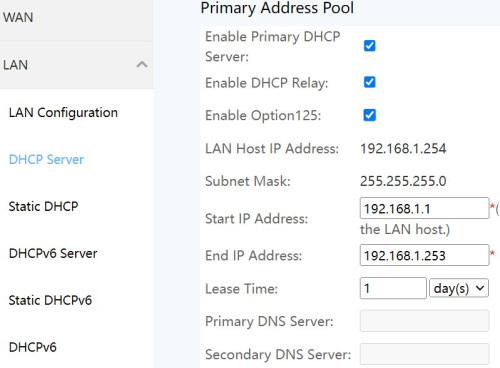
Hi, I'm on Maxis Fibre. I'm currently trying to set up pi-hole on raspberry pi to block ads. the pi-hole installation was successful. However when I tried to set static DHCP server on my router to use rasp pi, the field for primary DNS were greyed out as per picture below. My router is Huawei LG8245X6-10, and I already use the administrator user to access router setting. How can set the DNS server on the router? Currently I'm setting manually on each device to use the DNS pi-hole DNS server » Click to show Spoiler - click again to hide... «
|
|
|
Mar 6 2023, 08:18 PM
Show posts by this member only | IPv6 | Post
#7210
|
|
Senior Member
4,034 posts Joined: Dec 2019
|
QUOTE(eistern @ Mar 6 2023, 07:15 PM) Hi, I'm on Maxis Fibre. I'm currently trying to set up pi-hole on raspberry pi to block ads. the pi-hole installation was successful. However when I tried to set static DHCP server on my router to use rasp pi, the field for primary DNS were greyed out as per picture below. that is settings under "dhcp server".My router is Huawei LG8245X6-10, and I already use the administrator user to access router setting. How can set the DNS server on the router? Currently I'm setting manually on each device to use the DNS pi-hole DNS server » Click to show Spoiler - click again to hide... « are you accessing as the highest MaxDNSprUsr user? have you checked under WAN or LAN IP settings? it could be inheriting from there. (i don't have immediate access to my router; in another residence. trying to recall from memory that it was possible for me to set custom DNS server.) This post has been edited by Oltromen Ripot: Mar 6 2023, 08:19 PM |
|
|
Mar 7 2023, 07:43 AM
Show posts by this member only | IPv6 | Post
#7211
|
|
Junior Member
113 posts Joined: Jan 2010
|
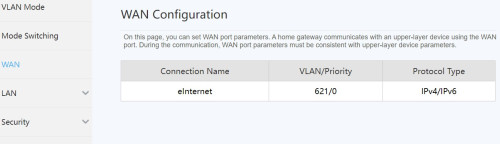
QUOTE(Oltromen Ripot @ Mar 6 2023, 08:18 PM) that is settings under "dhcp server". Thanks for reply.are you accessing as the highest MaxDNSprUsr user? have you checked under WAN or LAN IP settings? it could be inheriting from there. (i don't have immediate access to my router; in another residence. trying to recall from memory that it was possible for me to set custom DNS server.) I only know of 2 log in level to the router. first is user, the username and password are as stated on the router. the 2nd one is the administor, with username administrator and the p/w is the SN on the router. Both have the DNS field greyed out. Is there are higher level user? I've checked, there's no DHCP server setting under WAN setting, no DHCP server setting as picture below » Click to show Spoiler - click again to hide... «
|
|
|
Mar 7 2023, 08:51 AM
Show posts by this member only | IPv6 | Post
#7212
|
|
Senior Member
4,034 posts Joined: Dec 2019
|
QUOTE(eistern @ Mar 7 2023, 07:43 AM) I only know of 2 log in level to the router. Will the following helps to tinker?first is user, the username and password are as stated on the router. the 2nd one is the administor, with username administrator and the p/w is the SN on the router. caveat emptor. QUOTE(Oltromen Ripot @ Oct 14 2022, 03:24 PM) QUOTE(darthobiguan @ Aug 13 2022, 03:10 PM) User this credential instead MaxDNSprUsr !!bestHOME!!XXXX XXXX is the last 4 digit of the router SN wshoh liked this post
|
|
|
Mar 7 2023, 10:22 AM
Show posts by this member only | IPv6 | Post
#7213
|
|
Newbie
14 posts Joined: Sep 2016
|
Anyone experiencing disconnection issues of maxis Fibre in Subang Jaya?
I keep getting disconnected after a while and it takes a while to reconnect too. I wonder if it’s me or maxis |
|
|
|
|
|
Mar 7 2023, 11:08 AM
Show posts by this member only | IPv6 | Post
#7214
|
|
Senior Member
4,034 posts Joined: Dec 2019
|
Maxis RM10/mth public IP.
Can I subscribe just to use one? No question asked? (I just don't want CGNAT. Period.) |
|
|
Mar 7 2023, 08:07 PM
|
|
Senior Member
6,801 posts Joined: Oct 2008 From: Kuala Lumpur
|
QUOTE(Oltromen Ripot @ Mar 7 2023, 11:08 AM) Maxis RM10/mth public IP. Why not. They would be more than happy to provide you public IP if you request for it.Can I subscribe just to use one? No question asked? (I just don't want CGNAT. Period.) |
|
|
Mar 7 2023, 08:09 PM
Show posts by this member only | IPv6 | Post
#7216
|
|
Senior Member
4,034 posts Joined: Dec 2019
|
QUOTE(YoungMan @ Mar 7 2023, 08:07 PM) Why not. They would be more than happy to provide you public IP if you request for it. Oh, right.Maxis had just subscribed me to the public IP. Just need to modify the username in router for it to take effect. |
|
|
Mar 7 2023, 09:58 PM
|

All Stars
21,309 posts Joined: Jan 2003 From: Kuala Lumpur
|
Unsubscribe to Public IP -- just simple call to the CS and update your own router username.
Save RM10.00 I wonder telcos will offer even lower fibre broadband moving forward ? |
|
|
Mar 7 2023, 10:34 PM
Show posts by this member only | IPv6 | Post
#7218
|
|
Junior Member
113 posts Joined: Jan 2010
|
QUOTE(Oltromen Ripot @ Mar 7 2023, 08:51 AM) Will the following helps to tinker? It works. Finally caveat emptor.  Thanks  This post has been edited by eistern: Mar 7 2023, 10:37 PM PRSXFENG liked this post
|
|
|
Mar 8 2023, 12:43 AM
|
|
Junior Member
36 posts Joined: Nov 2009
|
QUOTE(uGinn @ Mar 2 2023, 08:38 PM) its happening for me again now...its nothing but problems for me after switching to maxis from unifi it is once again happening again at the same time..  been away for a few days and came back to this again. Can maxis CS even do anything if I complain? been away for a few days and came back to this again. Can maxis CS even do anything if I complain? |
|
|
Mar 8 2023, 01:21 AM
Show posts by this member only | IPv6 | Post
#7220
|
|
Senior Member
4,034 posts Joined: Dec 2019
|
QUOTE(ronnie @ Mar 7 2023, 09:58 PM) Unsubscribe to Public IP -- just simple call to the CS and update your own router username. WANT to subscribe.Save RM10.00 I wonder telcos will offer even lower fibre broadband moving forward ? It's done. Happy to see router getting public IP and not CGNAT shit. |
| Change to: |  0.0238sec 0.0238sec
 0.53 0.53
 6 queries 6 queries
 GZIP Disabled GZIP Disabled
Time is now: 8th December 2025 - 02:08 PM |
 Quote
Quote