Outline ·
[ Standard ] ·
Linear+
The Official Maxis FTTH Thread | v5, Maxis Home Fibre Internet, from RM89
|
QuantumEdge
|
 Mar 14 2023, 10:22 PM Mar 14 2023, 10:22 PM
|

|
QUOTE(Oltromen Ripot @ Mar 14 2023, 04:25 PM) This add-on made an appearance AFTER I subscribed to public IP (last week). Before, that area is an empty space in my MyMaxis, so I can't say how it should look like if you never subscribed to, OR, if you are no longer subscribing. 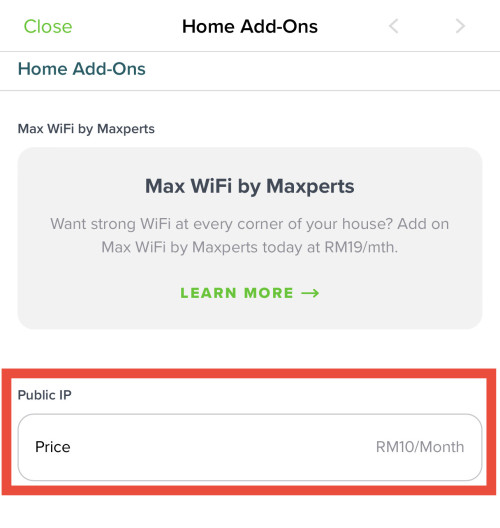 Mine is empty and I'm still on Public IP So I guess Maxis somehow missed me? 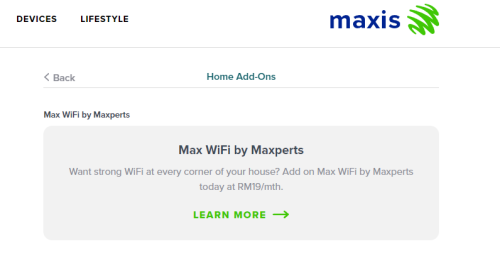 This post has been edited by QuantumEdge: Mar 15 2023, 06:23 AM This post has been edited by QuantumEdge: Mar 15 2023, 06:23 AM |
|
|
|
|
|
highflier
|
Mar 15 2023, 10:44 AM
|
Getting Started

|
QUOTE(Oltromen Ripot @ Mar 14 2023, 04:40 PM) Set "UseDNS no" on /etc~ssh/sshd_config, or equivalent. (i cannot post actual path, seems like cloudflare borks when i put /etc/ssh/...) This parameter controls whether server-side executes reverse DNS lookup to determine hostname of the IP that you are connecting from. Of course it will be faster to check the identity of public IP as opposed to check the identity of CGNAT you are jumping through (if that even make sense, but please, just say you understand it). 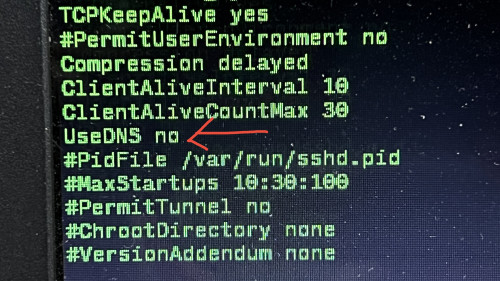 ok i also need to modify the ssh client to keep alive. but now getting these when using google  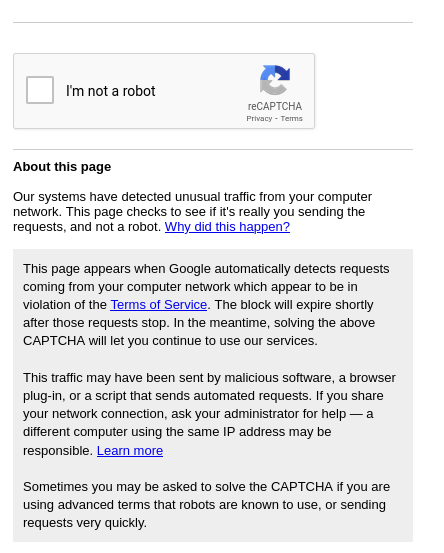 |
|
|
|
|
|
Oltromen Ripot
|
Mar 15 2023, 12:06 PM
|
|
|
QUOTE(highflier @ Mar 15 2023, 10:44 AM) ok i also need to modify the ssh client to keep alive. but now getting these when using google :confused: google CAPTCHA nothing to do with SSH ... but most probably to do with shared CGNAT-ed public IP. don't know how many subscribers are hidden behind your shared CGNAT-ed public IP. including shady, dubious, hanky-panky subscribers  |
|
|
|
|
|
Oltromen Ripot
|
Mar 15 2023, 12:11 PM
|
|
|
QUOTE(QuantumEdge @ Mar 14 2023, 10:22 PM) Mine is empty and I'm still on Public IP So I guess Maxis somehow missed me? your public IP still free until 31st March. Mine is outright have to pay. maybe, just maybe, it will appear when you start getting charged.... |
|
|
|
|
|
highflier
|
Mar 15 2023, 04:19 PM
|
Getting Started
|
QUOTE(Oltromen Ripot @ Mar 15 2023, 12:06 PM) google CAPTCHA nothing to do with SSH ... but most probably to do with shared CGNAT-ed public IP. don't know how many subscribers are hidden behind your shared CGNAT-ed public IP. including shady, dubious, hanky-panky subscribers of course captcha has nothing to do with ssh. Just try to highlight some users that share the same IP might be the cause of that issue. |
|
|
|
|
|
ChenKaiWen
|
Mar 15 2023, 04:52 PM
|
|
|
QUOTE(QuantumEdge @ Mar 14 2023, 10:22 PM) Mine is empty and I'm still on Public IP So I guess Maxis somehow missed me? You're not the only one. It is also missing for me. They also did not send me an email or SMS about it. I heard it's only free until March, whether it's until the end of March or start of March. I'm not sure. |
|
|
|
|
|
Oltromen Ripot
|
Mar 15 2023, 05:44 PM
|
|
|
Maxis have Huawei LG8245X6-10 and Kaon AR2140.
(1) Those who experienced both; which is better? Feature-wise? Signal-wise? Or they are comparable same?
(2) Kaon AR2140 supports how many SSIDs? (LG8245X6-10 supports 3 possible SSIDs for each band 2.4GHz and band 5GHz).
(2) If I sign up for MaxPerts subscription, will I get same as existing LG8245X6-10, or possible to get Kaon AR2140 instead?
intended use: as additional nodes for existing LG8245X6-10 2.4GHz mesh with 50 odd smart home WiFi devices, and expanding. i find that now using 3 nodes and shorter DHCP expiry has enabled the devices to remain connected and online, as opposed to having only 2 nodes with devices goes whack-a-mole "now you see it, now you don't". still seeing 1 or 2 specific devices acting up...which is better than having up to 10 random devices acting up at random times.
|
|
|
|
|
|
adamw
|
Mar 15 2023, 11:10 PM
|
|
|
QUOTE(ChenKaiWen @ Mar 15 2023, 04:52 PM) You're not the only one. It is also missing for me. They also did not send me an email or SMS about it. I heard it's only free until March, whether it's until the end of March or start of March. I'm not sure. I already asked them to cancel mine but just checked still on Public ip. Hopefully don't get charged rm10 in April. |
|
|
|
|
|
fruitie
|
Mar 16 2023, 11:42 AM
|
Rise and Shine

|
QUOTE(QuantumEdge @ Mar 14 2023, 10:22 PM) Mine is empty and I'm still on Public IP So I guess Maxis somehow missed me? Also nothing for me but I did receive emails. |
|
|
|
|
|
taylormade
|
Mar 17 2023, 11:50 AM
|
New Member
|
As previously mentioned, I have ported over from digi home fiber 50mbps to maxis 300mbps. Installer came and fixed it up but couldn’t get anywhere near 100mbps and left saying he will inform Hq (he didn’t do it) I had to make a call and lodge a complaint then another maxis guy came to check , he fiddled here and there and saw my max only 100mbps from his app. He called TM guy to come over and changed to another modem(mine was over 5years old) and whalla my 5ghz speed is around 300mbps now.
My question now is, how come my 2.4ghz can only do around 60mbps? Maxis guy told me it’s normal and just use 5ghz. Is this true?
|
|
|
|
|
|
jusbella
|
Mar 17 2023, 12:53 PM
|
|
|
Yes correct, 2.4 tend to interfere with your surrounding, too many overlapping channel frequency with other, even your microwave, TV, other electronic item will contribute to 2.4 interfere. So best is using wifi 5g or wifi 6, still. this also need depend your hardware can support wifi 5 or 6 as well. QUOTE(taylormade @ Mar 17 2023, 11:50 AM) As previously mentioned, I have ported over from digi home fiber 50mbps to maxis 300mbps. Installer came and fixed it up but couldn’t get anywhere near 100mbps and left saying he will inform Hq (he didn’t do it) I had to make a call and lodge a complaint then another maxis guy came to check , he fiddled here and there and saw my max only 100mbps from his app. He called TM guy to come over and changed to another modem(mine was over 5years old) and whalla my 5ghz speed is around 300mbps now. My question now is, how come my 2.4ghz can only do around 60mbps? Maxis guy told me it’s normal and just use 5ghz. Is this true? |
|
|
|
|
|
jsnhoh
|
Mar 17 2023, 12:55 PM
|
|
|
QUOTE(taylormade @ Mar 17 2023, 11:50 AM) As previously mentioned, I have ported over from digi home fiber 50mbps to maxis 300mbps. Installer came and fixed it up but couldn’t get anywhere near 100mbps and left saying he will inform Hq (he didn’t do it) I had to make a call and lodge a complaint then another maxis guy came to check , he fiddled here and there and saw my max only 100mbps from his app. He called TM guy to come over and changed to another modem(mine was over 5years old) and whalla my 5ghz speed is around 300mbps now. My question now is, how come my 2.4ghz can only do around 60mbps? Maxis guy told me it’s normal and just use 5ghz. Is this true? Yes, bandwidth limitation. To get full speed, better use 5ghz. |
|
|
|
|
|
alucard89
|
Mar 20 2023, 09:43 AM
|
|
|
Any updates on the rm69 b40 package?
Almost end of the month now, or just more bullshit by Fahmi
Called the hotline just now and they’ve got no clue about it lol
|
|
|
|
|
|
YoungMan
|
Mar 20 2023, 08:18 PM
|
|
|
QUOTE(alucard89 @ Mar 20 2023, 09:43 AM) Any updates on the rm69 b40 package? Almost end of the month now, or just more bullshit by Fahmi Called the hotline just now and they’ve got no clue about it lol To be announce by end of March. Can't remember is it 29th or 30th of March. |
|
|
|
|
|
TSronnie
|
Mar 23 2023, 10:04 PM
|
|
|
if we cancel Maxis Fibre, how should we return the ONU modem back to TM ?
|
|
|
|
|
|
YoungMan
|
Mar 24 2023, 02:56 PM
|
|
|
QUOTE(ronnie @ Mar 23 2023, 10:04 PM) if we cancel Maxis Fibre, how should we return the ONU modem back to TM ? Return it to Maxis. |
|
|
|
|
|
TSronnie
|
Mar 24 2023, 04:05 PM
|
|
|
QUOTE(YoungMan @ Mar 24 2023, 02:56 PM) You mean i need to bring to the nearest Maxis Centre to terminate my maxis home fibre ? |
|
|
|
|
|
Oltromen Ripot
|
Mar 24 2023, 05:23 PM
|
|
|
QUOTE(muhammadnajmi96 @ Mar 24 2023, 05:16 PM) Hi, I've terminated my maxis and replaced with unifi on 19 February. So I've called Maxis after the installation day of Unifi on the same day to terminate my account. Then the cs said that only after 10 days the account will automatically deactivated. Then I've received latest bill from 21 feb to 1 march although I no longer use maxis. Are this the correct procedure?  i believe i've read before, not specific to maxis->unifi. in general, there will be a short period of time where you will have concurrent "running" of both fibre service and get billed accordingly. something like the party A won't release you until party B confirm already switched, or something like along that line. you don't want your port to accidentally be released by one party before the other party had finished taking it up, right? |
|
|
|
|
|
YoungMan
|
Mar 24 2023, 08:40 PM
|
|
|
QUOTE(ronnie @ Mar 24 2023, 04:05 PM) You mean i need to bring to the nearest Maxis Centre to terminate my maxis home fibre ? Few years ago the procedure is that Maxis will come and collect the BTU from you after termination. Please check whether there is change of procedure for now. QUOTE(muhammadnajmi96 @ Mar 24 2023, 05:16 PM) Hi, I've terminated my maxis and replaced with unifi on 19 February. So I've called Maxis after the installation day of Unifi on the same day to terminate my account. Then the cs said that only after 10 days the account will automatically deactivated. Then I've received latest bill from 21 feb to 1 march although I no longer use maxis. Are this the correct procedure? Yes that's normal. I switch from Unifi to Digi fibre, I can run my Unifi until 1 week after Digi fibre is installed. There is a buffer time just in case if something happen to your internet, you can still use back Maxis fibre for a while. The final bill is normal, just pay up and can say bye bye Maxis. This post has been edited by YoungMan: Mar 24 2023, 08:41 PM |
|
|
|
|



 Quote
Quote


 0.0331sec
 0.11
0.11
 6 queries
 GZIP Disabled