Welcome Guest ( Log In | Register )

488 Pages « < 352 353 354 355 356 > » Bottom

Outline · [ Standard ] · Linear+

 The Official Maxis FTTH Thread | v5, Maxis Home Fibre Internet, from RM89

views
     
PRSXFENG
post Dec 15 2022, 05:06 PM

Look at all my stars!!
*******
Senior Member
2,608 posts

Joined: Nov 2020


So Maxis just offered us a plan to get us back into contract
and its tempting
was on Hotlink Postpaid Fibre 99
RM99 per month for
20gb sim (10gb + 10gb YT)
30Mbps Fibre

now offered 2 plans to recontract for 12 months
"from" RM49 a month for
Hotlink Postpaid 40 (20GB)
30Mbps Fibre

OR
2x Hotlink Postpaid 40 (20GB)
100Mbps Fibre
for RM89 monthly
+ 2 Kaon mesh wifi units

I will have to ask if the price is perma or will it shoot up after 12 months
or some weird "rebate" thing

Maxis knows exactly what they're doing
as TIME Fibre is coming to my area soon and the contract just expired last month

Would this be a good plan or if there's something I should know about?

EDIT: I should add that my area is Maxis Own Infra, not using TM's line

This post has been edited by PRSXFENG: Dec 15 2022, 05:07 PM
YoungMan
post Dec 15 2022, 09:59 PM

Look at all my stars!!
*******
Senior Member
6,801 posts

Joined: Oct 2008
From: Kuala Lumpur


QUOTE(PRSXFENG @ Dec 15 2022, 05:06 PM)
So Maxis just offered us a plan to get us back into contract
and its tempting
was on Hotlink Postpaid Fibre 99
RM99 per month for
20gb sim (10gb + 10gb YT)
30Mbps Fibre

now offered 2 plans to recontract for 12 months
"from" RM49 a month for
Hotlink Postpaid 40 (20GB)
30Mbps Fibre

OR
2x Hotlink Postpaid 40 (20GB)
100Mbps Fibre
for RM89 monthly
+ 2 Kaon mesh wifi units

I will have to ask if the price is perma or will it shoot up after 12 months
or some weird "rebate" thing

Maxis knows exactly what they're doing
as TIME Fibre is coming to my area soon and the contract just expired last month

Would this be a good plan or if there's something I should know about?

EDIT: I should add that my area is Maxis Own Infra, not using TM's line
*
Regardless, go for Time if you prioritise home fibre internet.
jsnhoh
post Dec 17 2022, 04:11 PM

Vinc
******
Senior Member
1,020 posts

Joined: Jun 2013
QUOTE(PRSXFENG @ Dec 15 2022, 05:06 PM)
So Maxis just offered us a plan to get us back into contract
and its tempting
was on Hotlink Postpaid Fibre 99
RM99 per month for
20gb sim (10gb + 10gb YT)
30Mbps Fibre

now offered 2 plans to recontract for 12 months
"from" RM49 a month for
Hotlink Postpaid 40 (20GB)
30Mbps Fibre

OR
2x Hotlink Postpaid 40 (20GB)
100Mbps Fibre
for RM89 monthly
+ 2 Kaon mesh wifi units

I will have to ask if the price is perma or will it shoot up after 12 months
or some weird "rebate" thing

Maxis knows exactly what they're doing
as TIME Fibre is coming to my area soon and the contract just expired last month

Would this be a good plan or if there's something I should know about?

EDIT: I should add that my area is Maxis Own Infra, not using TM's line
*
Yes, this new packages is so tempting, too bad,my area is not under msxis infra.
IanMok
post Dec 17 2022, 09:57 PM

New Member
*
Junior Member
35 posts

Joined: Oct 2005
From: JB ----> KL----> Heaven


QUOTE(PRSXFENG @ Dec 15 2022, 05:06 PM)
So Maxis just offered us a plan to get us back into contract
and its tempting
was on Hotlink Postpaid Fibre 99
RM99 per month for
20gb sim (10gb + 10gb YT)
30Mbps Fibre

now offered 2 plans to recontract for 12 months
"from" RM49 a month for
Hotlink Postpaid 40 (20GB)
30Mbps Fibre

OR
2x Hotlink Postpaid 40 (20GB)
100Mbps Fibre
for RM89 monthly
+ 2 Kaon mesh wifi units

I will have to ask if the price is perma or will it shoot up after 12 months
or some weird "rebate" thing

Maxis knows exactly what they're doing
as TIME Fibre is coming to my area soon and the contract just expired last month

Would this be a good plan or if there's something I should know about?

EDIT: I should add that my area is Maxis Own Infra, not using TM's line
*
wow.. this offer looks really good. any good perk if swtiching from unifi from maxis?
they call me last month as my unifi contract ending soon, and i got no time to talk to them, seems like missing some good deal
YoungMan
post Dec 18 2022, 11:43 AM

Look at all my stars!!
*******
Senior Member
6,801 posts

Joined: Oct 2008
From: Kuala Lumpur


QUOTE(IanMok @ Dec 17 2022, 09:57 PM)
wow.. this offer looks really good. any good perk if swtiching from unifi from maxis?
they call me last month as my unifi contract ending soon,  and i got no time to talk to them, seems like missing some good deal
*
The said offer is only for area running Maxis own infra. No way they can offer such plan under TM's infra, hence you will get a different offer if coming from Unifi.
xavier7
post Dec 22 2022, 09:54 PM

On my way
****
Senior Member
546 posts

Joined: Nov 2004
Hi guys, anyone using battlenet or play Overwatch 2?
These past few days can’t even connect to game server or the launcher won’t load friends list.
genzi0401
post Dec 23 2022, 09:10 AM

Getting Started
**
Junior Member
243 posts

Joined: Mar 2010
From: Ipoh


May I know did Maxis Fibre actually throttle the download speed from file hosting site? I am currently at 300Mbps plan but every time I download files from OneDrive or Google Drive, the download speed is very bad not hitting 20MB/s. Suppose 300Mbps could achieve download speed of above 30MB/s.

Previously before moving out, I was using Unifi 300Mbps (at old house) and the download speed is always full at around 30MB/s but now I am using Maxis Fibre and having this issue. When I tried to turn on VPN, the download speed can go higher but due VPN I still unable to achieve 30MB/s but at least better than with no VPN.

In general, with no VPN on, download speed for files from OneDrive is around 5MB/s and files from Google Drive is around 14MB/s. This is weird.

This post has been edited by genzi0401: Dec 23 2022, 09:38 AM
Oltromen Ripot
post Dec 24 2022, 04:53 PM

👍 999999 person Likes this member
*******
Senior Member
4,034 posts

Joined: Dec 2019
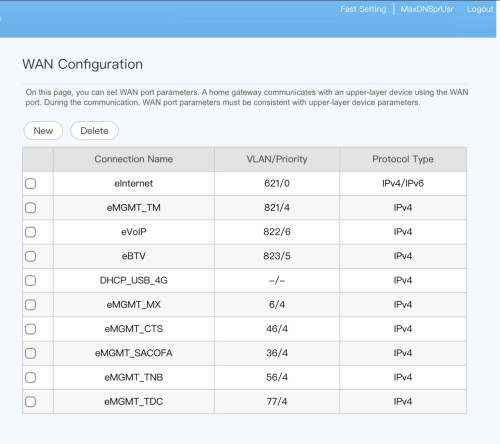
Found this list in LG8245X10.

user posted image
adurian
post Dec 26 2022, 01:14 PM

Getting Started
**
Junior Member
151 posts

Joined: Sep 2011
how to correctly connect own router to maxis fibre? currently i am using asus xt8 but i am not getting the full speed
PRSXFENG
post Dec 26 2022, 08:02 PM

Look at all my stars!!
*******
Senior Member
2,608 posts

Joined: Nov 2020


QUOTE(adurian @ Dec 26 2022, 01:14 PM)
how to correctly connect own router to maxis fibre? currently i am using asus xt8 but i am not getting the full speed
*
Stock ONT -> Asus XT8 right?
adurian
post Dec 26 2022, 11:27 PM

Getting Started
**
Junior Member
151 posts

Joined: Sep 2011
QUOTE(PRSXFENG @ Dec 26 2022, 08:02 PM)
Stock ONT -> Asus XT8 right?
*
the xt8 is connected to the provided router.
YoungMan
post Dec 27 2022, 10:55 AM

Look at all my stars!!
*******
Senior Member
6,801 posts

Joined: Oct 2008
From: Kuala Lumpur


QUOTE(adurian @ Dec 26 2022, 11:27 PM)
the xt8 is connected to the provided router.
*
Best is to connect Xt8 to ONT and configure the proper PPOE credential. Make sure to select Maxis profile and see which lan port is reserve for VOIP bridging. Then you can try to connect the Maxis router to the lan port for voip.
However through this method, some people reported that their voip is not working, so if you don't mine, not having access to VOIP, this is the best option.

This post has been edited by YoungMan: Dec 27 2022, 11:01 AM
adurian
post Dec 27 2022, 11:50 PM

Getting Started
**
Junior Member
151 posts

Joined: Sep 2011
QUOTE(YoungMan @ Dec 27 2022, 10:55 AM)
Best is to connect Xt8 to ONT and configure the proper PPOE credential. Make sure to select Maxis profile and see which lan port is reserve for VOIP bridging. Then you can try to connect the Maxis router to the lan port for voip.
However through this method, some people reported that their voip is not working, so if you don't mine,  not having access to VOIP, this is the best option.
*
currently not using voip so i guess this option is viable. is there any guide or tutorial available? if i wanna purchase a switch how do i connect it?
YoungMan
post Dec 28 2022, 12:08 AM

Look at all my stars!!
*******
Senior Member
6,801 posts

Joined: Oct 2008
From: Kuala Lumpur


QUOTE(adurian @ Dec 27 2022, 11:50 PM)
currently not using voip so i guess this option is viable. is there any guide or tutorial available? if i wanna purchase a switch how do i connect it?
*
Not sure about connecting a switch to it. You need the switch for wired connection I suppose?
tyja
post Dec 28 2022, 01:57 PM

-I Just Want To Share-
*****
Senior Member
913 posts

Joined: Dec 2008
From: Nusa Indah, Johor Bahru


guys, may i know setting for ipv6. try many combo slaac, dhcpv6, stateless, rdnss, still cant get ipv6. im using omada er605 tplink
PRSXFENG
post Dec 28 2022, 08:14 PM

Look at all my stars!!
*******
Senior Member
2,608 posts

Joined: Nov 2020


QUOTE(adurian @ Dec 27 2022, 11:50 PM)
currently not using voip so i guess this option is viable. is there any guide or tutorial available? if i wanna purchase a switch how do i connect it?
*
Simply obtain the PPPoE credentials from Maxis support or extracting from the stock router if you know how

then setup the router as new, select PPPoE as the mode, and tick the "special requirement from ISP" box
then from the menu select the Maxis profile, if that doesnt work, try Maxis-Special
SUSpetpenyubobo
post Dec 29 2022, 11:38 PM

Regular
******
Senior Member
1,030 posts

Joined: Jan 2022

QUOTE(tyja @ Dec 28 2022, 01:57 PM)
guys, may i know setting for ipv6. try many combo slaac, dhcpv6, stateless, rdnss, still cant get ipv6. im using omada er605 tplink
*
Maxis already supports native IPv6. Use DHCPv6 for minimal payload and best IP assignment method. You need to connect to IPv4 first before your IPv6 is relayed through it.
tyja
post Dec 30 2022, 12:20 PM

-I Just Want To Share-
*****
Senior Member
913 posts

Joined: Dec 2008
From: Nusa Indah, Johor Bahru


QUOTE(petpenyubobo @ Dec 29 2022, 11:38 PM)
Maxis already supports native IPv6. Use DHCPv6 for minimal payload and best IP assignment method. You need to connect to IPv4 first before your IPv6 is relayed through it.
*
what I suppose to fill?
my router does not have native option

This post has been edited by tyja: Dec 30 2022, 12:22 PM


Attached thumbnail(s)
Attached Image Attached Image
SUSpetpenyubobo
post Dec 30 2022, 07:39 PM

Regular
******
Senior Member
1,030 posts

Joined: Jan 2022

QUOTE(tyja @ Dec 30 2022, 12:20 PM)
what I suppose to fill?
my router does not have native option
*
DNS address you can use 3rd party ones from this list:
https://www.lifewire.com/free-and-public-dns-servers-2626062

The rest leave it as auto assign/delegated. Gateway and subnet leave them blank.

When you successfully connect to IPv4, the router will connect back to Maxis IPv6 broadband router servers to assign you with an IPv6 address automatically. Don't forget to enable Internet Protocol IPv6(TCP/IPv6) in your network adapter option settings in Windows and other clients such as those in Linux, and your mobile devices.

Follow this guide from TP-Link:

Select CASE 2: The IPV4 Internet Connection Type is PPPoE
https://www.tp-link.com/sg/support/faq/1525/

This post has been edited by petpenyubobo: Dec 30 2022, 07:46 PM
op9956
post Jan 8 2023, 10:44 PM

New Member
*
Junior Member
40 posts

Joined: Dec 2007
I plan to switch from Unifi to Maxis(contract end). Can I still get the 300mbps RM126 promotion?

488 Pages « < 352 353 354 355 356 > » Top
 

Change to:
| Lo-Fi Version
0.0299sec    0.32    6 queries    GZIP Disabled
Time is now: 8th December 2025 - 02:24 PM