Welcome Guest ( Log In | Register )

488 Pages « < 349 350 351 352 353 > » Bottom

Outline · [ Standard ] · Linear+

 The Official Maxis FTTH Thread | v5, Maxis Home Fibre Internet, from RM89

views
     
vinzhaw P
post Oct 9 2022, 06:13 PM

New Member
*
Probation
11 posts

Joined: Apr 2022
QUOTE(jsnhoh @ Oct 8 2022, 11:43 PM)
Risk of port is full and you can't get your internet back.
*
My agent already checked for me. Still got port so I assume not using my existing port. If I maintain my existing port until new port is connected, I should be safe right? Not sure am I allow to do that or not.

QUOTE(YoungMan @ Oct 9 2022, 10:52 AM)
If your area uses TM infra, you better not do this. TM has a cooling period when you terminate the line, and chances are that someone will take over the port.
Not to mention the hassle for Maxis to get TM technician to come during reinstallation.
*
Any method to check whether my currently port uses TM infra or not? Previously I'm using unifi, transfer to maxis when TM increase my monthly premium due to the Bonanza offer has expired (I didn't get perpetual offer).
PRSXFENG
post Oct 9 2022, 07:50 PM

Look at all my stars!!
*******
Senior Member
2,608 posts

Joined: Nov 2020


QUOTE(vinzhaw @ Oct 9 2022, 06:13 PM)
Any method to check whether my currently port uses TM infra or not? Previously I'm using unifi, transfer to maxis when TM increase my monthly premium due to the Bonanza offer has expired (I didn't get perpetual offer).
*
Probably on TM
Easiest way to check
Is your Maxis router connected to LAN2 of the modem?
If so, then you're probably on TM infra

This post has been edited by PRSXFENG: Oct 9 2022, 07:50 PM
YoungMan
post Oct 10 2022, 10:04 AM

Look at all my stars!!
*******
Senior Member
6,801 posts

Joined: Oct 2008
From: Kuala Lumpur


QUOTE(vinzhaw @ Oct 9 2022, 07:13 PM)
My agent already checked for me. Still got port so I assume not using my existing port. If I maintain my existing port until new port is connected, I should be safe right? Not sure am I allow to do that or not.
Any method to check whether my currently port uses TM infra or not? Previously I'm using unifi, transfer to maxis when TM increase my monthly premium due to the Bonanza offer has expired (I didn't get perpetual offer).
*
Transfer from Unifi then confirm it's TM infra. Anything major involving the BTU, cabling and DP, Maxis need to get TM technician to come over. This part the agent really cannot help, it is between the 2 companies.
Addword
post Oct 10 2022, 03:11 PM

Getting Started
**
Junior Member
203 posts

Joined: Oct 2014


QUOTE(vinzhaw @ Oct 8 2022, 10:52 PM)
Anyone tried to resubscribe Maxis fiber?
My current Maxis Fibre contract is ending soon and Maxis offered me a new WiFi 6 router/modem but in return have to tie to contract for another 2 years.
Recently saw there are some promotion for maxis fibre new subscription. So I thought of end the existing contract and get a new subscription.
My agent told me he able to do it but have to change port.
Just wonder is there any cons from doing this?
*
If no change port, can’t get new router/modem?
joshhd
post Oct 10 2022, 04:07 PM

Look at all my stars!!
*******
Senior Member
7,795 posts

Joined: Dec 2014
From: Malaysia


QUOTE(Addword @ Oct 10 2022, 03:11 PM)
If no change port, can’t get new router/modem?
*

For transfer request, you won't be getting new BTU (fibre modem) and you will be using back the same modem.

However, you will be getting new WiFi router from Maxis upon installation day of your Maxis Fibre.
Fibre modem (BTU) won't spoil that easily one. Even if does someday, just contact ISP customer service (Maxis) and they'll do thethe necessary arrangements for you. So don't worry.
vinzhaw P
post Oct 10 2022, 04:48 PM

New Member
*
Probation
11 posts

Joined: Apr 2022
QUOTE(PRSXFENG @ Oct 9 2022, 07:50 PM)
Probably on TM
Easiest way to check
Is your Maxis router connected to LAN2 of the modem?
If so, then you're probably on TM infra
*
Thank you for your guidance.
Just checked, it's connected to LAN 2 of the modem.

QUOTE(YoungMan @ Oct 10 2022, 10:04 AM)
Transfer from Unifi then confirm it's TM infra. Anything major involving the BTU, cabling and DP, Maxis need to get TM technician to come over. This part the agent really cannot help, it is between the 2 companies.
*
You are right. It's on TM infra. The router is connected to LAN 2 of the modem.

QUOTE(Addword @ Oct 10 2022, 03:11 PM)
If no change port, can’t get new router/modem?
*
They offered me new WiFi 6 router using existing port. But tied to 2 years of contract.

I've few option of 300mbps package on hand now.
1. Maintain with Maxis but switch over to new port and get RM129 per month (promotion rate).
2. Transfer to Digi Fibre RM100 per month but have to subscribe to Postpaid 90.
3. Transfer to Celcom Fibre RM100 per month but have to subscribe to Mega 80.
4. Doesn't have any attractive package to transfer back to Unifi.
Oltromen Ripot
post Oct 14 2022, 03:24 PM

👍 999999 person Likes this member
*******
Senior Member
4,034 posts

Joined: Dec 2019
QUOTE(epicure @ Oct 14 2022, 02:20 PM)
Thanks for the reply bro. I managed to call Maxis, they will give me a troubleshooting when i am home tonight. If they cant fix it they will send a technician to check the router settings.

By the way, I have a Maxis Huawei Wifi 6 router, the model is OptiXstar LG8245X6-10. Is there a way to remotely reboot this router? I checked in the configurations but doesnt seem to be a simple reboot/restart option. There is a restart option under maintenance, but doesnt seem like its that straightforward, cos it seems to be a scheduled restart setting. Anyone know how?
*
For MyMaxis app (and Maxis itself) to be able to manage your router from remote - and tinker both settings and reboot -, you need to check TR-069 setting is enabled.

I disabled my TR-069 in EACH of my Huawei LG8245x6-10 mesh unit using this login credential

QUOTE(darthobiguan @ Aug 13 2022, 03:10 PM)
User this credential instead

MaxDNSprUsr
!!bestHOME!!XXXX

XXXX is the last 4 digit of the router SN
*
This post has been edited by Oltromen Ripot: Oct 14 2022, 03:26 PM
epicure
post Oct 15 2022, 04:35 PM

Getting Started
**
Junior Member
229 posts

Joined: Sep 2009
Hi Oltromen Ripot, thanks for the reply

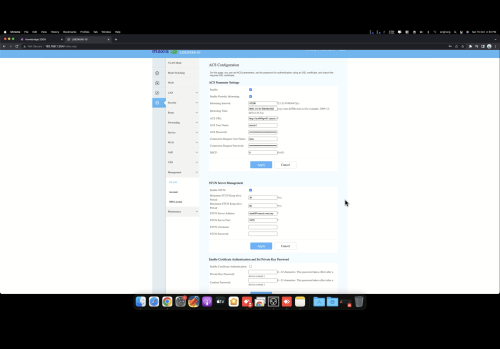
I managed to login to the router using the credentials that you gave me. I’ve clicked around and found this page, which contains a submenu for TR-069. Which one do i disable ? Im just looking to be able to reboot the router using the MMA.

QUOTE(Oltromen Ripot @ Oct 14 2022, 03:24 PM)
For MyMaxis app (and Maxis itself) to be able to manage your router from remote - and tinker both settings and reboot -, you need to check TR-069 setting is enabled.

I disabled my TR-069 in EACH of my Huawei LG8245x6-10 mesh unit using this login credential
*
user posted image
Oltromen Ripot
post Oct 15 2022, 04:52 PM

👍 999999 person Likes this member
*******
Senior Member
4,034 posts

Joined: Dec 2019
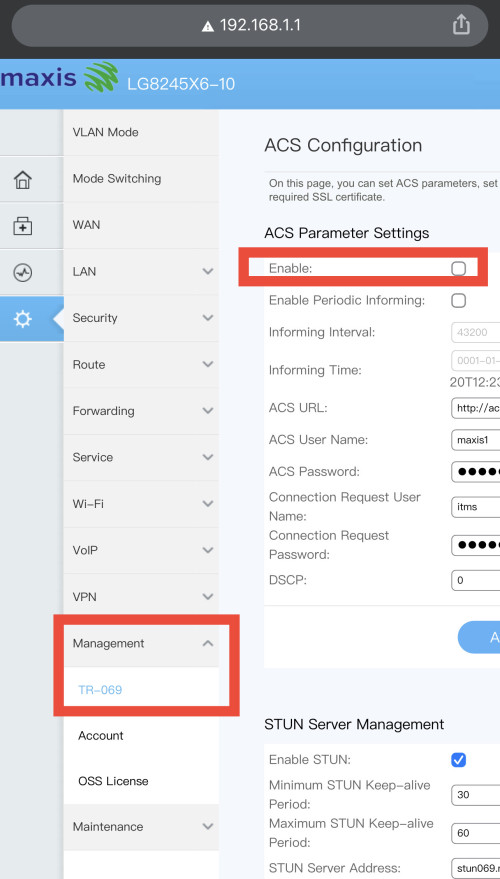
QUOTE(epicure @ Oct 15 2022, 04:35 PM)
Hi Oltromen Ripot, thanks for the reply

I managed to login to the router using the credentials that you gave me. I’ve clicked around and found this page, which contains a submenu for TR-069. Which one do i disable ? Im just looking to be able to reboot the router using the MMA.
user posted image
*
if you disable, then Maxis cannot access your router to do anything from remote.
If you want MyMaxis to be able to reboot your router, check the box to enable.

user posted image
epicure
post Oct 15 2022, 04:55 PM

Getting Started
**
Junior Member
229 posts

Joined: Sep 2009
Ah.. i see. well its enabled.. but maxis still can’t login to my account. They say its offline from their end. Something must be wrong. Ill just get them to have a look in person. If they need to reset everything then i cant let them.. cos.. ive already set so many static IP’s for my smart home devices.

I’ve found a way to reboot remotely, which is to ssh into my home computer, login to the router’s web config and reboot from there. abit of a hassle but it works.

Thanks for all the replies bro. Appreciate it

QUOTE(Oltromen Ripot @ Oct 15 2022, 04:52 PM)
if you disable, then Maxis cannot access your router to do anything from remote.
If you want MyMaxis to be able to reboot your router, check the box to enable.

user posted image
*
Oltromen Ripot
post Oct 15 2022, 05:13 PM

👍 999999 person Likes this member
*******
Senior Member
4,034 posts

Joined: Dec 2019
QUOTE(epicure @ Oct 15 2022, 04:55 PM)
Ah.. i see. well its enabled.. but maxis still can’t login to my account. They say its offline from their end. Something must be wrong. Ill just get them to have a look in person. If they need to reset everything then i cant let them.. cos.. ive already set so many static IP’s for my smart home devices.

I’ve found a way to reboot remotely, which is to ssh into my home computer, login to the router’s web config and reboot from there. abit of a hassle but it works.

Thanks for all the replies bro. Appreciate it
*
Open the desktop web browser, list then copy all of the MAC and assignments. Later manual re-entry.

--

That's why I have
- all the fibre-related equipments on one smart power gang (A) connected through LTE, and
- all LTE-related equipments on another smart power gang (B) connected through fibre.

So if the either set became unresponsive and cannot login, i just power them off and on again from remote.
fruitie
post Oct 17 2022, 12:13 PM

Rise and Shine
Group Icon
Staff
72,815 posts

Joined: Sep 2005
From: KUL

I installed Maxis Fibre in March and have used it extensively over the past few weeks. I'm not always at my own house, but I need it for IoT stuff, and also, if I go back to that house, I need a stable connection.

I'm pleased with it; enough said. There has been no downtime so far except for once due to TM port maintenance in our condo, which only lasted for a while. I subscribed to 300Mbps, and speed is always >300Mbps, around 310-325Mbps.
khainiz94
post Oct 17 2022, 07:43 PM

Look at all my stars!!
*******
Senior Member
2,856 posts

Joined: Mar 2012


QUOTE(fruitie @ Oct 17 2022, 12:13 PM)
I installed Maxis Fibre in March and have used it extensively over the past few weeks. I'm not always at my own house, but I need it for IoT stuff, and also, if I go back to that house, I need a stable connection.

I'm pleased with it; enough said. There has been no downtime so far except for once due to TM port maintenance in our condo, which only lasted for a while. I subscribed to 300Mbps, and speed is always >300Mbps, around 310-325Mbps.
*
Same.
On 300 Mbps also.
Day or night stable speed all day.
shinjay
post Oct 19 2022, 03:46 PM

Getting Started
**
Junior Member
72 posts

Joined: Nov 2008
Hi all, had anyone encounter if I apply Maxis and later on I decided not to proceed (accept counter offer by Unifi) there will be a cancellation fee RM200? They provided me the TR (Transfer Request) code.

This post has been edited by shinjay: Oct 19 2022, 03:47 PM
YoungMan
post Oct 19 2022, 08:17 PM

Look at all my stars!!
*******
Senior Member
6,801 posts

Joined: Oct 2008
From: Kuala Lumpur


QUOTE(shinjay @ Oct 19 2022, 03:46 PM)
Hi all, had anyone encounter if I apply Maxis and later on I decided not to proceed (accept counter offer by Unifi) there will be a cancellation fee RM200? They provided me the TR (Transfer Request) code.
*
If already set appointment for installation, then will kena cancellation fee if you do not proceed. If still in the early stage, and you get counter offer from Unifi, then TM will reject the port out request and no cancellation fee will be impose. Unless things change recently.
alucard89
post Oct 21 2022, 09:49 AM

Look at all my stars!!
*******
Senior Member
4,454 posts

Joined: Apr 2006
Hi guys, for the mobile plan bundled with maxis family plan has unlimited quota/speed or is there some FUP in the T&C?
Also, if I moved to Maxis Fiber but still got remaining 1 year contract for Unifi, does Maxis help to waive the penalty?

This post has been edited by alucard89: Oct 21 2022, 09:51 AM
Oltromen Ripot
post Oct 21 2022, 10:44 AM

👍 999999 person Likes this member
*******
Senior Member
4,034 posts

Joined: Dec 2019
QUOTE(alucard89 @ Oct 21 2022, 09:49 AM)
Hi guys, for the mobile plan bundled with maxis family plan has unlimited quota/speed or is there some FUP in the T&C?
*
Everything wireless is FUP total 300GB for WHOLE ACCOUNT (not per line).
That includes primary, supplementary, wireless broadband, fibre wireless backup, tablet plan, iwatch plan.
alucard89
post Oct 21 2022, 11:00 AM

Look at all my stars!!
*******
Senior Member
4,454 posts

Joined: Apr 2006
QUOTE(Oltromen Ripot @ Oct 21 2022, 10:44 AM)
Everything wireless is FUP total 300GB for WHOLE ACCOUNT (not per line).
That includes primary, supplementary, wireless broadband, fibre wireless backup, tablet plan, iwatch plan.
*
So it's not really unlimited then?
After reaching 300gb shared across 4 family members, it's back to snail speed?
Oltromen Ripot
post Oct 21 2022, 11:53 AM

👍 999999 person Likes this member
*******
Senior Member
4,034 posts

Joined: Dec 2019
QUOTE(alucard89 @ Oct 21 2022, 11:00 AM)
So it's not really unlimited then?
After reaching 300gb shared across 4 family members, it's back to snail speed?
*
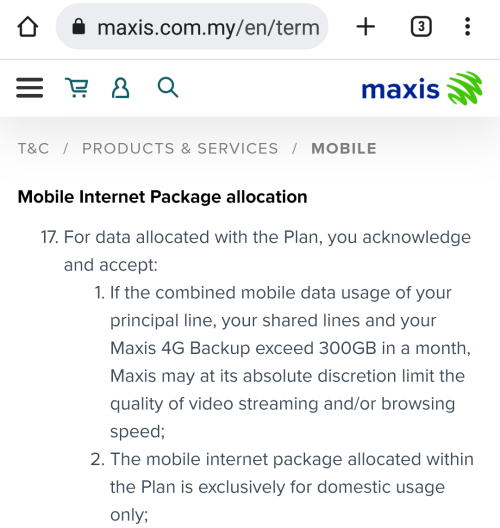
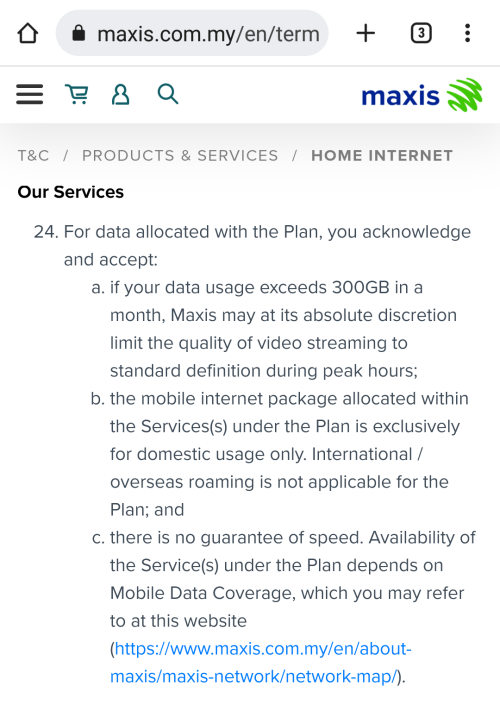
i can't recall the exact punishment; vague recollection of maxis reserving the right to violate your video streaming expectation.

edit:
here some snippets (part of mobile unlimited plan and fibre plan).

user posted image

user posted image

This post has been edited by Oltromen Ripot: Oct 21 2022, 12:00 PM
YoungMan
post Oct 21 2022, 01:50 PM

Look at all my stars!!
*******
Senior Member
6,801 posts

Joined: Oct 2008
From: Kuala Lumpur


QUOTE(alucard89 @ Oct 21 2022, 09:49 AM)
Hi guys, for the mobile plan bundled with maxis family plan has unlimited quota/speed or is there some FUP in the T&C?
Also, if I moved to Maxis Fiber but still got remaining 1 year contract for Unifi, does Maxis help to waive the penalty?
*
Maxis cannot help to waive the penalty. Unifi penalty is no joke, for you have to pay all the remaining months.

488 Pages « < 349 350 351 352 353 > » Top
 

Change to:
| Lo-Fi Version
0.1835sec    0.51    6 queries    GZIP Disabled
Time is now: 8th December 2025 - 08:40 PM