Welcome Guest ( Log In | Register )

488 Pages « < 347 348 349 350 351 > » Bottom

Outline · [ Standard ] · Linear+

 The Official Maxis FTTH Thread | v5, Maxis Home Fibre Internet, from RM89

views
     
khainiz94
post Sep 7 2022, 12:11 PM

Look at all my stars!!
*******
Senior Member
2,856 posts

Joined: Mar 2012


QUOTE(PRSXFENG @ Sep 7 2022, 10:32 AM)
As mentioned above,
this is TM's sly tactics
It's a known secret that
For their own customers, they set the cap to exactly or over the subscribed plan
For other ISPs riding on their infra, they set the cap ever so slightly lower to make you think Unifi is better as they can offer the true 300Mbps
and make you hate Maxis or the other isps riding on their infra for being slower.

I'm using Maxis fibre on Maxis own infra, I get 38Mbps from 30Mbps plan.
A relative of mine is using Maxis fibre on TM infra, 28Mbps max, never higher.

Not sure how this info will help but I suppose you can try using this to hold TM (and Maxis) accountable.
*
And also it depends on the TM installer.
Luckily mine he capped it above 300 Mbps.
So I will always get around 300 to 320 Mbps.
No complaints from me.

For me la, if you want faster local speeds but bad international bandwidth go for Unifi.
But for stable and fast international speeds, go for Maxis, TIME, Celcom.
No way in h**l I will go back to Unifi after they leaving a bad taste in my mouth with their atrocious international traffic shaping.
Playing Mobile Legends with sudden high ping for no reason is not fun weh.
And also slow loading watching Disney+ US/UK, Paramount+ etc.
khainiz94
post Sep 7 2022, 12:12 PM

Look at all my stars!!
*******
Senior Member
2,856 posts

Joined: Mar 2012


QUOTE(Oltromen Ripot @ Sep 6 2022, 05:33 PM)
The only reason i put the M9 Plus - and a single unit at that - is because I want the built-in speed tester cabled direct to the Maxis Huawei router  😅

maybe later i'll connect the rest of units, but at least now the first important purpose is already satisfied.
*
Well that is the advantage of the Deco routers.
You can test each telco stability direct from router.
Anyway do update us for long term usage.

Mine so far so good!
YoungMan
post Sep 10 2022, 08:48 PM

Look at all my stars!!
*******
Senior Member
6,803 posts

Joined: Oct 2008
From: Kuala Lumpur


QUOTE(salimbest83 @ Sep 7 2022, 11:02 AM)
fed up with maxis.
definitely will terminate once the contract ended

they never give us our subscribed speed on the term of
" we already give u the promised speed of over 80% "

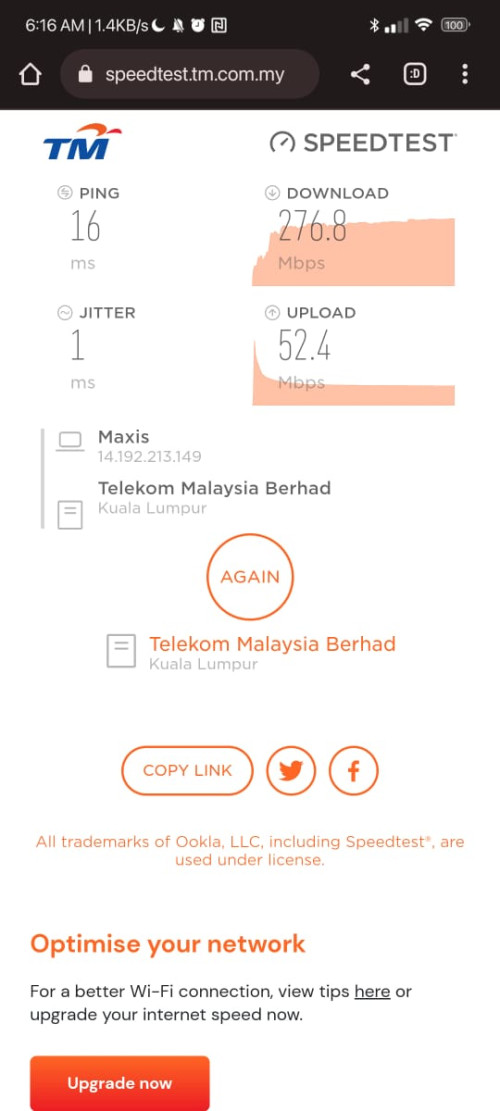
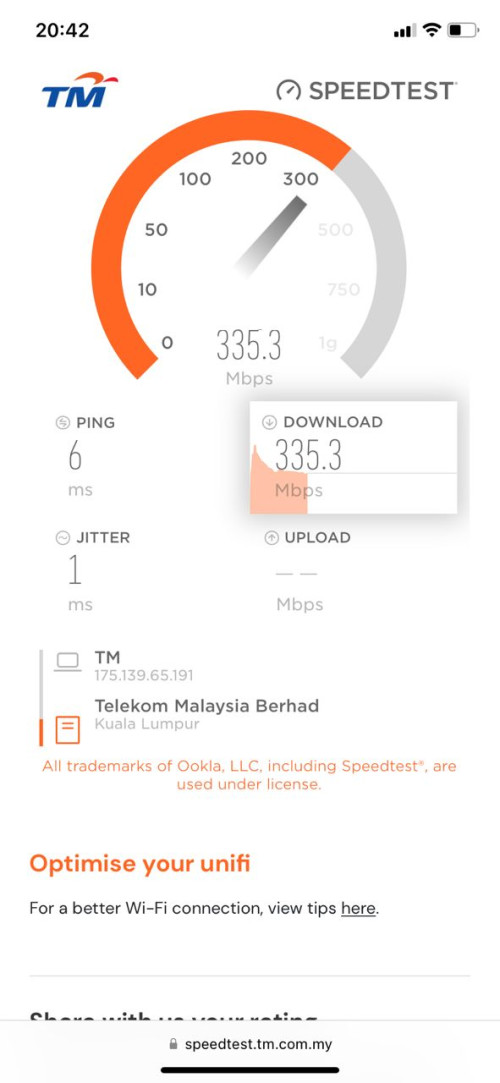
meanwhile, our my fren on 300 unifi always getting 300 as subscribed

user posted image

user posted image
*
It's a known tactic to get you back to Unifi. TM be like "our Unifi is faster compare to the other ISP". Unless the HSBB is manage by separate entity, this problem will persist.

QUOTE(PRSXFENG @ Sep 7 2022, 11:32 AM)
As mentioned above,
this is TM's sly tactics
It's a known secret that
For their own customers, they set the cap to exactly or over the subscribed plan
For other ISPs riding on their infra, they set the cap ever so slightly lower to make you think Unifi is better as they can offer the true 300Mbps
and make you hate Maxis or the other isps riding on their infra for being slower.

I'm using Maxis fibre on Maxis own infra, I get 38Mbps from 30Mbps plan.
A relative of mine is using Maxis fibre on TM infra, 28Mbps max, never higher.

Not sure how this info will help but I suppose you can try using this to hold TM (and Maxis) accountable.
*
They won't do anything. It's "over" the 90% subscribe speed, and Maxis has no control to the infra.
Addword
post Sep 10 2022, 11:57 PM

Getting Started
**
Junior Member
203 posts

Joined: Oct 2014


QUOTE(salimbest83 @ Sep 7 2022, 10:02 AM)
fed up with maxis.
definitely will terminate once the contract ended

they never give us our subscribed speed on the term of
" we already give u the promised speed of over 80% "

meanwhile, our my fren on 300 unifi always getting 300 as subscribed

user posted image

user posted image
*
LOL people still use wifi to test internet speed and compared to what they paid? Use WLAN cable la bro..
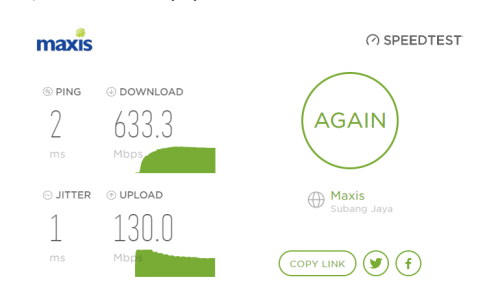
Currently subscribed to 500Mbps maxis fiber and this is what i get on my lan cable =)

user posted image
PRSXFENG
post Sep 11 2022, 12:38 PM

Look at all my stars!!
*******
Senior Member
2,608 posts

Joined: Nov 2020


QUOTE(Addword @ Sep 10 2022, 11:57 PM)
LOL people still use wifi to test internet speed and compared to what they paid? Use WLAN cable la bro..
Currently subscribed to 500Mbps maxis fiber and this is what i get on my lan cable =)

user posted image
*
Those are some great speeds, is your area on Unifi infra or Maxis own infra?
Easiest way to check is to see which LAN port you're plugged into on the ONT, LAN1 = Maxis own infra, LAN2, Maxis using Unifi infra
joshhd
post Sep 11 2022, 01:23 PM

Look at all my stars!!
*******
Senior Member
7,796 posts

Joined: Dec 2014
From: Malaysia


QUOTE(PRSXFENG @ Sep 11 2022, 12:38 PM)
Those are some great speeds, is your area on Unifi infra or Maxis own infra?
Easiest way to check is to see which LAN port you're plugged into on the ONT, LAN1 = Maxis own infra, LAN2, Maxis using Unifi infra
*

How about LAN 3 and LAN 4 on the ONT? hmm.gif
aniq8676
post Sep 11 2022, 04:09 PM

Regular
******
Senior Member
1,524 posts

Joined: Dec 2020
From: Perak


QUOTE(joshhd @ Sep 11 2022, 01:23 PM)
How about LAN 3 and LAN 4 on the ONT? hmm.gif
*
QUOTE(PRSXFENG @ Sep 11 2022, 12:38 PM)
Those are some great speeds, is your area on Unifi infra or Maxis own infra?
Easiest way to check is to see which LAN port you're plugged into on the ONT, LAN1 = Maxis own infra, LAN2, Maxis using Unifi infra
*
More details

If using TM Infra
LAN1 - Unifi
LAN2 - Maxis, Celcom, Digi, Astro
LAN3 - No traffic
LAN4 - No traffic or VLAN600 (Special case)

If using Maxis Infra
LAN1 - Maxis
LAN2 - No traffic
LAN3 - No traffic
LAN4 - No traffic
salimbest83
post Sep 11 2022, 07:21 PM

♥PMS on certain day♥
*******
Senior Member
8,642 posts

Joined: Feb 2006
From: Jelutong Penang


QUOTE(Addword @ Sep 10 2022, 11:57 PM)
LOL people still use wifi to test internet speed and compared to what they paid? Use WLAN cable la bro..
Currently subscribed to 500Mbps maxis fiber and this is what i get on my lan cable =)

user posted image
*
nope.. direct 1gbps port 30cm cat 6 cable also get 285mbps max since day 1
lilsparda
post Sep 12 2022, 12:15 PM

Getting Started
**
Junior Member
159 posts

Joined: Aug 2008
Hi guys, planning to port out from Unifi to Maxis fiber but is wondering if their Wifi 6 Router can be compatible with TP link mesh which i currently have running at home.

Did some googling and it seems like theirs are using DLink routers if not wrong.
Oltromen Ripot
post Sep 12 2022, 12:25 PM

👍 999999 person Likes this member
*******
Senior Member
4,034 posts

Joined: Dec 2019
QUOTE(lilsparda @ Sep 12 2022, 12:15 PM)
Hi guys, planning to port out from Unifi to Maxis fiber but is wondering if their Wifi 6 Router can be compatible with TP link mesh which i currently have running at home.

Did some googling and it seems like theirs are using DLink routers if not wrong.
*
Deco mesh?

Deco mesh can run either in router mode or in AP mode.

If in router mode, then you don't need to worry of Maxis-branded router. Straight away connect to BTU.

If in AP mode, then you just hook Deco to any of the LAN ports on Maxis router. Let Maxis router handles establishing connection. I use this mode for both my Unifi site and Maxis site.

Your VoIP line is taken care for by Maxis router. So if you choose to eliminate Maxis router from equation, ......

This post has been edited by Oltromen Ripot: Sep 12 2022, 12:26 PM
lilsparda
post Sep 12 2022, 12:41 PM

Getting Started
**
Junior Member
159 posts

Joined: Aug 2008
QUOTE(Oltromen Ripot @ Sep 12 2022, 12:25 PM)
Deco mesh?

Deco mesh can run either in router mode or in AP mode.

If in router mode, then you don't need to worry of Maxis-branded router. Straight away connect to BTU.

If in AP mode, then you just hook Deco to any of the LAN ports on Maxis router. Let Maxis router handles establishing connection. I use this mode for both my Unifi site and Maxis site.

Your VoIP line is taken care for by Maxis router. So if you choose to eliminate Maxis router from equation, ......
*
Yes, M4 Deco.

Im currently using my Deco as AP from the stock router that is provided by Unifi as i need the router for CCTV.
i was thinking if i can eliminate using Lan cable to connect to the router since it have EasyMesh
Oltromen Ripot
post Sep 12 2022, 12:49 PM

👍 999999 person Likes this member
*******
Senior Member
4,034 posts

Joined: Dec 2019
QUOTE(lilsparda @ Sep 12 2022, 12:41 PM)
Yes, M4 Deco.

Im currently using my Deco as AP from the stock router that is provided by Unifi as i need the router for CCTV.
i was thinking if i can eliminate using Lan cable to connect to the router since it have EasyMesh
*
Deco, in general, is incompatible with EasyMesh. Deco pre-dates EasyMesh. So if you opt for AP mode, then still need Ether et cable to link the main Deco.

M4 is dual-band mesh. If you don't use cable, it will eat up 5Ghz bandwidth for inter-node.
PRSXFENG
post Sep 12 2022, 12:52 PM

Look at all my stars!!
*******
Senior Member
2,608 posts

Joined: Nov 2020


QUOTE(lilsparda @ Sep 12 2022, 12:15 PM)
Hi guys, planning to port out from Unifi to Maxis fiber but is wondering if their Wifi 6 Router can be compatible with TP link mesh which i currently have running at home.

Did some googling and it seems like theirs are using DLink routers if not wrong.
*
Maxis fibre seems to be using Huawei or Kaon branded routers depending on plans subscribed
these support EasyMesh, which is the open standard by the wifi alliance so you could mix and match brands to mesh together

Problem is, manufacturers prefer you to be locked into their mesh ecosystem (TP-Link OneMesh, Deco, Asus AiMesh, etc)
Plus these existed longer than the easymesh standard

so sadly, you can't mesh these together

So far the only EasyMesh compatible routers/nodes I can find for sale are some D-Link COVR models.
lilsparda
post Sep 12 2022, 02:09 PM

Getting Started
**
Junior Member
159 posts

Joined: Aug 2008
QUOTE(Oltromen Ripot @ Sep 12 2022, 12:49 PM)
Deco, in general, is incompatible with EasyMesh. Deco pre-dates EasyMesh. So if you opt for AP mode, then still need Ether et cable to link the main Deco.

M4 is dual-band mesh. If you don't use cable, it will eat up 5Ghz bandwidth for inter-node.
*
QUOTE(PRSXFENG @ Sep 12 2022, 12:52 PM)
Maxis fibre seems to be using Huawei or Kaon branded routers depending on plans subscribed
these support EasyMesh, which is the open standard by the wifi alliance so you could mix and match brands to mesh together

Problem is, manufacturers prefer you to be locked into their mesh ecosystem (TP-Link OneMesh, Deco, Asus AiMesh, etc)
Plus these existed longer than the easymesh standard

so sadly, you can't mesh these together

So far the only EasyMesh compatible routers/nodes I can find for sale are some D-Link COVR models.
*
Thanks for the reply guys. Would have to spend alot if to replace the existing Cat5 Lan to Cat6 if plan to updgrade to 300mbps.
Lan cables are routed internally through the walls.
Addword
post Sep 12 2022, 10:48 PM

Getting Started
**
Junior Member
203 posts

Joined: Oct 2014


QUOTE(PRSXFENG @ Sep 11 2022, 12:38 PM)
Those are some great speeds, is your area on Unifi infra or Maxis own infra?
Easiest way to check is to see which LAN port you're plugged into on the ONT, LAN1 = Maxis own infra, LAN2, Maxis using Unifi infra
*
Maxis i think, my area wawasan Puchong.
salimbest83
post Sep 14 2022, 09:04 AM

♥PMS on certain day♥
*******
Senior Member
8,642 posts

Joined: Feb 2006
From: Jelutong Penang


Im using Deco M4 from unifi
connected to my maxis wifi6 router.

currently run as AP mode connected to a LAN port on my maxis router since my tv cannot lock at wifi 6 maxis . dunno why it prefer the 2.4Ghz
Oltromen Ripot
post Sep 14 2022, 10:43 AM

👍 999999 person Likes this member
*******
Senior Member
4,034 posts

Joined: Dec 2019
QUOTE(salimbest83 @ Sep 14 2022, 09:04 AM)
Im using Deco M4 from unifi
connected to my maxis wifi6 router.

currently run as AP mode connected to a LAN port on my maxis router since my tv cannot lock at wifi 6 maxis . dunno why it prefer the 2.4Ghz
*
comparing between 2.4GHz and 5GHz, regardless abcdefghijklmnopqrstuvwxyz

2.4Ghz lower throughput, deeper penetration through, farther reach

5GHz higher throughput, lower penetration through, shorter reach

....

somehow i feel like i had just written porn stuff.
Oltromen Ripot
post Sep 14 2022, 10:48 AM

👍 999999 person Likes this member
*******
Senior Member
4,034 posts

Joined: Dec 2019
QUOTE(salimbest83 @ Sep 14 2022, 09:04 AM)
Im using Deco M4 from unifi
dunno why it prefer the 2.4Ghz
*
i had that with my E4, M4, M9 Plus.

it just won't switch to better throughput on 5GHz.

so i decided to make use of the Guest network feature in Deco app.

The Main network is 5GHz-only with names like STEAMBOAT.
The Guest network is 2.4GHz-only with names like STEAMBOAT2.
Disable network isolation.
Dame password for both.

so all my devices stick to each of their own highest throughput band.
salimbest83
post Sep 14 2022, 12:59 PM

♥PMS on certain day♥
*******
Senior Member
8,642 posts

Joined: Feb 2006
From: Jelutong Penang


QUOTE(Oltromen Ripot @ Sep 14 2022, 10:48 AM)
i had that with my E4, M4, M9 Plus.

it just won't switch to better throughput on 5GHz.

so i decided to make use of the Guest network feature in Deco app.

The Main network is 5GHz-only with names like STEAMBOAT.
The Guest network is 2.4GHz-only with names like STEAMBOAT2.
Disable network isolation.
Dame password for both.

so all my devices stick to each of their own highest throughput band.
*
i mean, dunnow why my tv prefer 2.5Ghz if connected to MAXIS wifi 6 router.
but when connected to deco M4. the tv elok je use the 5ghz
KHOdin
post Sep 15 2022, 11:24 PM

7 Stars Newbie
*******
Senior Member
2,928 posts

Joined: Oct 2008
From: Somewhere On The Earth
maxis fiber no longer sending bill to our email ? didnt received it for last month and this month

488 Pages « < 347 348 349 350 351 > » Top
 

Change to:
| Lo-Fi Version
0.0441sec    0.37    6 queries    GZIP Disabled
Time is now: 9th December 2025 - 11:01 AM