Welcome Guest ( Log In | Register )

489 Pages « < 345 346 347 348 349 > » Bottom

Outline · [ Standard ] · Linear+

 The Official Maxis FTTH Thread | v5, Maxis Home Fibre Internet, from RM89

views
     
Oltromen Ripot
post Aug 29 2022, 02:06 PM

👍 999999 person Likes this member
*******
Senior Member
4,034 posts

Joined: Dec 2019
QUOTE(khainiz94 @ Aug 29 2022, 01:29 PM)
If upgrade speed they will not change router.
Only for new installation.
That is what my Maxis Centre said la.

They told me if want Kaon router, terus pasang 500 Mbps.
Later cannot change router.
LOL.
300 Mbps also depend on HQ dapat router apa.
Luckily I get Kaon.
Even my reseller said not all 300 Mbps sub get Kaon.
Mostly Huawei.
He said I am quite rare getting Kaon.
The only stupid thing for me is why Maxis is charging the same RRP for both Huawei and Kaon.
Both definitely have diff specs.
I read some spec sheet, Huawei is AX3000 vs Kaon AX5400.
*
actually not that i cared which router brand.
already ordered additional 2 pairs (4 units) of Deco M9 Plus through Unifi subscription. I probably just maintain the Huawei router for time being, and maybe dedicate the additional 2 Huawei units for home automation and CCTV devices.
khainiz94
post Aug 29 2022, 02:17 PM

Look at all my stars!!
*******
Senior Member
2,856 posts

Joined: Mar 2012


QUOTE(Oltromen Ripot @ Aug 29 2022, 02:06 PM)
actually not that i cared which router brand.
already ordered additional 2 pairs (4 units) of Deco M9 Plus through Unifi subscription. I probably just maintain the Huawei router for time being, and maybe dedicate the additional 2 Huawei units for home automation and CCTV devices.
*
That is great!
But the thing that bothers me is the unfairness Maxis treats customers la.
They charge the same RM12.50/month for mesh but both have different specs which Huawei users being shortchanged.
Why they don't just set all packages with the same router and be done with it.
Even in their promo, they promote the Kaon AR2140 more in ads, marketing etc.
Kakau dua2 sama spec takpe, but both have diff specs.
I am surprised that no one notice this.

This post has been edited by khainiz94: Aug 29 2022, 02:18 PM
khainiz94
post Aug 29 2022, 06:31 PM

Look at all my stars!!
*******
Senior Member
2,856 posts

Joined: Mar 2012


QUOTE(jsnhoh @ Aug 29 2022, 11:18 AM)
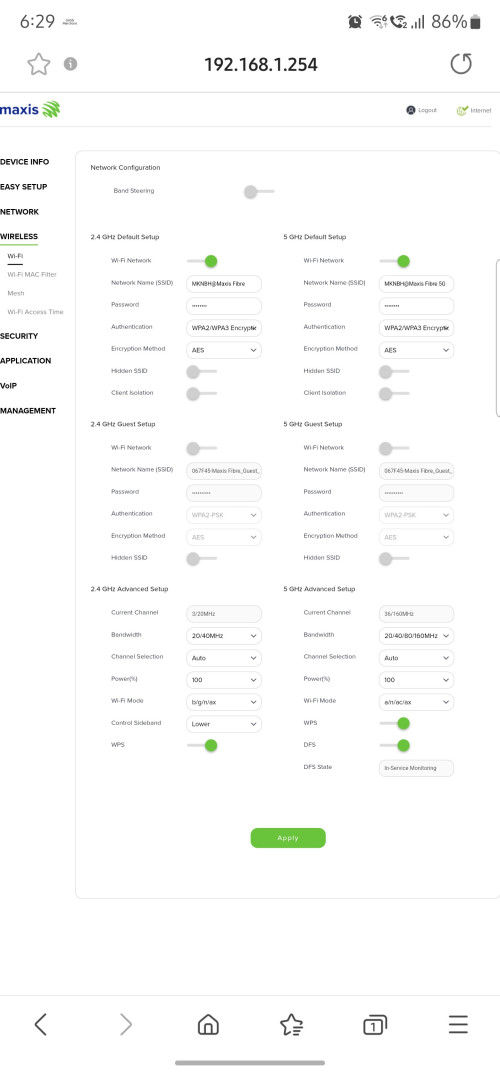
I just tried but seem no any option available for guest wifi... If you found one, do u mind to share me the screenshot where the option located? Tia.
*
Here it is!

user posted image
joshhd
post Aug 29 2022, 08:50 PM

Look at all my stars!!
*******
Senior Member
7,799 posts

Joined: Dec 2014
From: Malaysia


QUOTE(PRSXFENG @ Aug 29 2022, 10:28 AM)
use the following credentials

Username: MaxARSysOpr
Password: !!bestHOME!!XXXX

replace XXXX with last 4 digits of Serial Number
*
QUOTE(khainiz94 @ Aug 29 2022, 06:31 PM)
Here it is!

user posted image
*

I don't see Guest WiFi options even when logged in to MaxARSysOpr.
What did you enable to make that guest WiFi options appear?
khainiz94
post Aug 29 2022, 09:22 PM

Look at all my stars!!
*******
Senior Member
2,856 posts

Joined: Mar 2012


QUOTE(joshhd @ Aug 29 2022, 08:50 PM)
I don't see Guest WiFi options even when logged in to MaxARSysOpr.
What did you enable to make that guest WiFi options appear?
*
Seriously?
All of you did not see that option?
That is weird.

Surprisingly I did not so anything to the router at all.
Still at the original settings.

This post has been edited by khainiz94: Aug 29 2022, 09:23 PM
codex006 P
post Aug 29 2022, 09:27 PM

New Member
*
Probation
1 posts

Joined: Aug 2022
Hello.

I'm not sure if this is the right thread to ask. I'm using Maxis Fibre 300mbps plan. For the past 3 days, I'm experiencing intermittent signal loss (los goes red) throughout the day for few hours each time. It totally goes off during nighttime. I've called Maxis CS like 6 times and their technician has visited my house claiming he can't identify the issue ( It worked fine when he came). And it went off again now. I've contacted Maxis and they said they will send another guy tomorrow morning. To be honest, I don't believe that guy will solve this as well because this thing happens every month to me and this time is the worst. So can you guys advise me on what else I can do? I'm totally lost on this. Any help will be appreciated. Thanks.
Oltromen Ripot
post Aug 29 2022, 10:47 PM

👍 999999 person Likes this member
*******
Senior Member
4,034 posts

Joined: Dec 2019
QUOTE(codex006 @ Aug 29 2022, 09:27 PM)
Hello.

I'm not sure if this is the right thread to ask. I'm using Maxis Fibre 300mbps plan. For the past 3 days, I'm experiencing intermittent signal loss (los goes red) throughout the day for few hours each time. It totally goes off during nighttime. I've called Maxis CS like 6 times and their technician has visited my house claiming he can't identify the issue ( It worked fine when he came). And it went off again now. I've contacted Maxis and they said they will send another guy tomorrow morning. To be honest, I don't believe that guy will solve this as well because this thing happens every month to me and this time is the worst. So can you guys advise me on what else I can do? I'm totally lost on this. Any help will be appreciated. Thanks.
*
Put a clock next to your BTU/router, make surethe face is visible. Better if another smartphone that also displays date in addition to time.

Take a picture of the clock face, red LOS, everything. Take the picture from time to time interval. Don't need to be frequent. Since you said it could be few hours, probably 30mins apart is sufficient. Or 20mins. Or 15mins.

The CS laughs at you? Technician not convinced? Show them. Most importantly, show the one at the start, and the one at the end, to prove it did happened for that length of time.
joshhd
post Aug 29 2022, 11:01 PM

Look at all my stars!!
*******
Senior Member
7,799 posts

Joined: Dec 2014
From: Malaysia


QUOTE(codex006 @ Aug 29 2022, 09:27 PM)
Hello.

I'm not sure if this is the right thread to ask. I'm using Maxis Fibre 300mbps plan. For the past 3 days, I'm experiencing intermittent signal loss (los goes red) throughout the day for few hours each time. It totally goes off during nighttime. I've called Maxis CS like 6 times and their technician has visited my house claiming he can't identify the issue ( It worked fine when he came). And it went off again now. I've contacted Maxis and they said they will send another guy tomorrow morning. To be honest, I don't believe that guy will solve this as well because this thing happens every month to me and this time is the worst. So can you guys advise me on what else I can do? I'm totally lost on this. Any help will be appreciated. Thanks.
*

This seems to suggest that something wrong somewhere with your fibre cable connection. Let them assign a TM installer over and check for you...
jsnhoh
post Aug 30 2022, 04:06 AM

Vinc
******
Senior Member
1,022 posts

Joined: Jun 2013
QUOTE(khainiz94 @ Aug 29 2022, 06:31 PM)
Here it is!

user posted image
*
Seriously, I don't have the guest wifi menu even after logined as maxarsysopr.


Attached thumbnail(s)
Attached Image
khainiz94
post Aug 30 2022, 07:49 AM

Look at all my stars!!
*******
Senior Member
2,856 posts

Joined: Mar 2012


QUOTE(jsnhoh @ Aug 30 2022, 04:06 AM)
Seriously, I don't have the guest wifi menu even after logined as maxarsysopr.
*
What firmware are you on?
It shows on the login screen the firmware version.
I thought everyone have that option?

Nvm I will try scour around the router settings how to turn on the Guest mode.
Later I give feedback.

Edit: After comparing my screenshot, there is some settings on my router that is not shown like yours which is weird.
WMM, Airtime Fairness gone.

This post has been edited by khainiz94: Aug 30 2022, 07:52 AM
Oltromen Ripot
post Aug 30 2022, 08:27 AM

👍 999999 person Likes this member
*******
Senior Member
4,034 posts

Joined: Dec 2019
QUOTE(khainiz94 @ Aug 30 2022, 07:49 AM)
Edit: After comparing my screenshot, there is some settings on my router that is not shown like yours which is weird.
WMM, Airtime Fairness gone.
*
just a hunch; other than different firmware, it could also be different hardware version eventhough same model.
khainiz94
post Aug 30 2022, 08:38 AM

Look at all my stars!!
*******
Senior Member
2,856 posts

Joined: Mar 2012


QUOTE(Oltromen Ripot @ Aug 30 2022, 08:27 AM)
just a hunch; other than different firmware, it could also be different hardware version eventhough same model.
*
Maybe also.
Nvm.
Later I check the mesh router I get recently.
Did that router have the Guest option.

BTW EasyMesh pairing is seamless.
Kinda excited actually.
First time using mesh router.
zeng
post Aug 30 2022, 09:47 AM

Regular
******
Senior Member
1,810 posts

Joined: May 2008
Question:
When a Maxis home fibre line (formerly migrate from Unifi) is terminated today, the vacant port would belong to Maxis or TM Unifi ?
Or it is open to all other home fibre telcos for future subscriptions?
khainiz94
post Aug 30 2022, 06:22 PM

Look at all my stars!!
*******
Senior Member
2,856 posts

Joined: Mar 2012


QUOTE(zeng @ Aug 30 2022, 09:47 AM)
Question:
When a Maxis home fibre line (formerly migrate from Unifi) is terminated today, the vacant port would belong to Maxis or TM Unifi ?
Or it is open to all other home fibre telcos for future subscriptions?
*
The port will go back to TM Wholesale.
It is up to what telco the users want to use on that port.
Sometimes if the area port is full, they will give to those who are next in line to get the port.
Usually they will prioritise Unifi users because TM owned them.
So no chance for new users to get that port.

This is based on what I know from my colleague who works in the industry.

This post has been edited by khainiz94: Aug 30 2022, 06:23 PM
Oltromen Ripot
post Aug 30 2022, 07:23 PM

👍 999999 person Likes this member
*******
Senior Member
4,034 posts

Joined: Dec 2019
It arrived!!!! Feeling itchy to burst the packs eventhough I will only go to site 2 weeks later.

user posted image

QUOTE(Oltromen Ripot @ Aug 29 2022, 02:06 PM)
already ordered additional 2 pairs (4 units) of Deco M9 Plus through Unifi subscription. I probably just maintain the Huawei router for time being, and maybe dedicate the additional 2 Huawei units for home automation and CCTV devices.
*
QUOTE(khainiz94 @ Aug 30 2022, 08:38 AM)
BTW EasyMesh pairing is seamless.
Kinda excited actually.
First time using mesh router.
*
khainiz94
post Aug 30 2022, 07:44 PM

Look at all my stars!!
*******
Senior Member
2,856 posts

Joined: Mar 2012


QUOTE(Oltromen Ripot @ Aug 30 2022, 07:23 PM)
It arrived!!!! Feeling itchy to burst the packs eventhough I will only go to site 2 weeks later.

user posted image
*
Damn.
I only get cheap mesh from Maxis.
Better test now.
Can try to get max speed from it.
Oltromen Ripot
post Aug 30 2022, 08:06 PM

👍 999999 person Likes this member
*******
Senior Member
4,034 posts

Joined: Dec 2019
QUOTE(khainiz94 @ Aug 30 2022, 07:44 PM)
Damn.
I only get cheap mesh from Maxis.
Better test now.
Can try to get max speed from it.
*
Already have 2 unit bundle-installed with Unifi-ed home.

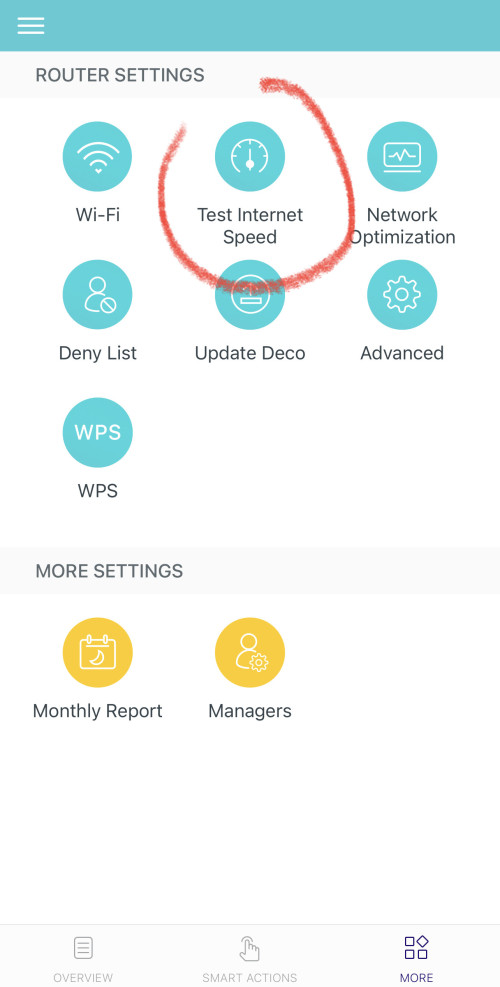
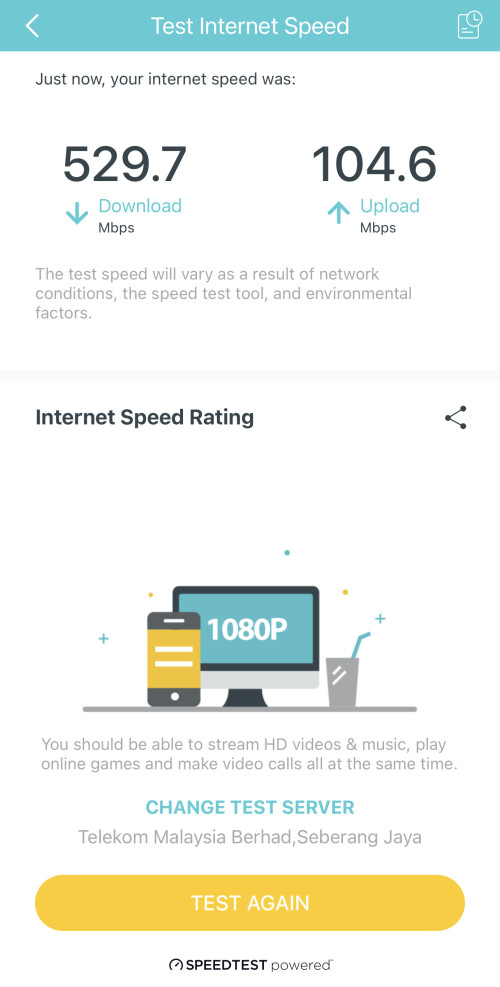
I fell in love with M9 Plus 'cause it have built-in speedtest. That's why I opt to have the same model installed at the Maxis-ed home, so I can really monitor the speed quality without being there.

Having a dedicated speed testing utility cabled right next to router removes the "wireless" variable from equation. And testing [Unifi fibre against Unifi server] and [Maxis fibre against Maxis server] shows whether the network is even capable of what speed within the ISP itself. If it cannot achieve satisfactory speed even within own ISP, that is already red flag.

user posted imageuser posted image
chtan
post Sep 4 2022, 01:34 PM

Look at all my stars!!
*******
Senior Member
2,353 posts

Joined: Jan 2003
Maxis fiber is currently having a problem and whole PG is affected by this. It slows to a crawl since yesterday night.
Quanta
post Sep 4 2022, 02:10 PM

Idiot member
******
Senior Member
1,425 posts

Joined: Jan 2003
From: Pearl 14000 + Kayangan 01000


Agree, 100Mbps drop down to 4-12Mbps nia. Ping time crawl to 20-50ms
waisang
post Sep 4 2022, 05:01 PM

On my way
****
Junior Member
588 posts

Joined: Dec 2009
Hi, i have received Maxis Huawei OptiXstar LG8245x6-10 router, it looks like this is a mesh ready router, anyone has any info/update? thanks.

489 Pages « < 345 346 347 348 349 > » Top
 

Change to:
| Lo-Fi Version
0.0220sec    1.08    6 queries    GZIP Disabled
Time is now: 14th December 2025 - 05:23 AM