Welcome Guest ( Log In | Register )

489 Pages « < 342 343 344 345 346 > » Bottom

Outline · [ Standard ] · Linear+

 The Official Maxis FTTH Thread | v5, Maxis Home Fibre Internet, from RM89

views
     
YoungMan
post Jul 27 2022, 09:24 AM

Look at all my stars!!
*******
Senior Member
6,823 posts

Joined: Oct 2008
From: Kuala Lumpur


QUOTE(koji188 @ Jul 26 2022, 10:18 PM)
Hi sifus. I’m a bit noob regarding these internet/network stuff. I’ve read the threads here regarding public/private IP. Why change from private to public in the first place? What are its advantages? Sorry if it’s a noob question.
*
For normal surfing/streaming/downloading, it doesn't make any difference whether public or private IP. But if you need to host a home server to access from outside, then public IP is needed.

QUOTE(koji188 @ Jul 26 2022, 10:22 PM)
I’m asking also because I’m getting my Maxis 500mbps installed in 2 days time and my house is quite reliant on Apple HomeKit. I have more than 20+ smart home lights/switches etc. So im wondering if private/public IP has any effect on it. Currently my house is running on Digi 150 infinite with a TPlink mesh system.
*
Since yu can run all those on Digi infinite, there is no problem running on Maxis. Digi infinite also on private IP.
ninty
post Jul 30 2022, 12:05 PM

Getting Started
**
Junior Member
122 posts

Joined: Nov 2007


QUOTE(shaktiv8 @ Jul 27 2022, 12:43 AM)
Anyone have issues with 1111? Can’t seem to turn it on when using maxis Wi-Fi.

Works instantly on digi hotspot lol

Maxis internet works fine until try to enable cloud flare warp

Says connected but nothing works, doesn’t display ip address or centre connected location in settings menu too
*
Recently seems some issues on maxis fibre with cloudflare dns, specifically WARP
Before this was working fine.

Not that big an issue for me so I haven't bothered to troubleshoot.
shaktiv8
post Jul 30 2022, 02:16 PM

Casual
***
Junior Member
363 posts

Joined: Sep 2014


QUOTE(ninty @ Jul 30 2022, 12:05 PM)
Recently seems some issues on maxis fibre with cloudflare dns, specifically WARP
Before this was working fine.

Not that big an issue for me so I haven't bothered to troubleshoot.
*
Turns out it’s a worldwide issue now. Nothing to do with maxis.
QuantumEdge
post Jul 30 2022, 06:20 PM

Regular
******
Senior Member
1,598 posts

Joined: Jan 2016


QUOTE(ninty @ Jul 30 2022, 12:05 PM)
Recently seems some issues on maxis fibre with cloudflare dns, specifically WARP
Before this was working fine.

Not that big an issue for me so I haven't bothered to troubleshoot.
*
Having the same problem on Unifi, global issue
sadlyfalways
post Aug 8 2022, 04:43 AM

Regular
******
Senior Member
1,185 posts

Joined: Nov 2020
Hello maxis fibre users, anyone noticed this week internet seems quite unstable to some websites ?

Now is 4am but my Shopee and lazada taking forever to load images

Tried reset multiple times, even change dns also same (Google and cloud flare)

Using own router Wi-Fi 6

Speedtest normal

YouTube 4K normal

Just website loading and pictures all slow

When turn off Wi-Fi and use mobile data it instantly loads again

Any fixes? Should I go back to maxis dns ?
Oltromen Ripot
post Aug 8 2022, 11:17 AM

👍 999999 person Likes this member
*******
Senior Member
4,034 posts

Joined: Dec 2019
user posted image

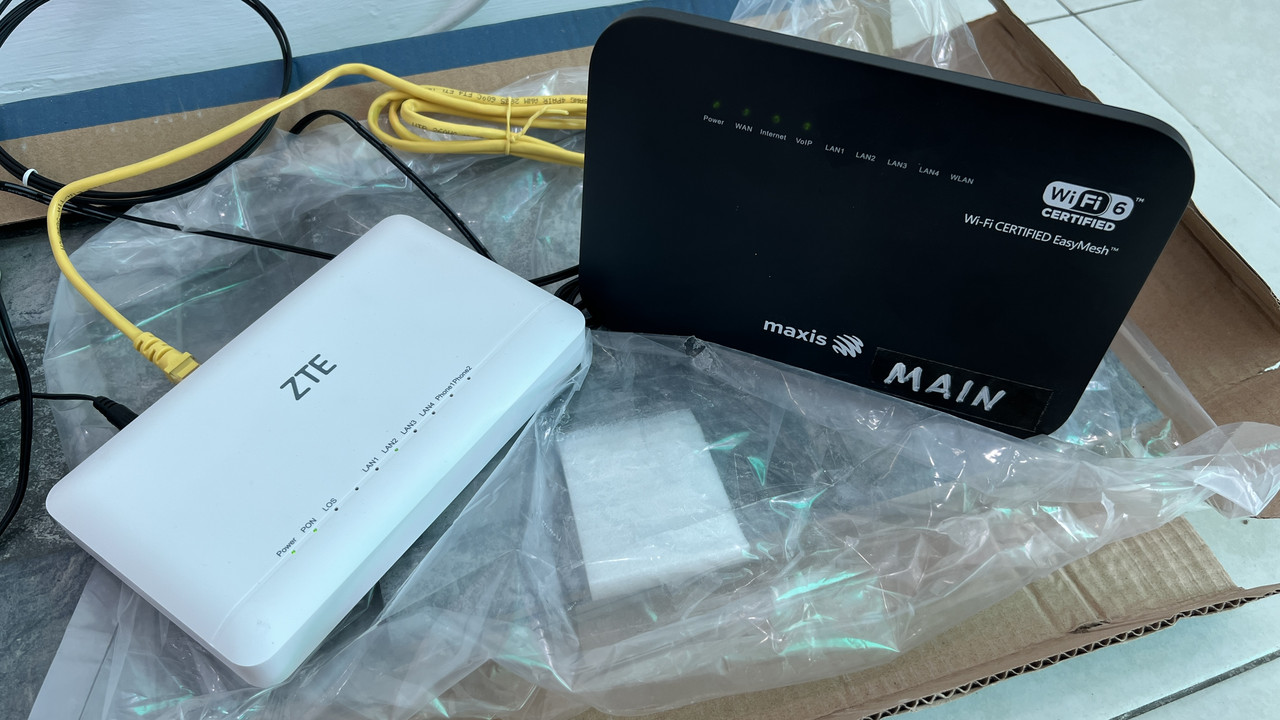
Set up was initially 1 BTU + 1 router.

Later, 2 mesh unit (same model as router) were added.

After unplugging for some time, today I teturned to switch on BTU + main router.

But wifi never returned, despite "Internet" light is on.

Since they were now configured as 3-gang mesh set, is it not able to function anymore when the mesh brothers are incomplete?
street
post Aug 8 2022, 09:30 PM

Getting Started
**
Junior Member
164 posts

Joined: Nov 2005
Last June 2022 upgraded to 300Mbps. I'm still waiting for my new WiFi 6 router. They told me it was gonna be available in July due to high demand. Now already August.

Still using the ol Archer C5v from back when I first had Maxis 30Mbps @ RM89 plan (the 2018 cheap internet era).

Anyone knows what kind of WiFi 6 router brand(s) I might get?
PRSXFENG
post Aug 8 2022, 10:23 PM

Look at all my stars!!
*******
Senior Member
2,611 posts

Joined: Nov 2020


QUOTE(street @ Aug 8 2022, 09:30 PM)
Last June 2022 upgraded to 300Mbps. I'm still waiting for my new WiFi 6 router. They told me it was gonna be available in July due to high demand. Now already August.

Still using the ol Archer C5v from back when I first had Maxis 30Mbps @ RM89 plan (the 2018 cheap internet era).

Anyone knows what kind of  WiFi 6 router brand(s) I might get?
*
Looks like either Huawei or Kaon
jsnhoh
post Aug 8 2022, 11:55 PM

Vinc
******
Senior Member
1,022 posts

Joined: Jun 2013
QUOTE(PRSXFENG @ Aug 8 2022, 10:23 PM)
Looks like either Huawei or Kaon
*
The router I got few months ago was tp link ax20.
rayfoo
post Aug 14 2022, 12:34 PM

Look at all my stars!!
*******
Senior Member
2,564 posts

Joined: Jan 2003


not too familiar with maxis fiber setup so asking here, is it possible to have setup consist of 1 unit fiber modem (maxis) with the voip attached to this main modem and router using 3rd party router..does maxis using 2-1 modem like TIME nowadays?
PRSXFENG
post Aug 14 2022, 12:54 PM

Look at all my stars!!
*******
Senior Member
2,611 posts

Joined: Nov 2020


QUOTE(rayfoo @ Aug 14 2022, 12:34 PM)
not too familiar with maxis fiber setup so asking here, is it possible to have setup consist of 1 unit fiber modem (maxis) with the voip attached to this main modem and router using 3rd party router..does maxis using 2-1 modem like TIME nowadays?
*
Depends on your area
If your area is using Maxis own infrastructure, you could but it takes quite a bit of configuration manually.
If your area is using TM infrastructure, not possible to use as far as I know.

I think for 30Mbps there is a chance of 2in1

Some alternative solutions if your area is using TM infra is to use an Ethernet VOIP phone that connects via Ethernet to your 3rd party router instead.
Or MicroSIP software on PC

There is a thread somewhere in this forum on how to set those devices/applications up
rayfoo
post Aug 14 2022, 01:05 PM

Look at all my stars!!
*******
Senior Member
2,564 posts

Joined: Jan 2003


i believe this is Maxis own infra, located at Four Seasons, this is a business line..currently having this setup MAXIS ONU -> MAXIS ROUTER -> WATCHGUARD FIREWALL, recently the connection seems just down like that until reset of both ONU and Router, not sure what the issue, would like to get rid and just MAXIS ONU - > WATCHGUARD, , i believe ONU is HGH8240H with VOIP port but unsure why the VOP was tagged to the router instead(cant remember what model, black color one), possible to have the VOIP on the main ONU with bridge mode connect with my watchguard

QUOTE(PRSXFENG @ Aug 14 2022, 12:54 PM)
Depends on your area
If your area is using Maxis own infrastructure, you could but it takes quite a bit of configuration manually.
If your area is using TM infrastructure, not possible to use as far as I know.

I think for 30Mbps there is a chance of 2in1

Some alternative solutions if your area is using TM infra is to use an Ethernet VOIP phone that connects via Ethernet to your 3rd party router instead.
Or MicroSIP software on PC

There is a thread somewhere in this forum on how to set those devices/applications up
*
aneip
post Aug 14 2022, 01:35 PM

Look at all my stars!!
*******
Senior Member
2,466 posts

Joined: Nov 2004


QUOTE(rayfoo @ Aug 14 2022, 01:05 PM)
i believe this is Maxis own infra, located at Four Seasons, this is a business line..currently having this setup MAXIS ONU -> MAXIS ROUTER -> WATCHGUARD FIREWALL, recently the connection seems just down like that until reset of both ONU and Router, not sure what the issue, would like to get rid and just MAXIS ONU - > WATCHGUARD, , i believe ONU is HGH8240H with VOIP port but unsure why the VOP was tagged to the router instead(cant remember what model, black color one), possible to have the VOIP on the main ONU with bridge mode connect with my watchguard
*
Another alternative will be ONU > Own Router > Maxis router (for voip). But need router with flexible config, like mikrotik.
PRSXFENG
post Aug 14 2022, 02:44 PM

Look at all my stars!!
*******
Senior Member
2,611 posts

Joined: Nov 2020


QUOTE(rayfoo @ Aug 14 2022, 01:05 PM)
i believe this is Maxis own infra, located at Four Seasons, this is a business line..currently having this setup MAXIS ONU -> MAXIS ROUTER -> WATCHGUARD FIREWALL, recently the connection seems just down like that until reset of both ONU and Router, not sure what the issue, would like to get rid and just MAXIS ONU - > WATCHGUARD, , i believe ONU is HGH8240H with VOIP port but unsure why the VOP was tagged to the router instead(cant remember what model, black color one), possible to have the VOIP on the main ONU with bridge mode connect with my watchguard
*
voip is tagged to the router because at other places tm wont let them use the voip ports on the modem

https://forum.lowyat.net/index.php?showtopic=5243640&hl=
Look into this thread for more info on setting this up

I successfully got my HG8240H5 connected up but your mileage may vary depending on the setup
blibala
post Aug 17 2022, 02:13 PM

Regular
******
Senior Member
1,922 posts

Joined: Jan 2005
anyone knows whether any ongoing promo for existing subscriber that is still within contract?
mytaffeta
post Aug 18 2022, 10:45 AM

Regular
******
Senior Member
1,327 posts

Joined: Dec 2010


QUOTE(blibala @ Aug 17 2022, 02:13 PM)
anyone knows whether any ongoing promo for existing subscriber that is still within contract?
*
why would they want to offer those in contract bro? biggrin.gif
blibala
post Aug 18 2022, 02:33 PM

Regular
******
Senior Member
1,922 posts

Joined: Jan 2005
QUOTE(mytaffeta @ Aug 18 2022, 10:45 AM)
why would they want to offer those in contract bro?  biggrin.gif
*
Never mind.... Already 'adjusted'.
OneFarEast
post Aug 22 2022, 12:35 PM

Getting Started
**
Junior Member
81 posts

Joined: Feb 2008
From: Pasir Mas,Kelantan


Any promo for other isp customer? whats the new 65 qled model?
khainiz94
post Aug 22 2022, 06:56 PM

Look at all my stars!!
*******
Senior Member
2,856 posts

Joined: Mar 2012


Guys.
Any help?
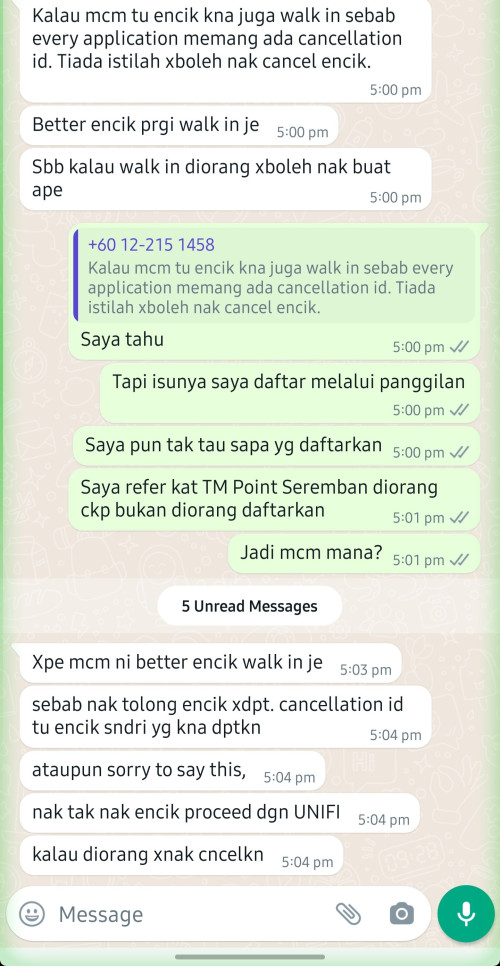
It seems TM does not want to release my port and Maxis ask me to go to TM Point to cancel my order but I already rejected my installation.
TM should have cancelled my order rite?
And this is the first time I get a CS that does not want my money.
He suggested me to continue proceed installation to Unifi.
user posted image
joshhd
post Aug 23 2022, 02:11 AM

Look at all my stars!!
*******
Senior Member
7,799 posts

Joined: Dec 2014
From: Malaysia


QUOTE(khainiz94 @ Aug 22 2022, 06:56 PM)
Guys.
Any help?
It seems TM does not want to release my port and Maxis ask me to go to TM Point to cancel my order but I already rejected my installation.
TM should have cancelled my order rite?
And this is the first time I get a CS that does not want my money.
He suggested me to continue proceed installation to Unifi.

user posted image
*

It seems that you are trying to port out from Unifi to Maxis Fibre, right?
Since your area is under TM, then there's this process called "Transfer Request". The term itself is self-explanatory, which means customer "requests" to "transfer" from an existing ISP to another ISP without losing DP port in the process.
You want to migrate from your existing ISP (Unifi) to another ISP (Maxis), so here's what the agent would do:

They will check service availability in TM Portal whether your house address can either perform Transfer Request or not. This is what it'll look like in TM portal:
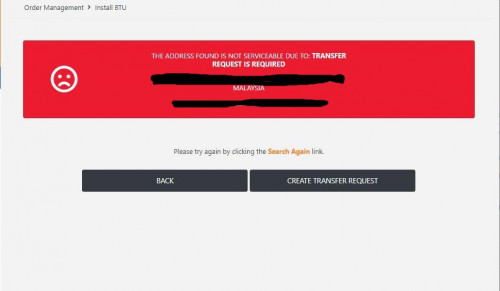
user posted image
Picture source: https://forum.lowyat.net/index.php?showtopi...ost&p=103102473

After giving them the necessary details like TM account number and User ID (e.g. khainiz94@unifi), the agent will provide you with the Transfer Request ID, which looks something like 1-xxxxxxxxxxx
Once the ID is generated, you will be given up to 10 days time to walk in to your existing ISP's service centre (TMpoint) to complete the Transfer Request process. Like it or not, it has to be walk-in, there's no other way than that.
It is strongly advised that the account holder is present, and all outstanding payments have been cleared before walking in. This is to prevent TM from giving "excuses" to reject your Transfer Request (as a tactic to make you stay on their service; making your life difficult to port out to other ISP, hoping that you'll give up).

If you don't walk in to TMpoint within that 10 days window, the Transfer Request ID will be automatically rejected. Your Unifi service won't be affected, and still can use it as usual.
If you're still interested to subscribe to Maxis Fibre, tell that agent to create a new Transfer Request ID again.

Once TM approves your Transfer Request, the Maxis agent would proceed with your order and arrange an installation appointment date for you.
But don't drag too long, cuz by default, your Unifi service will be permanently terminated 10 days after your Transfer Request approves, so make sure you got your Maxis Fibre installed within that 10 days.
If however, your Maxis Fibre installation somehow fails within that 10 days, you may chase that Maxis agent or customer service and tell them to extend the transfer request period beyond the default 10 days, so that your TM Unifi internet service won't get interrupted and still can use the Internet while waiting for your next Maxis Fibre installation appointment date.

Do note that if it is a Transfer Request order, you will be using back the same BTU (TM fibre modem); and no new fibre modem will be provided by TM.
That's pretty much how TM HSBA's Transfer Request process works, and the same applies to Celcom Fibre, Digi Fibre, Astro Fibre, etc.

=======

You might think, why not just terminate Unifi, and then subscribe to Maxis Fibre as a new customer?
The thing is, the moment you terminate Unifi service, it also means you will surrender your fibre DP port to your neighbours who wants to get their internet installed.
The moment you want to subscribe Maxis Fibre later on, who knows your neighbour who's waiting for fibre port after so long, they will be the ones to take away your port that you just "surrendered" earlier, therefore end up no more fibre port for you.
And when the Maxis agent search your address in TM portal, it shows that your area is currently "Port Full". When that happens, you cry also no use. cry.gif

That is also one of the reasons why Transfer Request is here to prevent this from happening.

489 Pages « < 342 343 344 345 346 > » Top
 

Change to:
| Lo-Fi Version
0.0363sec    0.49    6 queries    GZIP Disabled
Time is now: 17th December 2025 - 01:40 AM