Welcome Guest ( Log In | Register )

Bump Topic Topic Closed RSS Feed
83 Pages « < 72 73 74 75 76 > » Bottom

Outline · [ Standard ] · Linear+

Maxis The Official LYN Maxis Wireless (3G/3.5G) Thread, Now it comes with soap !

views
     
JWCheah
post Sep 24 2007, 11:59 PM

Getting Started
**
Junior Member
251 posts

Joined: Sep 2007


QUOTE(llhm87 @ Sep 24 2007, 11:43 PM)
Are you sure you can BT during daytime? I also using the Power Package of Maxis Wireless Broadband. BT is 100% not moving during daytime except after 1am then it moves with crazy speed. Btw, wish you luck tomolo if you able to change your modem. =)
*
I monitor the speed during Saturday and Sunday and it shows very positive results....
I'm still trying to optimize the speed (w/o port forward feature) by playing around with
the MTU,RWIN and stuff but the results is minimal (around 5-10%) and not confirmed
as the WBB speed itself varies with clouds and stuff.

Any existing Maxis USB WBB user? care to share your story?


riku2replica
post Sep 25 2007, 12:01 AM

Mugi-chan!! 可愛い!!
*******
Senior Member
3,304 posts

Joined: Mar 2006
From: Chicago(Port25)
QUOTE(hyperyouth_firepower @ Sep 24 2007, 02:30 AM)
You can try the 3g data plan. it still works better. technically, for now that is.
*
i thought that maxis wireless would cover wherever there's maxis mobile coverage?
ruffyfluffy
post Sep 25 2007, 12:52 AM

Getting Started
**
Junior Member
287 posts

Joined: Jun 2007
From: AmPuNk


i dun care maxis wbb DL fast or not. point is, this broadband completely not support for online gaming... even premium package... 768kbps.

hyperyouth_firepower
post Sep 25 2007, 10:29 AM

BlackBerry enthusiast
******
Senior Member
1,964 posts

Joined: Apr 2005
From: Sabah, Malaysia.


QUOTE(prasys @ Sep 24 2007, 08:35 PM)
Do you have any idea where to get the complete coverage list ?
*
Erm, the list is not to be released to the public, as far as I'm told. However, I'm allowed to refer to the list to help you out. Please mind that I'm supposed to be doing sales and stuffs like that (which I won't, considering I'm only a freelance agent that only wants to share what-so-ever experiences that I have).

@riku2replica:
Yes. As long as there's Maxis coverage, then there will be Maxis line. For 3G however, its a slightly different case because the ZTE modem comes with a signal booster, whilst I'm not so sure of the new USB Modem. Better yet, we often advise our potential customers to try running around with their 3G phones and check for the signal before applying.

@GTOForce:

Hmm. I can't help much, but if you PM me your street address (just the jalan only) i'll double check. Then I try to see what may have went wrong.


In regards to the selling broadbands, yes. Its agents who do it. However, I would kindly remind that even the WBB counter in Maxis KLCC (the small green counter) is not directly owned by Maxis, but also by another retailer. That's the retailer that I'm working with currently as a freelance agent. So please make sure of the offers given by retailers are checked thoroughly.


@ruffyfluffy:
All wireless modems will have huge latency. Its a well known fact.

This post has been edited by hyperyouth_firepower: Sep 25 2007, 10:31 AM

asiatrader98
post Sep 25 2007, 12:03 PM

Regular
******
Senior Member
1,485 posts

Joined: Dec 2005
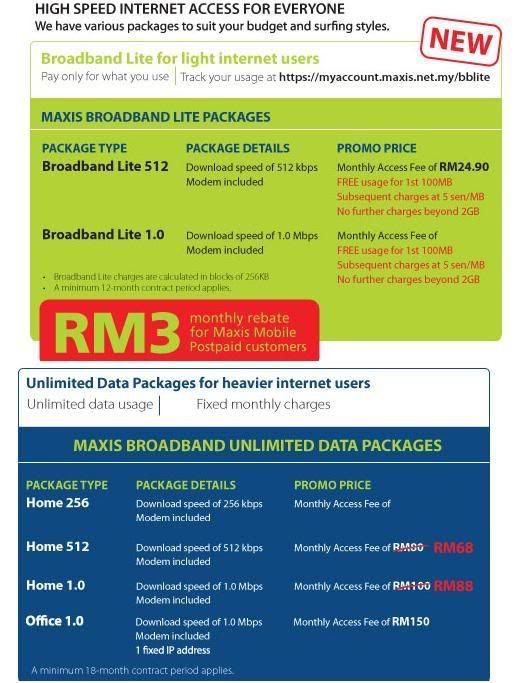
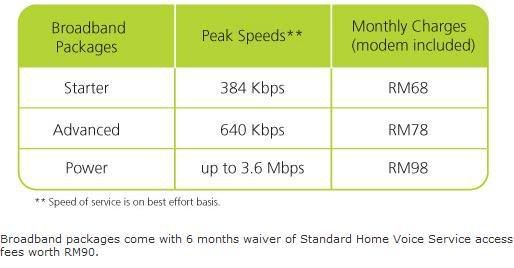
New package?

user posted image

user posted image
shamsay
post Sep 25 2007, 12:56 PM

On my way
****
Senior Member
606 posts

Joined: Jan 2003
From: Deep Beach


is it aircard 875 support with maxis 3g?how to configure it?because after i put the sim...aircard detected the network maxis mobile but no signal. anyone can help me.plss
zaqre
post Sep 25 2007, 05:50 PM

Getting Started
**
Junior Member
194 posts

Joined: Mar 2007


QUOTE(prasys @ Sep 24 2007, 05:28 PM)
A : Can't...You still need to get a standard modem. That one is nice for travelling only
*
That mean Maxis will give the user 2 modems? 1 ZTE and 1 USB?? With only 1 sim card?? rclxub.gif
So current user can request the USB modem from Maxis? hmm.gif
bulibulizaimon
post Sep 25 2007, 06:02 PM

PSN : bulibulizaimon
*******
Senior Member
4,667 posts

Joined: Jan 2005
From: UniVeRSiTy Of MaLaYa


QUOTE(ruffyfluffy @ Sep 25 2007, 12:52 AM)
i dun care maxis wbb DL fast or not. point is, this broadband completely not support for online gaming... even premium package... 768kbps.
*
i never try using that 768 package, will try out if got chance

This post has been edited by bulibulizaimon: Sep 25 2007, 06:03 PM
prasys
post Sep 25 2007, 06:16 PM

Heros Never Die
Group Icon
VIP
12,925 posts

Joined: Mar 2005
From: Kuala Lumpur
Dude , what you expect

Wireless is known for its latency. You still need a normal wired connection if you want to play games

Have you seen hardcore gamers using Satellite broadband to play games ?

No , you did not get me . That USB Modem can't connect to a router or so. For that you need to opt (get) the standard modem. They dont give you two modems
bulibulizaimon
post Sep 25 2007, 08:10 PM

PSN : bulibulizaimon
*******
Senior Member
4,667 posts

Joined: Jan 2005
From: UniVeRSiTy Of MaLaYa


QUOTE(prasys @ Sep 25 2007, 06:16 PM)
Dude , what you expect

Wireless is known for its latency. You still need a normal wired connection if you want to play games

Have you seen hardcore gamers using Satellite broadband to play games ?

*
Yes its true.. but if u read carefully at maxis wbb flyer, we can enjoy playing online games using 768 package... brows.gif
hyperyouth_firepower
post Sep 25 2007, 09:57 PM

BlackBerry enthusiast
******
Senior Member
1,964 posts

Joined: Apr 2005
From: Sabah, Malaysia.


Well, technically, you CAN. They didn't promise a blazing fast ultra-low-latency-real-time connection, did they?

All Maxis did was just to say "you can play online Games". Technically speaking, if one were to play, let's say.. UTOPIA (the ultra legendary browser Online Strategy Game) , Ragnarok Online, and others, then yes. You can enjoy a very good game in it. I believe most of other games that comes out from Korea falls under this category, where latency isn't too much of an issue.

For latency based games like World of Warcraft, Counter Strike, and others, its all based on how you adapt to the latency.
prasys
post Sep 25 2007, 10:04 PM

Heros Never Die
Group Icon
VIP
12,925 posts

Joined: Mar 2005
From: Kuala Lumpur
Finally I've bypass maxis lame port capping...Phew , now I am tunneling everything through a dedicated SSH Server
wr6969
post Sep 25 2007, 11:32 PM

Casual
***
Junior Member
314 posts

Joined: Jan 2003


QUOTE(prasys @ Sep 25 2007, 06:16 PM)

No , you did not get me . That USB Modem can't connect to a router or so. For that you need to opt (get) the standard modem. They dont give you two modems
*
If that new Maxis USB modem is a re-branded Huawei E220, then it *can* be used with a wireless router. A 3G wireless router from DLink to be exact. Model number DIR 451. Look for its specifications on the DLink Malaysia website.
llhm87
post Sep 25 2007, 11:53 PM

Casual
***
Junior Member
346 posts

Joined: Oct 2006
From: Kuala Lumpur, Malaysia


Do you guys feel the connection speed slow down compare to last time. I mean before Maxis come out with new packages and so on. I myself feel the connection speed is slower down. Anybody else having this problem?
JWCheah
post Sep 26 2007, 12:54 AM

Getting Started
**
Junior Member
251 posts

Joined: Sep 2007


QUOTE(prasys @ Sep 25 2007, 10:04 PM)
Finally I've bypass maxis lame port capping...Phew , now I am tunneling everything through a dedicated SSH Server
*
Do you mind sharing the details? Will this boost the BT speed? any results to share?

I've just shifted to Maxis WBB USB 3.5Mbps from the lame ZTEMF600... I've got "great speed" during the first hour
but after optimizing some registry and stuff, the speed drop back to a 768k performance... still new alot of optimization...


hyperyouth_firepower
post Sep 26 2007, 12:55 AM

BlackBerry enthusiast
******
Senior Member
1,964 posts

Joined: Apr 2005
From: Sabah, Malaysia.


Do A Ping Check for 5 minutes straight. For best results, do it on 3 tries.

Give me a report on it. If you wish, you can send it in a PM. I'm not sure whether this is also a support thread for Maxis Wireless Broadband? Because I don't want to infringe any rules.

We'll see how it goes.

BTW, do a traceroute check also.
JWCheah
post Sep 26 2007, 01:37 AM

Getting Started
**
Junior Member
251 posts

Joined: Sep 2007


QUOTE(hyperyouth_firepower @ Sep 26 2007, 12:55 AM)
Do A Ping Check for 5 minutes straight. For best results, do it on 3 tries.

Give me a report on it. If you wish, you can send it in a PM. I'm not sure whether this is also a support thread for Maxis Wireless Broadband? Because I don't want to infringe any rules.

We'll see how it goes.

BTW, do a traceroute check also.
*
Results :
Ping statistics for 209.131.36.158:
Packet: Sent = 184, Received = 154, Lost =30 (16% loss)
App round trip times in milli-seconds:
Minimum=268ms, Max=421ms, Avg=281ms


============================================


Is there a way i can send you the data w/o filling in the entire thread space...?

hyperyouth_firepower
post Sep 26 2007, 01:49 AM

BlackBerry enthusiast
******
Senior Member
1,964 posts

Joined: Apr 2005
From: Sabah, Malaysia.


Seems to be enough. Its pretty obvious that your signal is not on full strength. You're having quite a huge loss of packets, and the tracecert that you gave me isn't proving otherwise either.

I think that's why its reverting to the HSDPA (even though its 768, i'm suspecting a HSDPA connection)

TRy boosting the signal, (the parabola technique seems to work) and see if its any better. Direct it to the station that you can see.


JWCheah
post Sep 26 2007, 01:57 AM

Getting Started
**
Junior Member
251 posts

Joined: Sep 2007


QUOTE(hyperyouth_firepower @ Sep 26 2007, 01:49 AM)
Seems to be enough. Its pretty obvious that your signal is not on full strength. You're having quite a huge loss of packets, and the tracecert that you gave me isn't proving otherwise either.

I think that's why its reverting to the HSDPA (even though its 768, i'm suspecting a HSDPA connection)

TRy boosting the signal, (the parabola technique seems to work) and see if its any better. Direct it to the station that you can see.
*
For Maxis USB, what would be the best SIGNAL type? I've tried to log on at KLCC ground (open-air), the connection kept switching between
HSDPA and UMTS...would running programs like Net Speed Booster helps or making things worse?

==============================================
llhm87
post Sep 26 2007, 02:03 AM

Casual
***
Junior Member
346 posts

Joined: Oct 2006
From: Kuala Lumpur, Malaysia


QUOTE(JWCheah @ Sep 26 2007, 12:54 AM)
Do you mind sharing the details? Will this boost the BT speed? any results to share?

I've just shifted to Maxis WBB USB 3.5Mbps from the lame ZTEMF600... I've got "great speed" during the first hour
but after optimizing some registry and stuff, the speed drop back to a 768k performance... still new alot of optimization...
*
You switch to the new USB modem. Do you find it better than the ZTE modem? What is the procedure you need to switch it? I'm currently using the ZTE modem. I mean the new ZTE modem and Power Package.

83 Pages « < 72 73 74 75 76 > » Top
Topic ClosedOptions
 

Change to:
| Lo-Fi Version
0.0222sec    0.45    6 queries    GZIP Disabled
Time is now: 3rd December 2025 - 05:14 PM