Welcome Guest ( Log In | Register )

87 Pages « < 42 43 44 45 46 > » Bottom

Outline · [ Standard ] · Linear+

 MSI Gaming Notebook Thread V3

views
     
klmojuze
post Jan 6 2016, 04:34 PM

Getting Started
**
Junior Member
157 posts

Joined: Oct 2015


QUOTE(raven143 @ Jan 6 2016, 03:03 PM)
2QE Heart of Stones version. i'm not keen on the aesthetics though. but very happy with the performance and gaming
*
The Nvidia 950M series and above(Maxwell) is pretty impressive. I'm looking forward to Nvidia Pascal, the estimated boost at the same wattage is 50% (they claim 100% but that's for some CUDA-specific stuff).

Adrian_Alastair
post Jan 6 2016, 07:17 PM

Casual
***
Junior Member
372 posts

Joined: Oct 2014


QUOTE(raven143 @ Jan 6 2016, 03:03 PM)
2QE Heart of Stones version. i'm not keen on the aesthetics though. but very happy with the performance and gaming
*
Kudos! But just curious, why the Titan? Do you travel a lot?
raven143
post Jan 7 2016, 06:21 AM

Casual
***
Junior Member
312 posts

Joined: Apr 2006


QUOTE(klmojuze @ Jan 6 2016, 04:34 PM)
The Nvidia 950M series and above(Maxwell) is pretty impressive. I'm looking forward to Nvidia Pascal, the estimated boost at the same wattage is 50% (they claim 100% but that's for some CUDA-specific stuff).
*
Cool. Which model comes with CUDA?

raven143
post Jan 7 2016, 06:24 AM

Casual
***
Junior Member
312 posts

Joined: Apr 2006


QUOTE(Adrian_Alastair @ Jan 6 2016, 07:17 PM)
Kudos! But just curious, why the Titan? Do you travel a lot?
*
50% work and 50% play. I'm doing some on field map stitching projects via photos from drones the specs and somewhat portability of Titan serves my purpose. And I am a gamer too so it'll serve during free time too.
NewbieBetta
post Jan 11 2016, 09:43 PM

The Sexy Man
*******
Senior Member
3,706 posts

Joined: Aug 2005


Would wanna know, how lasting can MSI laptop be? and how many years extended warranty is allowed?
TSMSI-NB
post Jan 19 2016, 11:49 AM

Getting Started
**
Junior Member
120 posts

Joined: Apr 2011
[NEW!]Purchase MSI Gaming Notebook with GeForce GTX 970M,980M or 980 and get “Rise of the Tomb Raider” for FREE!

user posted image

Step into the shoes of the legendary Lara Croft in an epic search for immortality through some of the most treacherous and remote regions of the world. Experience intense guerilla combat featuring new weaponry, traverse mechanics, crafting, and silent kills that turn your gameplay into a cinematic experience. Nothing brings Lara‘s adventure to life like the advanced technology and exceptional performance of an MSI GeForce GTX 900-series graphics card.

For a limited time, get Rise of the Tomb Raider™ FREE when you buy an MSI GeForce GTX 980 Ti, 980 or 970 Graphics Card or GTX 980, 980M or 970M Notebook.

Experience Rise of the Tomb Raider™ The Way It‘s Meant to be Played with MSI GeForce GTX 900-series graphics cards.

* Rise of the Tomb Raider™ is scheduled to be launched on January 28th, 2016. For the latest update please visit: http://www.tombraider.com

Promotion Date:
7th January - 16th February 2016

Eligible models:
MSI Gaming Notebook with GTX980, GTX980M and GTX970M:

Game Release Date: *January 28th, 2016

Game Code expires: 16th April 2016

Redemption Site: http://gaming.msi.com/promotion/rise-of-the-tomb-raider

*T&C applies, while stocks last.


TSMSI-NB
post Jan 19 2016, 11:53 AM

Getting Started
**
Junior Member
120 posts

Joined: Apr 2011
Powerful and Efficient for Professionals:The Ultra Slim 17.3" Mobile Workstation -WS72

MSI Introduces new Ultra-Thin workstation laptop WS72 6Q series.

With an ultra-thin and light exterior appearance and aluminum chassis, WS72 measures less than 19.9mm thick and weighs only 2.55kg. It is definitely the world’s thinnest and lightest 17-inch ultra mobile workstation solution. This product is designed for all M&E (Multimedia & Entertainment) designers and CAD CAM engineers who want serious processing power on the go.

user posted image

The new WS72 Mobile Workstations series is shipped with preloaded Microsoft Windows 10 Pro, while different models come with new line of NVIDIA mobile Quadro GPUs, include WS72-6QJ with M2000M, WS72-6QI with M1000M, and WS72-6QH with M600M graphics respectively.

The Quadro M2100M, M1100M, and M600M built on NVIDIA Maxwell chip architecture. Maxwell is NVIDIA's 10th-generation GPU architecture, following Kepler.This new generation of Quadro processors delivers incredible performance and power efficiency. It’s up to 2X faster than its predecessor, with up to 4GB of ultra-fast GDDR5 memory, the largest on a previous generation of mobile workstation. These are new Quadro mobile GPU products encompass the entire to mid-range segments of the professional graphics card market.

Let’s compare these three graphics performance individually with their previous generations at the same product position: Quadro M2000M with Quadro K2100M, Quadro M1000M with Quadro K1100M, and Quadro M600M with Quadro K620M.
The CUDA Cores number and memory interface determinate the final performance of a graphics card. If we look into the CUDA cores and memory interface design, the Quadro M2000M has 640 CUDA Cores with 128bit memory interface and 5000MHz GDDR5, but the Quadro K2100M has 576 CUDA Cores and the memory bandwidth is lower than M2000M.
The Quadro M1100M comes with 512 CUDA Cores, with 128bit memory interface and GDDR5 as well. However, the Quadro K1100M comes with only 384 CUDA Cores, 128bit memory interface of GDDR5 and 2800MHz GDDR5.
Let’s then take a look at Quadro M600M. It has 384 CUDA Cores and 128bit of GDDR5, which is the same as GTX960M, possessing 640 CUDA Cores and 128bit of GDDR5. The Quadro K620M has also 384 CUDA Cores, but is built in with lower 64bit memory memory interface of DDR3.
Check below image from NVIDIA Quadro Webpage. It shows the Quadro Graphics ‘ Maxwell and Kepler chip architecture
http://www.nvidia.com/object/quadro-for-mo...rkstations.html

user posted image

user posted image

user posted image

SPECviewperf 12 is the latest version of the SPECviewperf benchmark released by the Standard Performance Evaluation Committee’s (SPEC) Graphics Performance Characterization (SPECgpc) working group. It replaces SPECviewperf 11, which was released in June 2010. SPECviewperf 12 includes updated versions of SPECviewperf 11 tests as well as new tests to simulate energy and medical applications. SPECviewperf 12 also includes the first DirectX test from the SPECgpc group.

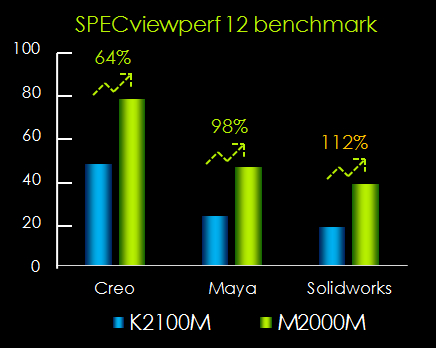
In SPECviewperf 12, the Quadro M2100M, M1100M, and M600M outperforms the NVIDIA Quadro K2100M, K1100M, and K620M for PTC Creo 2.0, Autodesk Maya
2012 and Solidworks2013 tests.The results of the graphics composite scores for these benchmarks are listed in the chart belowix:

We present SPECviewperf 12 benchmark data below for your reference.
user posted image

user posted image

user posted image

Powered by NVIDIA’s Quadro M-series, GPU up to M2000M graphics, the MSI WS72 mobile workstations provides great advantages of the state-of-the-art Maxwell architecture by the chip giant. Besides more energy efficient, challenging visualization workloads, such as 3D-modeling and rendering calculations, are to be taken care of in an effortless manner thanks to the 50% plus performance bump for more advanced architecture.

TSMSI-NB
post Jan 19 2016, 11:54 AM

Getting Started
**
Junior Member
120 posts

Joined: Apr 2011
Powerful and Efficient for ProfessionalsThe Ultra Slim 17.3 Mobile Workstation -WS72-QA

Q: Do these NVIDIA’s Quadro M-series GPUs support CUDA?

A: Yes, they include CUDA-support for GPU computing applications.

Q: What architecture do the NVIDIA’s Quadro M-series GPUs use?
A: These are a 28nm GPU based on our Maxwell Architecture.

Q: What is the difference between Quadro M2000M and Quadro K2100M GPU?

A: Quadro M2000M based on the Maxwell architecture so it offers superior power efficiency than the Quadro K2100M. This new generation of Quadro processors delivers incredible performance and power efficiency. In SPECviewperf 12, the Quadro M2100M outperforms the NVIDIA Quadro K2100M, for PTC Creo 2.0, Autodesk Maya 2012 and Solidworks2013 tests.The Quadro M2000M is around up to 112% faster than the Quadro K2100M.

user posted image

klmojuze
post Jan 19 2016, 08:10 PM

Getting Started
**
Junior Member
157 posts

Joined: Oct 2015


QUOTE(raven143 @ Jan 7 2016, 06:21 AM)
Cool. Which model comes with CUDA?
*
It appears all the Maxwell cards support CUDA and lots of older cards too:
http://www.geforce.com/hardware/technology.../supported-gpus

Realistically however the CUDA applications that one would commonly use is Blender 3D Cycles and Daz3D IRay - 3D rendering with GPU CUDA is very much accelerated nowadays.

The super-awesome increase in CUDA performance for Pascal appears to be CUDA applications that revolve around "deep learning" and "artificial intelligence" stuff.

Nonetheless for games and CUDA 3D rendering I hope, no, expect, Pascal to deliver at least 25%-50% improvement at same wattage - at least for those GPUs which have HBM (high bandwidth memory 3D memory thingy) attached because not only is that using Pascal GPU architecture but will have access to this super-fast GPU memory, way beyond GDDR5 speeds.
raven143
post Jan 20 2016, 02:57 PM

Casual
***
Junior Member
312 posts

Joined: Apr 2006


QUOTE(klmojuze @ Jan 19 2016, 08:10 PM)
It appears all the Maxwell cards support CUDA and lots of older cards too:
http://www.geforce.com/hardware/technology.../supported-gpus

Realistically however the CUDA applications that one would commonly use is Blender 3D Cycles and Daz3D IRay - 3D rendering with GPU CUDA is very much accelerated nowadays.

The super-awesome increase in CUDA performance for Pascal appears to be CUDA applications that revolve around "deep learning" and "artificial intelligence" stuff.

Nonetheless for games and CUDA 3D rendering I hope, no, expect, Pascal to deliver at least 25%-50% improvement at same wattage - at least for those GPUs which have HBM (high bandwidth memory 3D memory thingy) attached because not only is that using Pascal GPU architecture but will have access to this super-fast GPU memory, way beyond GDDR5 speeds.
*
i wonder how does does HBM fare in photo stitching large number of photos into maps.
Michael_Lee
post Jan 20 2016, 03:45 PM

On my way
****
Senior Member
638 posts

Joined: Apr 2012
From: Melaka


Hello i would i like to know which MSI Preloaded Apps are safe to Disable? Like MSI Super Charger , MSI True Color, Nahimic MSI Launcher , Killer Network Manager. I Have 8GB of RAM But everytime i Run a Games Like : GTA V or even Dying Light my computer will Display Low Memory warning. Any help?
klmojuze
post Jan 20 2016, 04:32 PM

Getting Started
**
Junior Member
157 posts

Joined: Oct 2015


QUOTE(raven143 @ Jan 20 2016, 02:57 PM)
i wonder how does does HBM fare in photo stitching large number of photos into maps.
*
Good question. I believe CUDA approaches with 8GB to 16GB or even 32GB of HBM memory will address those issues. Besides the speed of HBM the amount of VRAM they're planning to ship per GPU in Pascal then (I believe) Volta... looks like GPUs could have more RAM than CPUs.

I believe Nvidia is getting a massive amount of government, military, security-industrial and artificial intelligence contracts because they've cracked GPGPU implementations and so these customers that far outstrip the gaming industry - it looks like Nvidia can even go up against Intel now, and are doing so.

2015-2025 we're moving into a GPU+VRAM vs CPU+DRAM hybrid-competitive world.

Indeed if you look at photo stitching massive images a 8 x Titan "Y" Pascal with 16GB HBM VRAM each vs 64 Xeon Cores with 16GB DRAM each - certain types of computing appears to be very suited to GPU compute, and it appears that in many crucial large-data-set applications GPU compute is surpassing x86/64 CPU compute.

QUOTE(Michael_Lee @ Jan 20 2016, 03:45 PM)
Hello i would i like to know which MSI Preloaded Apps are safe to Disable? Like MSI Super Charger , MSI True Color, Nahimic MSI Launcher , Killer Network Manager. I Have 8GB of RAM But everytime i Run a Games Like : GTA V or even Dying Light my computer will Display Low Memory warning. Any help?
*
Hi, if I am not mistaken those background apps should not be taking a lot of memory. With 8GB of RAM you shouldn't be getting low-memory warnings.

I think if you set the swap (Virtual Memory) to 16GB on your primary (C:) drive you should ~not~ get those warnings any more.

This is because for example when you are running GTA V or Dying Light Windows will then allocate the "live" (hardware) RAM for the game then other processes/ apps/ etc. memory needs will go to the swap file on the hard disk (Virtual Memory).

This post has been edited by klmojuze: Jan 20 2016, 04:34 PM
Michael_Lee
post Jan 20 2016, 08:10 PM

On my way
****
Senior Member
638 posts

Joined: Apr 2012
From: Melaka


QUOTE(klmojuze @ Jan 20 2016, 04:32 PM)

I think if you set the swap (Virtual Memory) to 16GB on your primary (C:) drive you should ~not~ get those warnings any more.

This is because for example when you are running GTA V or Dying Light Windows will then allocate the "live" (hardware) RAM for the game then other processes/ apps/ etc. memory needs will go to the swap file on the hard disk (Virtual Memory).
*
Can you provide steps for solution for this? also im trying to understand "paging file a.k.a virtual memory i think"

Under Advance System Settings> System Properties ( Advanced ) > Settings > Advanced Tab > Virtual Memory. How to i setting the correct value for this? Im using 8GB Ram and 250GB SSD
raven143
post Jan 21 2016, 08:51 AM

Casual
***
Junior Member
312 posts

Joined: Apr 2006


QUOTE(klmojuze @ Jan 20 2016, 04:32 PM)
Good question. I believe CUDA approaches with 8GB to 16GB or even 32GB of HBM memory will address those issues. Besides the speed of HBM the amount of VRAM they're planning to ship per GPU in Pascal then (I believe) Volta... looks like GPUs could have more RAM than CPUs.

I believe Nvidia is getting a massive amount of government, military, security-industrial and artificial intelligence contracts because they've cracked GPGPU implementations and so these customers that far outstrip the gaming industry - it looks like Nvidia can even go up against Intel now, and are doing so.

2015-2025 we're moving into a GPU+VRAM vs CPU+DRAM hybrid-competitive world.

Indeed if you look at photo stitching massive images a 8 x Titan "Y" Pascal with 16GB HBM VRAM each vs 64 Xeon Cores with 16GB DRAM each - certain types of computing appears to be very suited to GPU compute, and it appears that in many crucial large-data-set applications GPU compute is surpassing x86/64 CPU compute.
Hi, if I am not mistaken those background apps should not be taking a lot of memory. With 8GB of RAM you shouldn't be getting low-memory warnings.

I think if you set the swap (Virtual Memory) to 16GB on your primary (C:) drive you should ~not~ get those warnings any more.

This is because for example when you are running GTA V or Dying Light Windows will then allocate the "live" (hardware) RAM for the game then other processes/ apps/ etc. memory needs will go to the swap file on the hard disk (Virtual Memory).
*
on the side note, cant wait for Dx12 and Vulcan too. to some degree it'll help GPU intensive calculations.
meh_man
post Jan 22 2016, 10:38 AM

Getting Started
**
Junior Member
76 posts

Joined: May 2008
From: Sabah


QUOTE(Adrian_Alastair @ Dec 29 2015, 11:27 AM)
How much for standard m.2 SSD for MSI laptop? I was offered RM250 for 128GB is that considered reasonable price?
*
Don't make same mistake as me. Be sure to get the 2280 size. 2260 does not fit at all.

Dannyoski
post Jan 23 2016, 11:00 AM

Getting Started
**
Junior Member
226 posts

Joined: Oct 2008


My long await samsung 950 pro pcie3 x4 m.2 2280 ssd 256G is coming next week..... Its a huge upgrade I guess, from 550MB/s to 2200MB/s


Dannyoski
post Jan 23 2016, 11:01 AM

Getting Started
**
Junior Member
226 posts

Joined: Oct 2008


My long await samsung 950 pro pcie3 x4 m.2 2280 ssd 256G is coming next week..... Its a huge upgrade I guess, from 550MB/s to 2200MB/s


tachlio
post Jan 23 2016, 10:52 PM

de~sign "ing"
*******
Senior Member
3,102 posts

Joined: May 2005
From: Penang *̡͌l̡*̡̡
QUOTE(Dannyoski @ Jan 23 2016, 11:01 AM)
My long await samsung 950 pro pcie3 x4  m.2 2280 ssd 256G is coming next week..... Its a huge upgrade I guess, from 550MB/s to 2200MB/s
*
I would said the price paid vs performance increase is not worth to get M2 PCIE a.t.m

Reality shop about 8.4% from review.
http://arstechnica.com/gadgets/2015/10/950...lute-monster/2/
Dannyoski
post Jan 24 2016, 03:13 PM

Getting Started
**
Junior Member
226 posts

Joined: Oct 2008


QUOTE(tachlio @ Jan 23 2016, 10:52 PM)
I would said the price paid vs performance increase is not worth to get M2 PCIE a.t.m

Reality shop about 8.4% from review.
http://arstechnica.com/gadgets/2015/10/950...lute-monster/2/
*
They claim the benchmark using skylake will be much better due to extra pcie line. Most benchmark still using older version of CPU which might not really showing its true color yet.

Finally installed Samsung 950 pro Pcie m.2 ssd 256G.
Window boots improved from 16sec to 11sec

This post has been edited by Dannyoski: Jan 30 2016, 09:02 PM
shirogawawa
post Jan 24 2016, 10:14 PM

Laptop enthusiast
*******
Senior Member
2,383 posts

Joined: Feb 2015
From: IT wonderland


QUOTE(klmojuze @ Jan 20 2016, 04:32 PM)
Good question. I believe CUDA approaches with 8GB to 16GB or even 32GB of HBM memory will address those issues. Besides the speed of HBM the amount of VRAM they're planning to ship per GPU in Pascal then (I believe) Volta... looks like GPUs could have more RAM than CPUs.

I believe Nvidia is getting a massive amount of government, military, security-industrial and artificial intelligence contracts because they've cracked GPGPU implementations and so these customers that far outstrip the gaming industry - it looks like Nvidia can even go up against Intel now, and are doing so.

2015-2025 we're moving into a GPU+VRAM vs CPU+DRAM hybrid-competitive world.

Indeed if you look at photo stitching massive images a 8 x Titan "Y" Pascal with 16GB HBM VRAM each vs 64 Xeon Cores with 16GB DRAM each - certain types of computing appears to be very suited to GPU compute, and it appears that in many crucial large-data-set applications GPU compute is surpassing x86/64 CPU compute.
Hi, if I am not mistaken those background apps should not be taking a lot of memory. With 8GB of RAM you shouldn't be getting low-memory warnings.

I think if you set the swap (Virtual Memory) to 16GB on your primary (C:) drive you should ~not~ get those warnings any more.

This is because for example when you are running GTA V or Dying Light Windows will then allocate the "live" (hardware) RAM for the game then other processes/ apps/ etc. memory needs will go to the swap file on the hard disk (Virtual Memory).
*
What is hbm memory ?


87 Pages « < 42 43 44 45 46 > » Top
 

Change to:
| Lo-Fi Version
0.0331sec    0.29    6 queries    GZIP Disabled
Time is now: 6th December 2025 - 08:17 PM