

QUOTE(ranger2020 @ Nov 30 2016, 10:32 AM)
[attachmentid=8170327]
see picture.
if you subscribing to 1mpbs, ask TM to increase to 2mbps

I just speedtest my speed tonite..see picture.
if you subscribing to 1mpbs, ask TM to increase to 2mbps

Streamyx Streamyx 4Mbps Club V6
|
|
 Dec 1 2016, 12:10 AM Dec 1 2016, 12:10 AM
|
 
Senior Member
4,179 posts Joined: Mar 2012 From: Kuala Lumpur    
|
QUOTE(ranger2020 @ Nov 30 2016, 10:32 AM) [attachmentid=8170327] I just speedtest my speed tonite..see picture. if you subscribing to 1mpbs, ask TM to increase to 2mbps |
|
|
|
|
|
Dec 1 2016, 12:21 AM
|

Senior Member
3,669 posts Joined: Apr 2006
|
QUOTE(JuneResources @ Dec 1 2016, 12:10 AM) I just speedtest my speed tonite.. .....Are you sure your account (not your port) doesn't get capped wrongly? It seem to me that your account is capped at 1Mbps download and 256Kbps upload.......I saw your screenshot and the port is capped 'correctly'. Technically, the downstream port should be capped at 5096 to compensate of ADSL PPP protocol overhead. The only thing left is your streamyx account cap limit. |
|
|
Dec 1 2016, 12:49 AM
|

Senior Member
2,392 posts Joined: Dec 2009
|
hi guys,
is this 4mbps package will be upgraded to 8mbps next year? if i care more on dl speed, does it make a difference if use unifi or streamyx assuming both same speed package? |
|
|
Dec 1 2016, 01:03 AM
|

Junior Member
80 posts Joined: Jun 2011 
|
» Click to show Spoiler - click again to hide... « QUOTE(JohnLai @ Dec 1 2016, 12:21 AM) .....Are you sure your account (not your port) doesn't get capped wrongly? It seem to me that your account is capped at 1Mbps download and 256Kbps upload....... I think you missed an important point from earlier...From what I gather, JuneResources is subscribed to 1Mbps, and NOT 4Mbps...The issue is slow youtube, he just wanted the opinion of all the sifus here whther there is anything wrong with his stats that might be causing this...I've quoted all the main points above...I saw your screenshot and the port is capped 'correctly'. Technically, the downstream port should be capped at 5096 to compensate of ADSL PPP protocol overhead. The only thing left is your streamyx account cap limit. |
|
|
Dec 1 2016, 01:08 AM
|
|
Senior Member
3,669 posts Joined: Apr 2006
|
QUOTE(killerjeya @ Dec 1 2016, 01:03 AM) » Click to show Spoiler - click again to hide... « I think you missed an important point from earlier...From what I gather, JuneResources is subscribed to 1Mbps, and NOT 4Mbps...The issue is slow youtube, he just wanted the opinion of all the sifus here whther there is anything wrong with his stats that might be causing this...I've quoted all the main points above...  Doubt he will issue with youtube after disabling ipv6. Although he has no choice but to enjoy the 200ms latency......  |
|
|
Dec 1 2016, 08:52 AM
|
|
Senior Member
4,179 posts Joined: Mar 2012 From: Kuala Lumpur
|
QUOTE(killerjeya @ Dec 1 2016, 01:03 AM) » Click to show Spoiler - click again to hide... « I think you missed an important point from earlier...From what I gather, JuneResources is subscribed to 1Mbps, and NOT 4Mbps...The issue is slow youtube, he just wanted the opinion of all the sifus here whther there is anything wrong with his stats that might be causing this...I've quoted all the main points above... Yes, I just want to get opinion based on my Streamyx line for the internet connections stability or not. QUOTE(JohnLai @ Dec 1 2016, 01:08 AM) Indeed I missed the point. Yes, yesterday night I just disable the ipv6. Doubt he will issue with youtube after disabling ipv6. Although he has no choice but to enjoy the 200ms latency...... I nearly forget to highlight, this speedtest I perform is after I disable the ipv6. And it's seem like I can stream the Youtube video slightly smooth already with 360P resolutions..  |
|
|
|
|
|
Dec 1 2016, 11:12 AM
|

Junior Member
482 posts Joined: Mar 2012
|
QUOTE(GOPI56 @ Nov 29 2016, 07:05 PM) You can disable IPV6 on Innatech W7100N router. No need to change on your device I will show you the steps: Thanks for sharing. 1.First click interface tab and choose WAN. 2.Then follow the steps like in picture below. 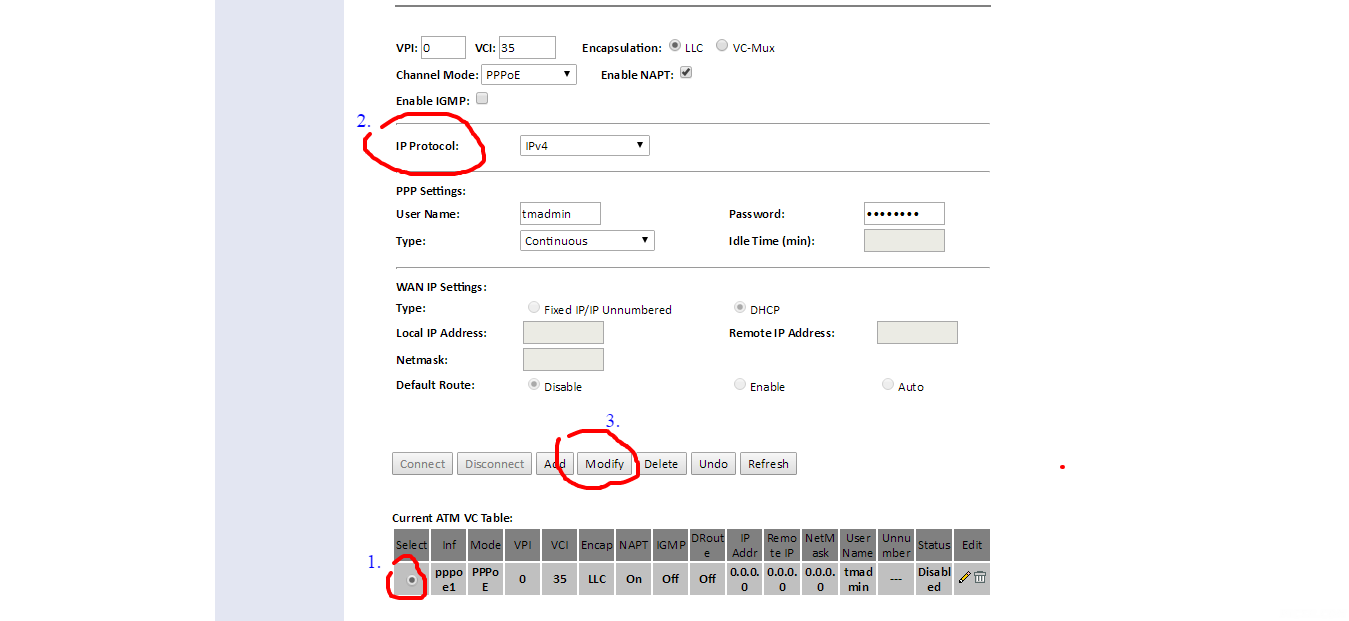 3.Then u will see a drop down menu beside IP Protocol like in the picture below. Here you choose IPV4. ( Area inside red circle in picture). And click modify to save settings. 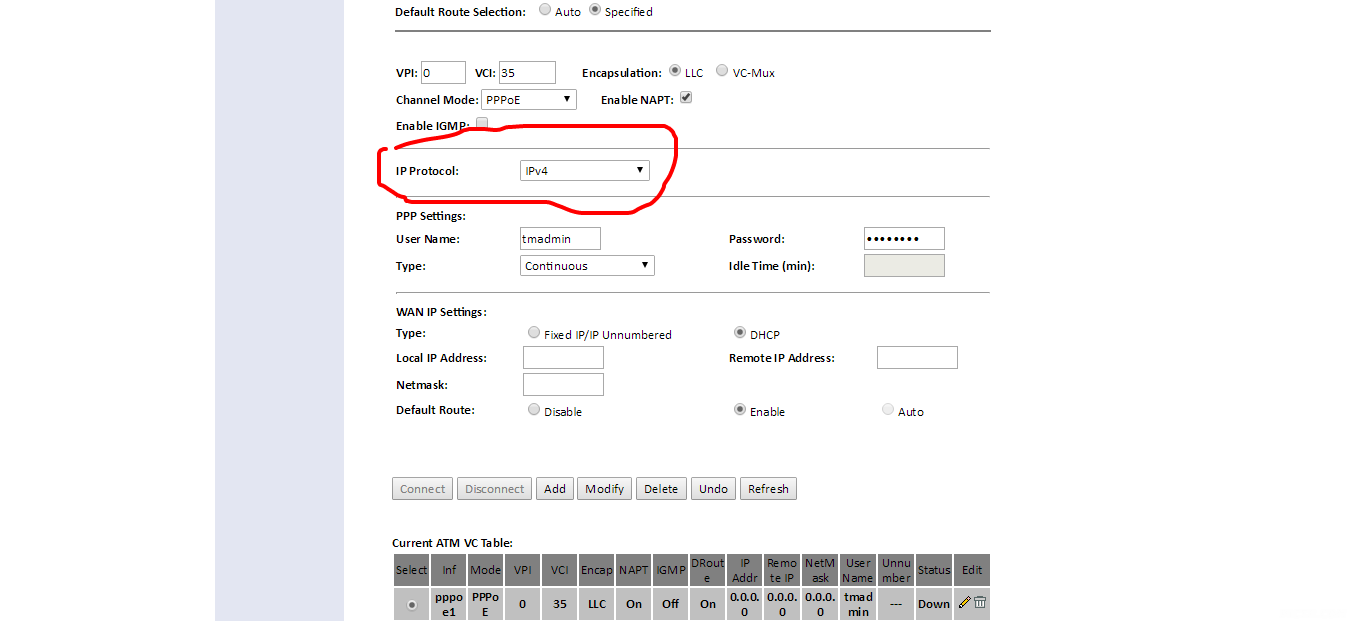 4.Now restart your modem. Done.  |
|
|
Dec 1 2016, 11:50 AM
|

Senior Member
6,381 posts Joined: Jun 2005 From: meow meow
|
QUOTE(brotan @ Dec 1 2016, 12:49 AM) hi guys, we streamyx user just dianak tirikan, mostly of those upgrades only caters to unifi users...is this 4mbps package will be upgraded to 8mbps next year? if i care more on dl speed, does it make a difference if use unifi or streamyx assuming both same speed package? push them more. https://forum.lowyat.net/index.php?showtopic=4024893 |
|
|
Dec 1 2016, 01:06 PM
|

Senior Member
1,495 posts Joined: Dec 2012
|
QUOTE(JuneResources @ Dec 1 2016, 09:52 AM) Thanks a lot for the highlight explanation.. 1. Are you using Google DNS, because Google DNS is better than Telekom Malaysia DNS.Yes, I just want to get opinion based on my Streamyx line for the internet connections stability or not. Yes, yesterday night I just disable the ipv6. I nearly forget to highlight, this speedtest I perform is after I disable the ipv6. And it's seem like I can stream the Youtube video slightly smooth already with 360P resolutions.. 2. When you are streaming youtube, you use what browser. Chrome, Firefox or others ? Chrome is the best browser for streaming youtube. This post has been edited by GOPI56: Dec 1 2016, 01:07 PM |
|
|
Dec 1 2016, 01:41 PM
|
|
Senior Member
4,179 posts Joined: Mar 2012 From: Kuala Lumpur
|
QUOTE(GOPI56 @ Dec 1 2016, 01:06 PM) 1. Are you using Google DNS, because Google DNS is better than Telekom Malaysia DNS. Answer as below:-2. When you are streaming youtube, you use what browser. Chrome, Firefox or others ? Chrome is the best browser for streaming youtube. 1. Yes, use Google DNS 8.8.8.8 2. Use Google Chrome to stream youtube. I don't install Firefox. |
|
|
Dec 1 2016, 03:05 PM
|

Senior Member
2,150 posts Joined: Apr 2009 From: 首尔 
|
QUOTE(GOPI56 @ Dec 1 2016, 01:06 PM) 1. Are you using Google DNS, because Google DNS is better than Telekom Malaysia DNS. Google DNS is better, you can visit any website you want 2. When you are streaming youtube, you use what browser. Chrome, Firefox or others ? Chrome is the best browser for streaming youtube.  you know that..... you know that.....Malaysia government has blocked many websites  |
|
|
Dec 1 2016, 04:56 PM
|

Senior Member
749 posts Joined: Aug 2011
|
Hi Guys,
Last week, there was a stolen cable case in my area which caused 3 days without any internet. It has been fixed. However, since then, speed is really slow. Speed test mostly under 1 Mbps. Mine is 4 Mbps package. 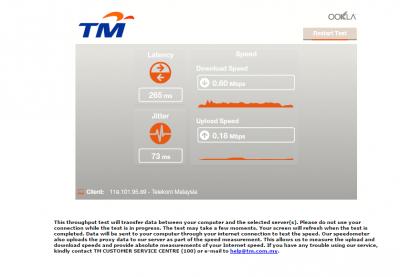
Reported to TM twitter, keep asking me to either refresh or change any equipment like this screenshot below which I have been told many times but no action taken. Plan to go complain to CFM  btw, is this normal? for 4mbps user  This post has been edited by chikuera: Dec 1 2016, 05:04 PM |
|
|
Dec 1 2016, 05:53 PM
Show posts by this member only | IPv6 | Post
#3073
|

Junior Member
312 posts Joined: Aug 2015
|
Just subscribed to 4Mbps package and got this disappointing speed
 anything I can do myself to fix it?  This post has been edited by Tokik Siwok: Dec 1 2016, 05:56 PM |
|
|
|
|
|
Dec 1 2016, 05:55 PM
|

Senior Member
2,807 posts Joined: Jun 2015
|
QUOTE(chikuera @ Dec 1 2016, 05:56 PM) Hi Guys, Nope. The data rate should stay at 4000++.Last week, there was a stolen cable case in my area which caused 3 days without any internet. It has been fixed. However, since then, speed is really slow. Speed test mostly under 1 Mbps. Mine is 4 Mbps package.
Reported to TM twitter, keep asking me to either refresh or change any equipment like this screenshot below which I have been told many times but no action taken. Plan to go complain to CFM btw, is this normal? for 4mbps user |
|
|
Dec 1 2016, 05:56 PM
|
|
Senior Member
2,807 posts Joined: Jun 2015
|
QUOTE(Tokik Siwok @ Dec 1 2016, 06:53 PM) Just subscribed to 4Mbps package and got this disappointing speed Nope. Just report to TM.anything I can do myself to fix it? |
|
|
Dec 1 2016, 05:57 PM
Show posts by this member only | IPv6 | Post
#3076
|
|
Junior Member
312 posts Joined: Aug 2015
|
QUOTE(mztang52 @ Dec 1 2016, 05:56 PM) Nope. Just report to TM. already did |
|
|
Dec 1 2016, 06:04 PM
|
|
Senior Member
2,807 posts Joined: Jun 2015
|
QUOTE(Tokik Siwok @ Dec 1 2016, 06:57 PM) already did You should do a speedtest before you sign the contract. |
|
|
Dec 1 2016, 06:36 PM
|
|
Senior Member
749 posts Joined: Aug 2011
|
QUOTE(mztang52 @ Dec 1 2016, 05:55 PM) Nope. The data rate should stay at 4000++. thanks for ur reply.on the other hand, looking at the options they gave me, is it legit? or is that some kind of exploitation to customer? |
|
|
Dec 1 2016, 08:19 PM
Show posts by this member only | IPv6 | Post
#3079
|
|
Junior Member
312 posts Joined: Aug 2015
|
QUOTE(mztang52 @ Dec 1 2016, 06:04 PM) You should do a speedtest before you sign the contract. Ya my bad forgot to check properlyFor case like this does TM technician needs to come oevr my house to fix or they can just tweak from their side? I need to plan my schedule tomorrow  |
|
|
Dec 1 2016, 10:22 PM
|

Junior Member
57 posts Joined: May 2013
|
Currently I'm subscribed to the infamous 1mbps Streamyx and I would like to upgrades. TM did contact me for upgrade offer from 1mbps to 2mbps and I eventually agreed. But then TM told me that the area that Im staying are lacking in term of infrastructure.
So basically am I stuck with 1mbps forever unless I upgrade to Unifi? Was thinking to upgrade to 4mbps Streamyx. Can they do something? |
| Change to: |  0.0228sec 0.0228sec
 0.52 0.52
 6 queries 6 queries
 GZIP Disabled GZIP Disabled
Time is now: 20th December 2025 - 05:04 AM |
 Quote
Quote
