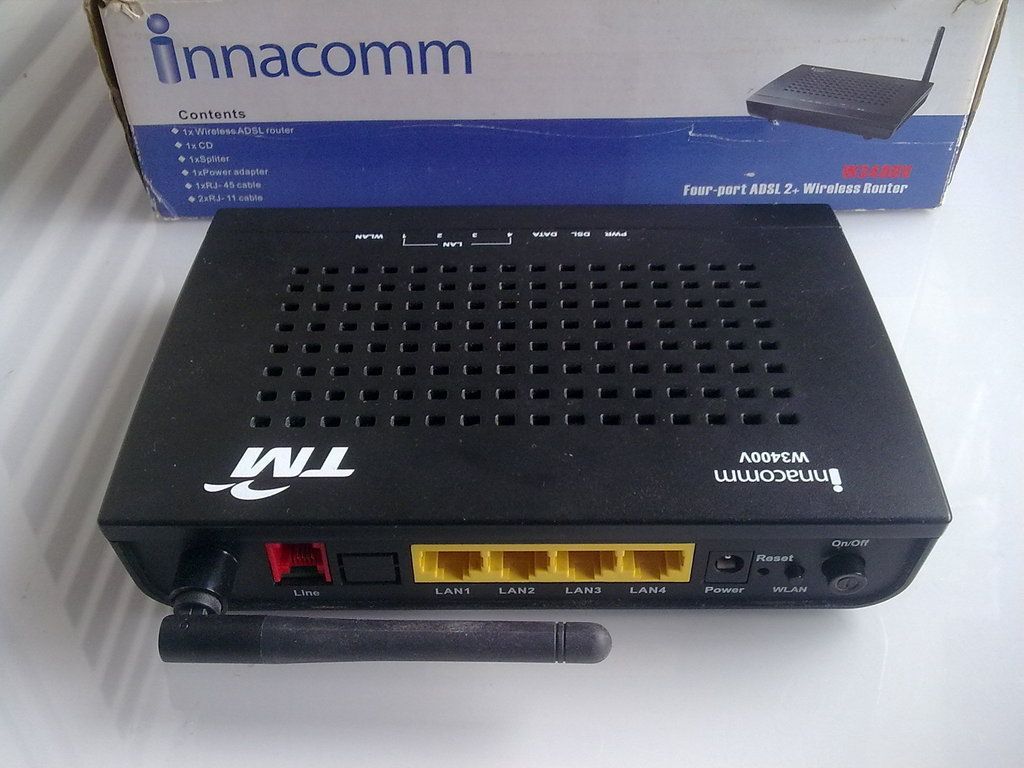
QUOTE(GOPI56 @ Nov 28 2016, 06:51 PM)
Sorry, I remember wrong already.Innacom W3400V currently use at family there.
I personally use silver color Innatech W7100N.
This post has been edited by JuneResources: Nov 29 2016, 07:52 AM
Streamyx Streamyx 4Mbps Club V6
|
|
Nov 29 2016, 07:51 AM
Show posts by this member only | IPv6 | Post
#3041
|
![]() ![]() ![]() ![]() ![]() ![]() ![]()
Senior Member
4,179 posts Joined: Mar 2012 From: Kuala Lumpur |
|
|
|
|
|
|
Nov 29 2016, 07:54 AM
Show posts by this member only | IPv6 | Post
#3042
|
![]() ![]() ![]() ![]() ![]() ![]() ![]()
Senior Member
4,179 posts Joined: Mar 2012 From: Kuala Lumpur |
QUOTE(Mubarak90 @ Nov 28 2016, 06:55 PM) I think my router don't have option to disable IPv6. (Coz I use that stupid modem)For my device, how to disable the IPv6? I use Lenovo Vibe Shot, don't see that setting before.. |
|
|
Nov 29 2016, 08:57 AM
|
![]() ![]()
Junior Member
208 posts Joined: Aug 2011 |
|
|
|
Nov 29 2016, 09:01 AM
|
![]() ![]() ![]() ![]() ![]() ![]()
Senior Member
1,165 posts Joined: Jul 2007 From: Johor |
|
|
|
Nov 29 2016, 09:03 AM
|
![]() ![]()
Junior Member
208 posts Joined: Aug 2011 |
|
|
|
Nov 29 2016, 09:05 AM
|
![]() ![]() ![]() ![]() ![]() ![]()
Senior Member
1,165 posts Joined: Jul 2007 From: Johor |
QUOTE(Passers-A @ Nov 29 2016, 09:03 AM) oo then i got no idea alreadyit happen to me before .... my house is more than 20years old already.. so the cable could be even older. and my snr margin kept jumping up and down like nobody business. requested TM to chg the cable form their pole to my house and still the same in the end i change the cable that is inside my house( the ones running inside the wall ) and walla solve the problem |
|
|
|
|
|
Nov 29 2016, 09:09 AM
|
![]() ![]()
Junior Member
208 posts Joined: Aug 2011 |
QUOTE(karthyhu @ Nov 29 2016, 09:05 AM) oo then i got no idea already which one you mean?it happen to me before .... my house is more than 20years old already.. so the cable could be even older. and my snr margin kept jumping up and down like nobody business. requested TM to chg the cable form their pole to my house and still the same in the end i change the cable that is inside my house( the ones running inside the wall ) and walla solve the problem the tm guy change the cable from the pole and bring in my house, so i doesnt use the wall socket anymore. im using the cable straight from the pole. |
|
|
Nov 29 2016, 09:16 AM
|
![]() ![]() ![]() ![]() ![]() ![]()
Senior Member
1,165 posts Joined: Jul 2007 From: Johor |
QUOTE(Passers-A @ Nov 29 2016, 09:09 AM) which one you mean? i mean....the tm guy change the cable from the pole and bring in my house, so i doesnt use the wall socket anymore. im using the cable straight from the pole. ok like this tm pole from outside your house they normally end the connection at your roof or nearby then from this will have another cable running inside your wall to the wall socket for you to plug in your land phone. i chg the cable running inside the house myself hope your understand but if using cable straight from pole shud be no problem already.... |
|
|
Nov 29 2016, 12:11 PM
|
![]() ![]() ![]()
Junior Member
482 posts Joined: Mar 2012 |
QUOTE(JuneResources @ Nov 29 2016, 07:54 AM) I think my router don't have option to disable IPv6. (Coz I use that stupid modem) Well, if you're browsing youtube mostly on your phones, I don't really know how. But if from PC, then it should be easier.For my device, how to disable the IPv6? I use Lenovo Vibe Shot, don't see that setting before.. https://support.microsoft.com/en-us/kb/929852 |
|
|
Nov 29 2016, 02:34 PM
|
![]() ![]() ![]() ![]() ![]() ![]() ![]()
Senior Member
4,179 posts Joined: Mar 2012 From: Kuala Lumpur |
QUOTE(Mubarak90 @ Nov 29 2016, 12:11 PM) Well, if you're browsing youtube mostly on your phones, I don't really know how. But if from PC, then it should be easier. Thanks for your useful information.https://support.microsoft.com/en-us/kb/929852 But Wow~ |
|
|
Nov 29 2016, 02:37 PM
|
![]() ![]() ![]()
Junior Member
482 posts Joined: Mar 2012 |
QUOTE(JuneResources @ Nov 29 2016, 02:34 PM) Thanks for your useful information. Yeah, you need to root the phone to disable it on mobile android. It's not that hard to disable IPv6 on my sony android tv though. Else, maybe you could upgrade the modem to get better result or easier configuration.But Wow~ |
|
|
Nov 29 2016, 02:47 PM
|
![]() ![]() ![]() ![]() ![]() ![]() ![]()
Senior Member
4,179 posts Joined: Mar 2012 From: Kuala Lumpur |
QUOTE(Mubarak90 @ Nov 29 2016, 02:37 PM) Yeah, you need to root the phone to disable it on mobile android. It's not that hard to disable IPv6 on my sony android tv though. Else, maybe you could upgrade the modem to get better result or easier configuration. It's kinda troublesome just only to disable the IPv6, need to root my device. But of course in the future, all of people been force to use IPv6 internet (Unifi) already due to stable internet connections and high speed. And you won't be surprise that TM will no longer support for Streamyx anymore... |
|
|
Nov 29 2016, 03:13 PM
|
![]() ![]() ![]()
Junior Member
482 posts Joined: Mar 2012 |
QUOTE(JuneResources @ Nov 29 2016, 02:47 PM) It's kinda troublesome just only to disable the IPv6, need to root my device. Not sure on how it will turn out. For the rural areas, maybe TM will focus to use existing copper cables from streamyx for starters. Probably with fibre optics internet, IPv6 issue will be nonexistent in the future.But of course in the future, all of people been force to use IPv6 internet (Unifi) already due to stable internet connections and high speed. And you won't be surprise that TM will no longer support for Streamyx anymore... |
|
|
|
|
|
Nov 29 2016, 04:14 PM
|
![]() ![]() ![]() ![]() ![]() ![]() ![]()
Senior Member
2,402 posts Joined: Jun 2007 |
QUOTE(JuneResources @ Nov 29 2016, 07:51 AM) Sorry, I remember wrong already. Innacom W3400V currently use at family there. I personally use silver color Innatech W7100N. QUOTE(JuneResources @ Nov 29 2016, 07:54 AM) I think my router don't have option to disable IPv6. (Coz I use that stupid modem) See post #956 at this thread: https://forum.lowyat.net/topic/2978208/+940For my device, how to disable the IPv6? I use Lenovo Vibe Shot, don't see that setting before.. The poster says the setting to disable IPV6 is hidden in the WAN settings. Suggest u take a look. |
|
|
Nov 29 2016, 07:05 PM
|
![]() ![]() ![]() ![]() ![]() ![]()
Senior Member
1,495 posts Joined: Dec 2012 |
QUOTE(JuneResources @ Nov 29 2016, 08:54 AM) I think my router don't have option to disable IPv6. (Coz I use that stupid modem) You can disable IPV6 on Innatech W7100N router. No need to change on your device I will show you the steps:For my device, how to disable the IPv6? I use Lenovo Vibe Shot, don't see that setting before.. 1.First click interface tab and choose WAN. 2.Then follow the steps like in picture below. ![]() 3.Then u will see a drop down menu beside IP Protocol like in the picture below. Here you choose IPV4. ( Area inside red circle in picture). And click modify to save settings. ![]() 4.Now restart your modem. Done. This post has been edited by GOPI56: Nov 29 2016, 07:23 PM |
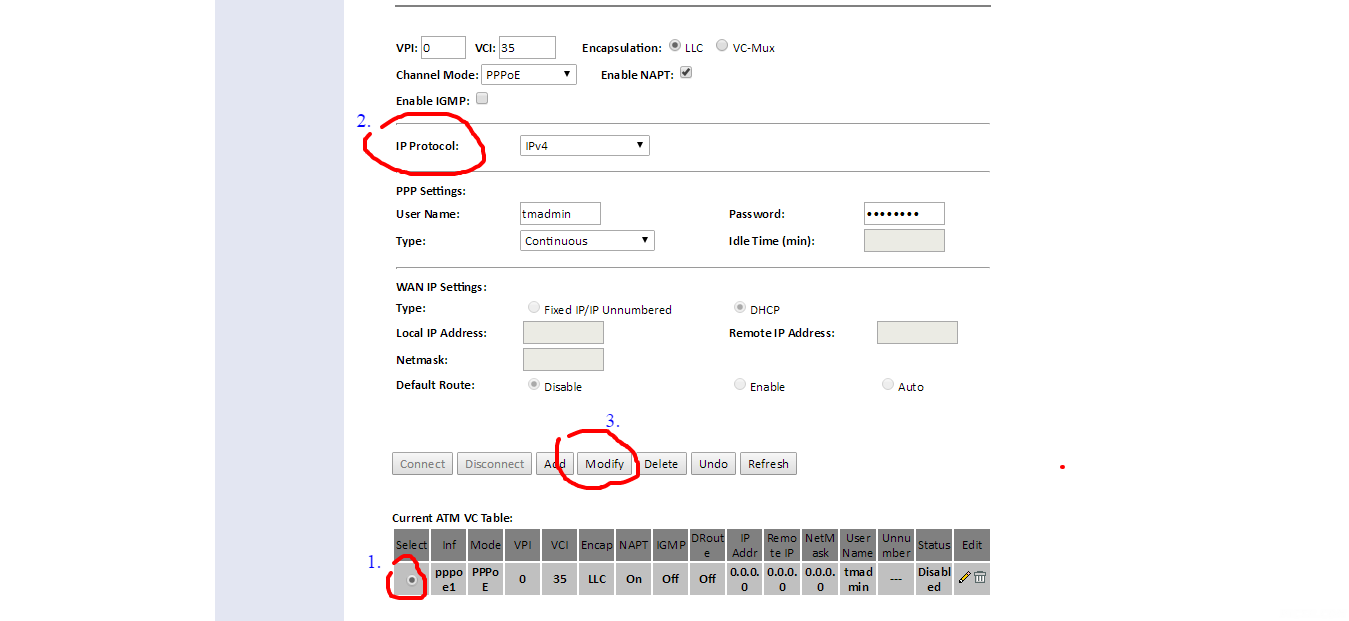
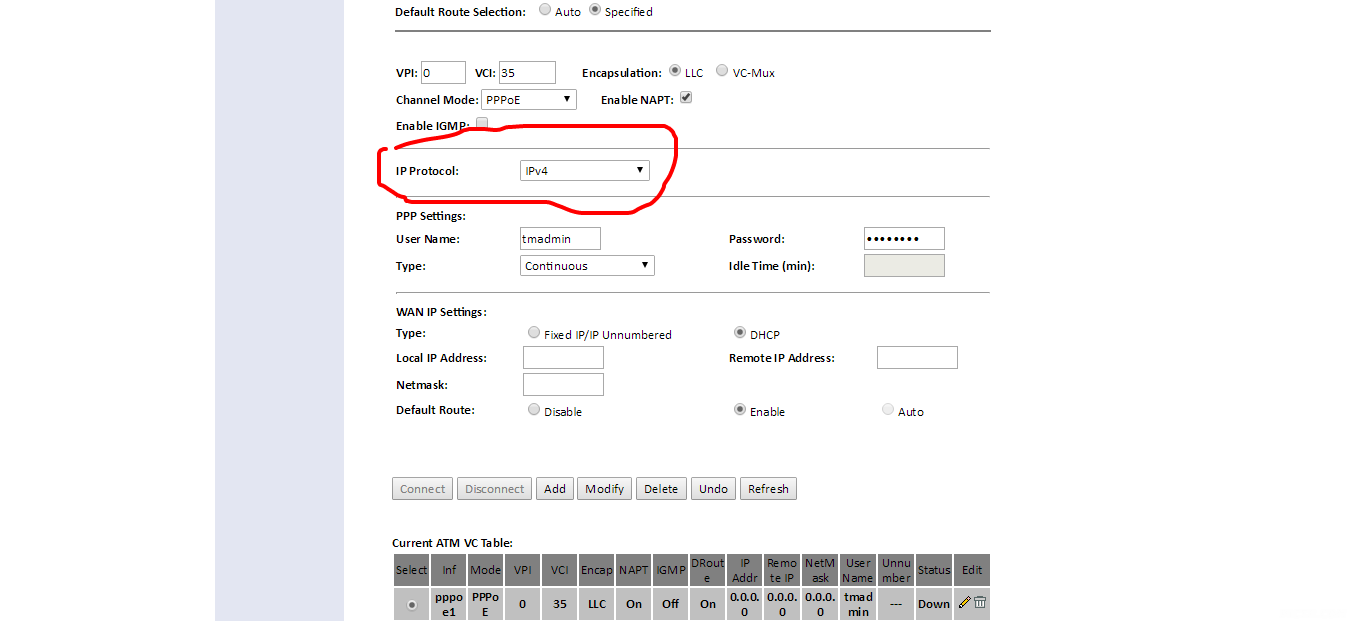
|
|
Nov 30 2016, 08:42 AM
|
![]() ![]() ![]() ![]() ![]() ![]() ![]()
Senior Member
4,179 posts Joined: Mar 2012 From: Kuala Lumpur |
QUOTE(andyng38 @ Nov 29 2016, 04:14 PM) See post #956 at this thread: https://forum.lowyat.net/topic/2978208/+940 Ok, thanks for your info.. The poster says the setting to disable IPV6 is hidden in the WAN settings. Suggest u take a look. QUOTE(GOPI56 @ Nov 29 2016, 07:05 PM) You can disable IPV6 on Innatech W7100N router. No need to change on your device I will show you the steps: That's much easier for this screenshot...1.First click interface tab and choose WAN. 2.Then follow the steps like in picture below. ![]() 3.Then u will see a drop down menu beside IP Protocol like in the picture below. Here you choose IPV4. ( Area inside red circle in picture). And click modify to save settings. ![]() 4.Now restart your modem. Done. Even baby can know how to set up for this.. Tonite let me set up of this, see any effect or not.. Respect~~ Thanks a lot... |

|
|
Nov 30 2016, 08:48 AM
|
![]() ![]()
Junior Member
214 posts Joined: Sep 2013 |
QUOTE(JuneResources @ Nov 28 2016, 04:01 PM) The screenshot is mine. Then why u said ur streamyx account is only 1mbps? The sceeenshot indicates you are 4mbps userBut I share out in here to let those expert to check whether my internet connections stable or not. This is because this few day when I watch youtube, it seems like frequently buffering and I already set to 360P still buffering. Previously 360P won't buffer at all, unless I set to 480P slightly buffer a bit.. |
|
|
Nov 30 2016, 09:44 AM
|
![]() ![]() ![]() ![]() ![]() ![]() ![]()
Senior Member
4,179 posts Joined: Mar 2012 From: Kuala Lumpur |
QUOTE(ranger2020 @ Nov 30 2016, 08:48 AM) Yes, my streamyx package monthly payment is 1mbps, and I last month speedtest before reach 0.98Mbps (Download speed), 0.36mbps if I m not wrong remember (Upload speed).I tonight screenshot again my actual speed test for this month.. Eventually how to see based the screenshot indicate I am 4mbps user? Previously consult with TM technical said that my coverage only max 1Mbps, no more port for 2Mbps or above... This post has been edited by JuneResources: Nov 30 2016, 09:45 AM |
|
|
Nov 30 2016, 10:32 AM
|
![]() ![]()
Junior Member
214 posts Joined: Sep 2013 |
QUOTE(JuneResources @ Nov 30 2016, 09:44 AM) Yes, my streamyx package monthly payment is 1mbps, and I last month speedtest before reach 0.98Mbps (Download speed), 0.36mbps if I m not wrong remember (Upload speed). I tonight screenshot again my actual speed test for this month.. Eventually how to see based the screenshot indicate I am 4mbps user? Previously consult with TM technical said that my coverage only max 1Mbps, no more port for 2Mbps or above... see picture. if you subscribing to 1mpbs, ask TM to increase to 2mbps This post has been edited by ranger2020: Nov 30 2016, 10:32 AM |
|
|
Nov 30 2016, 10:44 AM
|
![]() ![]() ![]() ![]() ![]()
Senior Member
773 posts Joined: Oct 2009 From: nowhere |
last night around 10 ~ 12 midnight browsing sped is really slow.
youtube/facebook speed roughly around 40kbytes/s (monitor using netspeedmonitor in taskbar), more weird is, dota2 is playable with not much noticeable delay. after restarts modem or manually reconnect from modem config page, i can regain normal speed. but slow down begin after roughly 10 minutes. dont think it is cable related issue, perhaps something on their side. this happens almost everynight. anyone having same problem as mine? |
| Change to: | 0.0282sec
0.65
6 queries
GZIP Disabled
Time is now: 20th December 2025 - 06:51 AM |