Welcome Guest ( Log In | Register )

235 Pages « < 150 151 152 153 154 > » Bottom

Outline · [ Standard ] · Linear+

Streamyx Streamyx 4Mbps Club V6

views
     
Passers-A
post Nov 26 2016, 07:04 PM

Getting Started
**
Junior Member
208 posts

Joined: Aug 2011


QUOTE(GOPI56 @ Nov 26 2016, 06:33 PM)
From the picture,

The SNR Margin & Attenuation values are actually displayed in 0.1dB units, meaning that 106 SNR margin is actually 10.6dB SNR margin. So your SNR margin is:

Downstream: 10.6 (Not good, cause of your connection problem probably )
Upstream:28.0 (Good, no problem)

Solution:
a.Try changing the telephone cable.
b.Try changing the DSL splitter.
*
both already did. Now even drop to 8.8 T_T

This post has been edited by Passers-A: Nov 26 2016, 07:11 PM
GOPI56
post Nov 26 2016, 07:06 PM

Regular
******
Senior Member
1,495 posts

Joined: Dec 2012
QUOTE(Passers-A @ Nov 26 2016, 08:04 PM)
both already did. T_T
*
Have you complained this matter to TM. Maybe their hardware or cable faulty.
Passers-A
post Nov 26 2016, 07:13 PM

Getting Started
**
Junior Member
208 posts

Joined: Aug 2011


QUOTE(GOPI56 @ Nov 26 2016, 07:06 PM)
Have you complained this matter to TM. Maybe their hardware or cable faulty.
*
they did change the cable from outside and even i get charged for that. But the dc problem does not occur anymore.
GOPI56
post Nov 26 2016, 07:31 PM

Regular
******
Senior Member
1,495 posts

Joined: Dec 2012
QUOTE(Passers-A @ Nov 26 2016, 08:13 PM)
they did change the cable from outside and even i get charged for that. But the dc problem does not occur anymore.
*
Is your internet speed ok ?
Passers-A
post Nov 26 2016, 07:42 PM

Getting Started
**
Junior Member
208 posts

Joined: Aug 2011


QUOTE(GOPI56 @ Nov 26 2016, 07:31 PM)
Is your internet speed ok ?
*
issit normal when i open a website or youtube-ing the ping goes up 1k?
GOPI56
post Nov 26 2016, 08:58 PM

Regular
******
Senior Member
1,495 posts

Joined: Dec 2012
QUOTE(Passers-A @ Nov 26 2016, 08:42 PM)
issit normal when i open a website or youtube-ing the ping goes up 1k?
*
Try ping google.com and screenshot it. Attach the screenshot here i want to take a look.
afiq10
post Nov 27 2016, 12:40 AM

Casual
***
Junior Member
394 posts

Joined: Jan 2014
QUOTE(Passers-A @ Nov 26 2016, 06:21 PM)
anyone know?
*
Your Attenuation is ok-ok..
SNR Margin a bit too low.. fair.. DC might occur..

Try plugging in your modem direct to phone socket..

and check it again..


This post has been edited by afiq10: Nov 27 2016, 12:46 AM
JuneResources
post Nov 28 2016, 07:44 AM

ONE Stop Resources
*******
Senior Member
4,179 posts

Joined: Mar 2012
From: Kuala Lumpur


Hey, does somebody know my internet or modem ok for the connection as screenshot below?

Attached Image
ranger2020
post Nov 28 2016, 10:45 AM

Getting Started
**
Junior Member
214 posts

Joined: Sep 2013
QUOTE(JuneResources @ Nov 28 2016, 07:44 AM)
Hey, does somebody know my internet or modem ok for the connection as screenshot below?

Attached Image
*
if you not getting the full 4mpbs, you may need to call TM to increase your downstream limit to 5mbps. tell them you no getting the full 4mbps. the rationale is to avoid internet connection not getting the full 4mbps.
andyng38
post Nov 28 2016, 01:05 PM

Look at all my stars!!
*******
Senior Member
2,402 posts

Joined: Jun 2007
QUOTE(JuneResources @ Nov 28 2016, 07:44 AM)
Hey, does somebody know my internet or modem ok for the connection as screenshot below?

Attached Image
*

You can compare yr modem stats with the figures on post #1 in this thread.

Your up/down data rates are capped too low. There is a loss in speed due to overheads, so in order to get 4mbps down and 512k up, your rate must be over 5mbps down and 600+k up in order to compensate for the overheads incurred.
Explanation of DSL overhead with TLDR version: http://www.dslreports.com/faq/13841

Recommend you call 100 and ask them to change your port configuration to the proper speeds.

Optional (if u have spare cash): a better-quality modem could improve your surfing/wifi experience.
JuneResources
post Nov 28 2016, 02:29 PM

ONE Stop Resources
*******
Senior Member
4,179 posts

Joined: Mar 2012
From: Kuala Lumpur


QUOTE(ranger2020 @ Nov 28 2016, 10:45 AM)
if you not getting the full 4mpbs, you may need to call TM to increase your downstream limit to 5mbps. tell them you no getting the full 4mbps. the rationale is to avoid internet connection not getting the full 4mbps.
*
QUOTE(andyng38 @ Nov 28 2016, 01:05 PM)
You can compare yr modem stats with the figures on post #1 in this thread.

Your up/down data rates are capped too low. There is a loss in speed due to overheads, so in order to get 4mbps down and 512k up, your rate must be over 5mbps down and 600+k up in order to compensate for the overheads incurred.
Explanation of DSL overhead with TLDR version: http://www.dslreports.com/faq/13841

Recommend you call 100 and ask them to change your port configuration to the proper speeds.

Optional (if u have spare cash): a better-quality modem could improve your surfing/wifi experience.
*
Thanks for your useful information.

Too sad my package is 1mbps as my coverage max Streamyx speed is 1mbps.
Currently not available for 4mbps.. cry.gif
ranger2020
post Nov 28 2016, 02:42 PM

Getting Started
**
Junior Member
214 posts

Joined: Sep 2013
QUOTE(JuneResources @ Nov 28 2016, 02:29 PM)
Thanks for your useful information.

Too sad my package is 1mbps as my coverage max Streamyx speed is 1mbps.
Currently not available for 4mbps.. cry.gif
*
oh. the screenshot is not yours?
JuneResources
post Nov 28 2016, 04:01 PM

ONE Stop Resources
*******
Senior Member
4,179 posts

Joined: Mar 2012
From: Kuala Lumpur


QUOTE(ranger2020 @ Nov 28 2016, 02:42 PM)
oh. the screenshot is not yours?
*
The screenshot is mine.
But I share out in here to let those expert to check whether my internet connections stable or not.

This is because this few day when I watch youtube, it seems like frequently buffering and I already set to 360P still buffering. Previously 360P won't buffer at all, unless I set to 480P slightly buffer a bit..
GOPI56
post Nov 28 2016, 04:03 PM

Regular
******
Senior Member
1,495 posts

Joined: Dec 2012
QUOTE(JuneResources @ Nov 28 2016, 05:01 PM)
The screenshot is mine.
But I share out in here to let those expert to check whether my internet connections stable or not.

This is because this few day when I watch youtube, it seems like frequently buffering and I already set to 360P still buffering.  Previously 360P won't buffer at all, unless I set to 480P slightly buffer a bit..
*
Have u disabled the IPV6 ? Youtube on IPV6 on streamyx is slow.
JuneResources
post Nov 28 2016, 04:40 PM

ONE Stop Resources
*******
Senior Member
4,179 posts

Joined: Mar 2012
From: Kuala Lumpur


QUOTE(GOPI56 @ Nov 28 2016, 04:03 PM)
Have u disabled the IPV6 ? Youtube on IPV6 on streamyx is slow.
*
Not notice about this IPV6 from the Youtube?
By the way, how to disable the IPV6?
GOPI56
post Nov 28 2016, 05:24 PM

Regular
******
Senior Member
1,495 posts

Joined: Dec 2012
QUOTE(JuneResources @ Nov 28 2016, 05:40 PM)
Not notice about this IPV6 from the Youtube?
By the way, how to disable the IPV6?
*
What streamyx modem are u using ?
JuneResources
post Nov 28 2016, 05:36 PM

ONE Stop Resources
*******
Senior Member
4,179 posts

Joined: Mar 2012
From: Kuala Lumpur


QUOTE(GOPI56 @ Nov 28 2016, 05:24 PM)
What streamyx modem are u using ?
*
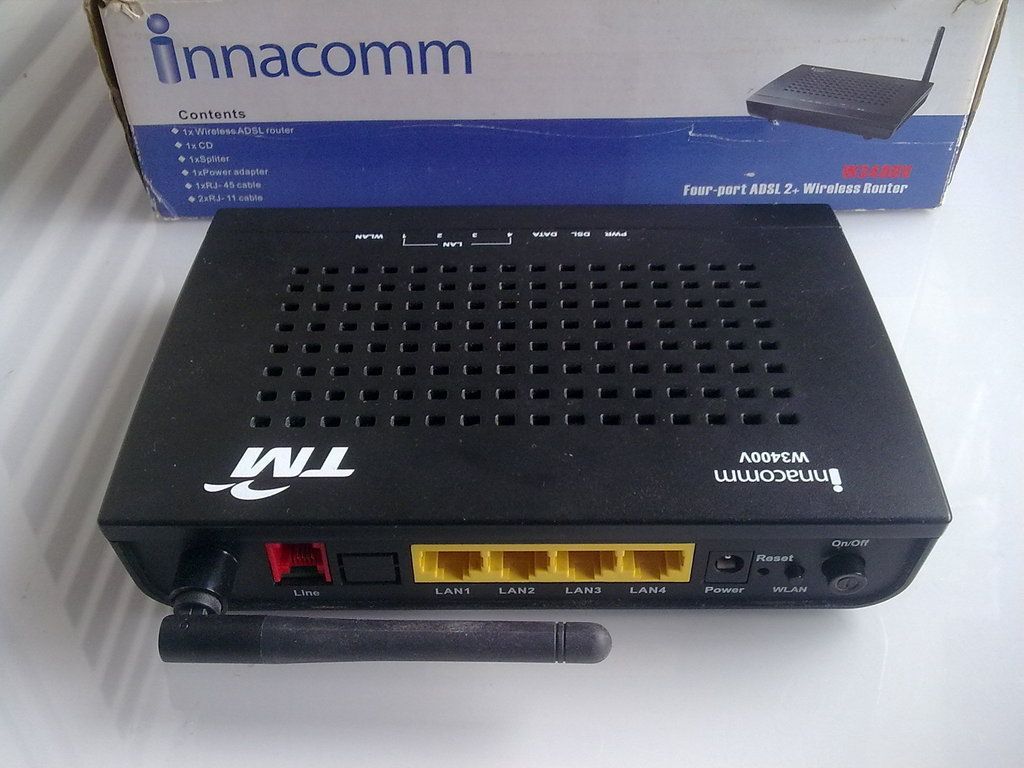
Innacomm W3400V
karthyhu
post Nov 28 2016, 05:42 PM

Regular
******
Senior Member
1,165 posts

Joined: Jul 2007
From: Johor


QUOTE(Passers-A @ Nov 26 2016, 07:04 PM)
both already did. Now even drop to 8.8 T_T
*
By changing telephone cable which did u change ?
is it from wall socket to modem?

GOPI56
post Nov 28 2016, 06:51 PM

Regular
******
Senior Member
1,495 posts

Joined: Dec 2012
QUOTE(JuneResources @ Nov 28 2016, 06:36 PM)
Innacomm W3400V
*
Are u using this modem ?
user posted image
Mubarak90
post Nov 28 2016, 06:55 PM

Casual
***
Junior Member
482 posts

Joined: Mar 2012
QUOTE(JuneResources @ Nov 28 2016, 04:40 PM)
Not notice about this IPV6 from the Youtube?
By the way, how to disable the IPV6?
*
If you can't disable IPv6 from the router, you could try disabling it on your device.

235 Pages « < 150 151 152 153 154 > » Top
 

Change to:
| Lo-Fi Version
0.0341sec    0.72    6 queries    GZIP Disabled
Time is now: 20th December 2025 - 03:27 AM