Welcome Guest ( Log In | Register )

55 Pages « < 27 28 29 30 31 > » Bottom

Outline · [ Standard ] · Linear+

 Dell Vostro 5460, Ultrabook

views
     
shawnme
post Oct 14 2013, 10:18 AM

Enthusiast
*****
Junior Member
743 posts

Joined: Feb 2011
bros, i've been using the 5470 for a few hours now. I really hate the touchpad i would say...but the multitouch gestures do come in handy.

However, i have been looking at my Performance Monitor and I notice that Disk Writes is at 100% many of the times while my CPU hardly reaches 90% and at normal usage i am using 70% of my RAM.

I do feel some lag somehow, I wonder it's windows 8 or its due to the 100% Disk writes.

and wow...i can tell you that the battery rocks...it doesn't seem to end

This post has been edited by shawnme: Oct 14 2013, 02:48 PM
samurai7
post Oct 14 2013, 06:22 PM

KaMiKazE
*******
Senior Member
2,047 posts

Joined: Feb 2011


how much current price now for this lappy?
Error404
post Oct 14 2013, 10:53 PM

Getting Started
**
Junior Member
236 posts

Joined: Mar 2009
From: Heilongjiang Province, China
QUOTE(samurai7 @ Oct 14 2013, 06:22 PM)
how much current price now for this lappy?
*
official price - dell.com.my

WhatMan
post Oct 14 2013, 11:03 PM

Regular
******
Senior Member
1,623 posts

Joined: Oct 2010


QUOTE(shawnme @ Oct 14 2013, 10:18 AM)
bros, i've been using the 5470 for a few hours now. I really hate the touchpad i would say...but the multitouch gestures do come in handy.

However, i have been looking at my Performance Monitor and I notice that Disk Writes is at 100% many of the times while my CPU hardly reaches 90% and at normal usage i am using 70% of my RAM.

I do feel some lag somehow, I wonder it's windows 8 or its due to the 100% Disk writes.

and wow...i can tell you that the battery rocks...it doesn't seem to end
*
What is it you hate about the touch pad? Yours is icore3 with or without nvidia?
nexus2238
post Oct 15 2013, 07:32 AM

Look at all my stars!!
*******
Senior Member
4,195 posts

Joined: Sep 2012


QUOTE(shawnme @ Oct 14 2013, 10:18 AM)
bros, i've been using the 5470 for a few hours now. I really hate the touchpad i would say...but the multitouch gestures do come in handy.

However, i have been looking at my Performance Monitor and I notice that Disk Writes is at 100% many of the times while my CPU hardly reaches 90% and at normal usage i am using 70% of my RAM.

I do feel some lag somehow, I wonder it's windows 8 or its due to the 100% Disk writes.

and wow...i can tell you that the battery rocks...it doesn't seem to end
*
how is the wireless connection range on your 5470? (that is the Achilles heel of 5460 hmm.gif )

Yup, HDD is the bottleneck (for any laptop), that's why it will be good to swap in a SDD smile.gif
shawnme
post Oct 15 2013, 11:24 AM

Enthusiast
*****
Junior Member
743 posts

Joined: Feb 2011
QUOTE(WhatMan @ Oct 14 2013, 11:03 PM)
What is it you hate about the touch pad? Yours is icore3 with or without nvidia?
*
sticky when fingers wet

mine is i5.. i think.. the highest spec

This post has been edited by shawnme: Oct 15 2013, 11:25 AM
lambethwalk
post Oct 15 2013, 01:23 PM

Look at all my stars!!
*******
Senior Member
2,635 posts

Joined: Jun 2011
From: bohtakchik
QUOTE(shawnme @ Oct 15 2013, 11:24 AM)
sticky when fingers wet

mine is i5.. i think.. the highest spec
*
appreciate your feedback shawnme. do test the Wifi capability and let us know how that stands out smile.gif
thanks man
shawnme
post Oct 15 2013, 02:39 PM

Enthusiast
*****
Junior Member
743 posts

Joined: Feb 2011
QUOTE(nexus2238 @ Oct 15 2013, 07:32 AM)
how is the wireless connection range on your 5470? (that is the Achilles heel of 5460  hmm.gif )

Yup, HDD is the bottleneck (for any laptop), that's why it will be good to swap in a SDD smile.gif
*
WIFI

I am not a hardcore in testing the wifi, but as a normal user, I have my Unifi DIR-615 router downstairs and my laptop upstairs on the second floor on battery with Dell's out-of-the-box battery power settings. I do not seem to have a wifi connection problem except for constantly disconnecting due to the stupid DIR-615 router which happens to all my other devices.

I have also used the laptop outside where, I easily get wifi signals where my iPad 4 cant even detect. I don't know if that is considered okay but I odnt find it a problem.

WIN 8

I have more problem with inconsistent Windows 8 platform between the metro and desktop interface and some occasional program crash, otherwise window 8 is okay as well.

BATTERY LIFE

I could easily get 4 to 5 hours of battery life with me playing around with the laptop these 2 days installing stuff and trying out programs in and out. The battery charges pretty fast too when plugged in. At least the battery can easily last longer than my damn HTC phone with the same amount of usage.

PERFORMANCE

I notice that whenever I feel lag, it will be accustomed with the blinking of the HDD and with the response I got, I now believe it is the bottleneck of the laptop. I am hesitating to change to SSD as I feel that the thing is still relatively new and it's relatively expensive which I feel the prices are going to drop pretty fast. Right now I would mind changing the RAM to 8Gb anyway...Will I see any difference? As I notice it's pretty odd with the way Win 8 uses the RAM. One half is "used", a minute amount as "modified", and the rest of it as "standby"...where very rarely, once in a blue moon you'll get to see about 400Mb as "free".

FINGER PRINT READER

This thing is pretty cool, I use it to log in to windows. Only downside to it is, I have to stick to Windows Explorer as it doesn't work with chrome.

SCREEN

Well, I always tried to avoid glossy screens, but this screen on this piece doesn't really pose a problem to my astig


Well, That's all I can think of for now. If there's anything else you guys would want to know, I'll try to respond.

p/s : this laptop is a fingerprint magnet
shawnme
post Oct 15 2013, 03:47 PM

Enthusiast
*****
Junior Member
743 posts

Joined: Feb 2011
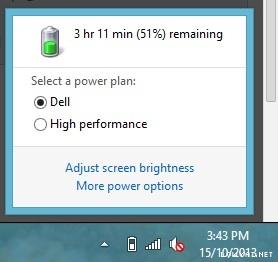
Just for fun...Vostro 5470 battery life with casual internet surfing, without watching videos..just searching, reading, upload, download

Attached Image
JML
post Oct 15 2013, 09:49 PM

Getting Started
**
Junior Member
269 posts

Joined: Sep 2006
@shawnme, i will recommend you to upgrade to SSD than upgrage ur ram.
seriously, try out SSD if you have not.. u'll love it wink.gif
Abk92
post Oct 15 2013, 11:11 PM

Enthusiast
*****
Senior Member
717 posts

Joined: Jun 2012
QUOTE(shawnme @ Oct 15 2013, 03:47 PM)
Just for fun...Vostro 5470 battery life with casual internet surfing, without watching videos..just searching, reading, upload, download

Attached Image
*
damnnnn that's cool after all that u still have 3 hours to go.. shocking.gif
WhatMan
post Oct 15 2013, 11:18 PM

Regular
******
Senior Member
1,623 posts

Joined: Oct 2010


Dell repairman told me Vostro is the model to go for if you are very mobile. Inspirons are what he said "fragile".
nexus2238
post Oct 16 2013, 04:02 AM

Look at all my stars!!
*******
Senior Member
4,195 posts

Joined: Sep 2012


QUOTE(WhatMan @ Oct 15 2013, 11:18 PM)
Dell repairman told me Vostro is the model to go for if you are very mobile. Inspirons are what he said "fragile".
*
I'll say Vostro 5460 / 5470 are quite "fragile" as well tongue.gif (i.e. the body / shell twist as much as the normal Inspiron tongue.gif. In fact, I'll say the new Inspiron 7000 series is slightly more "solid" than this Vostro hmm.gif ). The repairman may be referring to the older Vostro 3460.

For mobile workforce on a tight budget, if you are into Dell, may want to have a look at Latitude 14 3000 (Latitude 3440) as well. Weight 2.0kg (about the same as Inspiron 14 7000), but solid enough (not as solid as the Latitude 6430 that I'm using in office, but still good), and can opt for 65Whr battery tongue.gif Price is also quite competitive for proper business class laptop (< RM3k). No docking port though (need to use USB docking). (in fact, I have the sneaky feeling that Dell has "move" the old Vostro line into Latitude 3000 series (since we don't see any Haswell refresh for Vostro 3360 / 3460 / 3560), and let Vostro brand run with 5470 type of models hmm.gif )
nexus2238
post Oct 16 2013, 05:57 AM

Look at all my stars!!
*******
Senior Member
4,195 posts

Joined: Sep 2012


QUOTE(shawnme @ Oct 15 2013, 02:39 PM)
WIFI

I am not a hardcore in testing the wifi, but as a normal user, I have my Unifi DIR-615 router downstairs and my laptop upstairs on the second floor on battery with Dell's out-of-the-box battery power settings. I do not seem to have a wifi connection problem except for constantly disconnecting due to the stupid DIR-615 router which happens to all my other devices.

I have also used the laptop outside where, I  easily get wifi signals where my iPad 4 cant even detect. I don't know if that is considered okay but I odnt find it a problem.

WIN 8

I have more problem with inconsistent Windows 8 platform between the metro and desktop interface and some occasional program crash, otherwise window 8 is okay as well.

BATTERY LIFE

I could easily get 4 to 5 hours of battery life with me playing around with the laptop these 2 days installing stuff and trying out programs in and out. The battery charges pretty fast too when plugged in. At least the battery can easily last longer than my damn HTC phone with the same amount of usage.

PERFORMANCE

I notice that whenever I feel lag, it will be accustomed with the blinking of the HDD and with the response I got, I now believe it is the bottleneck of the laptop. I am hesitating to change to SSD as I feel that the thing is still relatively new and it's relatively expensive which I feel the prices are going to drop pretty fast. Right now I would mind changing the RAM to 8Gb anyway...Will I see any difference? As I notice it's pretty odd with the way Win 8 uses the RAM. One half is "used", a minute amount as "modified", and the rest of it as "standby"...where very rarely, once in a blue moon you'll get to see about 400Mb as "free".

FINGER PRINT READER

This thing is pretty cool, I use it to log in to windows. Only downside to it is, I have to stick to Windows Explorer as it doesn't work with chrome.

SCREEN

Well, I always tried to avoid glossy screens, but this screen on this piece doesn't really pose a problem to my astig
Well, That's all I can think of for now. If there's anything else you guys would want to know, I'll try to respond.

p/s : this laptop is a fingerprint magnet
*
Thanks for feedback rclxms.gif thumbup.gif
So, as expected, the Haswell spec 5470 address the battery runtime shortcoming of 5460.
Good to hear that the wireless connection in your 5470 is working fine.

On the RAM increase, you will notice slight improvement if you are into heavy multi-tasking.
The pattern of behaviour you see on RAM is normal, lots of prefetch / superfetch / swapping going around tongue.gif Btw, even if you increase RAM to 8G, you may still see the same pattern laugh.gif (yet another benefit of going SSD: you can turn off prefetch / superfetch to free up RAM usage, and swap file (if you leave it on) access faster on SSD).

Understand your concern on SSD cost, it is dropping fast year by year. But SSD is not new tech anymore lah smile.gif

This post has been edited by nexus2238: Oct 16 2013, 05:59 AM

WhatMan
post Oct 16 2013, 08:57 AM

Regular
******
Senior Member
1,623 posts

Joined: Oct 2010


QUOTE(nexus2238 @ Oct 16 2013, 04:02 AM)
I'll say Vostro 5460 / 5470 are quite "fragile" as well tongue.gif (i.e. the body / shell twist as much as the normal Inspiron tongue.gif. In fact, I'll say the new Inspiron 7000 series is slightly more "solid" than this Vostro  hmm.gif ). The repairman may be referring to the older Vostro 3460.

For mobile workforce on a tight budget, if you are into Dell, may want to have a look at Latitude 14 3000 (Latitude 3440) as well. Weight 2.0kg (about the same as Inspiron 14 7000), but solid enough (not as solid as the Latitude 6430 that I'm using in office, but still good), and can opt for 65Whr battery tongue.gif Price is also quite competitive for proper business class laptop (< RM3k). No docking port though (need to use USB docking). (in fact, I have the sneaky feeling that Dell has "move" the old Vostro line into Latitude 3000 series (since we don't see any Haswell refresh for Vostro 3360 / 3460 / 3560), and let Vostro brand run with 5470 type of models  hmm.gif )
*
The dell repairman talked to me about laptop model reliability, and he did mentioned about latitude being the better choice, although funny enough he was repairing a faulty new latitude right in front of me (motherboard issue).

Considering that Inspiron 7000 is very new its hard to tell if it is tough as the old and new Vostro.

I would really like to go for Inspiron 11 3000 series (RM1399 on dell.com), but the cheap price has me worry about its reliability.

Latitude seems like a b**** to find. In fact it was the first model I wanted to go for but for some oddball reason Dell refuse to put up the series for sale online. The RM4k price being sold on retailers aren't helping either.


Error404
post Oct 16 2013, 10:29 AM

Getting Started
**
Junior Member
236 posts

Joined: Mar 2009
From: Heilongjiang Province, China
Actually can we run on both HDD & SSD on 5460/5470?
I saw on Dell website that it comes with SSD as optional but didnt find the option to add the SSD.
nexus2238
post Oct 16 2013, 01:22 PM

Look at all my stars!!
*******
Senior Member
4,195 posts

Joined: Sep 2012


QUOTE(Error404 @ Oct 16 2013, 10:29 AM)
Actually can we run on both HDD & SSD on 5460/5470?
I saw on Dell website that it comes with SSD as optional but didnt find the option to add the SSD.
*
Do you mean having a SATA HDD and a mSATA SSD?
For 5460, 1 of the spec allow buyer to do that. Apparently, for those spec that come without the factory mSATA SSD, the mSATA port somehow is disabled (according to 1 of the forumer) hmm.gif

For 5470, I saw the mSATA port right beside the WLAN card, but did not try putting in mSATA SSD to test if the port work tongue.gif

Have to ask owner or some re-seller sifus to test it out notworthy.gif
bojan
post Oct 17 2013, 12:20 PM

New Member
*
Junior Member
11 posts

Joined: Jan 2009


those wondering how to reformat and reinstall windows for dell laptops... even if they dont come with recovery DVD... look inside the laptop for a file named "factory.wim"

this is your factory setting original windows image.. all the serial info built inside already apparently such that when you reinstall this .wim image.. you do not need to re-enter the windos serial number..

so find this factory.wim and make a backup copy somewhere... in your backup external HDD or your DVD or your thumbdrive... whenever you need to reformat.. use this image again...

how to restore factory.wim... that's a whole different story.. it could be tricky.. just be sure that the image is x86 or x64.. and use the image restrore software corresponding to it..
Error404
post Oct 17 2013, 12:24 PM

Getting Started
**
Junior Member
236 posts

Joined: Mar 2009
From: Heilongjiang Province, China
QUOTE(bojan @ Oct 17 2013, 12:20 PM)
those wondering how to reformat and reinstall windows for dell laptops... even if they dont come with recovery DVD... look inside the laptop for a file named "factory.wim"

this is your factory setting original windows image.. all the serial info built inside already apparently such that when you reinstall this .wim image.. you do not need to re-enter the windos serial number..

so find this factory.wim and make a backup copy somewhere... in your backup external HDD or your DVD or your thumbdrive... whenever you need to reformat.. use this image again...

how to restore factory.wim... that's a whole different story.. it could be tricky.. just be sure that the image is x86 or x64.. and use the image restrore software corresponding to it..
*
good info, quote for future use
shawnme
post Oct 18 2013, 02:26 AM

Enthusiast
*****
Junior Member
743 posts

Joined: Feb 2011
Hey guys,

Windows 8.1 is out apparently..

55 Pages « < 27 28 29 30 31 > » Top
 

Change to:
| Lo-Fi Version
0.0340sec    0.59    6 queries    GZIP Disabled
Time is now: 11th December 2025 - 10:20 PM