

» Click to show Spoiler - click again to hide... «
Home Networking ASUS Malaysia Networking User & Technical Support, Managed by ASUS Malaysia Representative
Home Networking ASUS Malaysia Networking User & Technical Support, Managed by ASUS Malaysia Representative
|
|
 Feb 16 2019, 08:39 PM Feb 16 2019, 08:39 PM
|
 
Senior Member
755 posts Joined: Oct 2008 From: Taiping, Perak  
|
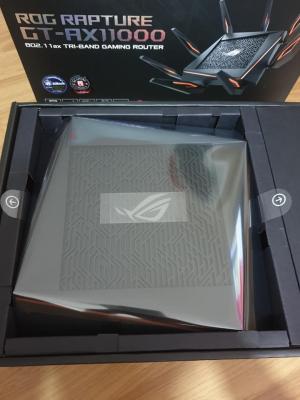
Just get this router..
» Click to show Spoiler - click again to hide... « |
|
|
|
|
|
Feb 16 2019, 11:26 PM
Show posts by this member only | IPv6 | Post
#9922
|
 
Elite
8,408 posts Joined: Jul 2008 
|
QUOTE(ukiya21 @ Feb 16 2019, 08:39 PM) Just get this router.. Where you got it from?» Click to show Spoiler - click again to hide... «  |
|
|
Feb 17 2019, 08:25 AM
|

Senior Member
2,741 posts Joined: Jan 2007
|
QUOTE(a07 @ Feb 16 2019, 03:21 PM) Hi AsusMy Did you set IPTV profile?keep getting message Reason for failed connection The network cable is unplugged. We suggest you Please ensure that the cable is properly connected between BRT-AC828 WAN port and the modem. If a problem still persists, manually change the connection settings. Asus AC2600 BRT828 . ppoe connection to unifi failed, In network map Internet status is network cable is unplugged. WAN led is red.Replace cable from modem to router still got same message. My standard unifi router work well. I have experience configure unifi connection with Asus RT-AC68U, Just key in unifi userid and password to get internet connection. The same way cannot work with BRT828. Is there any other configuration? Your cooperation is highly appreciated. Thank you |
|
|
Feb 17 2019, 09:36 AM
|

Junior Member
10 posts Joined: Jul 2007
|
QUOTE(JayceOoi @ Feb 17 2019, 08:25 AM) Did you set IPTV profile? Iptv profile not set.This post has been edited by a07: Feb 17 2019, 10:00 AM |
|
|
Feb 17 2019, 04:27 PM
|
|
Junior Member
10 posts Joined: Jul 2007
|
Finally I successfully make connection to unifi after I found Asus BRT-AC828 Business Router Review by Alvin Ong in blacktubi.com. What is the reason unifi connection from Unifi modem to LAN5 instead of the WAN ports??
 Thank you  |
|
|
Feb 17 2019, 04:38 PM
|
|
Elite
8,408 posts Joined: Jul 2008
|
QUOTE(a07 @ Feb 17 2019, 04:27 PM) Finally I successfully make connection to unifi after I found Asus BRT-AC828 Business Router Review by Alvin Ong in blacktubi.com. What is the reason unifi connection from Unifi modem to LAN5 instead of the WAN ports?? Hi, thanks for reading my blog. Thank you This is thanks to this router being DUAL-WAN and TM required VLAN which caused this slightly weirder config. But, this is still one of the fastest and strongest all in one router I tried.  QCA9984 is truly a legendary WiFi chip that normally being used in Enterprise AP. |
|
|
|
|
|
Feb 17 2019, 09:40 PM
|
|
Senior Member
755 posts Joined: Oct 2008 From: Taiping, Perak
|
QUOTE(blacktubi @ Feb 16 2019, 11:26 PM) Where you got it from? Bought from shopee... |
|
|
Feb 21 2019, 02:51 PM
|
|
Junior Member
176 posts Joined: Sep 2008
|
@Asusmy I'm interested in purchasing GT-AC5300 router, but would like to know whether it can let the Game Port, IPTV and Link Aggregation run together? Cause for Unifi to work I must enable IPTV then only Unifi allow me to login to Unifi. If IPTV is share port with Link Aggregation then I can't use it for NAS link aggregation which is the scenario I faced now in my TP-LINK C5400v2 router, whereby the IPTV cannot be used when Link aggregation is active which indirectly I can't login to internet due to Unifi need IPTV be active.
Anyone is welcome to provide the insight info on this. Thanks. |
 |
Feb 21 2019, 05:08 PM
|

Senior Member
2,319 posts Joined: Mar 2010
|
QUOTE(wesleycjh @ Feb 21 2019, 02:51 PM) @Asusmy I'm interested in purchasing GT-AC5300 router, but would like to know whether it can let the Game Port, IPTV and Link Aggregation run together? Cause for Unifi to work I must enable IPTV then only Unifi allow me to login to Unifi. If IPTV is share port with Link Aggregation then I can't use it for NAS link aggregation which is the scenario I faced now in my TP-LINK C5400v2 router, whereby the IPTV cannot be used when Link aggregation is active which indirectly I can't login to internet due to Unifi need IPTV be active. Hi wesleycjh,Anyone is welcome to provide the insight info on this. Thanks. It can only run either 2 of them together only, cannot run 3 function together. This is the switch limitation. Thank you |
|
|
Feb 21 2019, 05:09 PM
|

Senior Member
5,714 posts Joined: Mar 2007 
|
QUOTE(wesleycjh @ Feb 21 2019, 02:51 PM) @Asusmy I'm interested in purchasing GT-AC5300 router, but would like to know whether it can let the Game Port, IPTV and Link Aggregation run together? Cause for Unifi to work I must enable IPTV then only Unifi allow me to login to Unifi. If IPTV is share port with Link Aggregation then I can't use it for NAS link aggregation which is the scenario I faced now in my TP-LINK C5400v2 router, whereby the IPTV cannot be used when Link aggregation is active which indirectly I can't login to internet due to Unifi need IPTV be active. Not possible. Don't bother waiting for a reply. Unifi use VLAN tagging and each port needs to be tagged with the correct VLAN in order for the Internet to work. However, in saying that, you don't need to buy the GT-AC5300. Can't you just tag the VLAN port manually on your router and not tag the Link Aggregation ports and use that for your NAS?Anyone is welcome to provide the insight info on this. Thanks. |
|
|
Feb 21 2019, 05:58 PM
|
|
Elite
8,408 posts Joined: Jul 2008
|
QUOTE(wesleycjh @ Feb 21 2019, 02:51 PM) @Asusmy I'm interested in purchasing GT-AC5300 router, but would like to know whether it can let the Game Port, IPTV and Link Aggregation run together? Cause for Unifi to work I must enable IPTV then only Unifi allow me to login to Unifi. If IPTV is share port with Link Aggregation then I can't use it for NAS link aggregation which is the scenario I faced now in my TP-LINK C5400v2 router, whereby the IPTV cannot be used when Link aggregation is active which indirectly I can't login to internet due to Unifi need IPTV be active. An easy workaround is to shift the VLAN trunking job to a dedicated Switch instead of the router.Anyone is welcome to provide the insight info on this. Thanks. I achieved this with a cheap TP-Link switch. Check out my blog below. https://www.blacktubi.com/guide/make-any-ro...-work-on-unifi/ Internet will work reliably but some users face issue with HyppTV as it involves multicast and QoS. Someone found another switch with similar function but I couldn't find the thread. |
|
|
Feb 21 2019, 06:19 PM
|
|
Junior Member
375 posts Joined: Mar 2008 From: Selangor
|
In one month I experienced internet disconnected twice however the internet light indicator is still white (should means ok rite). Need to restart my ac86u
Anybody face the same prob? |
|
|
Feb 21 2019, 07:12 PM
|

Senior Member
2,281 posts Joined: Feb 2012
|
QUOTE(blacktubi @ Feb 21 2019, 05:58 PM) An easy workaround is to shift the VLAN trunking job to a dedicated Switch instead of the router. Bro, with this setup can we use the remaining LAN ports on the smart switch for internet?I achieved this with a cheap TP-Link switch. Check out my blog below. https://www.blacktubi.com/guide/make-any-ro...-work-on-unifi/ Internet will work reliably but some users face issue with HyppTV as it involves multicast and QoS. Someone found another switch with similar function but I couldn't find the thread. |
|
|
|
|
|
Feb 21 2019, 07:32 PM
|
|
Senior Member
5,714 posts Joined: Mar 2007
|
QUOTE(yed @ Feb 21 2019, 06:19 PM) In one month I experienced internet disconnected twice however the internet light indicator is still white (should means ok rite). Need to restart my ac86u It is overheating.Anybody face the same prob? |
|
|
Feb 21 2019, 09:34 PM
|
|
Junior Member
375 posts Joined: Mar 2008 From: Selangor
|
QUOTE(SilentVampire @ Feb 21 2019, 07:32 PM) It is overheating. Already installed double fan |
|
|
Feb 21 2019, 10:32 PM
|

Senior Member
1,263 posts Joined: Aug 2005
|
i need some help here.. when connecting to the main AX-11000 i able to get 500mbps for 5Ghz SSID, but when i turn on the GT-AC5300 under AImesh Node, it will drop to 200-300mbps.. is that how's the Aimesh Works?
|
|
|
Feb 21 2019, 11:10 PM
|

Senior Member
627 posts Joined: May 2009
|
QUOTE(invisiblelim @ Feb 21 2019, 10:32 PM) i need some help here.. when connecting to the main AX-11000 i able to get 500mbps for 5Ghz SSID, but when i turn on the GT-AC5300 under AImesh Node, it will drop to 200-300mbps.. is that how's the Aimesh Works? 1. on wifi; are you connected to AX11000 or AC5300? which one nearer to you when you test the speed?2. connection between AX11000 and AC5300 wifi or ethernet backhaul? |
|
|
Feb 21 2019, 11:15 PM
|
|
Senior Member
5,714 posts Joined: Mar 2007
|
QUOTE(yed @ Feb 21 2019, 09:34 PM) Already installed double fan It is still overheating. If you read the reviews and guides subforum here on LYN, specifically the Asus RT-AC86U section, lots of people have problem with the router overheating, even with double fan, as the heat dissipation was not implemented properly.QUOTE(invisiblelim @ Feb 21 2019, 10:32 PM) i need some help here.. when connecting to the main AX-11000 i able to get 500mbps for 5Ghz SSID, but when i turn on the GT-AC5300 under AImesh Node, it will drop to 200-300mbps.. is that how's the Aimesh Works? Yes. I am assuming that the GT-5300 is connected to the AX11000 wirelessly? You will lose some bandwidth between nodes and it is normal. |
|
|
Feb 21 2019, 11:33 PM
|
|
Senior Member
1,263 posts Joined: Aug 2005
|
QUOTE(SilentVampire @ Feb 21 2019, 11:15 PM) It is still overheating. If you read the reviews and guides subforum here on LYN, specifically the Asus RT-AC86U section, lots of people have problem with the router overheating, even with double fan, as the heat dissipation was not implemented properly. yes, you're right is connecting wirelessly~~ i see that's normal huh.. OK!Yes. I am assuming that the GT-5300 is connected to the AX11000 wirelessly? You will lose some bandwidth between nodes and it is normal. |
|
|
Feb 21 2019, 11:34 PM
|
|
Senior Member
1,263 posts Joined: Aug 2005
|
QUOTE(hnr2802 @ Feb 21 2019, 11:10 PM) 1. on wifi; are you connected to AX11000 or AC5300? which one nearer to you when you test the speed? 1. on wifi, AC 5300 will be nearer if under Node Mode, but AX11000 i still able to connect maintaining 4 bar. can get 500mbps, but if i switch on AC5300, then it dropped.2. connection between AX11000 and AC5300 wifi or ethernet backhaul? 2. connecting wireless |
| Change to: |  0.0223sec 0.0223sec
 0.54 0.54
 6 queries 6 queries
 GZIP Disabled GZIP Disabled
Time is now: 5th December 2025 - 07:18 PM |

 Quote
Quote