Welcome Guest ( Log In | Register )

826 Pages « < 496 497 498 499 500 > » Bottom

Outline · [ Standard ] · Linear+

Home Networking ASUS Malaysia Networking User & Technical Support, Managed by ASUS Malaysia Representative

views
     
blacktubi
post Feb 22 2019, 12:10 AM

-
Group Icon
Elite
8,401 posts

Joined: Jul 2008

QUOTE(firdausbhari @ Feb 21 2019, 07:12 PM)
Bro, with this setup can we use the remaining LAN ports on the smart switch for internet?
*
Nope.


QUOTE(invisiblelim @ Feb 21 2019, 10:32 PM)
i need some help here.. when connecting to the main AX-11000 i able to get 500mbps for 5Ghz SSID, but when i turn on the GT-AC5300 under AImesh Node, it will drop to 200-300mbps.. is that how's the Aimesh Works?
*
Can you try using dedicated backhaul for AiMesh?

Optimally you should use smart connect when under AiMesh mode.
invisiblelim
post Feb 22 2019, 12:27 AM

Regular
******
Senior Member
1,263 posts

Joined: Aug 2005


QUOTE(blacktubi @ Feb 22 2019, 12:10 AM)
Nope.
Can you try using dedicated backhaul for AiMesh?

Optimally you should use smart connect when under AiMesh mode.
*
sorry ya.. how to setup dedicated backhaul?

and smart connect is from main or node?
hnr2802
post Feb 22 2019, 12:52 AM

On my way
****
Senior Member
627 posts

Joined: May 2009


QUOTE(invisiblelim @ Feb 21 2019, 11:34 PM)
1. on wifi, AC 5300 will be nearer if under Node Mode, but AX11000 i still able to connect maintaining 4 bar. can get 500mbps, but if i switch on AC5300, then it dropped.

2. connecting wireless
*
As mentioned by SilentVampire when using wireless backhaul it is normal to get this kind of speed. You have to connect both router and note using ethernet to get an improved speed.
blacktubi
post Feb 22 2019, 01:39 AM

-
Group Icon
Elite
8,401 posts

Joined: Jul 2008

QUOTE(invisiblelim @ Feb 22 2019, 12:27 AM)
sorry ya.. how to setup dedicated backhaul?

and smart connect is from main or node?
*
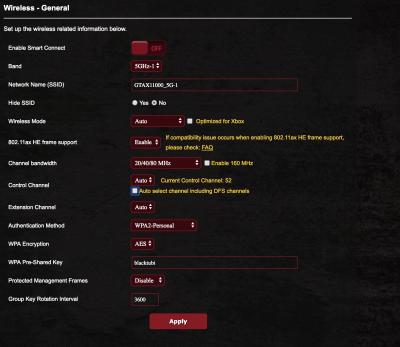
My bad, this feature is not available on the GT-AX11000 yet but it is already available on GT-AC5300.

Once the feature is here, enabling it will provide significant performance boost.

BTW, do not use DFS channels on your GT-AX11000 as the GT-AC5300 does not support it.
Doing so will result in the mesh networking being switched to 2.4Ghz for backhaul.
Refer to my screenshot below.

After performing this config, AiMesh should use the second 5Ghz band for backhaul by default. Always use the first 5Ghz band on your devices. wink.gif

This post has been edited by blacktubi: Feb 22 2019, 01:46 AM


Attached thumbnail(s)
Attached Image
yed
post Feb 22 2019, 04:43 AM

Casual
***
Junior Member
375 posts

Joined: Mar 2008
From: Selangor


[quote=SilentVampire,Feb 21 2019, 11:15 PM]
It is still overheating. If you read the reviews and guides subforum here on LYN, specifically the Asus RT-AC86U section, lots of people have problem with the router overheating, even with double fan, as the heat dissipation was not implemented properly.


Yeah read it already..to bad for a good router
invisiblelim
post Feb 22 2019, 09:21 AM

Regular
******
Senior Member
1,263 posts

Joined: Aug 2005


QUOTE(blacktubi @ Feb 22 2019, 01:39 AM)
My bad, this feature is not available on the GT-AX11000 yet but it is already available on GT-AC5300.

Once the feature is here, enabling it will provide significant performance boost.

BTW, do not use DFS channels on your GT-AX11000 as the GT-AC5300 does not support it.
Doing so will result in the mesh networking being switched to 2.4Ghz for backhaul.
Refer to my screenshot below.

After performing this config, AiMesh should use the second 5Ghz band for backhaul by default. Always use the first 5Ghz band on your devices. wink.gif
*
Noted! Thank you so much
blacktubi
post Feb 22 2019, 11:13 AM

-
Group Icon
Elite
8,401 posts

Joined: Jul 2008

QUOTE(yed @ Feb 22 2019, 04:43 AM)
It is still overheating. If you read the reviews and guides subforum here on LYN, specifically the Asus RT-AC86U section, lots of people have problem with the router overheating, even with double fan, as the heat dissipation was not implemented properly.
Yeah read it already..to bad for a good router
*
Have you tried the typical RESET and reconfigure?

Make sure you run the latest firmware as well.

This post has been edited by blacktubi: Feb 22 2019, 11:13 AM
yed
post Feb 22 2019, 01:28 PM

Casual
***
Junior Member
375 posts

Joined: Mar 2008
From: Selangor


QUOTE(blacktubi @ Feb 22 2019, 11:13 AM)
Have you tried the typical RESET and reconfigure?

Make sure you run the latest firmware as well.
*
How those things could prevent from overheating ya?

Or the disconnection due to firmware is it?

I always check for firmware update in the router page
blacktubi
post Feb 22 2019, 01:59 PM

-
Group Icon
Elite
8,401 posts

Joined: Jul 2008

QUOTE(yed @ Feb 22 2019, 01:28 PM)
How those things could prevent from overheating ya?

Or the disconnection due to firmware is it?

I always check for firmware update in the router page
*
I don’t think it is caused by overheating. It is more likely due to the firmware.

The chipset is designed to run at 80c and since you cool it, it should be fine.
tengzt
post Feb 25 2019, 06:25 AM

New Member
*
Junior Member
48 posts

Joined: Jun 2013
i bought Asus d2l-n12e c1 router for streamyx use. Is it normal this modem all light power not so strong like gona die? This modem reboot take more than 4 mins to access, is it normal?
lansi_raju
post Feb 26 2019, 08:29 AM

Getting Started
**
Junior Member
204 posts

Joined: May 2015
RIP my asus RT-N66u, totally can't power on the router although there's power on my adaptor...

any reckon for a new router?
im currently using having unifi 500mbps, about 6 mobile devices connected to the router.
welcomes all type of budget from cheap till expensive
jimbet1337
post Feb 26 2019, 08:45 AM

meh
*******
Senior Member
2,670 posts

Joined: Sep 2006
LAN connection keeps dropping sometimes. I'm on 2 months old AC86U. Anything that I should be worry about?
SilentVampire
post Feb 26 2019, 09:36 AM

Networking Enthusiast
*******
Senior Member
5,714 posts

Joined: Mar 2007


QUOTE(tengzt @ Feb 25 2019, 06:25 AM)
i bought Asus d2l-n12e c1 router for streamyx use. Is it normal this modem all light power not so strong like gona die? This modem reboot take more than 4 mins  to access, is it normal?
*
It is normal in a way, as it is a basic cheap model, so the hardware is a bit lacking, and it will take time to boot up.

QUOTE(lansi_raju @ Feb 26 2019, 08:29 AM)
RIP my asus RT-N66u, totally can't power on the router although there's power on my adaptor...

any reckon for a new router?
im currently using having unifi 500mbps, about 6 mobile devices connected to the router.
welcomes all type of budget from cheap till expensive
*
Click link on my signature and read green text on 1st page, 1st post. Decide your budget and pick a router.

QUOTE(jimbet1337 @ Feb 26 2019, 08:45 AM)
LAN connection keeps dropping sometimes. I'm on 2 months old AC86U. Anything that I should be worry about?
*
Did you have any fan or cooling method for your router?
tengzt
post Feb 27 2019, 03:21 PM

New Member
*
Junior Member
48 posts

Joined: Jun 2013
QUOTE(SilentVampire @ Feb 26 2019, 09:36 AM)
It is normal in a way, as it is a basic cheap model, so the hardware is a bit lacking, and it will take time to boot up.
Click link on my signature and read green text on 1st page, 1st post. Decide your budget and pick a router.
Did you have any fan or cooling method for your router?
*
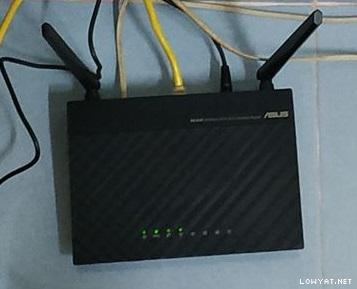
I wonder why my new modem dsl-n12e-c1 light no so bright compare my old modem same model but old version, is it normal?

It take long times light on adsl and internet light like 5 mins if i reboot modem.


Attached image(s)
Attached Image
rc2x
post Feb 27 2019, 03:42 PM

Ask me about my vore fettish
******
Senior Member
1,838 posts

Joined: Jun 2008
From: The Grid


QUOTE(jimbet1337 @ Feb 26 2019, 08:45 AM)
LAN connection keeps dropping sometimes. I'm on 2 months old AC86U. Anything that I should be worry about?
*
Can see the log what cause it to drop? Might just send it back for warranty.
SilentVampire
post Feb 27 2019, 03:55 PM

Networking Enthusiast
*******
Senior Member
5,714 posts

Joined: Mar 2007


QUOTE(tengzt @ Feb 27 2019, 03:21 PM)
I wonder why my new modem dsl-n12e-c1 light no so bright compare my old modem same model but old version, is it normal?

It take long times light on adsl and internet light like 5 mins if i reboot modem.
*
No idea why that is, bro. If it is working well, I wouldn't worry too much about it.
firdausbhari
post Feb 27 2019, 06:46 PM

Look at all my stars!!
*******
Senior Member
2,281 posts

Joined: Feb 2012


QUOTE(lansi_raju @ Feb 26 2019, 08:29 AM)
RIP my asus RT-N66u, totally can't power on the router although there's power on my adaptor...

any reckon for a new router?
im currently using having unifi 500mbps, about 6 mobile devices connected to the router.
welcomes all type of budget from cheap till expensive
*
Asus ftw

Icehart
post Feb 28 2019, 10:19 PM

72.55.191.6
********
All Stars
14,899 posts

Joined: Apr 2005
From: Kuala Lumpur & Selangor


I recently changed my router from Dlink DIR890L to Asus RT5300. So far everything seems to work, except the wireless printing to my printer. I've tried to search online but can't find the solution.

Anyone experience the same issue? My Windows unable to detect the printer. Any known issue on this?
alpidot
post Mar 1 2019, 12:36 PM

Getting Started
**
Junior Member
71 posts

Joined: Mar 2006
From: Dengkil, Selangor


@Asusmy can recommend router for Unifi 100mbps speed. i need 2 unit. Main unit is downstair. another unit for upstair. Im planning to use wired at upstair for my PS4 and PC and running fully in 5ghz Wifi for whole house.

thanks

This post has been edited by alpidot: Mar 1 2019, 12:37 PM
blacktubi
post Mar 1 2019, 12:51 PM

-
Group Icon
Elite
8,401 posts

Joined: Jul 2008

QUOTE(alpidot @ Mar 1 2019, 12:36 PM)
@Asusmy can recommend router for Unifi 100mbps speed. i need 2 unit. Main unit is downstair. another unit for upstair. Im planning to use wired at upstair for my PS4 and PC and running fully in 5ghz Wifi for whole house.

thanks
*
Asus RT-AC67U AiMesh 2 pack should be the one you are looking for.

https://www.lazada.com.my/products/asus-rt-...s637760959.html

826 Pages « < 496 497 498 499 500 > » Top
 

Change to:
| Lo-Fi Version
0.0254sec    0.37    6 queries    GZIP Disabled
Time is now: 2nd December 2025 - 08:30 PM