Outline ·
[ Standard ] ·
Linear+
Home Networking ASUS Malaysia Networking User & Technical Support, Managed by ASUS Malaysia Representative
|
invisiblelim
|
 Feb 12 2019, 03:16 PM Feb 12 2019, 03:16 PM
|

|
QUOTE(blacktubi @ Feb 12 2019, 02:41 PM) Use 5Ghz on the PCE-AC88, the speed should be faster than the 2.4Ghz if nothing is wrong. Report back the performance. IF it is already ~300Mbps, an AiMesh system won't produce a significant improvement. Adding another router as AiMesh node in the gaming room won't help as your PCE-AC88 is already inside the room so they will have the same performance. Adding an AiMesh node on the same floor as the gaming room but placed nearer to your main router may help. If you plan on getting an AiMesh node, I suggest getting a Tri-band router so it can use a dedicated band for backhaul. My 2 cents. does it mean that the range of receiver is just significantly same as the router? my current in mind solution is.. replaced GT-AC5300 to GT-AX11000 as main and GT-AC5300 as Node at second floor but inside the game room as well, my game room is quite near to the main router already but 1 floor up.. |
|
|
|
|
|
yed
|
Feb 12 2019, 03:28 PM
|
|
|
QUOTE(invisiblelim @ Feb 12 2019, 02:10 PM) 1. i haven't tried the 2.4Ghz network on my TV yet, but the 2.4Ghz can power my whole house from living hall to second floor, on coverage i don't think is a problem, only speed might only get max 100mbps, which i currently is on Unifi 500mbps. 2. i don't plan to run a cable to my PC, due to not that nice la..  therefore trying to maximize the wifi performance Netflix 4k only use abt 16mbps which is enough under 2.4Ghz |
|
|
|
|
|
invisiblelim
|
Feb 12 2019, 04:35 PM
|
|
|
QUOTE(yed @ Feb 12 2019, 03:28 PM) Netflix 4k only use abt 16mbps which is enough under 2.4Ghz Thank you so much for your reply, then my living hall problem (TV) connection is considered solved then. |
|
|
|
|
|
voncrane
|
Feb 12 2019, 06:19 PM
|
|
|
QUOTE(invisiblelim @ Feb 12 2019, 04:35 PM) Thank you so much for your reply, then my living hall problem (TV) connection is considered solved then. IMO, there was never a living room problem in the first place.. All that has been contributed..the reasoning..etc.. is all pretty much what I hinted.. Perhaps now you'll listen and run that cable. Cost doesn't seem to be an issue here.. Think it'll be ugly? Nah.. There are round or flat cables in different colors you can get or cover them in proper colors to match your walls, etc. Will you have to drill a hole or 2? Probably, but it can be a tiny one...Just big enough to let the cable through. Anyways.. your call. Me? I'll take a bit of "ugliness" over having to worry frequently about not getting the best speeds & stability over wifi.. my 2 sen.  |
|
|
|
|
|
invisiblelim
|
Feb 12 2019, 08:20 PM
|
|
|
QUOTE(voncrane @ Feb 12 2019, 06:19 PM) IMO, there was never a living room problem in the first place.. All that has been contributed..the reasoning..etc.. is all pretty much what I hinted.. Perhaps now you'll listen and run that cable. Cost doesn't seem to be an issue here.. Think it'll be ugly? Nah.. There are round or flat cables in different colors you can get or cover them in proper colors to match your walls, etc. Will you have to drill a hole or 2? Probably, but it can be a tiny one...Just big enough to let the cable through. Anyways.. your call. Me? I'll take a bit of "ugliness" over having to worry frequently about not getting the best speeds & stability over wifi.. my 2 sen. Yup, I understand cable will be always the best solution in terms of stability and speed. I'll consider badly on this. Thanks! |
|
|
|
|
|
blacktubi
|
Feb 12 2019, 09:28 PM
|
-

|
QUOTE(invisiblelim @ Feb 12 2019, 03:16 PM) does it mean that the range of receiver is just significantly same as the router? my current in mind solution is.. replaced GT-AC5300 to GT-AX11000 as main and GT-AC5300 as Node at second floor but inside the game room as well, my game room is quite near to the main router already but 1 floor up.. Yup, if you are adding another AiMesh node, it is another node in the network which negates the benefits of the better reception. That is why I am suggesting you to run a speedtest and see the performance. If it is already around 300Mbps, I doubt you will get any sizable gain. Another option is to use the GT-AC5300 in media bridge mode (wireless receiver) and connect it to the computer over wired LAN, it will give you the best performance over WiFi. |
|
|
|
|
|
invisiblelim
|
Feb 14 2019, 10:57 AM
|
|
|
QUOTE(blacktubi @ Feb 12 2019, 09:28 PM) Yup, if you are adding another AiMesh node, it is another node in the network which negates the benefits of the better reception. That is why I am suggesting you to run a speedtest and see the performance. If it is already around 300Mbps, I doubt you will get any sizable gain. Another option is to use the GT-AC5300 in media bridge mode (wireless receiver) and connect it to the computer over wired LAN, it will give you the best performance over WiFi. yesterday i tried using the 2.4ghz SSID to play Dota, then out of sudden, the connection lost, and show no internet, but i try using my mobile phone, the wifi is working fine. ended up i'm using my mobile data to end the game without issue..  |
|
|
|
|
|
blacktubi
|
Feb 14 2019, 11:29 AM
|
-
|
QUOTE(invisiblelim @ Feb 14 2019, 10:57 AM) yesterday i tried using the 2.4ghz SSID to play Dota, then out of sudden, the connection lost, and show no internet, but i try using my mobile phone, the wifi is working fine. ended up i'm using my mobile data to end the game without issue.. Don't use 2.4Ghz, it is unstable nowadays due to the abundance of congestion on this band. |
|
|
|
|
|
invisiblelim
|
Feb 14 2019, 04:10 PM
|
|
|
QUOTE(blacktubi @ Feb 14 2019, 11:29 AM) Don't use 2.4Ghz, it is unstable nowadays due to the abundance of congestion on this band. but using 5ghz also not stable, sometimes it will auto disconnect as well.. hmm |
|
|
|
|
|
soonwai
|
Feb 14 2019, 11:25 PM
|
|
|
Testing an Asus RT-N16. Firmware: Tomato 1.28.0000 MIPSR2-3.5-140 K26 USB AIO BCM_NAT: ON  Is this the best I can get? Or are there better firmwares around that I can use? |
|
|
|
|
|
blacktubi
|
Feb 14 2019, 11:55 PM
|
-
|
QUOTE(invisiblelim @ Feb 14 2019, 04:10 PM) but using 5ghz also not stable, sometimes it will auto disconnect as well.. hmm It's time to upgrade to GT-AX11000 and get AX PCIE adapter in the future.  |
|
|
|
|
|
invisiblelim
|
Feb 15 2019, 09:36 AM
|
|
|
QUOTE(blacktubi @ Feb 14 2019, 11:55 PM) It's time to upgrade to GT-AX11000 and get AX PCIE adapter in the future. yes!! haha |
|
|
|
|
|
voncrane
|
Feb 15 2019, 12:20 PM
|
|
|
QUOTE(blacktubi @ Feb 14 2019, 11:55 PM) It's time to upgrade to GT-AX11000 and get AX PCIE adapter in the future. If only so easy to plonk down the cash.. Later all also upgrade.. Then congested again..  |
|
|
|
|
|
invisiblelim
|
Feb 16 2019, 12:14 PM
|
|
|
QUOTE(blacktubi @ Feb 14 2019, 11:55 PM) It's time to upgrade to GT-AX11000 and get AX PCIE adapter in the future. AX11000 coverage is better than GT-AC5300, i just upgraded, and it solve all my problem without AiMesh needed, anyone want to buy my GT-AC5300 with 1 and 1/2 years warranty by Asus Malaysia  |
|
|
|
|
|
yuktsi14
|
Feb 16 2019, 12:16 PM
|
|
|
Just upgraded to RT-AC5300. Currently on unifi 500mbps plan, but the internet speed doesn't go more than 100mbps. I was able to achieve 200+mbps on my old ws880 with Merlin. Is there anything that I can do?
This post has been edited by yuktsi14: Feb 16 2019, 12:39 PM
|
|
|
|
|
|
SilentVampire
|
Feb 16 2019, 12:41 PM
|
|
|
QUOTE(yuktsi14 @ Feb 16 2019, 12:16 PM) Just upgraded to RT-AC5300. Currently on unifi 500mbps plan, but the internet speed doesn't go more than 100mbps. I was able to achieve 200+mbps on my old ws880 with Merlin. Is there anything that I can do? You are being throttled by router, or cable. Using Cat 5e or 6? |
|
|
|
|
|
blacktubi
|
Feb 16 2019, 12:58 PM
|
-
|
QUOTE(voncrane @ Feb 15 2019, 12:20 PM) If only so easy to plonk down the cash.. Later all also upgrade.. Then congested again.. Wireless AX comes with OFDMA, a tech that's inspired from LTE for more efficient spectrum block allocation.  Not to mention newer chipset always comes with better congestion control and interference mitigation. QUOTE(yuktsi14 @ Feb 16 2019, 12:16 PM) Just upgraded to RT-AC5300. Currently on unifi 500mbps plan, but the internet speed doesn't go more than 100mbps. I was able to achieve 200+mbps on my old ws880 with Merlin. Is there anything that I can do? Click the globe icon and click the status tab. Check if your port speed is 1Gbps. Some bad cables will drop to 100Mbps. 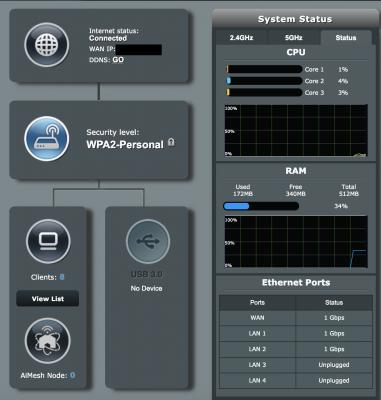
|
|
|
|
|
|
yuktsi14
|
Feb 16 2019, 01:36 PM
|
|
|
My WAN is indeed on 1Gbps. It seems like I was able to get 500Mbps with my Macbook, standing about three feet from the router.
But the I couldn't get more than 200Mbps on my iPhone X, which is lower than what I usually get from the WS880 (around 260ish Mbps).
Appreciate if anyone could help.
|
|
|
|
|
|
blacktubi
|
Feb 16 2019, 01:38 PM
|
-
|
QUOTE(yuktsi14 @ Feb 16 2019, 01:36 PM) My WAN is indeed on 1Gbps. It seems like I was able to get 500Mbps with my Macbook, standing about three feet from the router. But the I couldn't get more than 200Mbps on my iPhone X, which is lower than what I usually get from the WS880 (around 260ish Mbps). Appreciate if anyone could help. Maybe disable smart connect and manually connect to the 5G bands. |
|
|
|
|
|
a07
|
Feb 16 2019, 03:21 PM
|
New Member

|
Hi AsusMy
keep getting message
Reason for failed connection
The network cable is unplugged.
We suggest you
Please ensure that the cable is properly connected between BRT-AC828 WAN port and the modem.
If a problem still persists, manually change the connection settings.
Asus AC2600 BRT828 . ppoe connection to unifi failed, In network map Internet status is network cable is unplugged. WAN led is red.Replace cable from modem to router still got same message. My standard unifi router work well. I have experience configure unifi connection with Asus RT-AC68U, Just key in unifi userid and password to get internet connection. The same way cannot work with BRT828. Is there any other configuration?
Your cooperation is highly appreciated.
Thank you
This post has been edited by a07: Feb 16 2019, 04:20 PM
|
|
|
|
|



 Quote
Quote


 0.0269sec
 0.57
0.57
 6 queries
 GZIP Disabled