

But after 2 days and i think after i updated to latest firmware. The 5g wifi led wont on and also i cant find its 5g wifi signal. Now only can connect to 2.4g wifi.
After doing a reset, it still have same problem
Attached thumbnail(s)

Home Networking ASUS Malaysia Networking User & Technical Support, Managed by ASUS Malaysia Representative
|
|
 Nov 13 2018, 03:47 PM Nov 13 2018, 03:47 PM
Show posts by this member only | IPv6 | Post
#9441
|
 
Junior Member
26 posts Joined: Dec 2008  
|
I just bought a new asus rt as88u router.
But after 2 days and i think after i updated to latest firmware. The 5g wifi led wont on and also i cant find its 5g wifi signal. Now only can connect to 2.4g wifi. After doing a reset, it still have same problem Attached thumbnail(s)
|
|
|
|
|
|
Nov 13 2018, 05:54 PM
|
|
Junior Member
380 posts Joined: Jul 2014
|
QUOTE(doket @ Nov 13 2018, 03:47 PM) I just bought a new asus rt as88u router. login to your router menu , go under WIRELESS tab > PROFESSIONAL menu , if 5GHz radio is on or off ( just double check )But after 2 days and i think after i updated to latest firmware. The 5g wifi led wont on and also i cant find its 5g wifi signal. Now only can connect to 2.4g wifi. After doing a reset, it still have same problem  could be hardware issue if you have done a factory reset .... send RMA asap if it is hardware issue |
|
|
Nov 13 2018, 06:31 PM
|
 
Elite
8,415 posts Joined: Jul 2008 
|
QUOTE(doket @ Nov 13 2018, 03:47 PM) I just bought a new asus rt as88u router. Which seller you get it from? Send it back for RMA.But after 2 days and i think after i updated to latest firmware. The 5g wifi led wont on and also i cant find its 5g wifi signal. Now only can connect to 2.4g wifi. After doing a reset, it still have same problem |
|
|
Nov 13 2018, 08:30 PM
Show posts by this member only | IPv6 | Post
#9444
|
|
Junior Member
26 posts Joined: Dec 2008
|
QUOTE(sheemmet @ Nov 13 2018, 05:54 PM) login to your router menu , go under WIRELESS tab > PROFESSIONAL menu , if 5GHz radio is on or off ( just double check ) could be hardware issue if you have done a factory reset .... send RMA asap if it is hardware issue QUOTE(blacktubi @ Nov 13 2018, 06:31 PM) Which seller you get it from? Send it back for RMA. i bought by a seller from lazada. he agree to replace a new one for me. i return it back, now waiting for the new one arrive... |
|
|
Nov 19 2018, 06:58 PM
Show posts by this member only | IPv6 | Post
#9445
|

Junior Member
311 posts Joined: Dec 2012
|
Hi guys, I am glad i found this thread. I am on ASUS RT-AC55UHP at the moment. I have been turbo-ed to 500mbps but I am only getting 280mbps at most with LAN (and yeap all cables that I'm using are CAT5e or 6). On 5G, I am only getting 200 mbps at most, usually 180mbps.
I called up TM, they came with their dlink ac1200 router, boom 500mbps on mobile! 522mbps on LAN. It blew my mind. So yeah I was dumbfounded. What possibly went wrong? I checked my router config, nothing unusual. Somebody please save my ass lol |
|
|
Nov 19 2018, 09:12 PM
|
|
Elite
8,415 posts Joined: Jul 2008
|
QUOTE(jasonsaw96 @ Nov 19 2018, 06:58 PM) Hi guys, I am glad i found this thread. I am on ASUS RT-AC55UHP at the moment. I have been turbo-ed to 500mbps but I am only getting 280mbps at most with LAN (and yeap all cables that I'm using are CAT5e or 6). On 5G, I am only getting 200 mbps at most, usually 180mbps. Please update your firmware to the latest one from here/ I called up TM, they came with their dlink ac1200 router, boom 500mbps on mobile! 522mbps on LAN. It blew my mind. So yeah I was dumbfounded. What possibly went wrong? I checked my router config, nothing unusual. Somebody please save my ass lol  https://www.asuswebstorage.com/navigate/s/0...CE9F70FD61A392Y This post has been edited by blacktubi: Nov 19 2018, 09:13 PM |
|
|
|
|
|
Nov 19 2018, 09:46 PM
|

Senior Member
5,714 posts Joined: Mar 2007 
|
QUOTE(jasonsaw96 @ Nov 19 2018, 06:58 PM) Hi guys, I am glad i found this thread. I am on ASUS RT-AC55UHP at the moment. I have been turbo-ed to 500mbps but I am only getting 280mbps at most with LAN (and yeap all cables that I'm using are CAT5e or 6). On 5G, I am only getting 200 mbps at most, usually 180mbps. You need beta firmware. It is firmware issue. Update your firmware to the one blacktubi suggested.I called up TM, they came with their dlink ac1200 router, boom 500mbps on mobile! 522mbps on LAN. It blew my mind. So yeah I was dumbfounded. What possibly went wrong? I checked my router config, nothing unusual. Somebody please save my ass lol |
|
|
Nov 20 2018, 01:23 AM
Show posts by this member only | IPv6 | Post
#9448
|
|
Junior Member
311 posts Joined: Dec 2012
|
QUOTE(blacktubi @ Nov 19 2018, 09:12 PM) Please update your firmware to the latest one from here/ thanks for the link. apparently the latest firmware version is not working. I tried updating the firmware using the latest file but it kept showing error error error so i tried the october version, it did work...turn off/on router and ran unifi speediest again, speed is still the same. https://www.asuswebstorage.com/navigate/s/0...CE9F70FD61A392Y please advice |
|
|
Nov 20 2018, 12:34 PM
Show posts by this member only | IPv6 | Post
#9449
|

Senior Member
1,238 posts Joined: Mar 2012
|
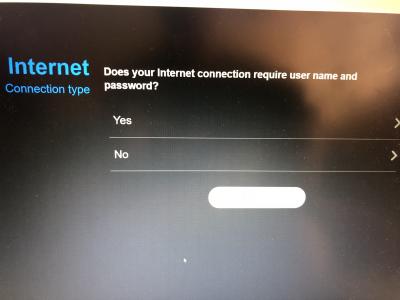
Hi guys my first time setup a ac86u bought from China. I have this problem, it didn't show that option to choose unifi home or ppope. I have key in the ISP got it from unifi. Am I doing it wrong?
Attached thumbnail(s) 

|
|
|
Nov 20 2018, 12:37 PM
|
|
Senior Member
3,035 posts Joined: Dec 2011
|
QUOTE(Kevin_Low @ Nov 20 2018, 12:34 PM) Hi guys my first time setup a ac86u bought from China. I have this problem, it didn't show that option to choose unifi home or ppope. I have key in the ISP got it from unifi. Am I doing it wrong? Go to LAN, then IPTV, from there can see ISP profile? |
|
|
Nov 20 2018, 12:51 PM
|
|
Senior Member
5,714 posts Joined: Mar 2007
|
QUOTE(Kevin_Low @ Nov 20 2018, 12:34 PM) Hi guys my first time setup a ac86u bought from China. I have this problem, it didn't show that option to choose unifi home or ppope. I have key in the ISP got it from unifi. Am I doing it wrong? Yes you are doing it wrong. See jusbella reply. |
|
|
Nov 20 2018, 12:52 PM
|
|
Senior Member
1,238 posts Joined: Mar 2012
|
QUOTE(jusbella @ Nov 20 2018, 12:37 PM) Go to LAN, then IPTV, from there can see ISP profile? Wow Thanks so much hahaha, u are really life saver, been stuck for hours. Didn't knew under IPTV setting |
|
|
Nov 20 2018, 12:57 PM
|
|
Senior Member
5,714 posts Joined: Mar 2007
|
QUOTE(Kevin_Low @ Nov 20 2018, 12:52 PM) Wow Thanks so much hahaha, u are really life saver, been stuck for hours. Didn't knew under IPTV setting To be fair, it is not easy to find. You can actually Google for the manual next time. The reason why it needs to be done is because Unifi uses VlAN tagging, so you will need to select Unifi mode, or manually tag the VLAN yourself. |
|
|
|
|
|
Nov 20 2018, 12:59 PM
|
|
Senior Member
3,035 posts Joined: Dec 2011
|
QUOTE(Kevin_Low @ Nov 20 2018, 12:52 PM) Wow Thanks so much hahaha, u are really life saver, been stuck for hours. Didn't knew under IPTV setting Enjoy your internet  |
|
|
Nov 20 2018, 02:47 PM
Show posts by this member only | IPv6 | Post
#9455
|
|
Junior Member
311 posts Joined: Dec 2012
|
QUOTE(SilentVampire @ Nov 19 2018, 09:46 PM) You need beta firmware. It is firmware issue. Update your firmware to the one blacktubi suggested. yes bro i did that, but the latest firmware gave me error so i tried the october version, updated successfully but speed still remains the same |
|
|
Nov 20 2018, 03:53 PM
|
|
Senior Member
5,714 posts Joined: Mar 2007
|
QUOTE(jasonsaw96 @ Nov 20 2018, 02:47 PM) yes bro i did that, but the latest firmware gave me error so i tried the october version, updated successfully but speed still remains the same Try with another router, not Asus and see if that makes a difference. |
|
|
Nov 20 2018, 07:53 PM
Show posts by this member only | IPv6 | Post
#9457
|
|
Junior Member
311 posts Joined: Dec 2012
|
QUOTE(SilentVampire @ Nov 20 2018, 03:53 PM) Try with another router, not Asus and see if that makes a difference. Well TM came yesterday with their own DLink ac1200 router, got 522mbps on LAN and 500mbps on WiFi . |
|
|
Nov 20 2018, 07:58 PM
|
|
Senior Member
5,714 posts Joined: Mar 2007
|
QUOTE(jasonsaw96 @ Nov 20 2018, 07:53 PM) Well TM came yesterday with their own DLink ac1200 router, got 522mbps on LAN and 500mbps on WiFi . Yes probably your router issue then. You need to wait for Asus to issue a firmware that can handle the speed. Otherwis3, change routers. |
|
|
Nov 20 2018, 09:40 PM
|

All Stars
24,455 posts Joined: Nov 2010
|
QUOTE(jasonsaw96 @ Nov 20 2018, 01:23 AM) thanks for the link. apparently the latest firmware version is not working. I tried updating the firmware using the latest file but it kept showing error error error so i tried the october version, it did work...turn off/on router and ran unifi speediest again, speed is still the same. please advice QUOTE(jasonsaw96 @ Nov 20 2018, 07:53 PM) Well TM came yesterday with their own DLink ac1200 router, got 522mbps on LAN and 500mbps on WiFi . u failed to update to the beta firmware, try again...w/o it, u may not get improvement i am using rtac1300uhp which is same class at ac55, ac58. updated similar beta firmware, now i get >700mbps.... was getting 5xx only before. and yes... the unifi guys showed me 820, 830 with their equipment. |
|
|
Nov 22 2018, 12:15 AM
|
|
Junior Member
37 posts Joined: Apr 2009
|
hi guys, i got AC86U and unable to connect to UNIFI IPTV.. (already choose UNIFI HOME).. any help? is that caused by this Enable multicast routing (IGMP Proxy) - DISABLE.. ?
|
| Change to: |  0.0243sec 0.0243sec
 0.94 0.94
 6 queries 6 queries
 GZIP Disabled GZIP Disabled
Time is now: 11th December 2025 - 01:24 AM |
 Quote
Quote