Outline ·
[ Standard ] ·
Linear+
Home Networking ASUS Malaysia Networking User & Technical Support, Managed by ASUS Malaysia Representative
|
doket
|
 Mar 28 2014, 01:04 PM Mar 28 2014, 01:04 PM
|
New Member


|
i dont see any ppl post about ASUS DSL - N55U last 3 months i 1st buy ASUS DSL - N55U modem router. before that it is very smooth to use but after 1 month, it always have lost connection problem and have to restart the modem, sometimes it works, sometimes dont. the adsl light, connection light and ethernet light gone. and my modem feel hot after few hours. so, i decide to return back to shop, they replace me with another same model. so now i am using my second ASUS DSL - N55U modem router. after replace, it works fine now. just 2 days ago i notice another problem again. this times the adsl light is no on, but i check my pc i still have internet connection. sometimes the light will back after few hours, sometimes it dont. i want to know what is the problem of this modem router. i read the review that this model is good before.... here is the screenshot of it... Modem: 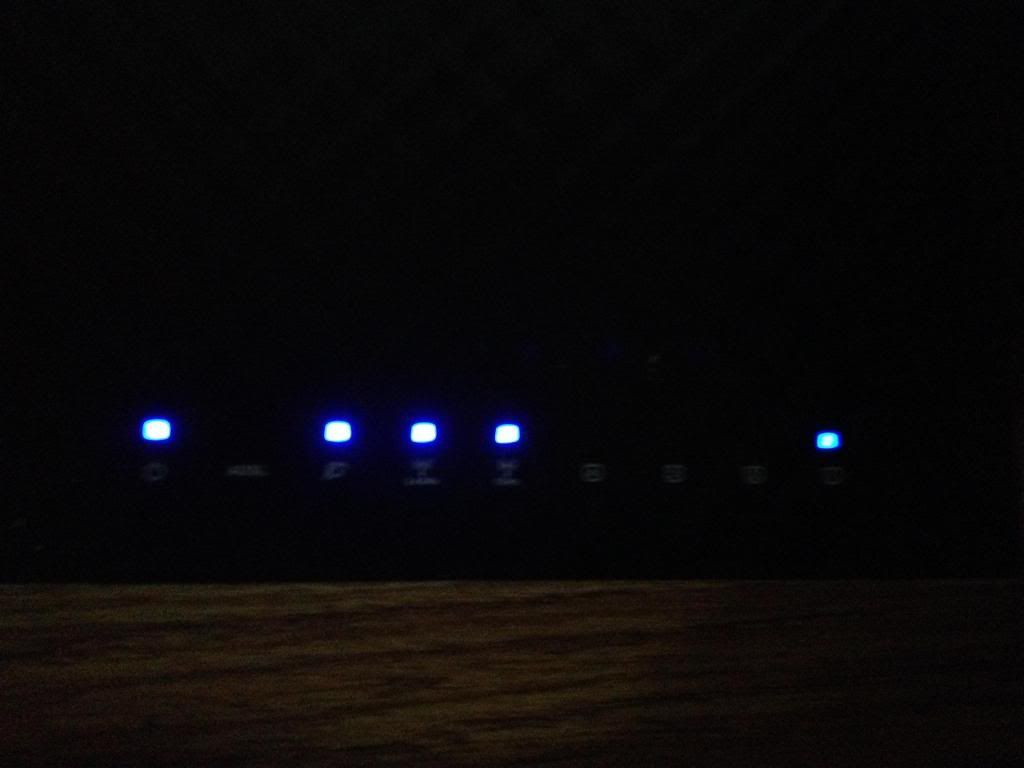 PC have connection: 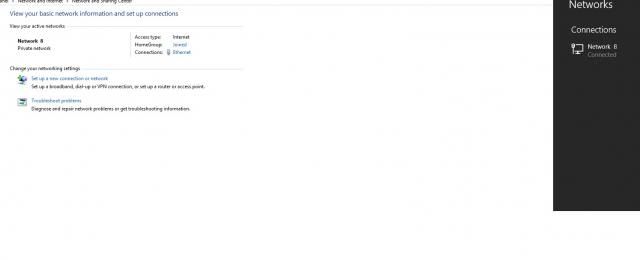 my model and firmware version:  |
|
|
|
|
|
doket
|
Mar 28 2014, 11:20 PM
|
New Member
|
QUOTE(ASUSmy @ Mar 28 2014, 02:21 PM) Hi doket, Can you try update the firmware to the latest which is 3.0.0.4.374.4422. And have you tried to check with the TM to see whether they have any problem with the line. Try change another splitter if you used one. http://www.asus.com/my/Networking/DSLN55U_Annex_A/#supportThank you yes, checked with TM. they said there is no problem with line in my area. i updated to latest firmware(3.0.0.4.374.4422) still the same. ADSL still no light but i have internet connection. do this mean that maybe the ADSL light ic is burned? another thing when i download the latest firmware, there is a notice: ASUS DSL-N55U Firmware version 3.0.0.4.374_4422 (Annex A) Notice: After upgrading to 3.0.0.4.374_4422 please press the hardware reset button of DSL-N55U over 8 seconds to reset the modem router. do i need to do hardware reset like the notice mention after i update? i affraid i lost all my old setting after reset. thanks for reply... edit: strange, after typing this and over 20 minutes the ADSL light is back on again. i hope it wont happen again... This post has been edited by doket: Mar 28 2014, 11:32 PM |
|
|
|
|
|
doket
|
Apr 3 2016, 08:29 PM
|
New Member
|
i am using asus dsl n55u. in a month already 3 times setting lari... i have to reset the modem and configure again my streamyx account.
it never happen before, problem start this month. i am using the latest firmware.. what is my modem problem?
|
|
|
|
|
|
doket
|
Apr 4 2016, 12:25 PM
|
New Member
|
QUOTE(ASUSmy @ Apr 4 2016, 09:11 AM) Hi doket, May I know is your modem router full model name is DSL-N55U_C1? If yes, can you try updating the beta firmware below and see that the problem still persist or not. https://www.asuswebstorage.com/navigate/s/0...DA1AAAC8F5EB68YAnd is the modem router are for home use or other places that has many people. Thank you no. my modem router name is DSL-N55U only. i tried the firmware you upload. it not compatible... the modem is for home use only... nobody can touch it except me.... |
|
|
|
|
|
doket
|
Apr 5 2016, 12:35 PM
|
New Member
|
QUOTE(ASUSmy @ Apr 4 2016, 01:55 PM) Hi doket, Then your firmware version should be 3.0.0.4.376_2736. if no, do update it to the latest. https://www.asus.com/Networking/DSLN55U_Ann...pDesk_Download/May I ask, when the setting is gone/missing, would you be able to get an IP address or able to ping the router? Thank you yes. this is the firmware version i have... when the setting is gone. i cant access to 192.168.1.1 modem setting page. it wont allow... besides i can still ping and get an ip address on ip confige so weird, still dont know what happen. |
|
|
|
|
|
doket
|
Nov 13 2018, 03:47 PM
|
New Member
|
I just bought a new asus rt as88u router. But after 2 days and i think after i updated to latest firmware. The 5g wifi led wont on and also i cant find its 5g wifi signal. Now only can connect to 2.4g wifi. After doing a reset, it still have same problem Attached thumbnail(s)
|
|
|
|
|
|
doket
|
Nov 13 2018, 08:30 PM
|
New Member
|
QUOTE(sheemmet @ Nov 13 2018, 05:54 PM) login to your router menu , go under WIRELESS tab > PROFESSIONAL menu , if 5GHz radio is on or off ( just double check ) could be hardware issue if you have done a factory reset .... send RMA asap if it is hardware issue QUOTE(blacktubi @ Nov 13 2018, 06:31 PM) Which seller you get it from? Send it back for RMA. i bought by a seller from lazada. he agree to replace a new one for me. i return it back, now waiting for the new one arrive... |
|
|
|
|
|
doket
|
Apr 8 2020, 02:29 PM
|
New Member
|
hello, ASUSmy,
i am using asus RT-ac88u and with Firmware Version:3.0.0.4.384_81790 on unifi.
i want to ask why Bandwidth Limiter not working? i already set rule for the target i want limited but it still have speed over the rule i set...
|
|
|
|
|
|
doket
|
Apr 9 2020, 12:09 PM
|
New Member
|
QUOTE(doket @ Apr 8 2020, 02:29 PM) hello, ASUSmy, i am using asus RT-ac88u and with Firmware Version:3.0.0.4.384_81790 on unifi. i want to ask why Bandwidth Limiter not working? i already set rule for the target i want limited but it still have speed over the rule i set... anything? |
|
|
|
|
|
doket
|
Aug 5 2025, 01:41 PM
|
New Member
|
how to know my router is broken? been reset few times still the same and suddenly happen today. only the power light is on.  |
|
|
|
|



 Quote
Quote

 0.0448sec
 0.49
0.49
 7 queries
 GZIP Disabled