Welcome Guest ( Log In | Register )

826 Pages « < 44 45 46 47 48 > » Bottom

Outline · [ Standard ] · Linear+

Home Networking ASUS Malaysia Networking User & Technical Support, Managed by ASUS Malaysia Representative

views
     
TSASUSmy
post Dec 4 2013, 10:40 AM

Look at all my stars!!
*******
Senior Member
2,319 posts

Joined: Mar 2010
QUOTE(shahzane @ Dec 4 2013, 10:22 AM)
Hi Asus,

I've just bought ASUS RT-N12HP router yesterday to replace my standard Unifi D-link router. While trying to set it up last night, I've initially keyed in the wrong Unifi username and password for several attempt. After that, even when I've keyed in the correct username and password, I still can't gain access. I've called Unifi customer service to confirm that the password and username that I have are correct.

I also can't seem to get back to the router set up page.

Any idea to what might be the problem? Thanks in advance.
*
Hi shahzane,

Try follow the step shown on the youtube below, and if you unable to log in the router, try do a factory reset and redo the setting again. You can find the reset button beside the on off button.

https://www.youtube.com/watch?v=Y7VUBSFy_es

Thank you
lpc26
post Dec 4 2013, 08:21 PM

Getting Started
**
Junior Member
135 posts

Joined: Jan 2003
ASUS RT-N66U support HUAWEI E398u-15 or not?
theberry
post Dec 5 2013, 01:44 AM

OK!
*******
Senior Member
3,514 posts

Joined: Oct 2011
hi, can i ask you some questions?
High End WiFi product - 802.11ac & 802.11n series Wireless Router

with regards to this range of products, only ac and n are supported?
how about a/b/g?
shahzane
post Dec 5 2013, 09:09 AM

Getting Started
**
Junior Member
156 posts

Joined: Nov 2010


QUOTE(ASUSmy @ Dec 4 2013, 10:40 AM)
Hi shahzane,

Try follow the step shown on the youtube below, and if you unable to log in the router, try do a factory reset and redo the setting again. You can find the reset button beside the on off button.

https://www.youtube.com/watch?v=Y7VUBSFy_es

Thank you
*
Hi,

Problem solved. Managed to install the modem successfully. Thanks for the help. thumbup.gif


TSASUSmy
post Dec 5 2013, 10:32 AM

Look at all my stars!!
*******
Senior Member
2,319 posts

Joined: Mar 2010
QUOTE(lpc26 @ Dec 4 2013, 08:21 PM)
ASUS RT-N66U support HUAWEI E398u-15 or not?
*
Hi lpc26,

If follow the list from the website, we unable to support yet.

http://event.asus.com/2009/networks/3gsupport/

Thank you
TSASUSmy
post Dec 5 2013, 10:35 AM

Look at all my stars!!
*******
Senior Member
2,319 posts

Joined: Mar 2010
QUOTE(theberry @ Dec 5 2013, 01:44 AM)
hi, can i ask you some questions?
High End WiFi product - 802.11ac & 802.11n series Wireless Router

with regards to this range of products, only ac and n are supported?
how about a/b/g?
*
Hi theberry,

If your wifi adapter are a/b/g only, you will still be able to connect to the router.

Thank you
theberry
post Dec 5 2013, 12:27 PM

OK!
*******
Senior Member
3,514 posts

Joined: Oct 2011
QUOTE(ASUSmy @ Dec 5 2013, 10:35 AM)
Hi theberry,

If your wifi adapter are a/b/g only, you will still be able to connect to the router.

Thank you
*
hi, thanks for attend to my inquiries.

could you also please let me know how do i see the power consumption in WATTS?, i dont understand the dc and ac.
and
the modem like RT-AC66U can stand the heat? i scared will burn easily because only left and right side got small hole.
lastly
what is difference WiFi ADSL router between (802.11ac & 802.11n series Wireless Router) and in term of their power saving?

This post has been edited by theberry: Dec 5 2013, 02:15 PM
digilife
post Dec 5 2013, 12:42 PM

The MNP guy, its me yeah.
*******
Senior Member
8,025 posts

Joined: Feb 2005
From: Planet Boleland


QUOTE(ASUSmy @ Dec 5 2013, 10:32 AM)
Hi lpc26,

If follow the list from the website, we unable to support yet.

http://event.asus.com/2009/networks/3gsupport/

Thank you
*
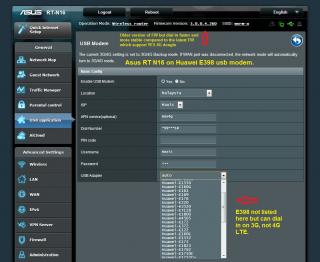
I believe it support as my RT N16 also support E398.

However, RT N16 do not support E3276 because Huawei utilise its self designed Hi Link Chip which most router [ except OpenWRT ] to dial into the USB modem.

I would urge Asus to study the dial in feature of this Hi Link Chip, I can provide you any data/log if you need regarding the E3276 cause I own one E3276 but you need to tell me how to extract them.

I would also hope Asus can upgrade the dial in feature for LTE on E398/E3276 instead of only 3G [DC HSPA+]

Thanks

Attached Image

This post has been edited by digilife: Dec 5 2013, 01:04 PM
th3.h04rd3r
post Dec 5 2013, 02:13 PM

Getting Started
**
Junior Member
91 posts

Joined: Dec 2010


Hi.

At 1am last night, my RT-N66U gave me this error:

You failed to access to the web page that you want to view.
Reason for failed connection :
No response from the remote server.

We suggest you: (Need account and password of administrator.)
Go to WAN type detecting page and RT-N66U will detect your WAN type automatically.

If these diagnosis can not solve your problem, please Go to Setting page of the RT-N66U and you can check and config your setting by yourself.

How do I fix this? i was just surfing normally and it happened.
TQ
TSASUSmy
post Dec 5 2013, 05:03 PM

Look at all my stars!!
*******
Senior Member
2,319 posts

Joined: Mar 2010
QUOTE(theberry @ Dec 5 2013, 12:27 PM)
hi, thanks for attend to my inquiries.

could you also please let me know how do i see the power consumption in WATTS?, i dont understand the dc and ac.
and
the modem like RT-AC66U can stand the heat? i scared will burn easily because only left and right side got small hole.
lastly
what is difference WiFi ADSL router between (802.11ac & 802.11n series Wireless Router) and in term of their power saving?
*
Hi theberry,

Below is the formula for calculating the watts.

Watts = 19(Volts) x 1.58(Amps)

You can refer to the link below to understand more what is ADSL Router and what is Router.

http://www.which.co.uk/technology/computin...r-cable-router/

Thank you
chinkw1
post Dec 6 2013, 01:34 PM

Look at all my stars!!
Group Icon
Elite
3,156 posts

Joined: Sep 2005


Hi,

Subject: Unifi TPLink wireless router

I have replaced a few wireless routers for my UNIFI over the years, and all are with wireless malfunctions. Wired connections are all perfect. Its the wireless issues.

1. If i use back the router (with only wireless malfunctions), is there a way i can buy another wireless device separately and connect it to the LAN of the wireless faulty router, so that i can connect wireless with the wireless device?

Because everytime when the wireless malfunctions, i just discard and replace with a whole new wireless router which is quite sayang..sad.gif


Khalid21
post Dec 6 2013, 08:26 PM

Regular
******
Senior Member
1,138 posts

Joined: May 2010
QUOTE(chinkw1 @ Dec 6 2013, 01:34 PM)
Hi,

Subject: Unifi TPLink wireless router

I have replaced a few wireless routers for my UNIFI over the years, and all are with wireless malfunctions. Wired connections are all perfect. Its the wireless issues.

1. If i use back the router (with only wireless malfunctions), is there a way i can buy another wireless device separately and connect it to the LAN of the wireless faulty router, so that i can connect wireless with the wireless device?

Because everytime when the wireless malfunctions, i just discard and replace with a whole new wireless router which is quite sayang..sad.gif
*


Is not wireless malfunction... I thing ur wifi channel clash/same as ur neighbour ..
Try download inssider sofware to check which channel best for u... Standard unifi router set to channel 6...
Need to change other channel ...
My 2 cent ...

chinkw1
post Dec 6 2013, 10:05 PM

Look at all my stars!!
Group Icon
Elite
3,156 posts

Joined: Sep 2005


Tq bro for advise.


This post has been edited by chinkw1: Dec 6 2013, 11:00 PM
Morning_Star
post Dec 8 2013, 10:08 AM

Casual
***
Junior Member
356 posts

Joined: Sep 2005


chinkw1,

Do let us know what brand / model of routers that have malfunctioned in yesteryears.

If not here, kindly PM me so can avoid/be aware of future models of brands.
chinkw1
post Dec 8 2013, 02:27 PM

Look at all my stars!!
Group Icon
Elite
3,156 posts

Joined: Sep 2005


QUOTE(Morning_Star @ Dec 8 2013, 10:08 AM)
chinkw1,

Do let us know what brand / model of routers that have malfunctioned in yesteryears.

If not here, kindly PM me so can avoid/be aware of future models of brands.
*
Tplink 1043 lor...sad.gif
Tats y I wanna jump ship to Rtn16 or rtn66u

Wazzzap
post Dec 12 2013, 03:34 PM

On my way
****
Junior Member
506 posts

Joined: Jan 2003


Hi,

I just want to ask if I buy this model RT-N12HP, can it replace the current unifi router dlink DIR-615 without additional hardware?

Thank you in advance.
chinkw1
post Dec 12 2013, 04:36 PM

Look at all my stars!!
Group Icon
Elite
3,156 posts

Joined: Sep 2005


Let say I install a RTN16 wireless router in ground floor.
At upper floor back room signal only 1 bar(very low).

If I connect a Lan cable from RTN16 to the back room, what device should I install in the back room to broadcast the WIFI signal?

Meaning: GroundFloor RTN16 -> Lan cable -> Upperfloor back room (Device) to broadcast wifi.

1. What device can do the job?
2. Can the device share the same SSID as the RTN16 in ground floor?
3. Or the device must have a separate SSID on its own, and that I must connect to its SSID when I m at the back room, and when i walk to ground floor, i disconnect its SSID and reconnect to the RTN16 SSID at ground floor?

TQ

This post has been edited by chinkw1: Dec 12 2013, 04:41 PM
Khalid21
post Dec 12 2013, 05:04 PM

Regular
******
Senior Member
1,138 posts

Joined: May 2010
QUOTE(chinkw1 @ Dec 12 2013, 04:36 PM)
Let say I install a RTN16 wireless router in ground floor.
At upper floor back room signal only 1 bar(very low).

If I connect a Lan cable from RTN16 to the back room, what device should I install in the back room to broadcast the WIFI signal?

Meaning: GroundFloor RTN16 -> Lan cable -> Upperfloor back room (Device) to broadcast wifi.

1. What device can do the job?
2. Can the device share the same SSID as the RTN16 in ground floor?
3. Or the device must have a separate SSID on its own, and that I must connect to its SSID when I m at the back room, and when i walk to ground floor, i disconnect its SSID and reconnect to the RTN16 SSID at ground floor?

TQ
*
1) http://www.asus.com/my/Networking/EAN66/
http://www.asus.com/my/Networking/RPN53/
no lan cable required ..it extender the signal (recommended location: family hall upper floor )

2) yes

3) n/a
TSASUSmy
post Dec 12 2013, 05:58 PM

Look at all my stars!!
*******
Senior Member
2,319 posts

Joined: Mar 2010
QUOTE(Wazzzap @ Dec 12 2013, 03:34 PM)
Hi,

I just want to ask if I buy this model RT-N12HP, can it replace the current unifi router dlink DIR-615 without additional hardware?

Thank you in advance.
*
Hi Wazzzap,

Yes, it can support and no need extra device.

Thank you
HiroBoroi
post Dec 12 2013, 07:57 PM

Regular
******
Senior Member
1,319 posts

Joined: Mar 2009


Hi,

I just got me a Asus RT-N12 (Hardware Ver:D1 firmware Ver:V3.0.0.4.260)

I have set it up and now I can access the net via Unifi.

My question is how do I get HyppTV? I have selected PPoE and ticked the Special ISP box for unifi-homeuser.

I have connected the cable to port 4 of the Asus router and the HyppTV box. When I turned on The box, it gives me "ETH" message.

I checked the CAT-5 cable using the a thingmajig with blinking lights I got from pasar road and the cable seems fine. (Worked before with the Dlink. tongue.gif )

Did I miss a setting somewhere? Do I need to change some settings in the Huawei box? Are there further options in LAN or WAN that I have to turn on?

Also is the a detailed site for setup of the HppTV portion?

Thank you.

826 Pages « < 44 45 46 47 48 > » Top
 

Change to:
| Lo-Fi Version
0.0292sec    0.75    6 queries    GZIP Disabled
Time is now: 10th December 2025 - 04:57 PM