QUOTE(thunderbird @ Apr 10 2018, 05:36 PM)
so, can't discuss any brand here except Asus?

 Can you go to Honda and ask for Toyota?
Home Networking ASUS Malaysia Networking User & Technical Support, Managed by ASUS Malaysia Representative
|
|
 Apr 10 2018, 05:27 PM Apr 10 2018, 05:27 PM
|
 
Junior Member
245 posts Joined: Feb 2010 
|
QUOTE(thunderbird @ Apr 10 2018, 05:36 PM) so, can't discuss any brand here except Asus? Can you go to Honda and ask for Toyota? |
|
|
|
|
|
Apr 10 2018, 05:56 PM
|

Senior Member
669 posts Joined: Sep 2015
|
QUOTE(thunderbird @ Apr 10 2018, 04:36 PM) so, can't discuss any brand here except Asus? You use unifi, can ask at Tm unifi thread.  One tip is look for award winning router. The more award it gets, the better the router is. This post has been edited by Alex9182: Apr 10 2018, 06:08 PM |
|
|
Apr 10 2018, 06:08 PM
|

Senior Member
5,714 posts Joined: Mar 2007  
|
QUOTE(thunderbird @ Apr 10 2018, 02:45 PM) Just upgraded my Unifi to 50MB, now using Asus N12HP router. Since this is an Asus thread, I would recommend the Asus RT-AC1300UHP. Very good router and dual band as well.Plan to upgrade to dual band, budget RM300-RM500. Can recommend one? No gaming, only watch youtube, surfing, online movie, downloading huge emails etc QUOTE(thunderbird @ Apr 10 2018, 03:13 PM) any brand also can. I have recommended Asus but you can try TP-Link Archer C7 v4, if you are on a tight budget.QUOTE(thunderbird @ Apr 10 2018, 04:36 PM) so, can't discuss any brand here except Asus? Well, that's courtesy but I have given you an alternative to the recommended Asus RT-AC1300UHP. |
|
|
Apr 11 2018, 09:21 AM
Show posts by this member only | IPv6 | Post
#8144
|

Junior Member
50 posts Joined: Nov 2004 From: USJ, Subang Jaya
|
QUOTE(SilentVampire @ Apr 10 2018, 06:08 PM) Since this is an Asus thread, I would recommend the Asus RT-AC1300UHP. Very good router and dual band as well. I’m currently using the Maxis default router, will this Asus RT-AC1300UHP increase the WiFi strength through the whole house? Because I’m feeling the current WiFi is like deteriorating from the default Maxis router.I have recommended Asus but you can try TP-Link Archer C7 v4, if you are on a tight budget. Well, that's courtesy but I have given you an alternative to the recommended Asus RT-AC1300UHP. Also wanna ask if this Asus RT-AC1300UHP support the Maxis Fibre VoIP? |
 |
Apr 11 2018, 11:23 AM
|

Senior Member
2,319 posts Joined: Mar 2010
|
QUOTE(skywardsword @ Apr 9 2018, 06:46 PM) Latest firmware. Hi skywardsword,I have tested the VPN Client with my unit, and it see okay. Is there any other setting that you have configured at the router. Or you can try do a factory reset on the router and try again? Thank you This post has been edited by ASUSmy: Apr 11 2018, 11:25 AM Attached thumbnail(s) 
|
|
|
Apr 11 2018, 11:30 AM
|
|
Senior Member
2,319 posts Joined: Mar 2010
|
QUOTE(look.eye @ Apr 11 2018, 09:21 AM) I’m currently using the Maxis default router, will this Asus RT-AC1300UHP increase the WiFi strength through the whole house? Because I’m feeling the current WiFi is like deteriorating from the default Maxis router. Hi look.eye,Also wanna ask if this Asus RT-AC1300UHP support the Maxis Fibre VoIP? I do not know how big is your house but I believe in term of signal strength, the RT-AC1300UHP is better compare to Maxis router. And as for the VOIP, because our router don't have the RJ11 port, you will need to use the Maxis router together with our router for the VOIP to work. From Maxis router WAN port, plug a LAN cable and then connect it to ASUS router LAN port 3. Thank you |
|
|
|
|
|
Apr 11 2018, 02:49 PM
Show posts by this member only | IPv6 | Post
#8147
|

Junior Member
332 posts Joined: Jun 2006 From: KOALA Lumpur
|
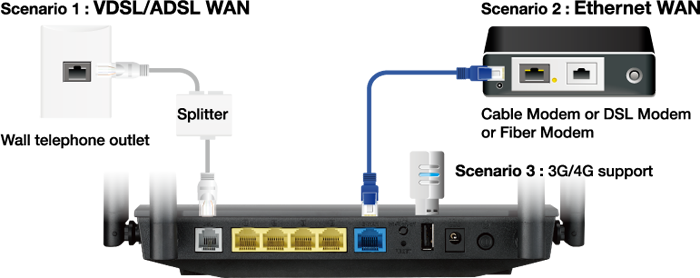
hi ASUS, I can see your router support modem and wifi router function as well.. ie DSL-AC52U. can i use this as a all in one? to remove the TM unifi modem? can it direct connect to fiber optics port?
» Click to show Spoiler - click again to hide... « This post has been edited by vpam5221: Apr 11 2018, 02:50 PM |
|
|
Apr 12 2018, 03:01 AM
Show posts by this member only | IPv6 | Post
#8148
|

Newbie
12 posts Joined: Jan 2017 From: Selangor
|
Hello ASUSmy,
I'm using RT-AC3200 with 100 wifi client, i have connection problem once (1-5 minutes) every 1-2 hours. The wifi is connected but limited (no internet). I already update latest firmare. Please suggest some solution since I'm planning to change the router. Thanks |
|
|
Apr 12 2018, 09:00 PM
Show posts by this member only | IPv6 | Post
#8149
|

Senior Member
1,132 posts Joined: Dec 2008
|
Hi @ASUSmy,
may i know whether Asus Ac-rt86U support Pantum P2500 usb mono laser printer? i tried and detected the printer at router page but unable to use as print server on window 7. |
|
|
Apr 12 2018, 11:17 PM
|

Senior Member
5,697 posts Joined: Nov 2007 From: A Place Where God And Master Of TroubleMaker Exist
|
QUOTE(azmanshah89 @ Apr 12 2018, 03:01 AM) Hello ASUSmy, woah.....100 wifi client. I'm not sure if there is enough bandwidth for it, although it had x2 5ghz bandI'm using RT-AC3200 with 100 wifi client, i have connection problem once (1-5 minutes) every 1-2 hours. The wifi is connected but limited (no internet). I already update latest firmare. Please suggest some solution since I'm planning to change the router. Thanks why not go for commercial grade? since u need to handle over 100wifi client. It could be thats the reason u getting limited ( no internet ) as the client is fighting for wireless bandwidth |
|
|
Apr 13 2018, 01:23 AM
|

Senior Member
6,373 posts Joined: May 2007
|
hi, just want to double confirm, RT-N12HP can support unifi 30mbps right?
will the speed be affected by range? |
|
|
Apr 13 2018, 09:19 AM
|
|
Senior Member
2,319 posts Joined: Mar 2010
|
QUOTE(vpam5221 @ Apr 11 2018, 02:49 PM) hi ASUS, I can see your router support modem and wifi router function as well.. ie DSL-AC52U. can i use this as a all in one? to remove the TM unifi modem? can it direct connect to fiber optics port? Hi vpam5221,» Click to show Spoiler - click again to hide... « Our DSL-AC52U only support RJ11 connection, unable to support fiber optics connection if you plan to change the modem. Thank you |
|
|
Apr 13 2018, 09:20 AM
|

Senior Member
1,811 posts Joined: Jan 2003 From: KL
|
QUOTE(pl95077 @ Apr 10 2018, 05:27 PM) Can you go to Honda and ask for Toyota?Who cares? This post has been edited by thunderbird: Apr 13 2018, 09:21 AM |
|
|
|
|
|
Apr 13 2018, 09:25 AM
|
|
Senior Member
2,319 posts Joined: Mar 2010
|
QUOTE(azmanshah89 @ Apr 12 2018, 03:01 AM) Hello ASUSmy, Hi azmanshah89,I'm using RT-AC3200 with 100 wifi client, i have connection problem once (1-5 minutes) every 1-2 hours. The wifi is connected but limited (no internet). I already update latest firmare. Please suggest some solution since I'm planning to change the router. Thanks Don't think the RT-AC3200 able to handle all the 100 Wi-Fi client, especially when they are connecting to a single band only. Thank you |
|
|
Apr 13 2018, 03:57 PM
|
|
Senior Member
2,319 posts Joined: Mar 2010
|
QUOTE(KIntos @ Apr 12 2018, 09:00 PM) Hi @ASUSmy, Hi KIntos,may i know whether Asus Ac-rt86U support Pantum P2500 usb mono laser printer? i tried and detected the printer at router page but unable to use as print server on window 7. Our support list don't have this brand and models for this printer. But you can follow the step show on the link below to do the setup. Do make sure the notebook or PC have the printer driver installed first. https://www.asus.com/support/FAQ/114046/ Thank you |
|
|
Apr 13 2018, 04:00 PM
|
|
Senior Member
2,319 posts Joined: Mar 2010
|
QUOTE(fkinmeng @ Apr 13 2018, 01:23 AM) hi, just want to double confirm, RT-N12HP can support unifi 30mbps right? Hi fkinmeng,will the speed be affected by range? It does support, and yes the speed will affected by distance. Blockage will also affect the speed too. Thank you |
|
|
Apr 14 2018, 01:18 PM
|
|
Senior Member
603 posts Joined: Apr 2011
|
Need help, Asus ac68u firewall - general when entering IPv4 address is keep throw error "not a valid IP address". i do not enable IPV6, IPV6 Firewall setting is "No". It cant support IPV4 address?
|
|
|
Apr 14 2018, 05:21 PM
|

Junior Member
382 posts Joined: Sep 2006
|
I can't setup my 3x AiMesh nodes. The GUI say it couldn't find any. I've tried placing the routers next to each other, and also tried to connect via cable WAN-LAN port. Both failed.
AiMesh Router = RT-AC5300 AiMesh Nodes = 3x RT-AC68U They are all on latest firmware as per your website Factory reset also cannot solve the issue. Please help. |
|
|
Apr 14 2018, 10:39 PM
|
 
Elite
8,418 posts Joined: Jul 2008 
|
QUOTE(HuorEarfalas @ Apr 14 2018, 05:21 PM) I can't setup my 3x AiMesh nodes. The GUI say it couldn't find any. I've tried placing the routers next to each other, and also tried to connect via cable WAN-LAN port. Both failed. The proper way to setup AiMesh is this.AiMesh Router = RT-AC5300 AiMesh Nodes = 3x RT-AC68U They are all on latest firmware as per your website Factory reset also cannot solve the issue. Please help. Setup your RT-AC5300 first, make sure it is running the latest firmware. Factory reset your RT-AC68U, make sure they are on latest firmware as well. Do not attempt to access it, they have to be on factory reset state. Go to the we GUI of the RT-AC5300, click AiMesh and Search for routers. You shall see the RT-AC68U listed there. |
|
|
Apr 14 2018, 10:44 PM
Show posts by this member only | IPv6 | Post
#8160
|
|
Senior Member
1,132 posts Joined: Dec 2008
|
QUOTE(ASUSmy @ Apr 13 2018, 03:57 PM) Hi KIntos, Hi ASUSmy,Our support list don't have this brand and models for this printer. But you can follow the step show on the link below to do the setup. Do make sure the notebook or PC have the printer driver installed first. https://www.asus.com/support/FAQ/114046/ Thank you Printer is ok now after i install the printer ez printer sharing application. |
| Change to: |  0.0321sec 0.0321sec
 0.39 0.39
 6 queries 6 queries
 GZIP Disabled GZIP Disabled
Time is now: 15th December 2025 - 09:50 PM |
 Quote
Quote